

Introduction
Time is money, especially when that time is spent handling things like calculating hours worked and filling out time-sheets.
Recently, a user on the forums posted a question about how to go about calculating the number of hours worked between two specified dates. The request required that it must be handled through Javascript and that it must be as “exact as possible” down to the minute. So I wrote up the following quick solution and thought I would post it here on the off-chance that anyone encounters the same issue.
Let’s take a look at what information we need:
- Define the work hours during the day (e.g between 9 AM and 5 PM).
- Define a starting and ending date to calculate between.
- Determine if weekends are counted.
Using this information I threw together the following annotated example:
- // Simple function that accepts two parameters and calculates
- // the number of hours worked within that range
- functionworkingHoursBetweenDates(startDate, endDate) {
- // Store minutes worked
- varminutesWorked = 0;
- // Validate input
- if (endDate < startDate) {
- return0;
- }
- // Loop from your Start to End dates (by hour)
- var current = startDate;
- // Define work range
- varworkHoursStart = 9;
- varworkHoursEnd = 18;
- varincludeWeekends = false;
- // Loop while currentDate is less than end Date (by minutes)
- while (current <= endDate) {
- // Is the current time within a work day (and if it
- // occurs on a weekend or not)
- if (current.getHours() >= workHoursStart && current.getHours() <= workHoursEnd && (includeWeekends ? current.getDay() !== 0 && current.getDay() !== 6 : true)) {
- minutesWorked++;
- }
- // Increment current time
- current.setTime(current.getTime() + 1000 * 60);
- }
- // Return the number of hours
- returnminutesWorked / 60;
- }
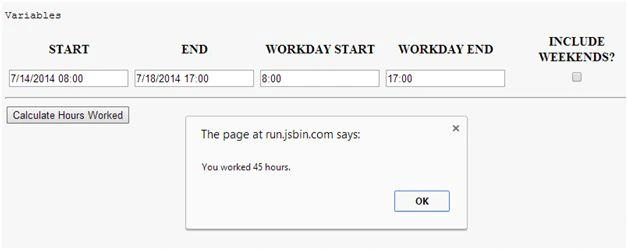
Or if you would prefer to pass in all of your variables as parameters, you could use:
Jaipal ReddyPosted Dec 4, 2015, 11:16 PM
Nice share.
Afzaal Ahmad ZeeshanPosted Dec 4, 2015, 5:48 PM
Why not use input[type="date"] to automatically ask for the date and time? :-) Hardcoded strings may cause a "format" error or so on. Much more painful!
sreenivasa kPosted Dec 4, 2015, 5:28 PM
good
Santhakumar MunuswamyPosted Dec 4, 2015, 1:57 PM
Good one
Ankur MistryPosted Dec 4, 2015, 1:41 PM
Nice share