In this article I am going to explain how to call Generic Handler using jQuery and pass some data to the handler and recieve that data in Generic Handler.
Before starting working on the Generic handler first we need some information about what is Generic handler.
What is a Generic Handler?
Generic handler is a dynamic file and is generated with c# code and disk resource. Generic handler do not have web forms. Generic handler is also known as ASHX generic handler. It is useful when we want to return image from a query string,write XML and other Data.
We use the ASHX file in the URL and it dynamically returns data. Also, we use the query string.
Step 1
Start Visual Studio.
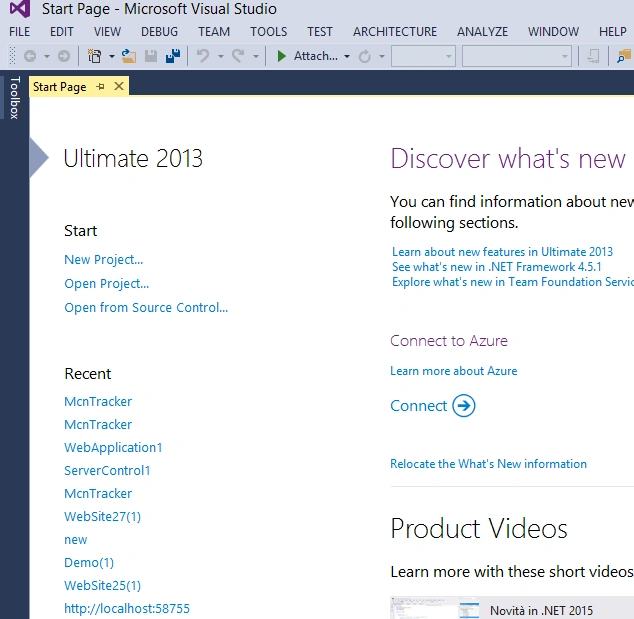
Step 2
Now for creating a website, click on File, go to New and click on the Website.
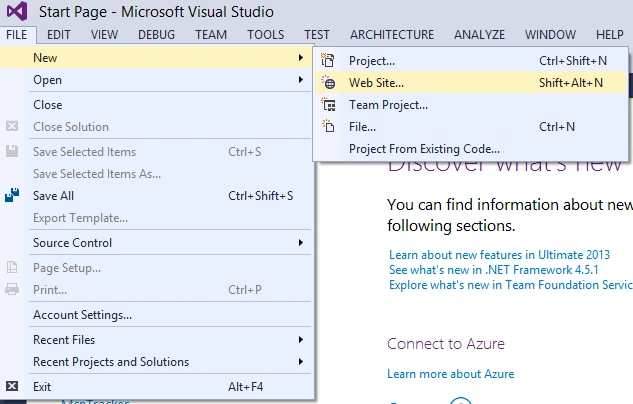
Step 3
Now add Web Form by right clicking on the website and then provide the name of the Web Form just added.
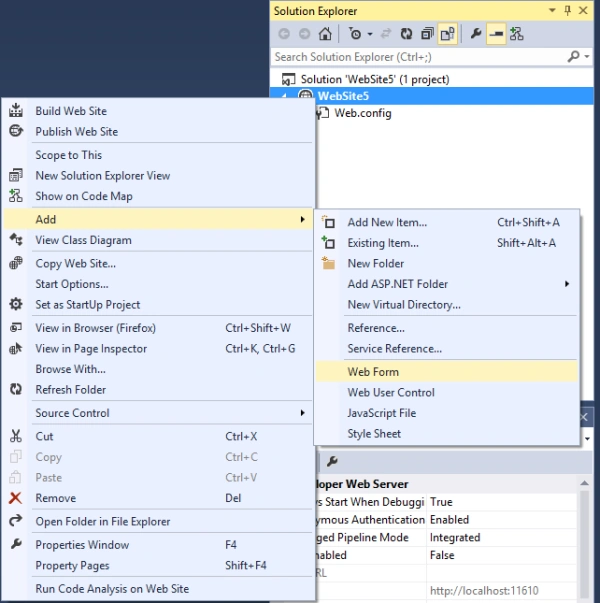
Step 4
After adding web form we will add the generic handler in the website, by right clicking on the website and add new item.
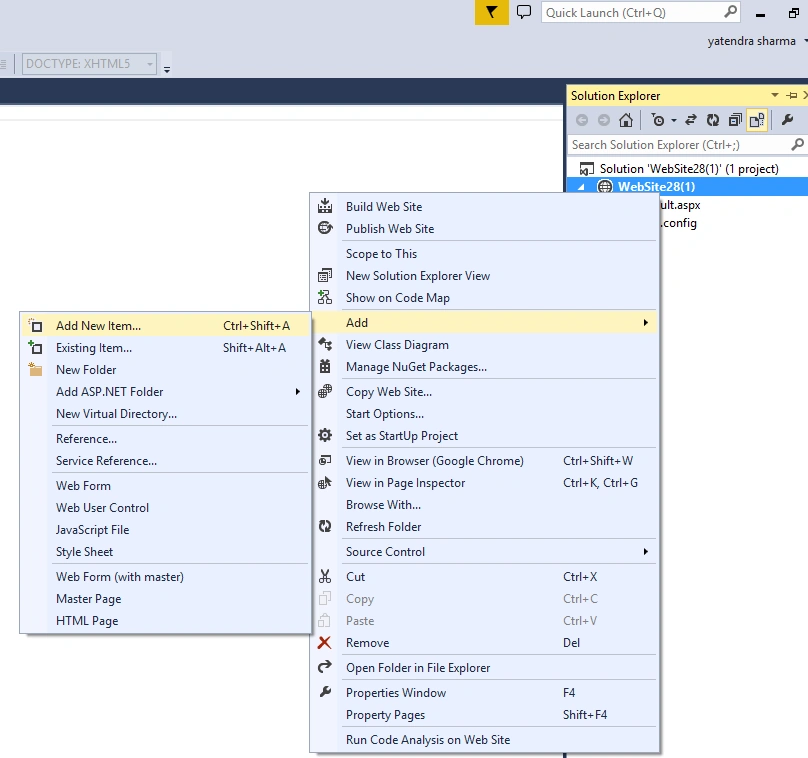
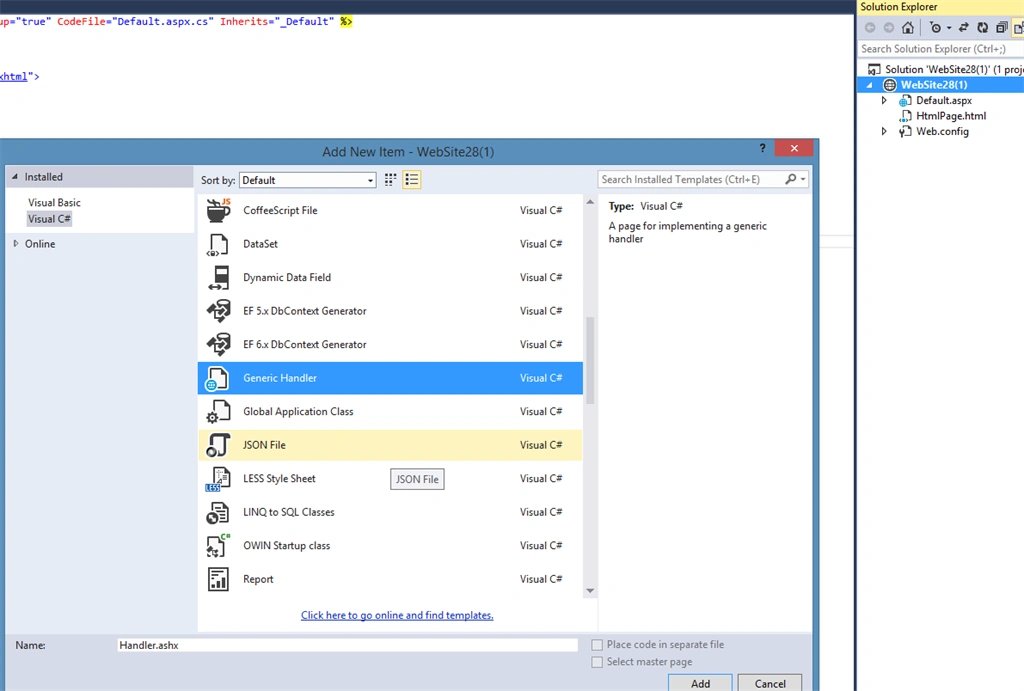
Step 5
The default handler contains the following code and the file extension of generic handler is .ashx.
- <% @WebHandler Language = "C#"
- Class = "Handler" %>
-
- using System;
- using System.Web;
-
- public class Handler: IHttpHandler {
-
- public void ProcessRequest(HttpContext context) {
- context.Response.ContentType = "text/plain";
- context.Response.Write("Hello World");
- }
-
- public bool IsReusable {
- get {
- return false;
- }
- }
-
- }
Step 6
After adding the handler in the website, we call the generic handler by using jQuery. For calling the generic handler we need to create a function for calling the generic handler.
- function CallHandler() {
- debugger;
- var obj = {
- 'Email': $('#ContentPlaceHolder1_txtEmail').val(),
- 'pass': $('#ContentPlaceHolder1_txtPass').val(),
- 'User': $('#ContentPlaceHolder1_txtusername').val(),
- 'txtPhone': $('#ContentPlaceHolder1_txtPhone').val(),
- 'txtState': $('#ContentPlaceHolder1_txtState').val(),
- 'txtCity': $('#ContentPlaceHolder1_txtCity').val()
- }
- $.ajax({
- url: "Registration.ashx",
- contentType: "application/json; charset=utf-8",
- dataType: "json",
- data: obj,
- responseType: "json",
- success: OnComplete,
- error: OnFail
- });
- return false;
- }
-
- function OnComplete(Registration) {
- debugger;
-
- }
-
- function OnFail(result) {
- alert('Request Failed');
- }
Now we need to call the jQuery method on button click:
- <asp:Button ID="AS" runat="server" Text="Submit" CssClass="mainBtn" OnClientClick="CallHandler();" />
Step 7
Now we write the code for getting the value of Web Form in generic handler:
- using System;
- using System.Collections.Generic;
- using System.Linq;
- using System.Web;
- using McnTracker.Models;
- using System.Data;
- using System.Data.SqlClient;
- using System.Web.Script.Serialization;
- using System.IO;
- using System.Web;
-
- namespace McnTrackerWeb {
-
-
-
- public class Registration1: IHttpHandler {
-
- public void ProcessRequest(HttpContext context) {
- McnTracker.Models.Registration rs = new McnTracker.Models.Registration();
- rs.UserName = context.Request.QueryString["User"].ToString();
- rs.Email = context.Request.QueryString["Email"].ToString();
- rs.pass = context.Request.QueryString["pass"].ToString();
- rs.Phone = Convert.ToInt64(context.Request.QueryString["Phone"].ToString());
- rs.States = context.Request.QueryString["States"].ToString();
- context.Response.ContentType = "text/plain";
- }
-
- public bool IsReusable {
- get {
- return false;
- }
- }
-
- }
- }
Step 8
After writing the code in generic handler we run the website and check data posted to the handler or not.
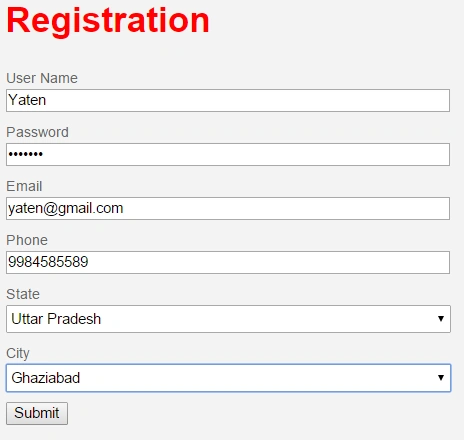
Write the detail in webform and click on the submit button.
Now we use the break point to check the value or not in generic handler.
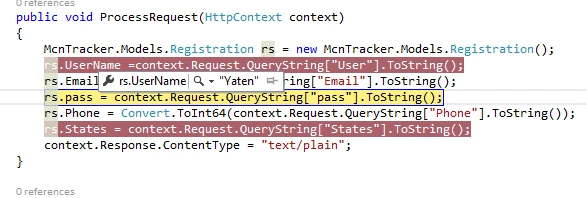
By clicking on the column, we see the value in the generic handler.
Summary
I hope this article is helpful for all those users who need to use the generic handler by using jQuery in ASP.NET.


jitendra kumarPosted Aug 9, 2017, 7:10 AM
I think user name and password will be send in plain-text format. Please help me that how to protect password.
Santhakumar MunuswamyPosted Oct 18, 2015, 5:18 AM
Good one
Shridhar SharmaPosted Oct 8, 2015, 12:45 PM
good one
Nilesh JadavPosted Oct 8, 2015, 9:11 AM
Nice one sir !! At last you got it sir !! Really nice one
Former memberPosted Oct 8, 2015, 5:27 AM
// this is ASHX file which receive json send by jquery ajax method// here see how StreamReader and JavaScriptSerializer class is using to read the json data send from jquery ajax function public class Feedback : IHttpHandler { public void ProcessRequest(HttpContext context) { string machine_ip = "", remote_ip = ""; DataTable dt = new DataTable(); string outputToReturn = ""; context.Response.ContentType = "text/html"; string strCountryCode = BBAreman.CountryCookie.GetCookieValue(); strCountryCode = (strCountryCode.Trim() == "" ? "GBR" : strCountryCode); machine_ip = Utility.GetMachineIP(); remote_ip =Utility.GetRemoteIP(); if (context.Request.QueryString["ac"] != "" && context.Request.QueryString["ac"] != null) { if (context.Request.QueryString["ac"] == "show") { System.Web.UI.Page pageHolder = new System.Web.UI.Page(); BBAReman.facebox.FeedBack ctl = (BBAReman.facebox.FeedBack)pageHolder.LoadControl("~/UserControls/FeedBack.ascx"); System.Web.UI.HtmlControls.HtmlForm tempForm = new System.Web.UI.HtmlControls.HtmlForm(); tempForm.Controls.Add(ctl); pageHolder.Controls.Add(tempForm); StringWriter output = new StringWriter(); HttpContext.Current.Server.Execute(pageHolder, output, false); outputToReturn = output.ToString(); } else if (context.Request.QueryString["ac"] == "send") { var jss = new JavaScriptSerializer(); string json = new StreamReader(context.Request.InputStream).ReadToEnd(); Dictionary<string, string> sData = jss.Deserialize<Dictionary<string, string>>(json); string _Name = sData["Name"].ToString(); string _Subject = sData["Subject"].ToString(); string _Email = sData["Email"].ToString(); string _Phone = sData["Phone"].ToString(); string _Details = sData["Details"].ToString(); string _url = sData["url"].ToString(); string _service = sData["Service"].ToString(); string _website = sData["Website"].ToString(); dt.Columns.Add("LogDate", typeof(string)); dt.Columns.Add("Name", typeof(string)); dt.Columns.Add("Subject", typeof(string)); dt.Columns.Add("Email", typeof(string)); dt.Columns.Add("FeedBack", typeof(string)); dt.Columns.Add("Phone", typeof(string)); dt.Columns.Add("Selected_Flag", typeof(string)); dt.Columns.Add("website_rating", typeof(string)); dt.Columns.Add("service_rating", typeof(string)); dt.Columns.Add("url", typeof(string)); dt.Columns.Add("remote_ip", typeof(string)); dt.Columns.Add("machine_ip", typeof(string)); DataRow dr = dt.NewRow(); dr[0] = DateTime.Now.ToString("dd/MM/yyyy"); dr[1] = _Name; dr[2] = _Subject; dr[3] = _Email; dr[4] = _Details; dr[5] = _Phone; dr[6] = strCountryCode; dr[7] = _website; dr[8] = _service; dr[9] = _url; dr[10] = remote_ip; dr[11] = machine_ip; dt.Rows.Add(dr); dt.CreateCSVFile("General_Feedback"); SendMail(_Name, _Subject, _Email, _Details, context.Request.QueryString["CountryCode"], "", "", _Phone, _url); outputToReturn = "SUCCESS"; } } context.Response.Write(outputToReturn); } private string SendMail(string Name, string Subject, string Email, string Details, string strCountry, string partname, string parttype, string phone, string _url) { // send mail code } public bool IsReusable { get { return false; } } } // from here i am making call to ashx and sending json data there // any one can see how json data is sending to ashx file var urlToHandler = location.protocol + "//" + location.host + "/Feedback.ashx"; var FeedCrd = {}; FeedCrd["Name"] = $("input[id*='txtName']").val(); FeedCrd["Subject"] = $("input[id*='txtSubject']").val(); FeedCrd["Email"] = $("input[id*='txtFEmail']").val(); FeedCrd["Phone"] = $("input[id*='txtfphone']").val(); FeedCrd["Details"] = $("textarea[id*='txtDetails']").val(); FeedCrd["url"] = window.location.href; FeedCrd["Service"] = $("[id*='ddlService']:visible option:selected").text(); FeedCrd["Website"] = $("[id*='ddlWebsite']:visible option:selected").text(); $.ajax({ type: "POST", url: urlToHandler + "?ac=send&CountryCode=" + feedCookie, data: JSON.stringify(FeedCrd), success: function (data) { if (data == "SUCCESS") { setTimeout(function () { if (_AdjustHeight == 0) { $(".ui-dialog").animate({ height: '+=' + dialog_loader.height + 'px' }, 600, function () { _AdjustHeight = 1; // $('#feed_loader').fadeOut('slow', function () { // $('#feed_loader').html('<span>' + dialog_Msg.Success + '</span>'); // }).fadeIn('slow'); $('#feed_loader').html('<span>' + dialog_Msg.Success + '</span>'); }); } else { $('#feed_loader').fadeOut('slow', function () { $('#feed_loader').html('<span>' + dialog_Msg.Success + '</span>'); }).fadeIn('slow'); } setTimeout(function () { close(); }, 2000); }, 2000); } }, error: function (XMLHttpRequest, textStatus, errorThrown) { alert(textStatus); } });
Former memberPosted Oct 8, 2015, 5:26 AM
here i am sharing code to show how json data send from jquery ajax and how to parse json data from ashx file.
Harshad PansuriyaPosted Oct 8, 2015, 4:22 AM
Nice one
Rajeesh MenothPosted Oct 8, 2015, 3:53 AM
Nice!
Former memberPosted Oct 8, 2015, 3:45 AM
you should show how to pass json data to generic handler
Arjunan SelvamPosted Oct 8, 2015, 3:11 AM
nice example