

Introduction
In this article, we will learn about the canvas element in HTML5 by using an example. The <canvas> element is used to draw graphics, on the fly, via a scripting language like JavaScript.
Create a Canvas
A Canvas drawable region is defined in HTML code with height and width attributes by specifying id, width, and height of the <canvas> element.
- <canvasid="mygame"width="1500"height="900">
- </canvas>
Canvas Drawing
The <canvas> element has no drawing abilities of its own so all drawings must be done inside JavaScript and JavaScript uses the id to find the <canvas> element.
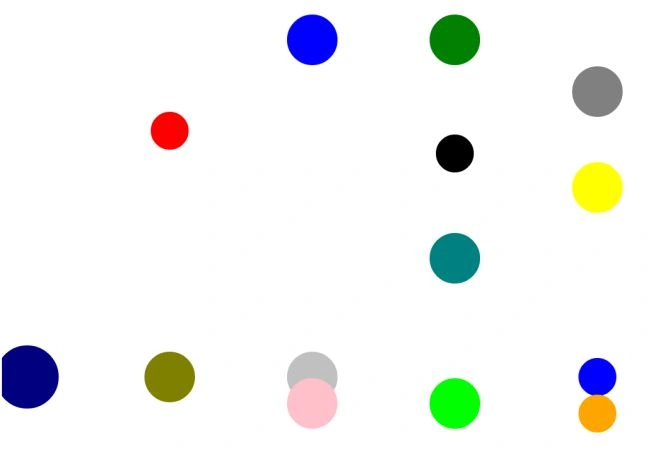
In our example we use two variables, a and b, to define the axis. We create a function Sphere and pass color, radius, da, and db as parameters. These parameters are used to create Spheres of different sizes, colors, and directions.
- <scripttype="text/javascript">
- var a = 40;
- var b = 50;
- function Sphere(color, radius, da, db) {
- this.canvas = canvas;
- this.context = canvas.getContext('2d');
- this.radius = radius;
- this.a = a;
- this.b = b;
- this.da = da;
- this.db = db;
- this.color = color;
- }
- Sphere.prototype.form = function () {
- this.context.beginPath();
- this.context.fillStyle =this.color;
- this.context.arc(this.a,this.b, this.radius, 0, Math.PI * 2, false);
- this.context.fill();
- }
- Sphere.prototype.Jump = function () {
- if (this.a >= (canvas.width - this.radius) ||this.a <= this.radius) this.da *= -1;
- if (this.b >= (canvas.height - this.radius) ||this.b <= this.radius) this.db *= -1;
- }
- function init() {
- canvas = document.getElementById("mygame")
- context = canvas.getContext('2d');
- // form an arry to store the Sphere info
- Spheres = [];
- Spheres.push(new Sphere('Olive', 40, 1, 3));
- Spheres.push(new Sphere('Silver', 40, 2, 3));
- Spheres.push(new Sphere('Lime', 40, 3, 4));
- Spheres.push(new Sphere('Grey', 40, 4, 1));
- Spheres.push(new Sphere('Pink', 40, 2, 4));
- Spheres.push(new Sphere('Navy', 50, 3, 3));
- Spheres.push(new Sphere('Teal', 40, 3, 5));
- Spheres.push(new Sphere('Blue', 30, 4, 3));
- Spheres.push(new Sphere('Black', 30, 3, 9));
- Spheres.push(new Sphere('Red', 30, 1, 6));
- Spheres.push(new Sphere('Blue', 40, 2, 8));
- Spheres.push(new Sphere('Green', 40, 3,8));
- Spheres.push(new Sphere('Orange', 30, 4, 4));
- Spheres.push(new Sphere('Yellow', 40 , 4, 9));
- setInterval(form, 20);
- }
- function form() {
- context.clearRect(0, 0, 2000, 1000);
- for (iin Spheres) {
- Spheres[i].a += Spheres[i].da;
- Spheres[i].b += Spheres[i].db;
- Spheres[i].Jump();
- Spheres[i].form();
- }
- }
- </script>
Canvas 2D API
The canvas element has no drawing abilities of its own and is a rectangular area where you can control every pixel using scripting. We use canvas.getContext('2d') to create a Sphere shape and getContext("2d") object has methods to draw lines, boxes, circles, and more.
setInterval Method
The setInterval method is used to call a function or evaluate an expression at specified intervals (in milliseconds), like this
setInterval(code,millisec,lang)
The Complete code look like this
- <!DOCTYPEhtml PUBLIC"-//W3C//DTD XHTML 1.0 Transitional//EN""http://www.w3.org/TR/xhtml1/DTD/xhtml1-transitional.dtd">
- <html xmlns="http://www.w3.org/1999/xhtml">
- <head>
- <title>Canvas Game</title>
- <script type="text/javascript">
- var a = 40;
- var b = 50;
- function Sphere(color, radius, da, db) {
- this.canvas = canvas;
- this.context = canvas.getContext('2d');
- this.radius = radius;
- this.a = a;
- this.b = b;
- this.da = da;
- this.db = db;
- this.color = color;
- }
- Sphere.prototype.form = function () {
- this.context.beginPath();
- this.context.fillStyle =this.color;
- this.context.arc(this.a,this.b, this.radius, 0, Math.PI * 2, false);
- this.context.fill();
- }
- Sphere.prototype.Jump = function () {
- if (this.a >= (canvas.width - this.radius) ||this.a <= this.radius)this.da *= -1;
- if (this.b >= (canvas.height - this.radius) ||this.b <= this.radius)this.db *= -1;
- }
- function init() {
- canvas = document.getElementById("mygame")
- context = canvas.getContext('2d');
- // form an arry to store the Sphere info
- Spheres = [];
- Spheres.push(new Sphere('Olive', 40, 1, 3));
- Spheres.push(new Sphere('Silver', 40, 2, 3));
- Spheres.push(new Sphere('Lime', 40, 3, 4));
- Spheres.push(new Sphere('Grey', 40, 4, 1));
- Spheres.push(new Sphere('Pink', 40, 2, 4));
- Spheres.push(new Sphere('Navy', 50, 3, 3));
- Spheres.push(new Sphere('Teal', 40, 3, 5));
- Spheres.push(new Sphere('Blue', 30, 4, 3));
- Spheres.push(new Sphere('Black', 30, 3, 9));
- Spheres.push(new Sphere('Red', 30, 1, 6));
- Spheres.push(new Sphere('Blue', 40, 2, 8));
- Spheres.push(new Sphere('Green', 40, 3,8));
- Spheres.push(new Sphere('Orange', 30, 4, 4));
- Spheres.push(new Sphere('Yellow', 40 , 4, 9));
- setInterval(form, 20);
- }
- function form() {
- context.clearRect(0, 0, 2000, 1000);
- for (i in Spheres) {
- Spheres[i].a += Spheres[i].da;
- Spheres[i].b += Spheres[i].db;
- Spheres[i].Jump();
- Spheres[i].form();
- }
- }
- </script>
- </head>
- <body onLoad="init();">
- <canvas id="mygame" width="1500"height="900"></canvas>
- </body>
- </html>
Mike GoldPosted Jun 3, 2012, 12:16 AM
As far as I know, a sphere is a 3d object. I think what you meant to write about were circles :-)