Reading this article, you will learn how to use CarouselPage in Xamarin.Forms application for Android and Universal Windows Platform with XAML and Visual C# in cross platform application development.
The following important tools are required for developing UWP,
- Windows 10 (Recommended)
- Visual Studio 2015 Community Edition (It is a free software available online)
- Using Visual Studio 2015 Installer, Enable the Xamarin (Cross Platform Mobile development and C#/.NET while installing or modifying Visual Studio 2015).
Now, we can discuss step by step app development.
Step 1
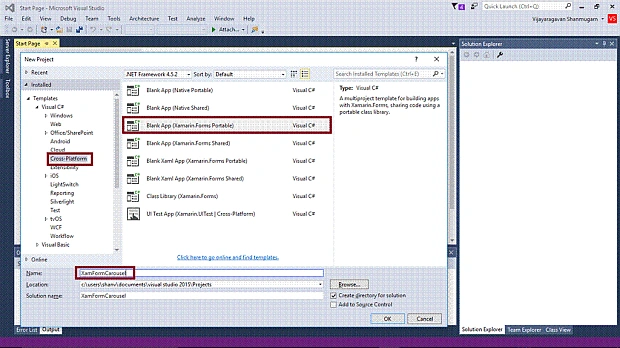
Open Visual Studio 2015. Go to Start -> New Project-> select Cross-Platform (under Visual C#-> Blank App (Xamarin.Forms Portable)-> Give a suitable name for your app (XamFormCarousel) ->OK.
Step 2
Now, create project “XamFormCarousel_Droid” …
Choose the target and minimum platform versions for your Universal Windows Project and the system starts creating project “XamFormCarousel_UWP” ….
Step 3
Afterwards, Visual Studio creates 6 projects and displays Getting Started.XamarinPage. Now, we have to update the Xamarin.Forms reference for Portable Project and XamFormCarousel_Droid project, using "Manage NUGet Packages".
Step 4
Add 4 images in drawable folder in XamFormCarousel _Droid project and XamFormCarousel_UWP project.
Step 5
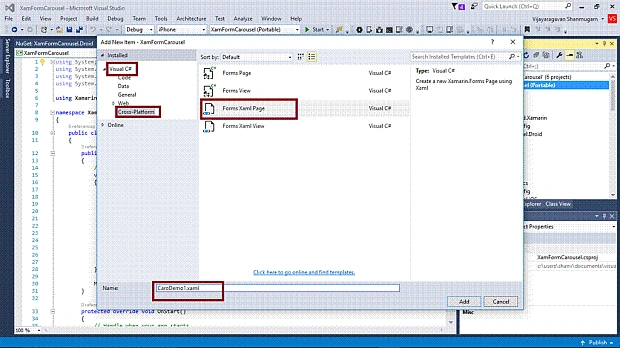
Add 4 XAML pages (CaroDemo1, CarouselPage Demo), right click the project, select ADD-> NewItem
Select ->CrossPlatform-> FormXamlPage-> Give the relevant name
Step 6
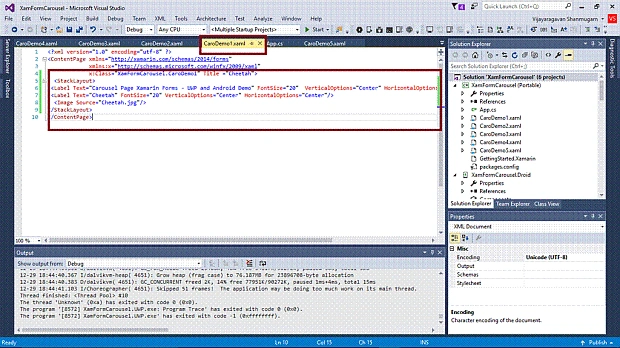
In CaroDemo1.Xaml page, add labels and image.
- <ContentPage xmlns="http://xamarin.com/schemas/2014/forms" xmlns:x="http://schemas.microsoft.com/winfx/2009/xaml" x:Class="XamFormCarousel.CaroDemo1" Title="Cheetah">
- <StackLayout>
- <Label Text="Carousel Page Xamarin Forms - UWP and Android Demo"="20" VerticalOptions="Center" HorizontalOptions="Center" />
- <Label Text="Cheetah"="20" VerticalOptions="Center" HorizontalOptions="Center" />
- <Image Source="Cheetah.jpg" />
- </StackLayout
Similarly, add XAMLCode for remaining three pages,
(CaroDemo2, CaroDemo3, CaroDemo4) for CarouselPage Demo.
Step 7
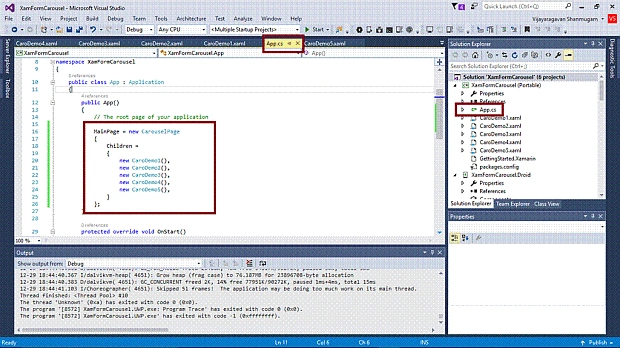
Open (double click) the file App.cs in the Solution Explorer-> XamFormCarousel(portable) and set the root page as Carousel Page with children pages.
Step 8
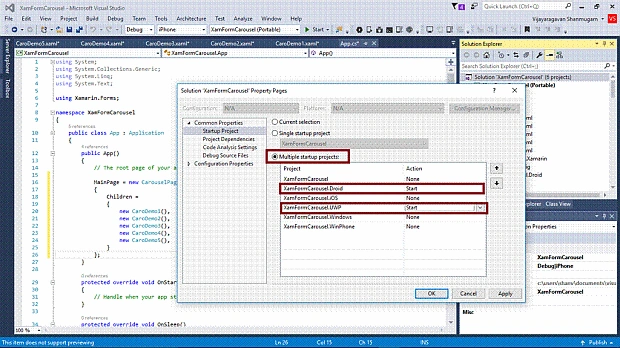
We will test Android and UWP. So, we need to set multiple startup projects as XamFormCarousel.Droid and XamFormCarousel.UWP (Universal Windows).
Step 9
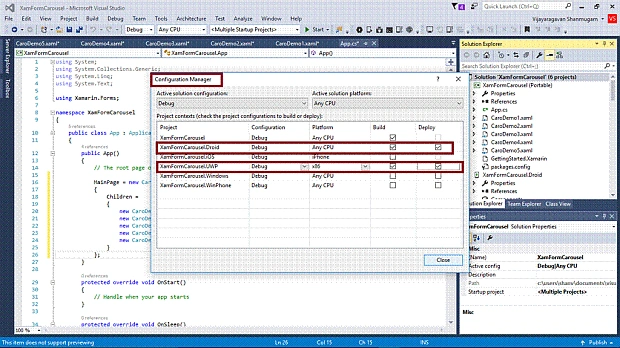
Change the Configuration Manager settings. Go to Build -> Configuration Manager, uncheck all the "Build" and "Deploy" options except for Droid and UWP.
Step 10
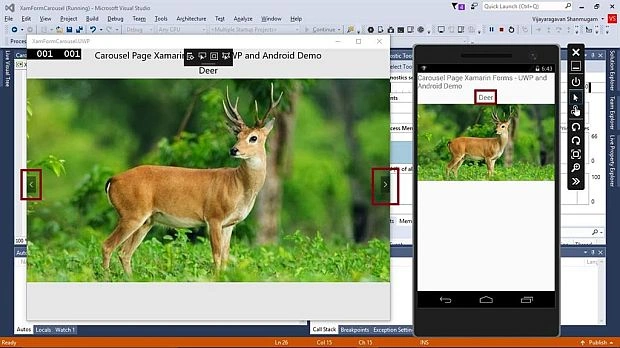
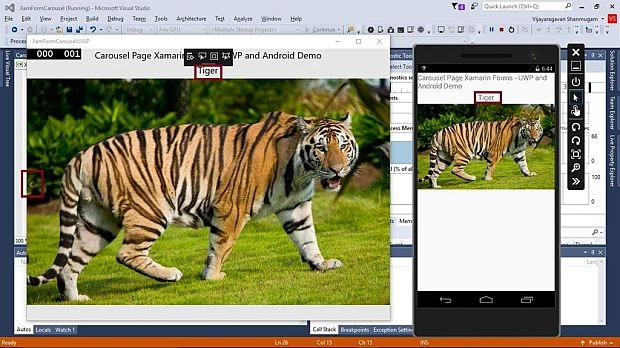
Deploy your app on Local Machine. The output of the XamFormCarousel App is,
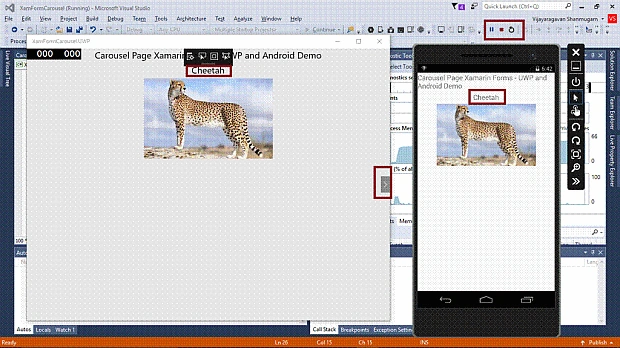
After swiping the next page.
After swiping the last page,
Summary
Now, you have successfully tested CarouselPage in Xamarin.Forms application using Visual C# and Xamarin.


Alex PandianPosted Dec 14, 2017, 12:53 AM
Hi i want to integrate Carousel view in xamarin forms for both ios and android. i tried lot of example but i can able to solve. i tried following url https://blog.xamarin.com/flip-through-items-with-xamarin-forms-carouselview/. my project having one Carousel view in dashboard view below some other contents is there.can give one example? Vijay help me..
Jaco ZwartsPosted Jan 3, 2017, 5:52 AM
Interesting thank you for sharing