

Sometimes, it is required to make a dropdown which is dependent to another one, I mean to say if the first dropdownlist will be selected, on the basis of selected value, the second dropdownlist will be bind.
Here I am going to take a very simple example for cascading dropdown and it is selection of country, state and city.
Step 1: Create Database and Table in SQL.
So, I have created a database “Test” with three different tables “tblCountry”, “tblState” and “tblCity”.
See the following structure I have made for these tables.
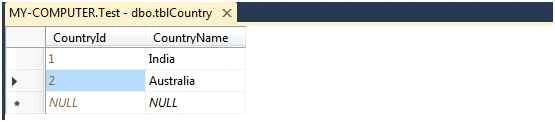
TblCountry
This table contains the list of countries. In this table, there are two columns, first one is CountryId and it is primary key and second one is
CountryName.
TblState
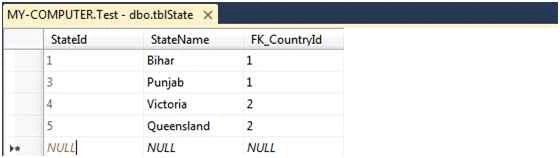
This table contains the list of state. In this table, there are three columns; there are StateId, StateName and Fk_CountryId. There is also relationship between tblCountry and tblState.
TblCity
This table contains the list of City corresponding to their city. In this table, there are three columns: CityId, CityName and StateId. There is also relationship between tblState and tblCity.

Step 2: Create ASP.NET Project
Open Visual Studio and from the File menu, choose New > Project. It will open a New Project window. From this window, you need to choose ASP.NET Web Application and provide the name of the project and click on OK.
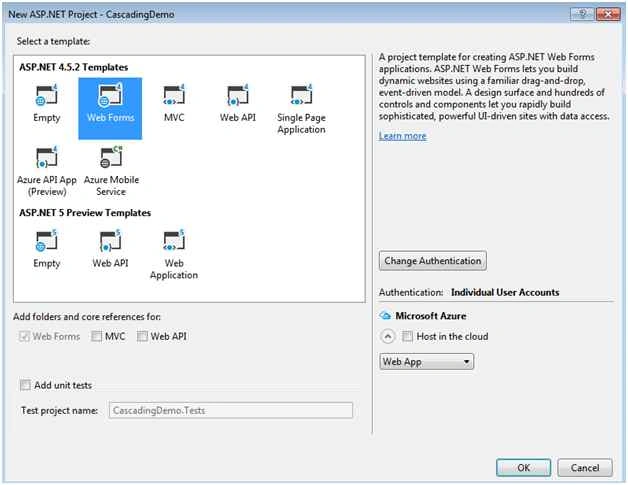
It will open a New ASP.NET Project dialog, where we can choose different template for the project. From the template, you need to select Web Forms and click on OK.
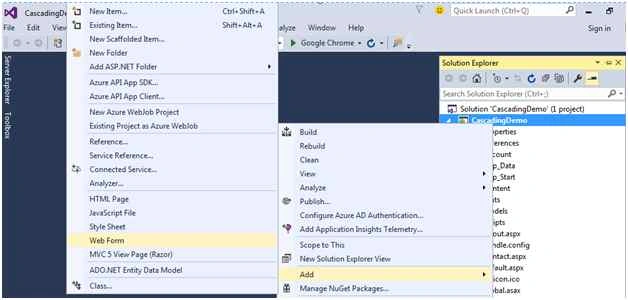
Now add a new web form “Location.aspx” into the solution.
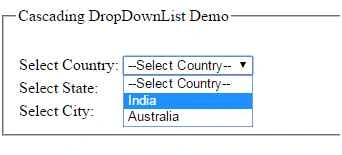
Create the following structure for cascading DropDownList demo. First you need to select the name of the country and after that it will load all corresponding states into the State DropDownList.
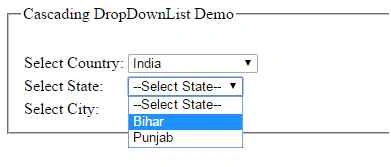
After selecting state, it will be doing same and load all the corresponding cities into the city DropDownList.
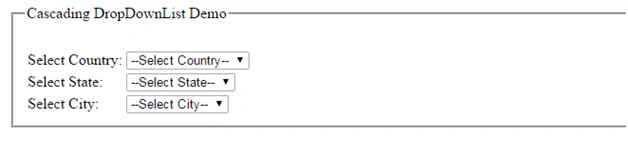
Make the code changes as in the following to load the country on page load and on the basis of selection, It will proceed to the next operation.
Location.aspx.cs
- using System;
- using System.Collections.Generic;
- using System.Configuration;
- using System.Data;
- using System.Data.SqlClient;
- using System.Linq;
- using System.Web;
- using System.Web.UI;
- using System.Web.UI.WebControls;
- namespace CascadingDemo
- {
- public partial class Location: System.Web.UI.Page
- {
- SqlConnection objSqlConnection = new SqlConnection(ConfigurationManager.ConnectionStrings["myconnection"].ConnectionString);
- protected void Page_Load(object sender, EventArgs e)
- {
- if (objSqlConnection.State == ConnectionState.Closed)
- {
- objSqlConnection.Open();
- }
- if (!IsPostBack)
- {
- ddlState.Items.Insert(0, new ListItem("--Select State--", "0"));
- ddlCity.Items.Insert(0, new ListItem("--Select City--", "0"));
- BindCountries();
- }
- }
- protected void BindCountries()
- {
- try
- {
- SqlDataAdapter objSQLAdapter = new SqlDataAdapter("select * from tblCountry", objSqlConnection);
- DataSet objDataSet = new DataSet();
- objSQLAdapter.Fill(objDataSet);
- ddlCountry.DataSource = objDataSet;
- ddlCountry.DataTextField = "CountryName";
- ddlCountry.DataValueField = "CountryId";
- ddlCountry.DataBind();
- ddlCountry.Items.Insert(0, new ListItem("--Select Country--", "0"));
- }
- catch (Exception ex)
- {
- Response.Write("Exception in Binding Country Dropdownlist : " + ex.Message.ToString());
- }
- finally
- {
- objSqlConnection.Close();
- }
- }
- protected void ddlCountry_SelectedIndexChanged(object sender, EventArgs e)
- {
- try
- {
- int CountryId = Convert.ToInt32(ddlCountry.SelectedValue);
- SqlDataAdapter objSQLAdapter = new SqlDataAdapter("select * from tblState where Fk_CountryId=" + CountryId, objSqlConnection);
- DataSet objDataSet = new DataSet();
- objSQLAdapter.Fill(objDataSet);
- ddlState.DataSource = objDataSet;
- ddlState.DataTextField = "StateName";
- ddlState.DataValueField = "StateId";
- ddlState.DataBind();
- ddlState.Items.Insert(0, new ListItem("--Select State--", "0"));
- if (ddlState.SelectedValue == "0")
- {
- ddlCity.Items.Clear();
- ddlCity.Items.Insert(0, new ListItem("--Select City--", "0"));
- }
- }
- catch (Exception ex)
- {
- Response.Write("Exception in Binding State Dropdownlist: " + ex.Message.ToString());
- }
- finally
- {
- objSqlConnection.Close();
- }
- }
- protected void ddlState_SelectedIndexChanged(object sender, EventArgs e)
- {
- try
- {
- int StateId = Convert.ToInt32(ddlState.SelectedValue);
- SqlDataAdapter objSQLAdapter = new SqlDataAdapter("select * from tblCity where StateId=" + StateId, objSqlConnection);
- DataSet objDataSet = new DataSet();
- objSQLAdapter.Fill(objDataSet);
- ddlCity.DataSource = objDataSet;
- ddlCity.DataTextField = "CityName";
- ddlCity.DataValueField = "CityId";
- ddlCity.DataBind();
- ddlCity.Items.Insert(0, new ListItem("--Select City--", "0"));
- }
- catch (Exception ex)
- {
- Response.Write("Exception in Binding City Dropdownlist: " + ex.Message.ToString());
- }
- finally
- {
- objSqlConnection.Close();
- }
- }
- }
- }

Dẫn Dương ĐìnhPosted Jun 20, 2025, 3:13 PM
In the tutorial clip about Cascading Dropdown List Of Country, State And City Using MVC, Web API And jQuery, I want to get the values ??in each dropdown List and save them to another Database Table, how can I do that?
Ihsan IsmailPosted Apr 1, 2022, 1:02 AM
Thanks for the article, may i ask how i can bind name instead of id?
Santhakumar MunuswamyPosted Dec 1, 2015, 1:32 AM
Nice share
Mohammed IbrahimPosted Nov 30, 2015, 1:39 PM
nice
Muammer AktasPosted Nov 30, 2015, 12:46 PM
thanks for the article, it was very helpful
Banketeshvar NarayanPosted Nov 30, 2015, 11:19 AM
Nice Share
Suman VermaPosted Nov 30, 2015, 5:46 AM
nice one
Amandeep singhPosted Nov 30, 2015, 4:15 AM
good article
Yaduveer SainiPosted Nov 30, 2015, 4:15 AM
Very nice article mukesh
Vipul MalhotraPosted Nov 30, 2015, 2:40 AM
nice article
Aishwarya DPosted Nov 30, 2015, 2:28 AM
Nice one.. Helpful
Ajay GandhiPosted Nov 30, 2015, 2:15 AM
Nice one