

Introduction
When you install the Windows 8 Consumer Preview, it will ask you
for the password for your account in Windows 8 and later if you want to change
your user account password in Windows 8 then you have to follow certain steps.
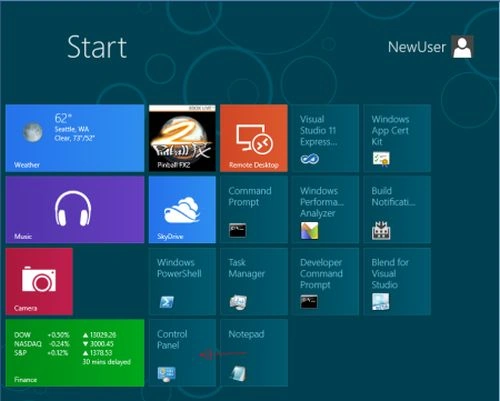
Step 1
Switch
to Metro
UI and
there select Control
Panel and
then click
it to
open it.
 Step 2
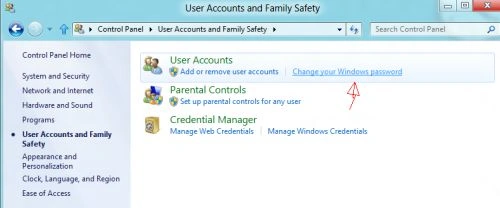
Now
in the Control Panel, navigate to "User
Accounts and Family Safety" and
Click on "Change
your Windows password".
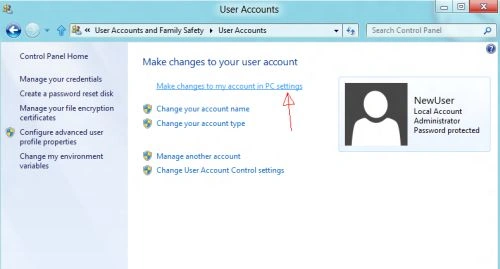
 Now click on "make
changes to my accounts in PC settings":
Now click on "make
changes to my accounts in PC settings":
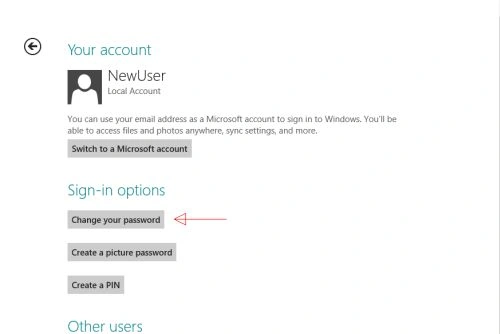
From
there click on Change
Your Password:
 Step 4
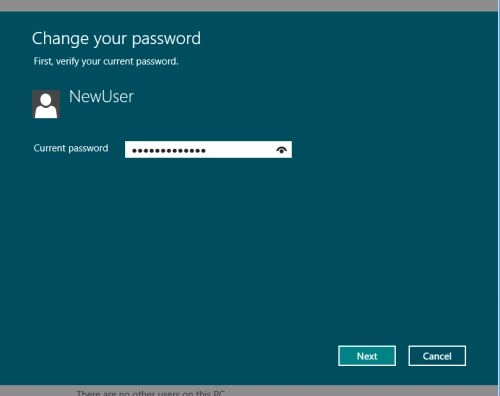
It
will ask you the current password so enter it; after that only you can change
your current password.
 Step 5
Type New
Password and
then save to
change the password.
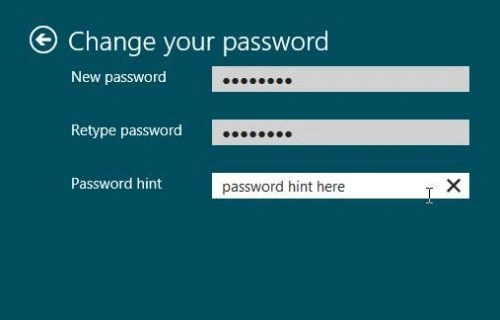 Remember,
don't forget the password hint, because, without that, you will not be able to
change the password.
Remember,
don't forget the password hint, because, without that, you will not be able to
change the password.
Summary
In this article, we learned about Changing User Account Passwords in Windows 8.
SubashPosted Aug 28, 2016, 10:45 PM
All the best for more impressive article
SubashPosted Aug 28, 2016, 10:45 PM
Good
Brett GmosereditedPosted Apr 18, 2013, 2:25 AMEdited Apr 18, 2013, 2:29 AM
Nice post! If we forgot Windows password and was locked out of Windows 8, there are still many tricks for us to reset Windows 8 password: http://www.top-password.com/knowledge/reset-windows-8-password.html
Gopakumar HerryPosted Dec 6, 2012, 11:50 PM
Good method to change the Windows 8 password. I forgot my Windows 8 password last week. And I don’t know the easy way like the article says. So I use the Anmosoft Windows Password Reset Professional to change my PC. It is also helpful. www.resetwindowspassword.com/reset-windows-8-password.html can help you.
PUSHPARAJ ADIGOPULAeditedPosted Apr 25, 2012, 11:40 AMEdited Apr 25, 2012, 11:41 AM
@Vipendra You can Right click on "My Computer" go to "Manage" In that select "Local Users and Groups"> "Users" , there right click on the user account you want to change the password and click "Set Password". It won't ask you for the previous password. You need to be in "Admin" group to do this operation. Hope this helps.. Or you can use tools in "Hiren's Boot CD"(http://www.hiren.info/pages/bootcd) which will allow you to reset password from Dos before booting to windows itself
Vipendra VermaPosted Apr 23, 2012, 6:58 PM
I want to know how can i change my password in windows XP, windows 7 & in windows 8 OS if don't know my current account password.