In this article, we are going to create a simple chat application using Angular 8, ASP.NET Core 2.2.0, and SignalR 1.1.0 as shown below.

We need to install all the below-mentioned prerequisites on our development machine.
Prerequisite
- .NET Core SDK 2.2.0: download from here.
- Node.js 10.15.3: download from here.
- Angular CLI 8.0: Install the Angular command package by executing this command: “npm install -g @angular/[email protected]”
Set up ASP.NET core with SignalR project
Open the command prompt and enter the following command to create an ASP.NET Core web project as below.
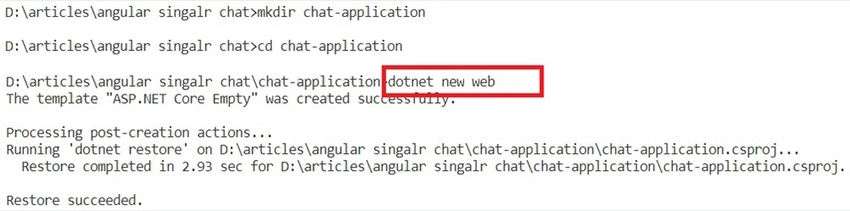
Install the following NuGet package in your project.
- Microsoft.AspNetCore.SignalR
- Microsoft.AspNetCore.SpaServices.Extensions
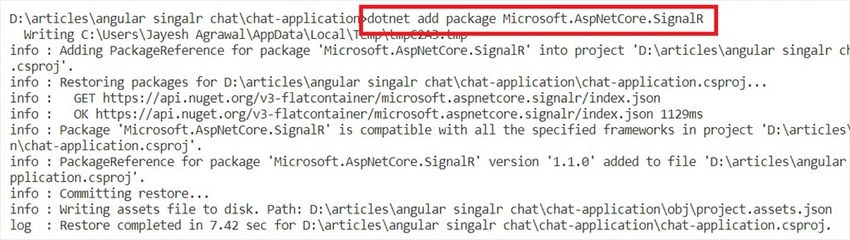
Call SignalR in the “Startup.ConfigureServices” method to add SignalR services.
services.AddSignalR();
Create MessageHub Class
SignalR makes real-time client-to-server and server-to-client communications possible and it will call methods to connect clients from a server using SignalR Hub API. You can find more details about SignalR from here. Now, we need to perform the following steps to create the MessageHub class that is extending SignalR Hub API features.
- Create a Hubs Folder in the project
- Declare MessageHub class that inherits from SignalR Hub
- Add the NewMessage public method to get a new message from a connected client.
- Then, Send an async message to all connected clients.
using ChatApp.Models;
using Microsoft.AspNetCore.SignalR;
using System.Threading.Tasks;
namespace ChatApp.Hubs
{
    public class MessageHub : Hub
    {
        public async Task NewMessage(Message msg)
        {
            await Clients.All.SendAsync("MessageReceived", msg);
        }
    }
}
Then, add a route to handle a request in Startup.ConfigureService method for MessageHub.
app.UseSignalR(options =>
{
    options.MapHub<MessageHub>("/MessageHub");
});
Add a Message Class.
public class Message
{
    public string ClientUniqueId { get; set; }
    public string Type { get; set; }
    public string Content { get; set; }
    public DateTime Date { get; set; }
}
Add Angular 8 to the project
We will scaffold Angular into our project. For this, we need to execute “ng new ClientApp --skip-install” on the Visual Studio Code terminal. Here, --the skip-install option is used to skip the installation of the npm packages.
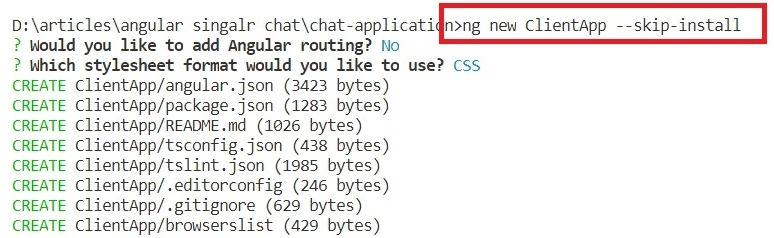
Now, let us enter the “npm install” command to install all Angular npm packages in the terminal. Then, update the SPA static file service configuration to the Angular output files folder location. For this, we will add the below code to the “Startup. Configure” method.
app.UseSpa(spa =>
{
    // To learn more about options for serving an Angular SPA from ASP.NET Core,
    // see https://go.microsoft.com/fwlink/?linkid=864501
    spa.Options.SourcePath = "ClientApp";
    if (env.IsDevelopment())
    {
        // spa.UseProxyToSpaDevelopmentServer("http://localhost:4200");
        spa.UseAngularCliServer(npmScript: "start");
    }
});
Here, UseAngularCliServer will pass the request through to an instance of the Angular CLI server which keeps up-to-date CLI-built resources without having to run the Angular CLI server manually.
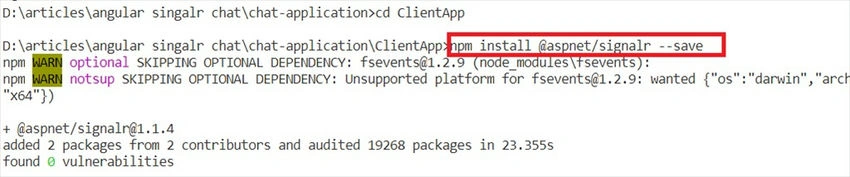
Now, add the SignalR client library to connect MessageHub from the Angular as below screenshot.
Create a Chat Service to connect SignalR
Create chat.service.ts class to establish a connection with Message Hub and to publish & receive chat messages.
Then, we have added a chat service as a provider in Ng Modules.
import { EventEmitter, Injectable } from '@angular/core';
import { HubConnection, HubConnectionBuilder } from '@aspnet/signalr';
import { Message } from '../models/message';
@Injectable()
export class ChatService {
  messageReceived = new EventEmitter<Message>();
  connectionEstablished = new EventEmitter<Boolean>();
  private connectionIsEstablished = false;
  private _hubConnection: HubConnection;
  constructor() {
    this.createConnection();
    this.registerOnServerEvents();
    this.startConnection();
  }
  sendMessage(message: Message) {
    this._hubConnection.invoke('NewMessage', message);
  }
  private createConnection() {
    this._hubConnection = new HubConnectionBuilder()
      .withUrl(window.location.href + 'MessageHub')
      .build();
  }
  private startConnection(): void {
    this._hubConnection
      .start()
      .then(() => {
        this.connectionIsEstablished = true;
        console.log('Hub connection started');
        this.connectionEstablished.emit(true);
      })
      .catch(err => {
        console.log('Error while establishing connection, retrying...');
        setTimeout(() => { this.startConnection(); }, 5000);
      });
  }
  private registerOnServerEvents(): void {
    this._hubConnection.on('MessageReceived', (data: any) => {
      this.messageReceived.emit(data);
    });
  }
}
Create a Chat app component
app.component.html
<div class="container">
  <h3 class="text-center chat_header">Chat Application</h3>
  <div class="messaging">
    <div class="inbox_msg">
      <div class="mesgs">
        <div class="msg_history">
          <div *ngFor="let msg of messages">
            <div class="incoming_msg" *ngIf="msg.type == 'received'">
              <div class="incoming_msg_img"></div>
              <div class="received_msg">
                <div class="received_withd_msg">
                  <p>
                    {{ msg.message }}
                  </p>
                  <span class="time_date"> {{ msg.date | date:'medium' }} </span>
                </div>
              </div>
            </div>
            <div class="outgoing_msg" *ngIf="msg.type == 'sent'">
              <div class="sent_msg">
                <p>
                  {{ msg.message }}
                </p>
                <span class="time_date"> {{ msg.date | date:'medium' }}</span>
              </div>
            </div>
          </div>
        </div>
        <div class="type_msg">
          <div class="input_msg_write">
            <input type="text" class="write_msg" [value]="txtMessage" (input)="txtMessage=$event.target.value" (keydown.enter)="sendMessage()" placeholder="Type a message" />
            <button class="msg_send_btn" type="button" (click)="sendMessage()">
              <i class="fa fa-paper-plane-o" aria-hidden="true"></i>
            </button>
          </div>
        </div>
      </div>
    </div>
  </div>
</div>
app.component.ts
import { Component, NgZone } from '@angular/core';
import { Message } from '../models/Message';
import { ChatService } from '../services/chat.service';
@Component({
  selector: 'app-root',
  templateUrl: './app.component.html',
  styleUrls: ['./app.component.css']
})
export class AppComponent {
  title = 'ClientApp';
  txtMessage: string = '';
  uniqueID: string = new Date().getTime().toString();
  messages = new Array<Message>();
  message = new Message();
  constructor(
    private chatService: ChatService,
    private _ngZone: NgZone
  ) {
    this.subscribeToEvents();
  }
  sendMessage(): void {
    if (this.txtMessage) {
      this.message = new Message();
      this.message.clientuniqueid = this.uniqueID;
      this.message.type = "sent";
      this.message.message = this.txtMessage;
      this.message.date = new Date();
      this.messages.push(this.message);
      this.chatService.sendMessage(this.message);
      this.txtMessage = '';
    }
  }
  private subscribeToEvents(): void {
    this.chatService.messageReceived.subscribe((message: Message) => {
      this._ngZone.run(() => {
        if (message.clientuniqueid !== this.uniqueID) {
          message.type = "received";
          this.messages.push(message);
        }
      });
    });
  }
}
Now, our chat application is ready. Let's run the following command in the terminal and test apps.
dotnet run
Summary
In this article, we have learned how we can create a sample chat app using Angular 8 and ASP.NET Core with SignalR. Please find the entire source code here as an attachment and also on GitHub.


Hatem JouiniPosted Mar 30, 2021, 8:31 PM
Hey i have this probleme "TimeoutException: The Angular CLI process did not start listening for requests within the timeout period of 50 seconds. Check the log output for error information."
Abhishek TyagiPosted Feb 26, 2021, 5:55 AM
Hi Jayesh, you have any idea about this : (How to add Message seen functionality in ChatBot app)..??
Ankur AroraPosted Apr 22, 2020, 11:15 PM
Hi, I am getting a series of errors in Angular application. Please find below the logs and share the fix if any. POST http://localhost:4200/MessageHub/negotiate 404 (Not Found) Error: Failed to complete negotiation with the server: Error: Not Found Error: Failed to start the connection: Error: Not Found ERROR TypeError: this.startConnection is not a function
Michal CejzaPosted Apr 6, 2020, 8:48 AM
How can I create this app when i've routing in angular and routing in net core with mvc?
Sándor HatvaniPosted Mar 13, 2020, 7:13 AM
Hi, I'd like to know whether I can use a chatbot with this solution and where (on the client or server side), please? Thank you for sharing your knowledge.
Jayesh AgrawalPosted Jan 30, 2020, 1:23 PM
GIRIBABU G Yes Sure, We can do that with Signal R Broadcast feature.
GIRIBABU GPosted Jan 28, 2020, 6:50 PM
Thanks, i realy like it. can u help me how to group base chat or how to send particular group in angular