

Introduction
Not all data is the same, and not all storage works the same way.
Just like you wouldn't store clothes, food, and important papers in the same place at home, businesses also need different storage solutions for different types of data.
Let's take an online shopping website as an example. It deals with many kinds of data:
Product information (like names, prices, and descriptions)
Photos and videos of the products
Financial data (like customer orders, payments, and profits)
Each of these types of data is different and used in different ways. Some need to be loaded very fast, some need to be super secure, and some take up a lot of space.
So, it's important to:
Understand what kind of data you have
Know how that data will be used
Choose the best storage method to keep your app fast and efficient
There's no one-size-fits-all solution, so picking the right storage for each type of data helps your business run better.
Classify your data
An online shopping business deals with many types of information. And each type of information may need a different way to store it.
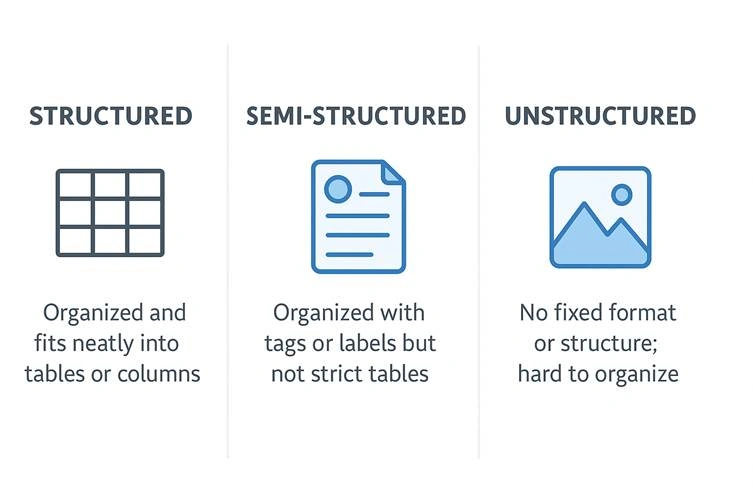
To pick the best way to store your data, you first need to understand what kind of data you have . We usually group data into three types:
1. Structured Data
This is neat and organized—like data in a spreadsheet or a table.
Example: Product prices, names, stock levels, and customer orders.
This kind of data is easy to search, sort, and analyze.
2. Semi-Structured Data
This data is somewhat organized, but not as neat as structured data.
Example: Customer reviews or website logs (like who clicked what).
It has some structure, but not enough to fit into a simple table.
3. Unstructured Data
This is messy data with no clear structure.
Example: Product images, videos, or customer support chat recordings.
You can't put this kind of data into rows and columns.
By knowing which type your data is, you can choose the best storage option that keeps things running smoothly and quickly for your business.
Approaches to storing data in the cloud
Structured data
Structured data is information that is neatly organized—like data in a spreadsheet.
Every piece of data follows the same format and has the same kind of information in it.
In structured data, sometimes called relational data , all data has the same fields or properties. All the data has the same organization and shape, or schema . The shared schema allows this type of data to be easily searched by using query languages like Structured Query Language (SQL). This capability makes this data style perfect for applications like CRM systems, reservations, and inventory management.
For example, imagine a table that stores student names. Every row has:
A student ID
A student name
An age
All rows look the same. That's what makes it "structured."
Structured data is often stored in database tables with rows and columns. In the table, a key column indicates how one row in a table relates to data in another row of another table. In the following image, a table that has data about grades gets data from a table of student names and a table of class data by using key columns.
Why Use Structured Data?
Because it's so organized, it's easy to:
Search
Sort
Filter
Connect with other data
That's why structured data is perfect for things like:
Customer databases (CRM)
Hotel or flight reservations
Inventory systems
Example: Tables with Structured Data
Let's say we're running a school system. We might have three tables :
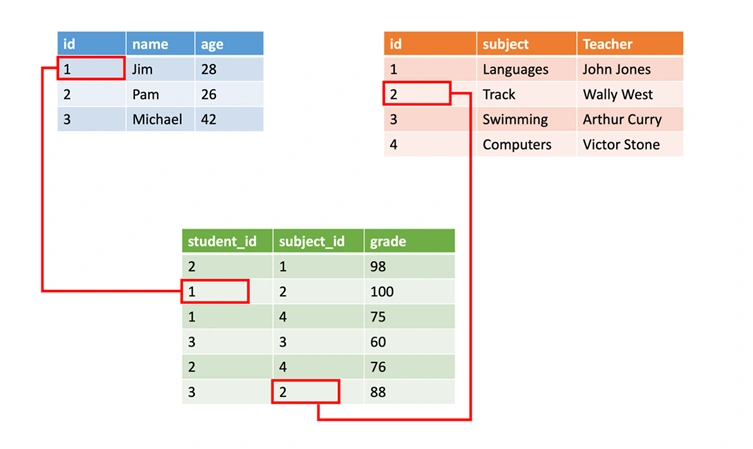
Why Relationships Matter
We don't repeat all the student or class information in the Grades table.
Instead, we use IDs to link data between tables.
This keeps data clean, saves space, and is easy to manage.
One Thing to Remember
Since everything has to follow the same format, making changes is harder .
If you want to add a new field (like student phone number), you must update every record to match the new structure.
Semi-structured data
Semi-structured data is a type of data that is partly organized , but not as strictly as data in a spreadsheet or database table. It doesn't always fit neatly into rows and columns, but it still has some structure to make it understandable.
For example, instead of a table, the data might look like this:
    {
  "name": "John",
  "age": 30,
  "city": "New York"
}
This kind of data is often called NoSQL or non-relational data because it's not stored in traditional databases.
Real-Life Examples of Semi-Structured Data:
Emails : The subject, sender, and message are labeled, but not stored in rows and columns.
JSON files : Used by websites and apps to send data.
XML files : Common in older systems to share data between apps.
Log files : Data from software or websites that isn't strictly organized but has patterns.
To share or store this kind of data, developers use something called a data serialization language . Serialization is just the process of turning data into a format that can be saved to a file or sent over the internet.
What is Serialization?
Serialization is like packing your data into a suitcase so you can send it to someone else or store it somewhere.
You take the data in your computer's memory and turn it into a format (like JSON or XML) that can be easily saved or shared.
When another system gets that data, it can unpack it (called deserialization) and use it, even if it's a completely different system.
This is helpful because two different systems (like two computers or apps) don't need to know much about each other. As long as they both understand the same data format (like JSON or XML), they can read and use the data without confusion.
In simple words
Semi-structured data = "Kinda organized" data that uses tags, labels, or keys, but not strict tables.
Serialization = "Packing data" into a common format so it's easy to share or save.
Why it's useful : Two different apps or computers can understand each other's data as long as they use the same data format.
Common serialization languages
Three common serialization languages are XML, JSON, and YAML.
Let's understand one by one all three of these.
XML
XML (Extensible Markup Language) is one of the oldest and most popular ways to store and share data.
It's text-based , which means you can open it in a text editor and understand it easily.
It's also machine-readable , so computers can read and process it quickly.
Almost every programming language has tools (called parsers) to read XML.
Why Use XML?
You can organize data clearly with labels (called tags).
You can show relationships between pieces of data (like a person and their hobbies).
XML has rules for schemas (to define structure), transformations (to change data format), and even for displaying on websites .
Example: A Person's Details in XML
    <Person Age="23">
    <FirstName>Quinn</FirstName>
    <LastName>Anderson</LastName>
    <Hobbies>
        <Hobby Type="Sports">Golf</Hobby>
        <Hobby Type="Leisure">Reading</Hobby>
        <Hobby Type="Leisure">Guitar</Hobby>
   </Hobbies>
</Person>
Here's what's happening:
<Person>is the main tag , andAge="23"is an attribute (extra info about the person).<FirstName>and<LastName>are elements that store data.<Hobbies>contains child elements<Hobby>to show a list of hobbies
Easy Way to Think About It:
XML is like putting your data in labeled boxes :
The labels (tags) tell you what's inside.
Boxes can be placed inside other boxes (child elements).
Attributes are like sticky notes on the box giving extra details.
Pros and Cons
✅ Easy to read by humans and computers.
✅ Very flexible; can describe complex data.
❌ Can be wordy and take up more space , which makes it slower to send over the internet.
Because of this, simpler formats like JSON have become more popular for web apps.
JSON
JSON (JavaScript Object Notation) is a very popular way to store and share data, especially on the web.
It's lightweight , meaning it doesn't take up much space.
It uses curly braces
{ }to organize data.It's easier to read and write compared to XML because it's less wordy .
JSON is often used by websites and apps to send data between servers and browsers.
Example: A Person's Details in JSON
    {
    "firstName": "Quinn",
    "lastName": "Anderson",
    "age": "23",
    "hobbies": [
        {
           "type": "Sports",
           "value": "Golf"
        },
        {
           "type": "Leisure",
           "value": "Reading"
        },
        {
           "type": "Leisure",
           "value": "Guitar"
        }
    ]
}
Here's what's happening:
Each piece of data is written as a key/value pair , like
"firstName": "Quinn".Curly braces
{ }hold related information together.Square brackets
[ ]represent a list of items (like hobbies).
Easy Way to Think About It
JSON is like writing data as a shopping list with labels :
You write the label (key) and its value next to it.
Lists (like hobbies) are grouped together inside brackets.
It's simple, clean, and easy for programmers to understand.
Why Developers Love JSON
✅ Smaller and faster to send over the internet.
✅ Very easy to use with JavaScript (and most programming languages).
✅ Great for web apps and mobile apps.
❌ Not as formal as XML, so it doesn't enforce strict rules.
❌ Can be harder for non-programmers to edit because of symbols like {}, [], and :.
🔑 In short: JSON is a lightweight, modern way to store and share data, while XML is more structured but wordy . JSON is now the preferred choice for most web services .
YAML
YAML (YAML Ain't Markup Language) is a newer way to store and share data.
It's designed to be super easy for humans to read and write .
Instead of using lots of symbols like
{},[], or<>, YAML uses indentation and line breaks to organize data.Because it's so clean and simple, YAML is often used for configuration files —files that people write to tell a program how to run.
Example: A Person's Details in YAML
    firstName: Quinn
lastName: Anderson
age: 23
hobbies:
  - type: Sports
    value: Golf
  - type: Leisure
    value: Reading
  - type: Leisure
    value: Guitar
Here's what's happening:
Each piece of data is written as
key: value(likefirstName: Quinn).Indentation (spaces at the start of a line) shows relationships, instead of brackets or tags.
The
-symbol is used for lists (like hobbies).
Easy Way to Think About It
YAML is like writing notes in plain English :
No need for extra punctuation or brackets.
Just use spaces and dashes to keep things organized.
Much simpler to read at a glance than XML or JSON.
Why Developers Use YAML
✅ Very human-friendly —easy to read and write.
✅ Cleaner than JSON or XML (no curly braces or angle brackets).
✅ Perfect for config files (like Docker, Kubernetes, GitHub Actions).
❌ Requires careful indentation ; a wrong space can break things.
❌ Not as widely supported as JSON yet, but still growing in popularity.
Join the conversation! Your thoughts help the community grow.