

Introduction
In this article, we will learn how to create and use Clearable EditText without using any third-party library. It is very easy to implement and useful control for our application development.
Steps
I have split this part into 3 steps as in the following.
- Step 1 - Creating a New Project with Empty Activity.
- Step 2 - Setting up the Library.
- Step 3 - Implementation of Custom Control in Android.
Step 1 - Creating a New Project with Android Studio
- Open Android Studio and select Create a new project.
- Name the project as per your wish and select your activity template.
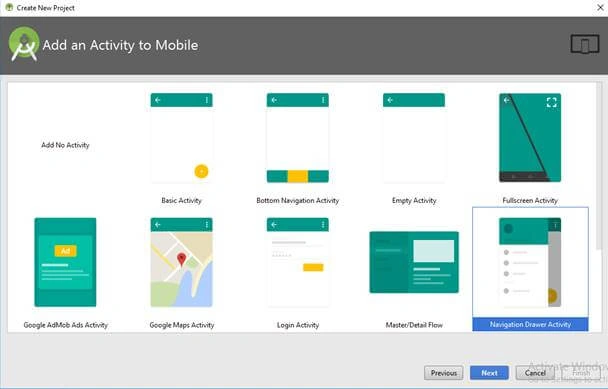
- Click the “Finish” button to create a new project in Android Studio.
Step 2 - Setting up the Firebase Library
In this part, we will see how to set up the library for the project.
- Open your app level build.gradle file and add the following lines in dependencies to apply the required libraries to your project.
- dependencies {
- ...
- implementation 'com.android.support:appcompat-v7:26.1.0'
- implementation 'com.android.support.constraint:constraint-layout:1.1.2'
- implementation 'com.android.support:support-annotations:27.1.1'
- implementation 'com.android.support:design:26.1.0'
- }
- Then click “Sync Now” to setup your project.
Step 3 - Implementation of Clearable EditText
Create a class named as ClearableEditText extend with android.support.v7.widget.AppCompatEditText as Parent. Then open the class file and add the following lines of code.
- public class ClearableEditText extends android.support.v7.widget.AppCompatEditText {
- private Drawable drawableTemp;
- private Drawable drawableRight;
- int actionX, actionY;
- private DrawableClickListener clickListener;
- public ClearableEditText(Context context) {
- super(context);
- }
- public ClearableEditText(Context context, AttributeSet attrs) {
- super(context, attrs);
- }
- public ClearableEditText(Context context, AttributeSet attrs, int defStyleAttr) {
- super(context, attrs, defStyleAttr);
- }
- protected void onDraw(Canvas canvas) {
- super.onDraw(canvas);
- }
- @Override
- protected void onSizeChanged(int w, int h, int oldw, int oldh) {
- super.onSizeChanged(w, h, oldw, oldh);
- }
- @Override
- public void setCompoundDrawables(Drawable left, Drawable top,
- Drawable right, Drawable bottom) {
- if (right != null) {
- drawableRight = right;
- }
- super.setCompoundDrawables(left, top, right, bottom);
- }
- @Override
- protected void onTextChanged(CharSequence text, int start, int lengthBefore, int lengthAfter) {
- if (text.toString().length() > 0) {
- drawableRight = drawableTemp;
- setCompoundDrawables(null, null, drawableRight, null);
- } else {
- drawableTemp = drawableRight;
- setCompoundDrawables(null, null, null, null);
- }
- super.onTextChanged(text, start, lengthBefore, lengthAfter);
- }
- @SuppressLint("ClickableViewAccessibility")
- @Override
- public boolean onTouchEvent(MotionEvent event) {
- Rect bounds;
- if (event.getAction() == MotionEvent.ACTION_DOWN) {
- actionX = (int) event.getX();
- actionY = (int) event.getY();
- if (drawableRight != null) {
- bounds = drawableRight.getBounds();
- int x, y;
- int extraTapArea = 13;
- /*
- IF USER CLICKS JUST OUT SIDE THE RECTANGLE OF THE DRAWABLE
- THAN ADD X AND SUBTRACT THE Y WITH SOME VALUE SO THAT AFTER
- CALCULATING X AND Y CO-ORDINATE LIES INTO THE DRAWBABLE
- BOUND. - this process help to increase the tappable area of
- the rectangle.
- */
- x = actionX + extraTapArea;
- y = actionY - extraTapArea;
- /*
- Since this is right drawable subtract the value of x from the width
- of view. so that width - tapped_area will result in x co-ordinate in drawable bound.
- */
- x = getWidth() - x;
- /*x can be negative if user taps at x co-ordinate just near the width.
- e.g views width = 300 and user taps 290. Then as per previous calculation
- 290 + 13 = 303. So subtract X from getWidth() will result in negative value.
- So to avoid this add the value previously added when x goes negative.
- */
- if (x <= 0) {
- x += extraTapArea;
- }
- /*
- If result after calculating for extra tap-able area is negative.
- assign the original value so that after subtracting
- extra tapping area value doesn't go into negative value.
- */
- if (y <= 0)
- y = actionY;
- /*
- If drawable bounds contains the x and y points then move ahead.
- */
- if (bounds.contains(x, y) && clickListener != null) {
- clickListener.onClick();
- event.setAction(MotionEvent.ACTION_CANCEL);
- return false;
- }
- return super.onTouchEvent(event);
- }
- }
- return super.onTouchEvent(event);
- }
- @Override
- protected void finalize() throws Throwable {
- drawableRight = null;
- super.finalize();
- }
- public void setDrawableClickListener(DrawableClickListener listener) {
- this.clickListener = listener;
- }
- public interface DrawableClickListener {
- void onClick();
- }
Join the conversation! Your thoughts help the community grow.