

Question 1: Collection Framework.
Answer
A collection is a set of similarly typed objects that are grouped together.
A collections is a set of similarly type of elements that are grouped together System.Collection namespace contains interfaces and classes that define various collections of objects, such as lists, queue, hash tables and dictionaries, and so on.
Memory management is done automatically for all the collections. This becomes easy for a .NET developer to handle objects. Types of collections available in .Net framework are as follows.
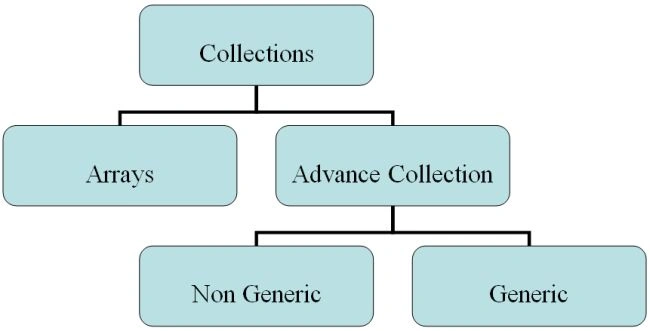
Collections can contain mainly two types:
- Arrays
- Advance Collections
- Non Generic
- Generic
1. Arrays
Array class is defined in System namespace. Arrays can store any type of data but only one type at a time. The size of the array has to be specified at compiler time and we cannot insert, delete an element from an array randomly. If done programmatically, it is at the cost of performance.
2. Advance Collections
There are various operations that are required to process data. There include searching, sorting, insertion, comparing, and so on. To perform these operations efficiently, the data needs to be organized in a specific way. This gives rise to advance collections. Advanced collections are found in System. Collections namespace. They are subcategorized as non-generic and generic collections.
Non-generic collections are defined in this namespace prior to .NET framework 2.0. They are Array List, Stack, Queue, Hash Table, and so on. Every element in non-generic collection is stored as System. Object type.
The generic collections are defined in the System.Collections.Generic namespace in Framework 2.0. They are generic list, generic stack, generic queue, and so on. They are template-based versions of non-generic counterparts.
Every class in the collections has a unique feature. Some classes have sorting capability; some are based on a specific axiom. For example, a stack is based on the principle of List In First Out (LIFO) whereas a queue is based on First in First Out (FIFO). Collections like a Hash Table and Dictionary are stored as key value pairs. Elements in an Array List are similar to an Array but it can grow dynamically whenever a new element is added.
Array Class
namespace ArrayClass
{
class Program
{
static void Main(string[] args)
{
string[] strarry = new string[] { "First",
"Second", "Third", "Fourth", "Fifth" };
string[] strdest = new string[5];
int[] inarry = new int[] { 3, 6, 44, 123, 88 };
//Sort Array
Array.Sort(strarry);
foreach (string s in strarry)
{
Console.WriteLine(s);
}
Console.WriteLine("---------------");
//Reverse Array
Array.Reverse(strarry);
foreach (string s in strarry)
{
Console.WriteLine(s);
}
Console.WriteLine("---------------");
//Copy Array in Another Array
Array.Copy(strarry, strdest, 0);
foreach (string s in strarry)
{
Console.WriteLine(s);
}
Console.WriteLine("---------------");
Console.ReadLine();
}
}
}
Array List Class
namespace ArrayListClass
{
class Program
{
static void Main(string[] args)
{
int[] arr = new int[3] { 1, 2, 3 };
ArrayList country = new ArrayList();
country.Add("India");
country.Add("Japan");
country.Add("Spain");
country.Add("UK");
Console.WriteLine("Count: {0}", country.Count);
Console.WriteLine("---Display ArrayList----");
foreach (string str in country)
{
Console.WriteLine(str);
}
Console.WriteLine("--Remove From ArrayList-");
country.Remove("Japan");
foreach (string str in country)
{
Console.WriteLine(str);
}
Console.WriteLine(country.Count);
Console.WriteLine("----Add In ArrayList --");
country.Add("US");
foreach (string str in country)
{
Console.WriteLine(str);
}
Console.WriteLine("------Count--------------");
Console.WriteLine(country.Count);
Console.ReadLine();
}
}
}
Hash Table
namespace CollectionApp
{
class HastTableClass
{
public static void Main()
{
Hashtable ht = new Hashtable();
ht.Add(001, "monday");
ht.Add(002, "tuesday");
ICollection obj = ht.Keys;
foreach (int i in obj)
{
Console.WriteLine(i + ":" + ht[i]);
}
IDictionaryEnumerator e = ht.GetEnumerator();
while (e.MoveNext())
{
Console.WriteLine(e.Key + "\t" + e.Value);
}
Console.ReadLine();
}
}
}
Stack Demo
namespace CollectionApp
{
class StackCls
{
static void Main()
{
// Stack ss = new Stack();
//ss.Push(11);
//ss.Push("fsd");
Stack<string> ss = new Stack<string>();
//Stack<int> myStack = new Stack<int>();
//myStack.Push(1);
ss.Push("dfsf");
ss.Push("dfs");
ss.Push("df");
ss.Push("d");
//myStack.Push(2);
//myStack.Push(3);
//myStack.Push(4);
//myStack.Push(5);
foreach (string i in ss)
{
Console.WriteLine(i);
}
Console.WriteLine("-------POP-----------");
Pawan TiwariPosted Sep 26, 2016, 1:19 AM
Nice article