

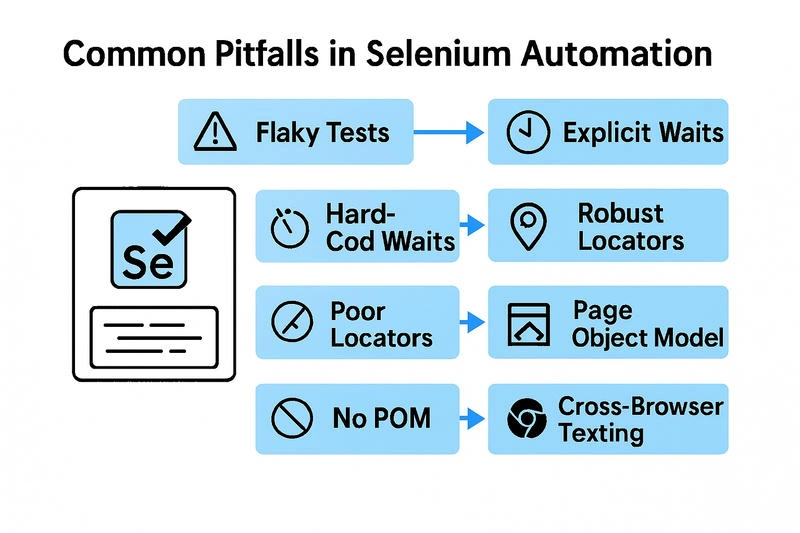
Selenium is a powerful tool for automating web applications, but even experienced testers can fall into common traps that lead to flaky tests, maintenance headaches, and unreliable results. This article outlines the most frequent pitfalls in Selenium automation and provides actionable strategies to avoid them.
1. Using Inappropriate Locators
- Problem: Relying on brittle locators like XPath with dynamic attributes can make tests unstable. Changes in the UI can easily break these locators.
- Solution: Use robust locators such as IDs or data-* attributes whenever possible. Utilize CSS selectors for better readability and performance.
Code Snippet
// Problematic XPath
WebElement element = driver.findElement(By.xpath("//div[@class='dynamic-class']"));

// Improved Locator (ID or CSS Selector)
WebElement element = driver.findElement(By.id("username"));
WebElement button = driver.findElement(By.cssSelector("button[data-action='submit']"));
2. Not Handling Dynamic Content Properly
- Problem: Web elements that load asynchronously can cause NoSuchElementException or ElementNotInteractableException.
- Solution: Use Explicit Waits (WebDriverWait) to wait for elements to be present or clickable before interacting with them.
Code Snippet
WebDriverWait wait = new WebDriverWait(driver, Duration.ofSeconds(10));
WebElement dynamicElement = wait.until(ExpectedConditions.visibilityOfElementLocated(By.id("dynamicContent")));
dynamicElement.click();
3. Hard-Coding Waits
- Problem: Using Thread.sleep() introduces unnecessary delays and makes tests slower and less reliable.
- Solution: Replace hard-coded waits with Explicit or Fluent Waits to wait only as long as necessary.
Code Snippet
// Avoiding Thread.sleep() with Explicit Wait
WebDriverWait wait = new WebDriverWait(driver, Duration.ofSeconds(10));
WebElement loginButton = wait.until(ExpectedConditions.elementToBeClickable(By.id("login")));
loginButton.click();
4. Ignoring Browser Compatibility
- Problem: Tests may pass in one browser but fail in another due to rendering differences or unsupported features.
- Solution: Perform cross-browser testing using Selenium Grid or cloud-based services like BrowserStack or Sauce Labs.
Code Snippet
DesiredCapabilities capabilities = new DesiredCapabilities();
capabilities.setBrowserName("firefox");

WebDriver driver = new RemoteWebDriver(new URL("http://localhost:4444/wd/hub"), capabilities);
driver.get("https://example.com");
5. Lack of Test Data Management
- Problem: Tests that rely on hard-coded or shared data can lead to conflicts and false failures.
- Solution: Use data-driven testing approaches and isolate test data to ensure repeatability and independence.
Code Snippet
@DataProvider(name = "loginData")
public Object[][] getData() {
    return new Object[][] {
        {"user1", "pass1"},
        {"user2", "pass2"}
    };
}

@Test(dataProvider = "loginData")
public void loginTest(String username, String password) {
    driver.findElement(By.id("username")).sendKeys(username);
    driver.findElement(By.id("password")).sendKeys(password);
    driver.findElement(By.id("login")).click();
}
6. Not Using Page Object Model (POM)
- Problem: Mixing test logic with UI locators makes tests harder to maintain and scale.
- Solution: Implement the Page Object Model to separate test logic from page structure, improving maintainability.
Code Snippet
public class LoginPage {
    WebDriver driver;

    @FindBy(id = "username")
    WebElement usernameField;

    @FindBy(id = "password")
    WebElement passwordField;

    @FindBy(id = "login")
    WebElement loginButton;

    public LoginPage(WebDriver driver) {
        this.driver = driver;
        PageFactory.initElements(driver, this);
    }

    public void login(String username, String password) {
        usernameField.sendKeys(username);
        passwordField.sendKeys(password);
        loginButton.click();
    }
}
7. Poor Exception Handling
- Problem: Uncaught exceptions can cause test runs to fail abruptly without meaningful logs.
- Solution: Use try-catch blocks and logging to capture and report errors gracefully.
Code Snippet
try {
    WebElement element = driver.findElement(By.id("submit"));
    element.click();
} catch (NoSuchElementException e) {
    System.out.println("Element not found: " + e.getMessage());
}
Conclusion
Avoiding these common pitfalls can significantly improve the reliability, maintainability, and performance of your Selenium test automation suite. By following best practices and continuously refining your approach, you can build robust and scalable test frameworks that deliver consistent results.
Join the conversation! Your thoughts help the community grow.