

Abstraction
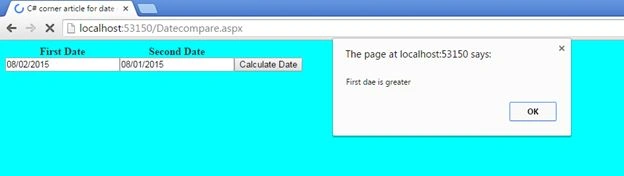
Many beginners and sometimes experienced developers also encounter the question of how to compare two dates. In this article I have described this difference and explained everything that will help a beginner. If this has some drawback or if you have some suggestion, then feel free to mention it in the comments section. Today a friend told me that he encountered the same question in an interview during a machine test process.
Initial chamber
Step 1
Open Visual Studio and create an empty website, provide a suitable name such as DateCompare.
Step 2
In Solution Explorer you will get your empty website, then add web forms
For Web Form
DateCompare (your empty website). Right-click and select Add New Item, then Web Form. Name it DateCompare.aspx.
Design chamber
Step 3
Open the DateCompare.aspx file and write some code for the design of the application.
First add a jQuery plugin to your head section. Here I used jquery-1.9.1.js for demonstration purposes.
The following shows how to add it to your page:
DateCompare (your empty website). Right-click and select Add New Item, then Web Form. Name it DateCompare.aspx.
Design chamber
Step 3
Open the DateCompare.aspx file and write some code for the design of the application.
First add a jQuery plugin to your head section. Here I used jquery-1.9.1.js for demonstration purposes.
The following shows how to add it to your page:
- <div>
- <div>
- <table border="0" cellpadding="0" cellspacing="0">
- <tr>
- <th>First Date
- </th>
- <th>Second Date
- </th>
- </tr>
- <tr>
- <td>
- <asp:TextBox ID="txtDate1" runat="server" />
- </td>
- <td>
- <asp:TextBox ID="txtDate2" runat="server" />
- </td>
- <td>
- <asp:Button ID="btnDiff" runat="server" OnClick="btnDiff_Click" Text="Calculate Date" />
- </td>
- </tr>
- </table>
- </div>
- </div>
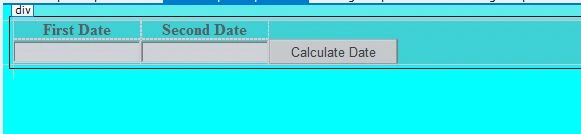
Now write some script for jQuery. Here we will write code to show and hide jQuery code:
- <script>
- $(document).ready(
- /* This is the function that will get executed after the DOM is fully loaded */
- function () {
- $("#txtDate1").datepicker({
- changeMonth: true,//this option for allowing user to select month
- changeYear: true //this option for allowing user to select from year range
- });
- $("#txtDate2").datepicker({
- changeMonth: true,//this option for allowing user to select month
- changeYear: true //this option for allowing user to select from year range
- });
- }
- );
- </script>
- <style type="text/css">
- body {
- color: #333;
- text-align: center;
- background-color: aqua;
- }
- </style>
DateCompare.aspx
- <%@ Page Language="C#" AutoEventWireup="true" CodeFile="DateCompare.aspx.cs" Inherits="DateCompare" %>
- <!DOCTYPE html>
- <html xmlns="http://www.w3.org/1999/xhtml">
- <head runat="server">
- <title>C# corner article for date comparision</title>
- <!-- Load jQuery from Google's CDN -->
- <!-- Load jQuery UI CSS -->
- <link rel="stylesheet" href="http://code.jquery.com/ui/1.10.3/themes/smoothness/jquery-ui.css" />
- <!-- Load jQuery JS -->
- <script src="http://code.jquery.com/jquery-1.9.1.js"></script>
- <!-- Load jQuery UI Main JS -->
- <script src="http://code.jquery.com/ui/1.10.3/jquery-ui.js"></script>
- <!-- Load SCRIPT.JS which will create datepicker for input field -->
- <script>
- $(document).ready(
- /* This is the function that will get executed after the DOM is fully loaded */
- function () {
- $("#txtDate1").datepicker({
- changeMonth: true,//this option for allowing user to select month
- changeYear: true //this option for allowing user to select from year range
- });
- $("#txtDate2").datepicker({
- changeMonth: true,//this option for allowing user to select month
- changeYear: true //this option for allowing user to select from year range
- });
- }
- );
- </script>
- <style type="text/css">
- body {
- color: #333;
- text-align: center;
- background-color: aqua;
- }
- </style>
- </head>
- <body>
- <form id="form1" runat="server">
- <div>
- <div>
- <table border="0" cellpadding="0" cellspacing="0">
- <tr>
- <th>First Date
- </th>
- <th>Second Date
- </th>
- </tr>
- <tr>
- <td>
- <asp:TextBox ID="txtDate1" runat="server" />
- </td>
- <td>
- <asp:TextBox ID="txtDate2" runat="server" />
- </td>
- <td>
- <asp:Button ID="btnDiff" runat="server" OnClick="btnDiff_Click" Text="Calculate Date" />
- </td>
- </tr>
- </table>
- </div>
- </div>
- </form>
- </body>
- </html>

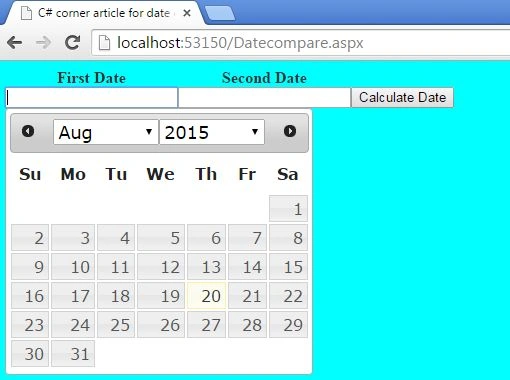


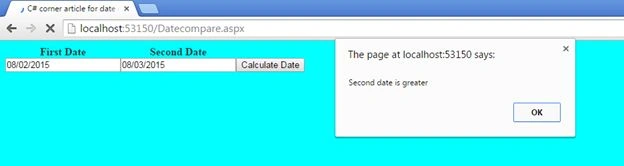
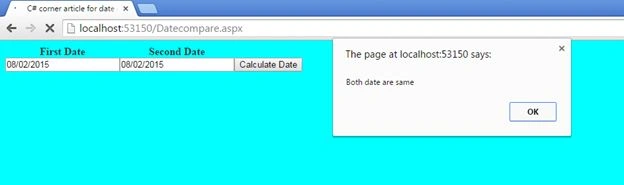
Yashwanth MuthineniPosted Aug 22, 2015, 7:22 AM
Nice Share
Santhakumar MunuswamyPosted Aug 22, 2015, 7:10 AM
Good Article. Thanks for sharing
Nilesh JadavPosted Aug 21, 2015, 9:48 AM
Nicely done sir :)
Ankit BansalPosted Aug 21, 2015, 4:38 AM
good share...
Vaikesh K PPosted Aug 21, 2015, 12:43 AM
Good
RakeshPosted Aug 21, 2015, 12:09 AM
Good work
Van LaiPosted Aug 20, 2015, 11:26 PM
Helpful, thx for sharing.
Karthikeyan KPosted Aug 20, 2015, 11:12 PM
Good one sir...Thanks for sharing
Mohammed IbrahimPosted Aug 20, 2015, 11:02 PM
good one
Arjunan SelvamPosted Aug 20, 2015, 10:46 PM
Nice article..
Gowtham KPosted Aug 20, 2015, 8:52 PM
Goo one
Pankaj Kumar ChoudharyPosted Aug 20, 2015, 2:24 PM
Nice Article Sir..............
Rajeesh MenothPosted Aug 20, 2015, 2:04 PM
Good Buddy...