Introduction : The CompensateSequence
Activity will provide compensation only if there is any error thrown. The
CompensatableSequence Activity class inherits from Sequence Activity, it can
contain any number of child activities that execute in order. Compensation
logic is similar to a transaction. The difference is that a transaction locks
the database until all updates are done, making it only suitable for short
durations. A compensate action is used in long running transactions to undo the
original transaction that was already committed.
- Compensate sequence class : public sealed class.
- CompensatableSequence Activity : Sequence Activity, ICompensatable Activity.
Step 1 : Open Visual Studio 2011.
- Go to File->New->Project.
- Select Sequential Workflow Console Application.

Step 2 : Now drag the activity from
Toolbox.
- Select CompensatableSequenceActivity.
- Select Code Activity and Delay Activity below the CompensatableSequence Activity.
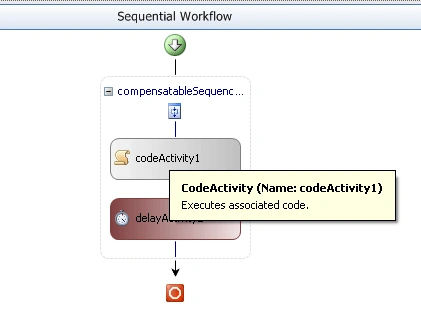
Step 3 : Right-click on
CompensatableSequence Activity and go to Properties option.
- Give the Enabled Condition is "True".
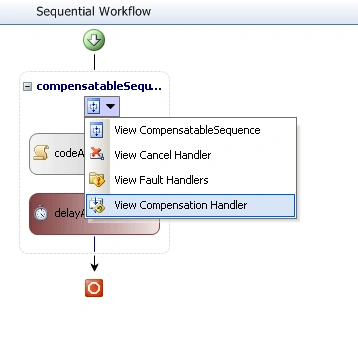
Step 4 : Click in
CompensatableSequence Activity and select View Compensation Handler because we
can define the Executecode.
- Define the CodeActivity1 event inside the property of CodeActivty2.
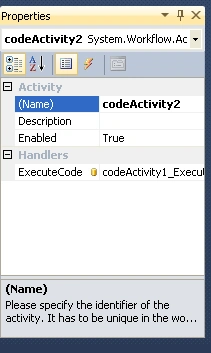
Step 5 : Now go to the
Workflow1.cs[Design] and select Sequential Workflow Application and right-click.
- Define the Completed and Initialized property.
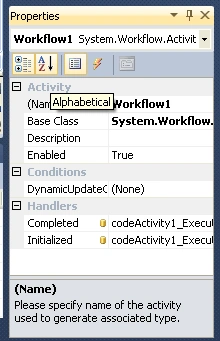
Step 6 : Go to Workflow1.cs and write
the below code.
Code :
using
System;
using
System.ComponentModel;
using
System.ComponentModel.Design;
using
System.Collections;
using
System.Collections.Generic;
using
System.Linq;
using
System.Workflow.ComponentModel.Compiler;
using
System.Workflow.ComponentModel.Serialization;
using
System.Workflow.ComponentModel;
using
System.Workflow.ComponentModel.Design;
using
System.Workflow.Runtime;
using
System.Workflow.Activities;
using
System.Workflow.Activities.Rules;
namespace
WorkflowConsoleApplication21
{
public sealed
partial class
Workflow1 :
SequentialWorkflowActivity
{
public Workflow1()
{
InitializeComponent();
}
private
void codeActivity1_ExecuteCode(object
sender, EventArgs e)
{
Console.WriteLine("hi
my workflow application");
Console.WriteLine("Prerss
Exist to application");
Console.WriteLine("activity
processing......");
Console.WriteLine("activity
execurte.....");
Console.ReadLine();
}
private void
delayActivity2_InitializeTimeoutDuration(object
sender, EventArgs e)
{
DelayActivity delay = sender
as DelayActivity;
if (delay !=
null)
{
delay.TimeoutDuration = new
TimeSpan(0, 0, 5);
}
}
private void
codeActivity2_ExecuteCode(object sender,
EventArgs e)
{
Console.WriteLine("namstey");
Console.ReadLine();
}
}
}
Step 7 : Select Solution
Explorer and click program.cs option and define the below code.
Code :
using
System;
using
System.Collections.Generic;
using
System.Linq;
using
System.Text;
using
System.Threading;
using
System.Workflow.Runtime;
using
System.Workflow.Runtime.Hosting;
namespace
WorkflowConsoleApplication21
{
class Program
{
static void
Main(string[] args)
{
using (WorkflowRuntime
workflowRuntime = new
WorkflowRuntime())
{
AutoResetEvent waitHandle =
new AutoResetEvent(false);
workflowRuntime.WorkflowCompleted +=
delegate(object sender,
WorkflowCompletedEventArgs e) {
waitHandle.Set(); };
workflowRuntime.WorkflowTerminated +=
delegate(object sender,
WorkflowTerminatedEventArgs e)
{
Console.WriteLine(e.Exception.Message);
waitHandle.Set();
};
WorkflowInstance instance =
workflowRuntime.CreateWorkflow(typeof(WorkflowConsoleApplication21.Workflow1));
instance.Start();
waitHandle.WaitOne();
}
}
}
}
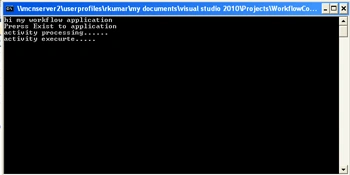
Step 8 : Now we Press F5 and
run the application.

Amit MaheshwarieditedPosted Nov 21, 2011, 4:03 PMEdited Nov 21, 2011, 4:04 PM
thanks davin it is really helpful for me. but you should have to give code explanation too
Deepak DwijPosted Nov 21, 2011, 4:03 PM
Its really a nice explanation Davin , u encourages me alot ! Thanks