

Introduction
This article shall describe an approach that may be used to collect files from multiple locations and zip them up into a single zipped folder. The code contained in the sample project may be useful if one needs to gather up multiple files, zip them up, and then do something with them such as upload the zipped files to a server location for storage or processing. The application uses the SharpZipLib for the basis of the compression function.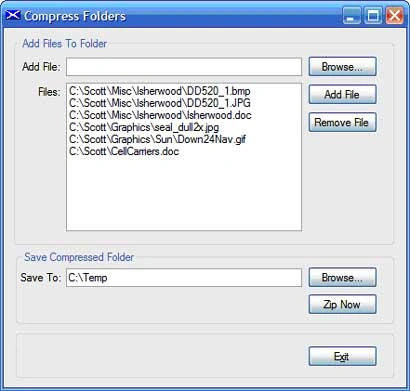
Figure 1: Demo User Interface for Folder Compression Project.
As was mentioned, the example code is dependent upon the SharpZipLib libraries; these libraries may be downloaded from this location: http://www.icsharpcode.net/OpenSource/SharpZipLib/
In addition to handling zip files, the library also handles tar, gzip, and bzip2 compression.
The Solution
The solution contains a single project. The example is provided in the form of a single Windows Forms project; the project contains a single main form (frmMain); the references are all in the default configuration with the exception being that the SharpZipLib DLL has been added (first item in the reference list). Having downloaded the DLL from the www.icsharpcode.net web, the download was installed into the local file system and was adding by using the "Add Reference" dialog's Browse option. All of the code necessary to drive the application is included in the main form's code file.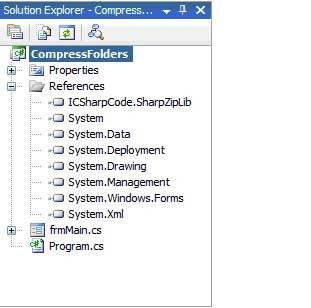
Figure 2: The Solution Explorer Showing the Project.
The Code: Compress Folders - Main Form
The Compress Folders project is a Windows Forms project containing a single form. All UI and code required by the project are contained in the single main form (frmMain.cs).
The only references added to the project, aside from the defaults, were those necessary to support the use of the SharpZipLib in the project. The imports, namespace, and class declarations are as follows:
using System;
using System.Collections;
using System.Text;
using System.IO;
using System.ComponentModel;
using System.Windows.Forms;
using System.Management;
using ICSharpCode.SharpZipLib.Checksums;
using ICSharpCode.SharpZipLib.Zip;
using ICSharpCode.SharpZipLib.GZip;
namespace CompressFolders
{
public partial class frmMain : Form
{
After the class declaration, the next block of code is the default constructor and empty form load event handler:
public frmMain()
{
InitializeComponent();
}
private void frmMain_Load(object sender, EventArgs e)
{
}
The next block of code is used to handle the browse button's click event. This button is used to display the open file dialog; this dialog is used to capture the path to a folder that the user wants to include in the zipped folder. The code is annotated such that you may review descriptions of what each section of the code is doing by reading though this code block:
/// <summary>
/// Select files for subsequent addition to the list of
/// files to be archived
/// </summary>
/// <param name="sender"></param>
/// <param name="e"></param>
private void btnBrowse_Click(object sender, EventArgs e)
{
// configure the open file dialog
openFileDialog1.Title = "Add File";
openFileDialog1.Filter = "All Files (*.*)|*.*";
openFileDialog1.FileName = "";
if (openFileDialog1.ShowDialog() == DialogResult.Cancel)
{
return;
}
// captured from the open file dialog
string sFilePath;
sFilePath = openFileDialog1.FileName;
if (sFilePath == "")
return;
// its path to the list of files to be
// compressed
if (System.IO.File.Exists(sFilePath) == false)
return;
else
txtAddFile.Text = sFilePath;
}
The next block of code is used to add a file selected by the previous method (Browse button) and add to a list of files to included in the zipped folder. Again, this section of code is annotated to describe what each part of the code does.
/// <summary>
/// Button click event handler used to add files from the browse
/// textbox to the listbox control
/// </summary>
/// <param name="sender"></param>
/// <param name="e"></param>
private void btnAddFile_Click(object sender, EventArgs e)
{
// Check for content in the text box
if (txtAddFile.Text == string.Empty)
{
MessageBox.Show("Use the browse button to search for " +"the file to be added.", "Missing File Name");
return;
}
for (int i = 0; i < lstFilePaths.Items.Count; i++)
{
if (lstFilePaths.Items[i].ToString() ==txtAddFile.Text.ToString())
{
MessageBox.Show("That file has already been added to the list.", "Duplicate");
return;
}
}
// Add the file to the listbox list
if (txtAddFile.Text != string.Empty)
lstFilePaths.Items.Add(txtAddFile.Text.ToString());
txtAddFile.Text = string.Empty;
txtAddFile.Focus();
}
The next section of code is the Remove button's click event handler; this method allows the user to remove items from the listbox list after they have been added using the browse button and add button.
/// <summary>
/// Button click handler to remove selected items from
/// the listbox
/// </summary>
/// <param name="sender"></param>
/// <param name="e"></param>
private void btnRemoveFile_Click(object sender, EventArgs e)
{
try
{
lstFilePaths.Items.Remove(lstFilePaths.SelectedItem);
}
catch (Exception ex)
{
MessageBox.Show(ex.Message, "Error");
}
}
Next up is a button event handler that uses the Folder Browser Dialog control to help the user to specify a destination path for the finished zip file.
/// <summary>
/// Button click handler used to set the path to
/// the zipped file
/// </summary>
/// <param name="sender"></param>
/// <param name="e"></param>
private void btnSaveBrowse_Click(object sender, EventArgs e)
{
// clear the folder path
txtSaveTo.Text = string.Empty;
DialogResult result = folderBrowserDialog1.ShowDialog();
Karundeep YadavPosted Nov 4, 2011, 5:24 AM
Hi, I am having a problem while creating and writing a ZIP Using ICSharpCode.SharpZipLib.Zip. I need to write ZIP file in a directory. However, when the size of the folder is more than 1GB, ZIP file is not created. If i delete some of large size file from the directory(size become less than 1 GB), new ZIP files are easily created. I cannot understant this behaviour. Exactly Why it is happening. Is it a problem with Our Application Server. Or Is it an issue with Folder's write Permissions(I have granted full read - write premissions for everyone). Or Is it an issue with ICSharpCode.SharpZipLib.Zip that it cannot save file in a directory whose size is greater than 1 GB Thanks for your time.
Harvey BernsteinPosted Jan 22, 2008, 1:28 PM
I zipped out files with using this code, but when I try to unzip/view with M.S. Compression viewer, the files do not load. Is there something I need to do this?
Harvey BernsteinPosted Jan 22, 2008, 1:12 PM
I zipped out files with using this code, but when I try to unzip/view with M.S. Compression viewer, the files do not load. Is there something I need to do this?
ajay ChaurasiaPosted Dec 26, 2007, 5:26 AM
how to zipping a multiple file in asp.net 3.0 or 2.0 using c#.
jeff bazinetPosted Jun 29, 2007, 12:15 PM
Hello, For anyone interested in using GZipStream to do compression of folders and multiple files, check out this article: http://www.vwd-cms.com/forum/forums.aspx?topic=18 I hope that you find this article and the code samples helpful. Jeff Bazinet