

Managing computers and mobile devices is an important job for every IT department. Microsoft provides three main ways to manage devices: Configuration Manager, Microsoft Intune, and Co-management. Each solution has different features and is useful in different situations. Understanding these tools helps organizations choose the best way to manage their devices.
Configuration Manager
Configuration Manager is a device management tool that works mainly in an on-premises environment. It uses a client installed on Windows devices to communicate with a local server.
Configuration Manager helps IT administrators install software, deploy operating systems, manage updates, collect hardware and software information, and create detailed reports. It is a good choice for organizations that need full control over their Windows devices.
Advantages
Provides detailed hardware and software information
Supports software deployment and automation
Works even when devices have limited internet access
Offers powerful reporting features
Disadvantages
Requires on-premises servers
Costs more to set up and maintain
Mainly supports Windows devices
Not the best choice for remote workers
Microsoft Intune
Microsoft Intune is a cloud-based device management service. It manages devices through the internet using secure HTTPS connections.
Intune supports Windows, macOS, Android, and iOS/iPadOS devices. It allows administrators to deploy applications, apply security policies, manage updates, and protect company data from anywhere.
It is a good solution for companies with remote employees and cloud-based environments.
Advantages
No on-premises servers are needed
Supports multiple operating systems
Easy to manage remote devices
Simple to deploy and maintain
Disadvantages
Provides less detailed inventory than Configuration Manager
Some advanced features are still improving
Requires a reliable internet connection
Co-management
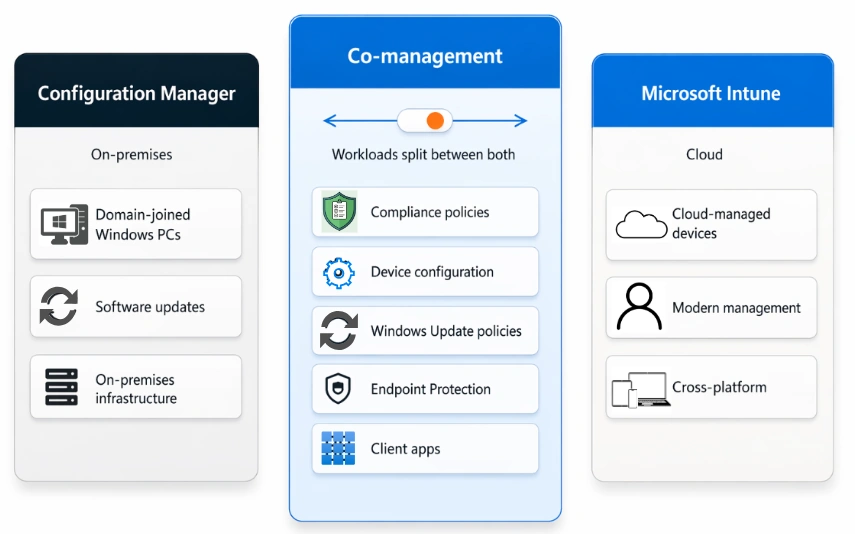
Co-management allows Configuration Manager and Intune to manage the same Windows 10 and Windows 11 devices together.
With co-management, organizations do not have to move everything to the cloud at once. They can move one workload at a time from Configuration Manager to Intune. This makes the migration process easier and safer.
For example, compliance policies and Windows updates can be managed by Intune, while software deployment remains in Configuration Manager.
Advantages
Makes cloud migration easier
Uses the strengths of both tools
Protects existing Configuration Manager investments
Allows gradual movement to Intune
Disadvantages
More difficult to configure
Two management systems must be maintained
Some workloads cannot be moved immediately
Join the conversation! Your thoughts help the community grow.