

Introduction
In my previous article on C# Corner, we saw how to create a Web API and consume that API from an MVC application. In this article, we will see how to create a Web API using repository patterns and will consume this API from an MVC application. We will use a single interface for implementing three different services for MS SQL, MongoDB and MySQL databases. We will call these repository classes from a single Web API and consume this API from the MVC controller.
We will create a simple Employee application to demonstrate these functionalities. We must create a database and a table in MS SQL server and MySQL server. Please note, in MongoDB database and the collection will be created automatically once the application starts.
Create an “Employees” table in MS SQL Server
- USE [SarathDB]
- GO
- CREATE TABLE [dbo].[Employees](
- [Id] [nvarchar](50) NOT NULL,
- [Name] [nvarchar](50) NULL,
- [Gender] [nvarchar](10) NULL,
- [Company] [nvarchar](50) NULL,
- [Designation] [nvarchar](50) NULL,
- [DbType] [nvarchar](10) NULL,
- CONSTRAINT [PK_Employee] PRIMARY KEY CLUSTERED
- (
- [Id] ASC
- )
- )
- GO
- CREATE DATABASE SarathMySQLDB;
- USE SarathMySQLDB;
- CREATE TABLE Employee
- (Id VARCHAR(50) PRIMARY KEY,
- Name VARCHAR(50),
- Gender VARCHAR(50),
- Company VARCHAR(50),
- Designation VARCHAR(50),
- DbType VARCHAR(50)
- );
Create a Visual Studio project with MVC and Web API templates
We can create a new project in VS 2015/2017. I am using a free 2017 community edition.
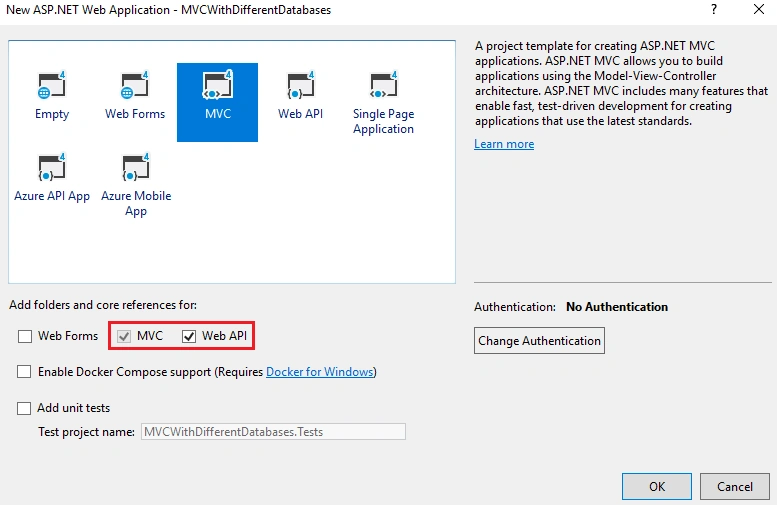
As I mentioned earlier, we will connect three different types of servers with the same MVC application. We are using entity framework for connecting the MS SQL server. We will use MongoDB.Driver package for connecting the MongoDB database. We will use MySql.Data package for connecting MySQL server. We will use the Unity container for dependency injection.
We can now install below NuGet packages to project one by one.



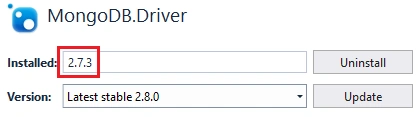

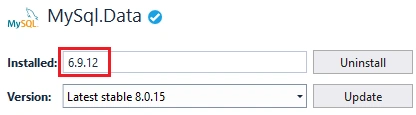
- using System;
- using System.Collections.Generic;
- using System.Web.Http.Dependencies;
- using Unity;
- namespace MVCWithDifferentDatabases.Resolver
- {
- public class UnityResolver : IDependencyResolver
- {
- protected IUnityContainer container;
- public UnityResolver(IUnityContainer container)
- {
- if (container == null)
- {
- throw new ArgumentNullException("container");
- }
- this.container = container;
- }
- public object GetService(Type serviceType)
- {
- try
- {
- return container.Resolve(serviceType);
- }
- catch (ResolutionFailedException)
- {
- return null;
- }
- }
- public IEnumerable<object> GetServices(Type serviceType)
- {
- try
- {
- return container.ResolveAll(serviceType);
- }
- catch (ResolutionFailedException)
- {
- return new List<object>();
- }
- }
- public IDependencyScope BeginScope()
- {
- var child = container.CreateChildContainer();
- return new UnityResolver(child);
- }
- public void Dispose()
- {
- container.Dispose();
- }
- }
- }
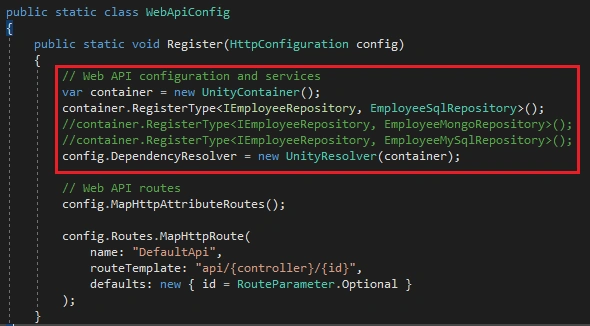
We will register our three services for different repository classes with this UnityResolver in the WebApiConfig class later.
We will use the same Employee class for all database types. In MS SQL and My SQL databases, we will provide a GUID while creating the new employee record. But MongoDB will automatically create object id for each record. Hence, we will add two attributes to the Id property in Employee class.
- using MongoDB.Bson;
- using MongoDB.Bson.Serialization.Attributes;
- namespace MVCWithDifferentDatabases.Models
- {
- public class Employee
- {
- [BsonId]
- [BsonRepresentation(BsonType.ObjectId)]
- public string Id { get; set; }
- public string Name { get; set; }
- public string Gender { get; set; }
- public string Company { get; set; }
- public string Designation { get; set; }
- public string DbType { get; set; }
- }
- }
We can create “SqlDbContext” class and derives DbContext class insides this class.
SqlDbContext.cs
- using System.Data.Entity;
- namespace MVCWithDifferentDatabases.Models
- {
- public class SqlDbContext : DbContext
- {
- public SqlDbContext() : base("name=SqlConnection")
- {
- }
- public DbSet<Employee> Employees { get; set; }
- }
- }
We have used a connection “SqlConnection” in the above DbContext class. We must create the connection string in Web.Config file.

- <connectionStrings>
- <add name="SqlConnection"
- connectionString="Data Source=MURUGAN\SQL2017ML; Initial Catalog=SarathDB; Integrated Security=True; MultipleActiveResultSets=True;"
- providerName="System.Data.SqlClient" />
- </connectionStrings>
We must create two key-value pairs in Web.Config file under “appSettings” section for MongoDB and MySQL connections. We will use these connection strings later with corresponding repository classes.

We can create a DbContext for MongoDB connection. Please note, we are not using Entity Framework for MongoDB data connectivity. Instead, you are using MongoDB driver package.
- using MongoDB.Driver;
- namespace MVCWithDifferentDatabases.Models
- {
- public class MongoDbContext
- {
- private readonly IMongoDatabase _mongoDb;
- public MongoDbContext()
- {
- var client = new MongoClient("mongodb://localhost:27017");
- _mongoDb = client.GetDatabase("SarathMongoDB");
- }
- public IMongoCollection<Employee> Employee
- {
- get
- {
- return _mongoDb.GetCollection<Employee>("Employee");
- }
- }
- }
- }
We are following the repository pattern in this application. We can create a “IEmployeeRepository” interface and define all the methods here.
- using System.Collections.Generic;
- using System.Threading.Tasks;
- namespace MVCWithDifferentDatabases.Models
- {
- public interface IEmployeeRepository
- {
- Task Add(Employee employee);
- Task Update(Employee employee);
- Task Delete(string id);
- Task<Employee> GetEmployee(string id);
- Task<IEnumerable<Employee>> GetEmployees();
- }
- }
We can implement separate repository service classes for MS SQL, MongoDB and MySQL and implement CRUD operations inside these classes.
We are going to implement the SQL repository now.
- using System;
- using System.Collections.Generic;
- using System.Data.Entity;
- using System.Linq;
- using System.Threading.Tasks;
- namespace MVCWithDifferentDatabases.Models
- {
- public class EmployeeSqlRepository : IEmployeeRepository, IDisposable
- {
- private readonly SqlDbContext db = new SqlDbContext();
- bool disposed = false;
- public async Task Add(Employee employee)
- {
- employee.Id = Guid.NewGuid().ToString();
- employee.DbType = "MS SQL";
- db.Employees.Add(employee);
- try
- {
- await db.SaveChangesAsync();
- }
- catch
- {
- throw;
- }
- }
- public async Task<Employee> GetEmployee(string id)
- {
- try
- {
- Employee employee = await db.Employees.FindAsync(id);
- if (employee == null)
- {
- return null;
- }
- return employee;
- }
- catch
- {
- throw;
- }
- }
- public async Task<IEnumerable<Employee>> GetEmployees()
- {
- try
- {
- var employees = await db.Employees.ToListAsync();
- return employees.AsQueryable();
- }
- catch
- {
- throw;
- }
- }
- public async Task Update(Employee employee)
- {
- try
- {
- db.Entry(employee).State = EntityState.Modified;
- await db.SaveChangesAsync();
- }
- catch
- {
- throw;
- }
- }
- public async Task Delete(string id)
- {
- try
- {
- Employee employee = await db.Employees.FindAsync(id);
- db.Employees.Remove(employee);
- await db.SaveChangesAsync();
- }
- catch
- {
- throw;
- }
- }
- private bool EmployeeExists(string id)
- {
- return db.Employees.Count(e => e.Id == id) > 0;
- }
- ~EmployeeSqlRepository()
- {
- if (!disposed)
- {
- disposed = true;
- Dispose(true);
- }
- }
- protected virtual void Dispose(bool disposing)
- {
- if (disposing)
- {
- db.Dispose();
- }
- }
- public void Dispose()
- {
- if (!disposed)
- {
- disposed = true;
- Dispose(true);
- GC.SuppressFinalize(this);
- }
- }
- }
- }
I have implemented all CRUD actions (total 5 methods) inside the above class. I have also implemented the “Dispose” method to destruct the db context instance.
- using MongoDB.Driver;
- using System.Collections.Generic;
- using System.Threading.Tasks;
- namespace MVCWithDifferentDatabases.Models
- {
- public class EmployeeMongoRepository : IEmployeeRepository
- {
- MongoDbContext db = new MongoDbContext();
- public async Task Add(Employee employee)
- {
- try
- {
- employee.DbType = "MongoDB";
- await db.Employee.InsertOneAsync(employee);
- }
- catch
- {
- throw;
- }
- }
- public async Task<Employee> GetEmployee(string id)
- {
- try
- {
- FilterDefinition<Employee> filter = Builders<Employee>.Filter.Eq("Id", id);
- return await db.Employee.Find(filter).FirstOrDefaultAsync();
- }
- catch
- {
- throw;
- }
- }
- public async Task<IEnumerable<Employee>> GetEmployees()
- {
- try
- {
- return await db.Employee.Find(_ => true).ToListAsync();
- }
- catch
- {
- throw;
- }
- }
- public async Task Update(Employee employee)
- {
- try
- {
- await db.Employee.ReplaceOneAsync(filter: g => g.Id == employee.Id, replacement: employee);
- }
- catch
- {
- throw;
- }
- }
- public async Task Delete(string id)
- {
- try
- {
- FilterDefinition<Employee> data = Builders<Employee>.Filter.Eq("Id", id);
- await db.Employee.DeleteOneAsync(data);
- }
- catch
- {
- throw;
- }
- }
- }
- }
We can implement the My SQL repository now.
- using MySql.Data.MySqlClient;
- using System;
- using System.Collections.Generic;
- using System.Configuration;
- using System.Data;
- using System.Threading.Tasks;
- namespace MVCWithDifferentDatabases.Models
- {
- public class EmployeeMySqlRepository : IEmployeeRepository
- {
- private MySqlConnection GetConnection()
- {
- return new MySqlConnection(ConfigurationManager.AppSettings["MySQLConnection"]);
- }
- public async Task Add(Employee employee)
- {
- employee.Id = Guid.NewGuid().ToString();
- try
- {
- using (MySqlConnection conn = GetConnection())
- {
- conn.Open();
- var commandText = @"INSERT INTO Employee (Id,Name,Gender,Company,Designation,DbType) VALUES (@Id, @Name, @Gender, @Company, @Designation,'My SQL');";
- MySqlCommand cmd = new MySqlCommand(commandText, conn);
- cmd.Parameters.Add(new MySqlParameter
- {
- ParameterName = "@Id",
- DbType = DbType.String,
- Value = employee.Id,
- });
- cmd.Parameters.Add(new MySqlParameter
- {
- ParameterName = "@Name",
- DbType = DbType.String,
- Value = employee.Name,
- });
- cmd.Parameters.Add(new MySqlParameter
- {
- ParameterName = "@Gender",
- DbType = DbType.String,
- Value = employee.Gender,
- });
- cmd.Parameters.Add(new MySqlParameter
- {
- ParameterName = "@Company",
- DbType = DbType.String,
- Value = employee.Company,
- });
- cmd.Parameters.Add(new MySqlParameter
- {
- ParameterName = "@Designation",
- DbType = DbType.String,
- Value = employee.Designation,
- });
- await cmd.ExecuteNonQueryAsync();
- }
- }
- catch (Exception ex)
- {
- throw;
- }
- }
- public async Task<Employee> GetEmployee(string id)
- {
- try
- {
- using (MySqlConnection conn = GetConnection())
- {
- conn.Open();
- var commandText = @"SELECT Name,Gender,Company,Designation FROM Employee Where Id=@Id;";
- MySqlCommand cmd = new MySqlCommand(commandText, conn);
- cmd.Parameters.Add(new MySqlParameter
- {
- ParameterName = "@Id",
- DbType = DbType.String,
- Value = id,
- });
- using (var reader = cmd.ExecuteReader())
- {
- if (await reader.ReadAsync())
- {
- return new Employee()
- {
- Id = id,
- Name = await reader.GetFieldValueAsync<string>(0),
- Gender = await reader.GetFieldValueAsync<string>(1),
- Company = await reader.GetFieldValueAsync<string>(2),
- Designation = await reader.GetFieldValueAsync<string>(3)
- };
- }
- else
- {
- return null;
- }
- }
- }
- }
- catch
- {
- throw;
- }
- }
- public async Task<IEnumerable<Employee>> GetEmployees()
- {
- try
- {
- List<Employee> list = new List<Employee>();
- using (MySqlConnection conn = GetConnection())
- {
- conn.Open();
- var commandText = @"SELECT Id,Name,Gender,Company,Designation,DbType FROM Employee;";
- MySqlCommand cmd = new MySqlCommand(commandText, conn);
- using (var reader = cmd.ExecuteReader())
- {
- while (await reader.ReadAsync())
- {
- list.Add(new Employee()
- {
- Id = await reader.GetFieldValueAsync<string>(0),
- Name = await reader.GetFieldValueAsync<string>(1),
- Gender = await reader.GetFieldValueAsync<string>(2),
- Company = await reader.GetFieldValueAsync<string>(3),
- Designation = await reader.GetFieldValueAsync<string>(4),
- DbType = await reader.GetFieldValueAsync<string>(5)
- });
- }
- }
- }
- return list;
- }
- catch
- {
- throw;
- }
- }
- public async Task Update(Employee employee)
- {
- try
- {
- using (MySqlConnection conn = GetConnection())
- {
- conn.Open();
- var commandText = @"UPDATE Employee SET Name=@Name, Gender=@Gender, Company=@Company, Designation=@Designation Where Id=@Id;";
- MySqlCommand cmd = new MySqlCommand(commandText, conn);
- cmd.Parameters.Add(new MySqlParameter
- {
- ParameterName = "@Id",
- DbType = DbType.String,
- Value = employee.Id,
- });
- cmd.Parameters.Add(new MySqlParameter
- {
- ParameterName = "@Name",
- DbType = DbType.String,
- Value = employee.Name,
- });
- cmd.Parameters.Add(new MySqlParameter
- {
- ParameterName = "@Gender",
- DbType = DbType.String,
- Value = employee.Gender,
- });
- cmd.Parameters.Add(new MySqlParameter
- {
- ParameterName = "@Company",
- DbType = DbType.String,
- Value = employee.Company,
- });
- cmd.Parameters.Add(new MySqlParameter
- {
- ParameterName = "@Designation",
- DbType = DbType.String,
- Value = employee.Designation,
- });
- await cmd.ExecuteNonQueryAsync();
- }
- }
- catch
- {
- throw;
- }
- }
- public async Task Delete(string id)
- {
- try
- {
- using (MySqlConnection conn = GetConnection())
- {
- conn.Open();
- var commandText = @"DELETE FROM Employee Where Id=@Id;";
- MySqlCommand cmd = new MySqlCommand(commandText, conn);
- cmd.Parameters.Add(new MySqlParameter
- {
- ParameterName = "@Id",
- DbType = DbType.String,
- Value = id,
- });
- await cmd.ExecuteNonQueryAsync();
- }
- }
- catch
- {
- throw;
- }
- }
- }
- }
Unlike SQL and MongoDB, here we have used traditional ADO.Net way to communicate with My SQL database. We have used MySql data library for that.
- using MVCWithDifferentDatabases.Models;
- using System.Collections.Generic;
- using System.Threading.Tasks;
- using System.Web.Http;
- namespace MVCWithDifferentDatabases.Controllers
- {
- public class EmployeesApiController : ApiController
- {
- private IEmployeeRepository _iEmployeeRepository;
- public EmployeesApiController(IEmployeeRepository iEmployeeRepository)
- {
- _iEmployeeRepository = iEmployeeRepository;
- }
- [HttpGet]
- [Route("api/Employees/Get")]
- public async Task<IEnumerable<Employee>> Get()
- {
- return await _iEmployeeRepository.GetEmployees();
- }
- [HttpPost]
- [Route("api/Employees/Create")]
- public async Task CreateAsync([FromBody]Employee employee)
- {
- if (ModelState.IsValid)
- {
- await _iEmployeeRepository.Add(employee);
- }
- }
- [HttpGet]
- [Route("api/Employees/Details/{id}")]
- public async Task<Employee> Details(string id)
- {
- var result = await _iEmployeeRepository.GetEmployee(id);
- return result;
- }
- [HttpPut]
- [Route("api/Employees/Edit")]
- public async Task EditAsync([FromBody]Employee employee)
- {
- if (ModelState.IsValid)
- {
- await _iEmployeeRepository.Update(employee);
- }
- }
- [HttpDelete]
- [Route("api/Employees/Delete/{id}")]
- public async Task DeleteConfirmedAsync(string id)
- {
- await _iEmployeeRepository.Delete(id);
- }
- protected override void Dispose(bool disposing)
- {
- if (disposing)
- {
- _iEmployeeRepository = null;
- }
- base.Dispose(disposing);
- }
- }
- }
We have created a service instance with IEmployeeRepository interface in above API class. All the CRUD actions are also implemented in this Web API class.
- using MVCWithDifferentDatabases.Models;
- using MVCWithDifferentDatabases.Resolver;
- using System.Web.Http;
- using Unity;
- namespace MVCWithDifferentDatabases
- {
- public static class WebApiConfig
- {
- public static void Register(HttpConfiguration config)
- {
- // Web API configuration and services
- var container = new UnityContainer();
- //container.RegisterType<IEmployeeRepository, EmployeeSqlRepository>();
- //container.RegisterType<IEmployeeRepository, EmployeeMongoRepository>();
- container.RegisterType<IEmployeeRepository, EmployeeMySqlRepository>();
- config.DependencyResolver = new UnityResolver(container);
- // Web API routes
- config.MapHttpAttributeRoutes();
- config.Routes.MapHttpRoute(
- name: "DefaultApi",
- routeTemplate: "api/{controller}/{id}",
- defaults: new { id = RouteParameter.Optional }
- );
- }
- }
- }
We have completed our Web API design. If needed, you can check the Web API using Postman or any other tool. Please note down the URL of the application. We need to add this base URL in our Web.Config file because we will use this base URL in MVC controller.
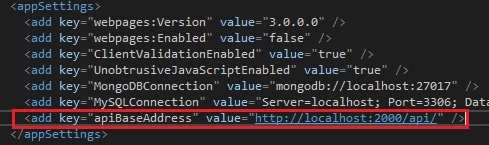
We have named the key as “apiBaseAddress” and gave the project URL as value. Please note our project will be running in localhost with port number 2000.
Create the MVC Controller using Scaffolding
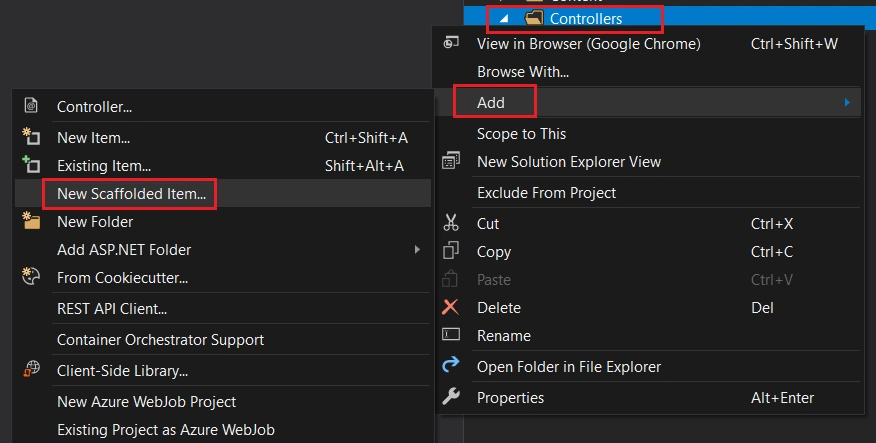
We can right-click the “Controller” folder and click “Add” and choose “New Scaffolded Item” to create a new MVC controller.
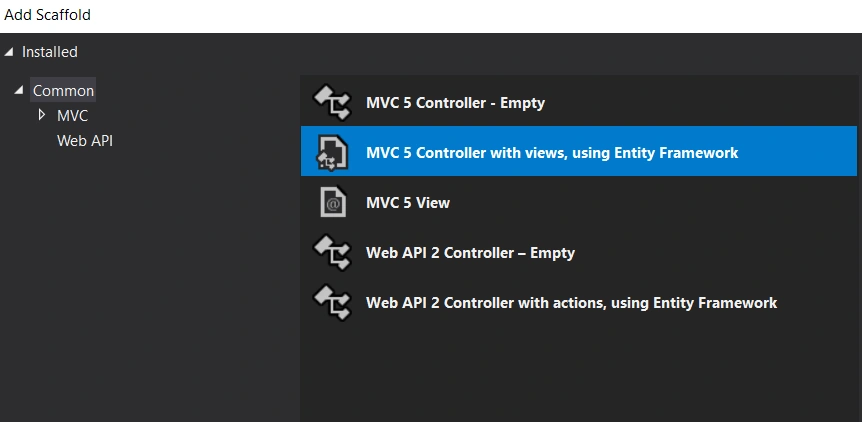
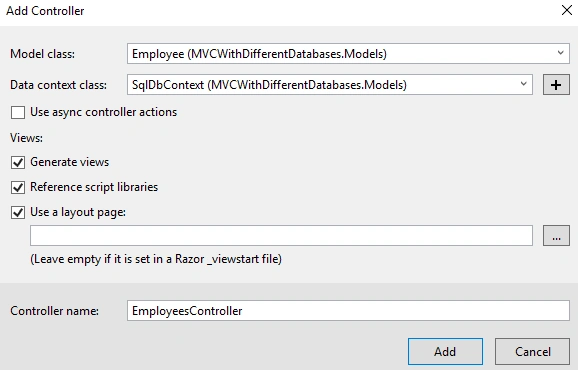
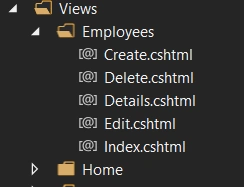
- using MVCWithDifferentDatabases.Models;
- using System;
- using System.Collections.Generic;
- using System.Configuration;
- using System.Linq;
- using System.Net;
- using System.Net.Http;
- using System.Threading.Tasks;
- using System.Web.Mvc;
- namespace MVCWithDifferentDatabases.Controllers
- {
- public class EmployeesController : Controller
- {
- readonly string apiBaseAddress = ConfigurationManager.AppSettings["apiBaseAddress"];
- public async Task<ActionResult> Index()
- {
- IEnumerable<Employee> employees = null;
- using (var client = new HttpClient())
- {
- client.BaseAddress = new Uri(apiBaseAddress);
- var result = await client.GetAsync("employees/get");
- if (result.IsSuccessStatusCode)
- {
- employees = await result.Content.ReadAsAsync<IList<Employee>>();
- }
- else
- {
- employees = Enumerable.Empty<Employee>();
- ModelState.AddModelError(string.Empty, "Server error try after some time.");
- }
- }
- return View(employees);
- }
- public async Task<ActionResult> Details(string id)
- {
- if (id == null)
- {
- return new HttpStatusCodeResult(HttpStatusCode.BadRequest);
- }
- Employee employee = null;
- using (var client = new HttpClient())
- {
- client.BaseAddress = new Uri(apiBaseAddress);
- var result = await client.GetAsync($"employees/details/{id}");
- if (result.IsSuccessStatusCode)
- {
- employee = await result.Content.ReadAsAsync<Employee>();
- }
- else
- {
- ModelState.AddModelError(string.Empty, "Server error try after some time.");
- }
- }
- if (employee == null)
- {
- return HttpNotFound();
- }
- return View(employee);
- }
- public ActionResult Create()
- {
- return View();
- }
- [HttpPost]
- [ValidateAntiForgeryToken]
- public async Task<ActionResult> Create([Bind(Include = "Name,Gender,Company,Designation")] Employee employee)
- {
- if (ModelState.IsValid)
- {
- using (var client = new HttpClient())
- {
- client.BaseAddress = new Uri(apiBaseAddress);
- var response = await client.PostAsJsonAsync("employees/Create", employee);
- if (response.IsSuccessStatusCode)
- {
- return RedirectToAction("Index");
- }
- else
- {
- ModelState.AddModelError(string.Empty, "Server error try after some time.");
- }
- }
- }
- return View(employee);
- }
- public async Task<ActionResult> Edit(string id)
- {
- if (id == null)
- {
- return new HttpStatusCodeResult(HttpStatusCode.BadRequest);
- }
- Employee employee = null;
- using (var client = new HttpClient())
- {
- client.BaseAddress = new Uri(apiBaseAddress);
- var result = await client.GetAsync($"employees/details/{id}");
- if (result.IsSuccessStatusCode)
- {
- employee = await result.Content.ReadAsAsync<Employee>();
- }
- else
- {
- ModelState.AddModelError(string.Empty, "Server error try after some time.");
- }
- }
- if (employee == null)
- {
- return HttpNotFound();
- }
- return View(employee);
- }
- [HttpPost]
- [ValidateAntiForgeryToken]
- public async Task<ActionResult> Edit([Bind(Include = "Id,Name,Gender,Company,Designation")] Employee employee)
- {
- if (ModelState.IsValid)
- {
- using (var client = new HttpClient())
- {
- client.BaseAddress = new Uri(apiBaseAddress);
- var response = await client.PutAsJsonAsync("employees/edit", employee);
- if (response.IsSuccessStatusCode)
- {
- return RedirectToAction("Index");
- }
- else
- {
- ModelState.AddModelError(string.Empty, "Server error try after some time.");
- }
- }
- return RedirectToAction("Index");
- }
- return View(employee);
- }
- public async Task<ActionResult> Delete(string id)
- {
- if (id == null)
- {
- return new HttpStatusCodeResult(HttpStatusCode.BadRequest);
- }
- Employee employee = null;
- using (var client = new HttpClient())
- {
- client.BaseAddress = new Uri(apiBaseAddress);
- var result = await client.GetAsync($"employees/details/{id}");
- if (result.IsSuccessStatusCode)
- {
- employee = await result.Content.ReadAsAsync<Employee>();
- }
- else
- {
- ModelState.AddModelError(string.Empty, "Server error try after some time.");
- }
- }
- if (employee == null)
- {
- return HttpNotFound();
- }
- return View(employee);
- }
- [HttpPost, ActionName("Delete")]
- [ValidateAntiForgeryToken]
- public async Task<ActionResult> DeleteConfirmed(string id)
- {
- using (var client = new HttpClient())
- {
- client.BaseAddress = new Uri(apiBaseAddress);
- var response = await client.DeleteAsync($"employees/delete/{id}");
- if (response.IsSuccessStatusCode)
- {
- return RedirectToAction("Index");
- }
- else
- ModelState.AddModelError(string.Empty, "Server error try after some time.");
- }
- return View();
- }
- }
- }
You can see, we have defined an “apiBaseAddress” variable globally and got the value for apiBaseAddress from Web.Config file. We will use this value in all our controller actions.
- public async Task<ActionResult> Index()
- {
- IEnumerable<Employee> employees = null;
- using (var client = new HttpClient())
- {
- client.BaseAddress = new Uri(apiBaseAddress);
- var result = await client.GetAsync("employees/get");
- if (result.IsSuccessStatusCode)
- {
- employees = await result.Content.ReadAsAsync<IList<Employee>>();
- }
- else
- {
- employees = Enumerable.Empty<Employee>();
- ModelState.AddModelError(string.Empty, "Server error try after some time.");
- }
- }
- return View(employees);
- }
If you look at the index action, you can see, we have declared a “HttpClient” variable and using client.GetAsync method, we have got the employee data result from Web API and store in a “result” variable. We have again read the employee data from this result variable using “ReadAsync” method.
- @model IEnumerable<MVCWithDifferentDatabases.Models.Employee>
- @{
- ViewBag.Title = "Employee List";
- }
- <h3>Employee List</h3>
- <p>
- @Html.ActionLink("New Employee", "Create")
- </p>
- <table class="table">
- <tr>
- <th>
- @Html.DisplayNameFor(model => model.Name)
- </th>
- <th>
- @Html.DisplayNameFor(model => model.Gender)
- </th>
- <th>
- @Html.DisplayNameFor(model => model.Company)
- </th>
- <th>
- @Html.DisplayNameFor(model => model.Designation)
- </th>
- <th>
- @Html.DisplayNameFor(model => model.DbType)
- </th>
- <th></th>
- </tr>
- @foreach (var item in Model)
- {
- <tr>
- <td>
- @Html.ActionLink(item.Name, "Details", new { id = item.Id })
- </td>
- <td>
- @Html.DisplayFor(modelItem => item.Gender)
- </td>
- <td>
- @Html.DisplayFor(modelItem => item.Company)
- </td>
- <td>
- @Html.DisplayFor(modelItem => item.Designation)
- </td>
- <td>
- @Html.DisplayFor(modelItem => item.DbType)
- </td>
- <td>
- @Html.ActionLink("Edit", "Edit", new { id = item.Id }) |
- @Html.ActionLink("Delete", "Delete", new { id = item.Id })
- </td>
- </tr>
- }
- </table>
We have modified the existing “Index” view. We have removed the “Details” link from this view and instead, we have given a hyperlink in the employee name itself for details.
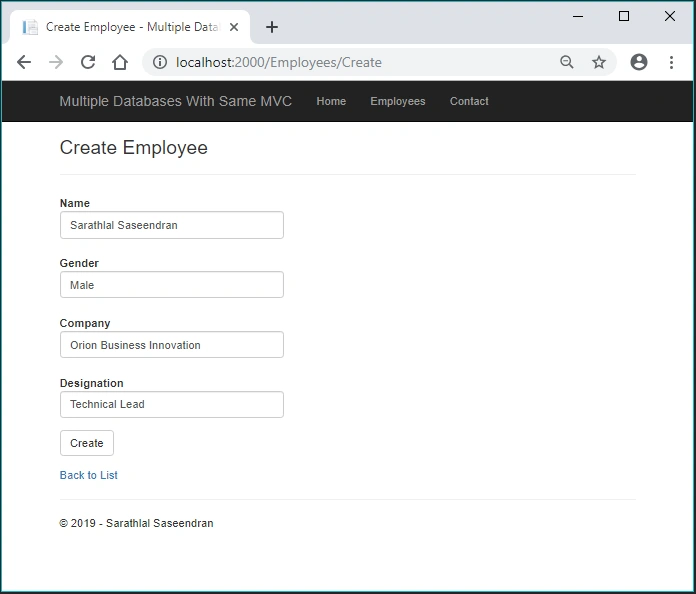
We can modify the “Create” view by removing the Id field. Because for us, employee Id will be created automatically while inserting new data. We have used system GUID for this.
- @model MVCWithDifferentDatabases.Models.Employee
- @{
- ViewBag.Title = "Create Employee";
- }
- <h3>Create Employee</h3>
- @using (Html.BeginForm())
- {
- @Html.AntiForgeryToken()
- <div class="form-horizontal">
- <hr />
- @Html.ValidationSummary(true, "", new { @class = "text-danger" })
- <div class="form-group">
- @Html.LabelFor(model => model.Name, htmlAttributes: new { @class = "control-label col-md-2" })
- <div class="col-md-10">
- @Html.EditorFor(model => model.Name, new { htmlAttributes = new { @class = "form-control" } })
- @Html.ValidationMessageFor(model => model.Name, "", new { @class = "text-danger" })
- </div>
- </div>
- <div class="form-group">
- @Html.LabelFor(model => model.Gender, htmlAttributes: new { @class = "control-label col-md-2" })
- <div class="col-md-10">
- @Html.EditorFor(model => model.Gender, new { htmlAttributes = new { @class = "form-control" } })
- @Html.ValidationMessageFor(model => model.Gender, "", new { @class = "text-danger" })
- </div>
- </div>
- <div class="form-group">
- @Html.LabelFor(model => model.Company, htmlAttributes: new { @class = "control-label col-md-2" })
- <div class="col-md-10">
- @Html.EditorFor(model => model.Company, new { htmlAttributes = new { @class = "form-control" } })
- @Html.ValidationMessageFor(model => model.Company, "", new { @class = "text-danger" })
- </div>
- </div>
- <div class="form-group">
- @Html.LabelFor(model => model.Designation, htmlAttributes: new { @class = "control-label col-md-2" })
- <div class="col-md-10">
- @Html.EditorFor(model => model.Designation, new { htmlAttributes = new { @class = "form-control" } })
- @Html.ValidationMessageFor(model => model.Designation, "", new { @class = "text-danger" })
- </div>
- </div>
- <div class="form-group">
- <div class="col-md-offset-2 col-md-10">
- <input type="submit" value="Create" class="btn btn-default" />
- </div>
- </div>
- </div>
- }
- <div>
- @Html.ActionLink("Back to List", "Index")
- </div>
- @section Scripts {
- @Scripts.Render("~/bundles/jqueryval")
- }
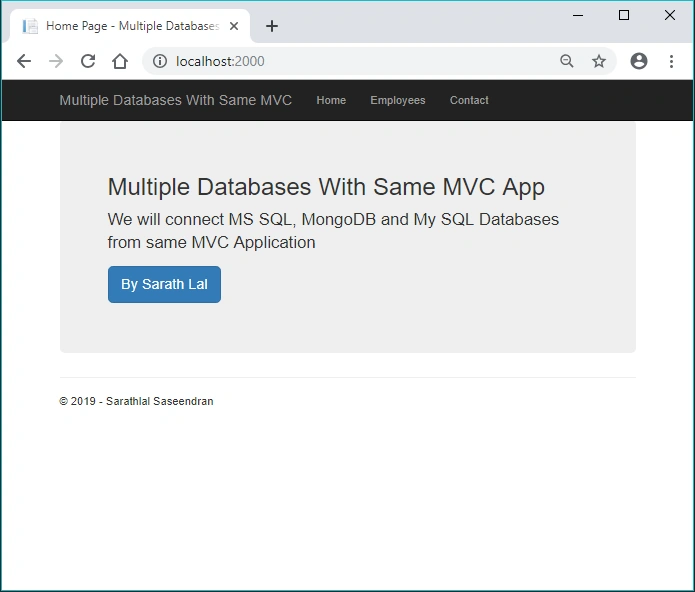
We can run the application now. The home page will look like the below screenshot.
We can click the “Employees” link and create a new employee record.
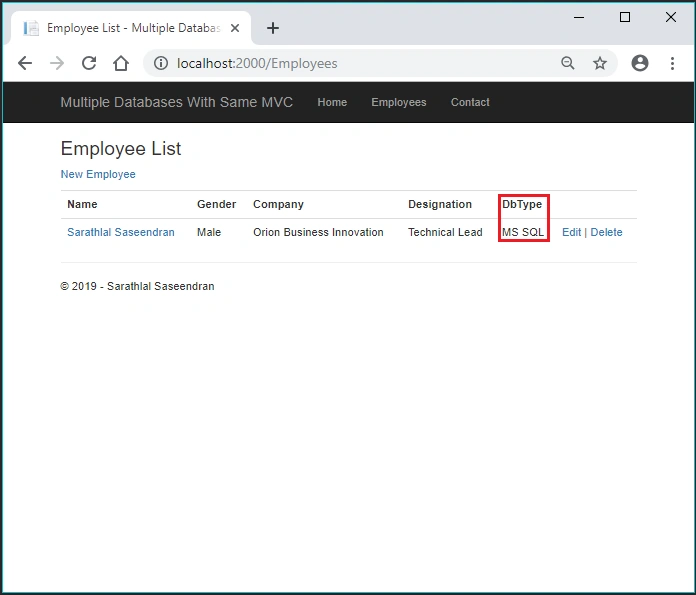
Please note the above Db Type is “MS SQL”. We have automatically saved that field to the table while inserting the data.
We can change the service to MongoDB repository by injecting the service in WebApiConfig file. We will comment the SQL service from and uncomment the MongoDB service as given below.

We need no more changes to connect the application with MongoDB. We can simply run the application again. The application will automatically connect with the MongoDB database.
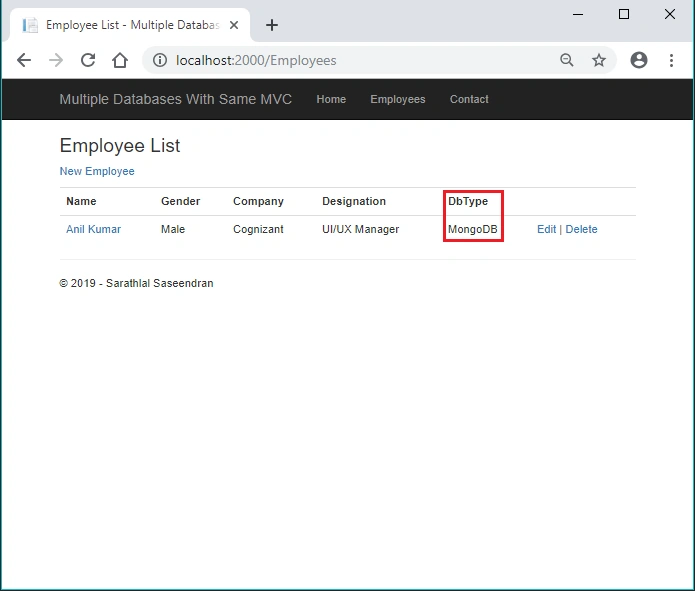
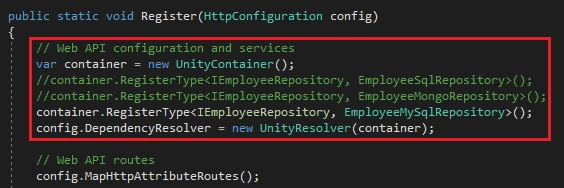
You can run the application again. Now the application will be connected to MySql server.
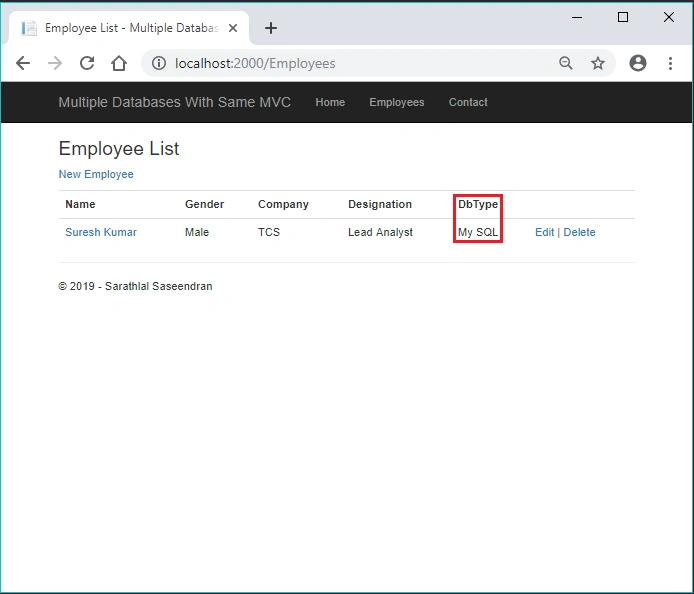
Please note the Db Type shown as “My SQL” for the above employee record.
kavya MekalaPosted Feb 23, 2021, 11:03 AM
Hi sir, i have downloaded the source code and trying to connect to my Mongo cluster, But i am facing Internal server error. i am quite new to .Net and Mongo DB. Please help me understand where i might have gone wrong. Only change i have done is the connection string to connect to mongo cluster.
Ramya MPosted Sep 15, 2019, 8:20 AM
Sir i am a Master student,My guide suggest this project that's why i have chosen this sir,how can i contact you sir?
Ramya MPosted Sep 13, 2019, 10:35 PM
Thanks for your reply Sir, i have work under the project called query processing system,In that we are creating a hospital management system in that we consider three documents one is doctor record,patient record and department record,for example i am planning to store the doctor address details in MongoDB and doctor's educational qualification in MYSQL,If the user wants to retrieve the doctor's educational details it will go and search in which database it contain the educational details and finally it retrieves the data from the respective database and give it to the user.This is what i am trying to do,is it possible to do that?can you please guide some points.
Ramya MPosted Sep 13, 2019, 7:17 AM
Hi Sir,Very useful article for connecting different databases,is it possible to combine MongoDB and MYSQL and retrieve the the data from both the database for a single SQL user query?
Sarathlal SaseendranPosted Mar 25, 2019, 2:52 PM
Hi Arvind, Thank you very much for your feedback. I have already achieved this same feature with Blazor (you can use same method for .Net core) Please have a look at this URL "https://www.c-sharpcorner.com/article/connecting-same-cosmos-db-using-sql-api-and-mongo-api-from-a-blazor-app-experim/" If you use different databases in same application you need individual api controllers and you can instantiate the repository for relevant database easily. This will be an interesting use case.
Ano MepaniPosted Mar 25, 2019, 12:00 PM
Very nice article. Can we achieve same thing in aspnetcore? Is it possible that at the same time we can use these three database in single application? What's your thoughts?