

Introduction
Secure channels are a cornerstone to users and employees working remotely and on the go. Users and developers expect end-to-end security when sending and receiving data - especially, sensitive data on channels protected by VPN, SSL, or TLS. While organizations which control DNS, Host Entry, and CA have likely reduced risk to trivial levels under most threat models, users and developers subjugated to other's DNS and a public CA hierarchy are exposed to non-trivial amounts of risk. In fact, history has shown those relying on outside services have suffered chronic breaches in their secure channels.

The Service-oriented applications with HTTPS (SSL/TLS), enables developers to build secure, reliable, transacted, and interoperable distributed applications, securing the communication between mobile app and services.
This article demonstrates how to consume an HTTPS service with a self-signed certificate (certificate pinning using public key) from a Xamarin.Forms application.
Problem and issue
Xamarin Mobile application is easy to connect. Both http://192.168.1.107 or http://devenevxe.com/xyz.json will work using HTTP client but while trying to connect SSL enabled URL and self-signed certificate, the user will get many issues like below.
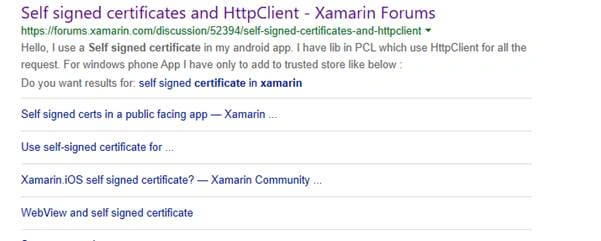
There are many resolutions from the internet but you can follow the below steps for pinning certificates using Xamairn.Forms. This is exactly the way Apple and Android recommended. Let us try to follow the below steps for implementing pinning certificates.
Create a new Xamarin.Forms Application
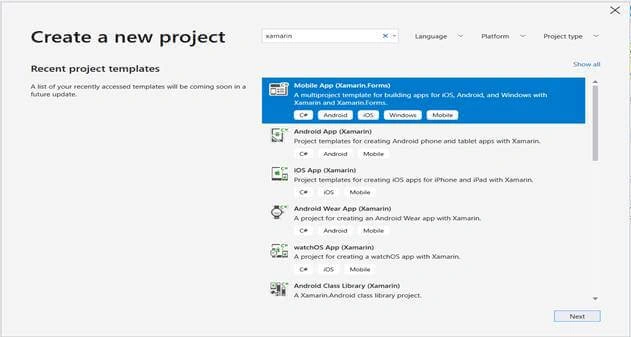
In order to implement certificate pinning, let’s start creating a new Xamarin.Forms project using Visual Studio 2019 or VS mac. When accessing Visual Studio 2019 for the first time, you will come across a new interface for opening a creating the projects.
Open Run >> Type “Devenev.Exe” and enter >> Create New Project (Ctrl+Shift+N) or select open recent application.
The available templates will appear on a window like below. Select Xamarin.Forms application with different mobile platforms.
Generate and Validate Public Key
You will need the valid certificate’s public key. A public key developer can generate using GetPublicKeyString and validate the certificate using the below two methods.
Create and add a new C# httpsValidation class, include the following two namespaces with call back methods.
The System.Net.Security namespace provides network streams for secure communications between hosts. It provides methods for passing credentials across a stream and requesting or performing authentication for client-server applications.
The System.Security.Cryptography.X509Certificates namespace contains the common language runtime implementation of the Authenticode X.509 v.3 certificate. This certificate is signed with a private key that uniquely and positively identifies the holder of the certificate.
- using System;
- using System.Net;
- using System.Net.Security;
- using System.Security.Cryptography.X509Certificates;
An application can set the ServerCertificateValidationCallback property to a method to use for custom validation by the client of the server certificate. When doing custom validation, the sender parameter passed to the RemoteCertificateValidationCallback can be a host string name or an object derived from WebRequest (HttpWebRequest, for example) depending on the CertificatePolicy property.
When custom validation is not used, the certificate name is compared with the hostname used to create the request. For example, if Create (String) was passed a parameter of "https://www.devenvexe.com/default.html", the default behavior is for the client to check the certificate against www.devenvexe.com.
- namespace HttpsService
- {
- public static class httpsValidation
- {
- //Call GenerateSSLpubklickey callback method and repalce here
- static string PUBLIC_KEY = "R E P L A C E - Y O U R P U B L I C K E Y ";
- public static void Initialize()
- {
- ServicePointManager.SecurityProtocol = SecurityProtocolType.Tls12;
- // ServicePointManager.ServerCertificateValidationCallback = OnValidateCertificate;
- //Generate Public Key and replace publickey variable
- // ServicePointManager.ServerCertificateValidationCallback = GenerateSSLPublicKey;
- ServicePointManager.ServerCertificateValidationCallback = OnValidateCertificate;
- }
- }
- }
Despite being a multicast delegate, only the value returned from the last-executed event handler is considered authoritative. In other words, you can attach multiple delegates, and they all get a callback from ServerCertificateValidationCallback. Each callback returns a value that indicates whether the certificate is accepted or not; however, only the value from the last delegate is respected.
- static bool OnValidateCertificate(object sender, X509Certificate certificate, X509Chain chain, SslPolicyErrors sslPolicyErrors)
- {
- var certPublicString = certificate?.GetPublicKeyString();
- var keysMatch = PUBLIC_KEY == certPublicString;
- return keysMatch;
- }
The following method uses the GetPublicKeyString method to return a certificate's public key as a string and add the same method to a callback for getting the public key.
- static string GenerateSSLPublicKey(object sender, X509Certificate certificate, X509Chain chain, SslPolicyErrors sslPolicyErrors)
- {
- string certPublicString = certificate?.GetPublicKeyString();
- return certPublicString ;
- }
Create Service Helper Class
Create or add a service helper C# class and replace your base URL and relative URL. If you are using any local on-premises with a self-signed certificate with a host entry, try to add the URL like below. If you are getting any issue in the Android application, you can replace with IP address instead of the domain address.
Vivek SoniPosted Jul 6, 2020, 8:05 AM
ServerCertificateValidationCallback is not called on all devices, it works on some android devices
suresh PalaniyappanPosted Mar 17, 2020, 5:11 AM
Hi Suthahar, I have .p12 certificate file, how to add in xamarin and use in the code.