

Continue Statement in TypeScript
- continue;
Step 1
Open Visual Studio 2012 and click on "File" menu -> "New" -> "Project". After that, a window is opened, enter the name of your application like "ExampleOfContinue", then click on the Ok button.
Step 2
After Step 1, your project has been created. The Solution Explorer, which is shown on the right side of Visual Studio, contains the js file, ts file, CSS file, an HTML file.
Step 3
The code of the continue statement program:
ExampleOfContinue.ts
- class ExOfContinue {
- MyFunction() {
- for (var n = 1; n <= 10; n++) {
- if (n % 4 == 0)
- continue;
- var y = document.createElement("y");
- y.innerText = n.toString();
- y.innerText = "" + n + "\n";
- document.body.appendChild(y);
- }
- }
- }
- window.onload = () => {
- var value = new ExOfContinue();
- value.MyFunction();
- }
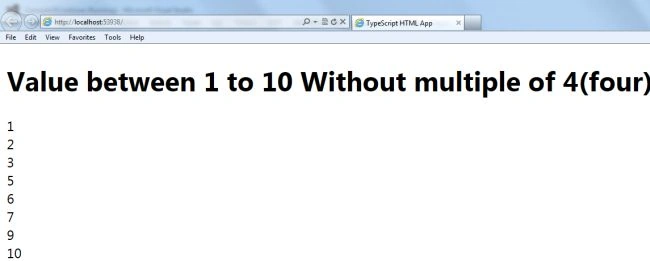
Note In the above-declared program, n is declared and initialized to Zero(0). In the for loop, after each iteration, the value of n is incremented by one (1), until the for loop condition will be true. When n becomes a multiple of four, the continue statement is executed and jumps over the remaining part of the body and back to the loop and updates the value of n by 1 (n++) to begin another iteration.
default.html
Join the conversation! Your thoughts help the community grow.