

iTextSharp is a very popular PDF Library to create, modify and do some additional manipulation with PDF files. This article explains how to convert a text file to a PDF when uploading.
Ground work
Before starting we need to download the iTextSharp PDF library from this URL. Alternatively we can download it from the NuGet Gallary into your project solution using the “NuGet Package Manager” if you are using Visual Studio. This can be depicted below with screen shots.

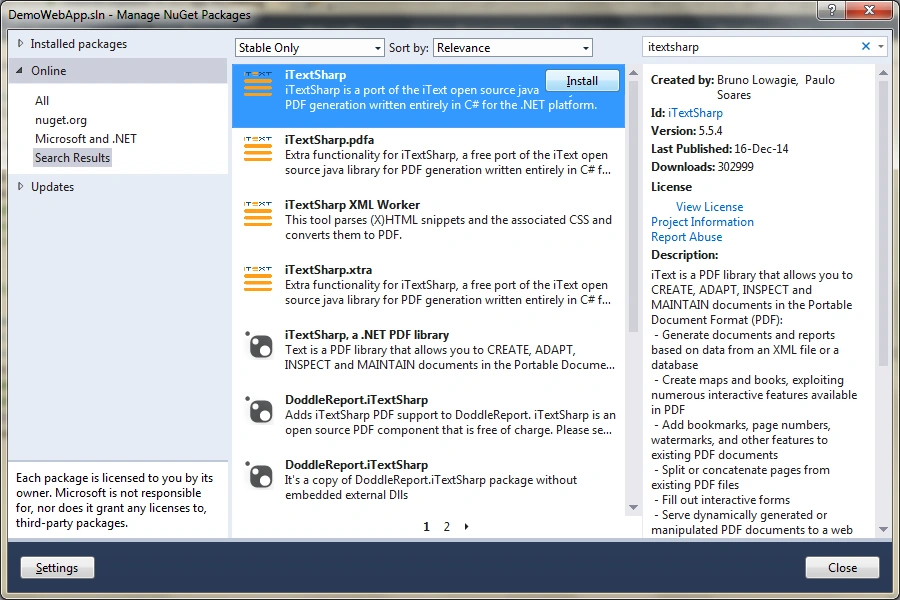
Code
For the sake of simplicity, I have designed the webform with a upload control and a button. So the markup looks like this:
- <!DOCTYPE html>
- <html xmlns="http://www.w3.org/1999/xhtml">
- <head runat="server">
- <title></title>
- </head>
- <body>
- <form id="form1" runat="server">
- <div>
- <asp:Label ID="lbl" runat="server" Text="Select a file to upload:"></asp:Label>
- <asp:FileUpload runat="server" ID="fu" /><br />
- <asp:Button runat="server" ID="btnUpload" Text="Upload" OnClick="btnUpload_Click" />
- </div>
- </form>
- </body>
- </html>
- protected void btnUpload_Click(object sender, EventArgs e)
- {
- // Check that upload control had file
- if(fu.HasFile)
- {
- // Get the Posted File
- HttpPostedFile pf = fu.PostedFile;
- Int32 fileLen;
- // Get the Posted file Content Length
- fileLen = fu.PostedFile.ContentLength;
- // Create a byte array with content length
- Byte[] Input = new Byte[fileLen];
- // Create stream
- System.IO.Stream myStream;
- // get the stream of uploaded file
- myStream = fu.FileContent;
- // Read from the stream
- myStream.Read(Input, 0, fileLen);
- // Create a Document
- Document doc = new Document();
- // create PDF File and create a writer on it
- PdfWriter writer = PdfWriter.GetInstance(doc, new FileStream(string.Concat(Server.MapPath("~/Pdf/PdfSample"), ".pdf"), FileMode.Create));
- // open the document
- doc.Open();
- // Add the text file contents
- doc.Add(new Paragraph(System.Text.Encoding.Default.GetString(Input)));
- // Close the document
- doc.Close();
- }
- }
Output


Muhammad Aqib ShehzadPosted Dec 28, 2015, 5:21 AM
good way