

Microsoft Graph is a single solution to connect all the services across Microsoft Cloud with a single authentication. By using this, we can build an application for Microsoft 365 using a single API.
Microsoft provides a POSTMAN kind of tool to test the several endpoints from Microsoft Graph, called Microsoft Graph Explorer.
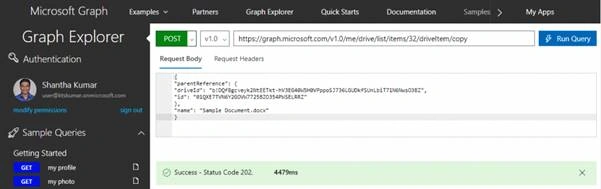
This post will walk you through to copy the document from OneDrive to SharePoint library using Microsoft Graph Explorer without any code.
- Authenticate with Microsoft Account
- Source Information - OneDrive Path and Id Information
- Target Information – Folder details from SharePoint
Authentication in Microsoft GRAPH
First of all, you should have Microsoft business account with a read/write access to OneDrive and SharePoint Online site.
- Navigate to Microsoft Graph Explorer
- Login to the Microsoft Graph Explorer with your Microsoft account
- Ensure your account should have permission to access and modify the files in both OneDrive and SharePoint library.
- Check the checkboxes to apply the permission scopes ( Read.All, Files.ReadWrite.All, Sites.Read.All, Sites.ReadWrite.All ) in Modify Permissions dialog in Graph Explorer.
Now, we should require the Item Id of the document from OneDrive and Target folder’s unique identities (drive id and id) from SharePoint Online.
Destination Information – Get Folder details from SharePoint
To get the drive id and id of the target folder from SharePoint library, we have to follow the below steps.
Get SharePoint Site Id
Below is the format for getting the site information and the Request has the URL format for retrieving the Siteid. Response section shows the site information based on our request.
Format
GET /sites/{host-name}:/{server-relative-path}
Request
https://graph.microsoft.com/v1.0/sites/ktskumar.sharepoint.com:/sites/dev?$select=idResponse
- {
- “@odata.context”: “https://graph.microsoft.com/v1.0/$metadata#sites(id)/$entity”,
- “id”: “ktskumar.sharepoint.com,81fc070d-decb-4dca-8db4-411392dfa157,45e30671-1fb9-4f45-a69a-1227bdfa2c65”
- }
Get Document Library Id
Prepare the URL as below format to get the document library from the site based on the retrieved site id.
Format
GET /sites/{site id}/drives?$select=id,name
Request
https://graph.microsoft.com/v1.0/sites/ktskumar.sharepoint.com,81fc070d-decb-4dca-8db4-411392dfa157,45e30671-1fb9-4f45-a69a-1227bdfa2c65/drives?$select=id,name
Response
- {“
- @odata.context”: “https: //graph.microsoft.com/v1.0/$metadata#drives(id,name)”,
- “value”: [{“
- id”: “b!DQf8gcveyk2NtEETkt - hV3EG40W5H0VPppoSJ736LGUDkfSUnLbiT71N6NwsO3BZ”,
- “name”: “Documents”
- }]
- }
From the above response, the value of id represents the id for the SharePoint Document Library “Documents”. We have to pass this id value in Graph endpoint to get the parent reference for the target folder.
Get Target Folder’s Driver Id and Id
Vidushi ChaudharyPosted Dec 12, 2023, 10:02 AM
How to get the item-id of documents from OneDrive
GOKUL NATARAJANPosted Apr 17, 2021, 2:54 PM
This is great. Though the file is getting copied I am getting empty Response. I want the item id of the file that got created in the destination location. How to get it ?
Sergio C.Posted Apr 13, 2021, 7:27 PM
This is awesome. Thank you. How can this be automated? and or run on a schedule so that it copies files periodically?
Vikas SrivastavaPosted Jul 23, 2018, 12:45 AM
Thank-you for sharing.
Hadshana KamalanathanPosted Jul 20, 2018, 10:40 AM
Nice sharing