

In this article we will be seeing how to create a Content Source Scope Rule in
SharePoint 2010 Enterprise Search Service Application using PowerShell.
Content Source Scope Rule creation in SharePoint 2010
We can create a Content Source Scope Rule in SharePoint 2010 Enterprise Search
Service Application from Central Administration.
Go to Central Administration => Application Management => Manage Service
Applications => Enterprise Search Service Application.
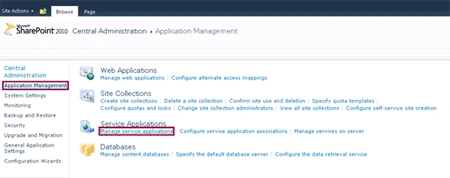
On the Quick Launch Menu, go to Queries and Results then click on Scopes.
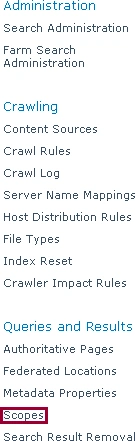
You could be able to see the Scopes.
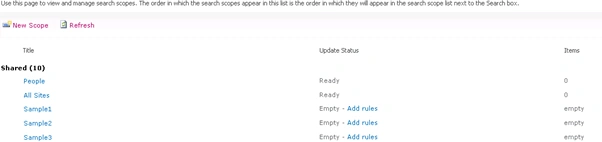
Click on the Scope to which Scope Rule has to be added.
Click on Add New Rule link to add the new scope rule.
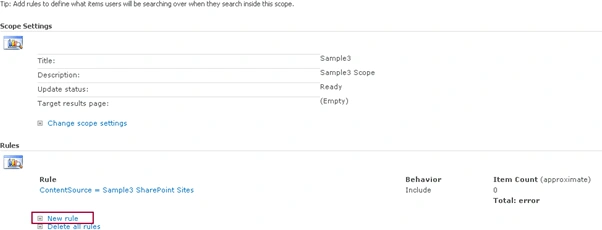
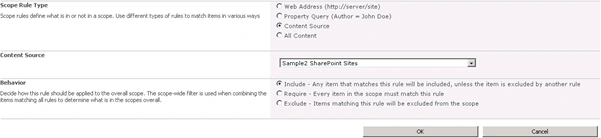
In the Scope Rule Type section, select Content Source.
In the Content Sources section, select the Content Source that has to be added
to the scope rule.
Click on Ok.
Automating the Content Source Scope Rule creation in SharePoint 2010
Here we will be seeing about automating the Content Source Scope Rule creation
using powershell script.
Steps Involved:
- Create the input XML file which contains the inputs for Content Source Scope Rule creation.
- Create ps1 file which contains the script for Content Source Scope Rule creation.
CreateContentSourceScopeRules.xml
<?xml
version="1.0"
encoding="utf-8"
?>
<ScopeRules>
<SSAName>EnterPrise
Search Service Application</SSAName>
<ScopeURL>http://server06:8080/</ScopeURL>
<Rule
ScopeName="Sample1"
ContentSourceName="Sample1
SharePoint Sites" />
<Rule
ScopeName="Sample2"
ContentSourceName="Sample2
SharePoint Sites" />
<Rule
ScopeName="Sample3"
ContentSourceName="Sample3
SharePoint Sites" />
</ScopeRules>
CreateContentSourceScopeRules.ps1
#----------------Get
the xml file---------------------------------------------------------------
[xml]$xmlData=Get-Content "C:\Users\Desktop\ContentSources\CreateContentSourceScopeRules.xml"
#----------------Create Content Source Scope Rule function---------------------------------------------
Function
CreateContentSourceScopeRule()
{
$flag=0
$ssa=Get-SPEnterPriseSearchServiceApplication
-Identity
$xmlData.SSAName
$ssaContent
=
new-object
Microsoft.Office.Server.Search.Administration.Content($ssa)
$scopeCollection=Get-SPEnterpriseSearchQueryScope
-SearchApplication
$ssa
$xmlData.ScopeRules.Rule
|
ForEach-Object
{
$ScopeName=$_.ScopeName
$contentSourceName=$_.ContentSourceName
$scope=Get-SPEnterpriseSearchQueryScope
-SearchApplication
$ssa
|
Where-Object
{$_.Name
-eq
$ScopeName}
if($scope
-ne
$null)
{
foreach
($availableContentSource
in
$ssaContent.ContentSources)
{
if
($availablecontentSource.Name.ToString()
-eq
$contentSourceName)
{
$flag=1
break
}
}
Stephen JohnsonPosted Sep 13, 2011, 8:00 AM
Hi vijai will u please tell whts ssa here?