

I made this project because my friends wanted creepy software like this one. In this project I have created not a file locker but a user friendly file attributes changer. I have used two cmd commands.
Command 1 : To hide or unhide
ATTRIB [+A | -A ] [+S | -S] [+H | -H] [[drive:] [path] filename] [/S [/D]]
| + | Sets an attribute. |
| - | Clears an attribute. |
| R | Read-only file attribute. |
| A | Archive file attribute. |
| S | System file attribute. |
| H | Hidden file attribute. |
| /S | Processes files in all directories in the specified path. |
| /D | Process folders as well. |
Command 2 : To change the security access
ICACLS (don't know the full-form)
Code icacls "path/file.ext" /t /deny or grant username : (f)
/T Traverse all subfolders to match files/directories
(f) full control
/deny the user particular rights
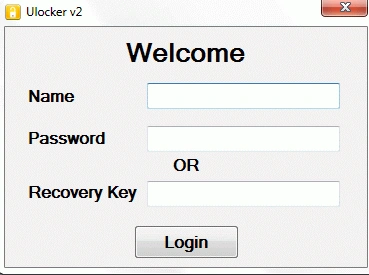
Name = demo
Password = pass
Always run as administrator and it always will be.
Caution Warning
- I cannot guarantee a robust application but I have tried and tested it many time in Windows 7.
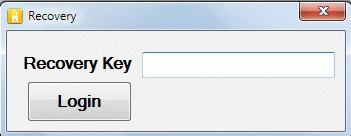
- Recovery key is the file version 51350.73.4970.938 with dash 51350-73-4970-938
- Last but not the least I cannot be held responsible for any loss of data/monetary.
- The best way is for you try it first on a demo file.
- If you trust it then try it on main stuff.
- I trust your intellectual capabilities and because of that you can overcome any problem.
Troubleshooting
- If anything went wrong run these code in run window
- Including double quotes and *.* for all file and folder
- Attrib /s /d -h -s "C:/path/*.*"
- icacls "C:/path/*.*" /t /grant everyone:f
- Access denied means you don't have rights to change the attributes; first unblock it.
- Drawbacks are that you can enter only one file name in the file name box.
Example : my.mp3 (correct)
Example : my.mp3,you.mp3,all.docx (wrong)
Read The Read me file properly
Ok that was the basic info needed to start. We will require three forms.
Application flow diagram
Login->username & pass or recovery->Main page->if recovery was used->recovery window.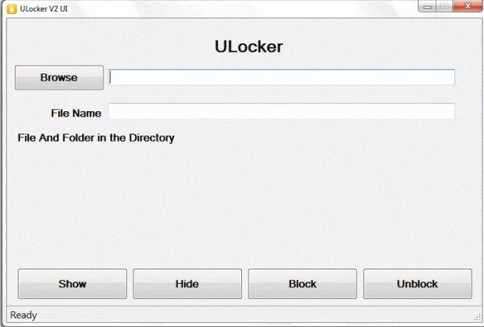
Main page
browsertextbox = readonly
filenametxtbox = nochanges
richtextbox=readonly
filebrowersdialog
statustrip=nochanges
4 buttons = nochanges
Code()
using System.IO;
namespace Locker
{
public partial class mainpg : Form
{
public mainpg()
{
InitializeComponent();
}
//some variable we will need path and file
string path, file;
// the variable which will tell that the recovery is used
Login l1 = new Login();
//the imp method which will do all the work
//parameter command and diretor (used for directory list just to diffrentiate the commands)
//1 for directory list and 0 for other methods
public void cmdproc(string cmd, int dir)
{
//which process tho start with which command
Process.Start("CMD.exe", cmd);//just to hide the black window and get any errors from the cmd.exe
Process proc = new Process();
ProcessStartInfo info = new ProcessStartInfo();
info.RedirectStandardOutput = true;
info.CreateNoWindow = true;
info.UseShellExecute = false;
info.FileName = "cmd.exe";
info.Arguments = cmd;
proc.StartInfo = info;
//now the process starts
proc.Start();
//dir is used to diffrentiate the message which is going to be displayed
if (dir == 1)
{
//this will read the output from start to end
string res = proc.StandardOutput.ReadToEnd();
richTextBox1.Text = res;
}
//any other case
else if (dir == 0)
{
//this will read only the first line of the output
//basically display any error or info of procesing
string result = proc.StandardOutput.ReadLine();
//if the output contains an error or info
if (result != null)
{
//if the string the word denied than the string also contain trouble shooting it
if (result.Contains("denied"))
{
result += " First Unblock It";
}
//finally display it
too1.Text = result;
}
//if there is no error then simply show done
else
{
too1.Text = "Done";
}
}
}
private void button1_Click(object sender, EventArgs e)
{
//browse
if (flbrowse.ShowDialog() == DialogResult.OK)
{
//assign the path
path = flbrowse.SelectedPath;
pat.Text = path;
//create comand to display the file in the path
//simple dir command of cmd
// /c dir "C:/bla/bla/bla" /a /b"
// /a will display all the hidden files
// /b display only the name
// 1 will change the outputshowed
cmdproc("/c dir " + "\"" + path + "\"" + " /a /b", 1);
}
}
private void button2_Click(object sender, EventArgs e)
{
//if all the inputs are provided
if (valid() == true)
{
//attrib command to change the visibilty of the file
// /c will tell the cmd to exit as soon as the command is exicuted
// -s remove system file property
// -h remove the hidden attribute
// /s /d will include all the file and folder if *.* is selected
cmdproc("/c attrib /s /d -s -h \"" + path + "\\" + file + "\"", 0);
}
}
private void button3_Click(object sender, EventArgs e)
{
//if all the inputs are provided
if (valid() == true)
{
//attrib command to change the visibilty of the file
// /c will tell the cmd to exit as soon as the command is exicuted
// +s add system file property
// +h add the hidden attribute
// /s /d will include all the file and folder if *.* is selected
cmdproc("/c attrib /s /d +s +h \"" + path + "\\" + file + "\"", 0);
}
}
Adarsh AcharyaPosted Feb 3, 2012, 11:17 AM
To add/remove features All suggestions are welcomed Thnks
Adarsh AcharyaPosted Feb 3, 2012, 11:13 AM
Thnks for appreciation
Abhishek DubeyPosted Feb 1, 2012, 5:11 AM
this article can improve as best folder security software ............really good...
Sonakshi SinghPosted Feb 1, 2012, 3:16 AM
Very huge,Well explained.
Sanjoli GuptaPosted Feb 1, 2012, 3:15 AM
very well explained...
Alok PandeyPosted Feb 1, 2012, 3:15 AM
Very useful article. thanks for sharing.
Aaron CronjePosted Feb 1, 2012, 3:13 AM
Good Work...
Adarsh AcharyaPosted Jan 30, 2012, 2:18 AM
I learned from the mistakes from my last article it lacked explanation and now the error is rectified Thanks for ur feedbacks
Adora KrausePosted Jan 29, 2012, 11:21 PM
Nicely presented article.
Adarsh AcharyaeditedPosted Jan 29, 2012, 6:58 AMEdited Jan 29, 2012, 6:59 AM
can anyone help me to create user-define password / username and recovery option i was thinking of xml but not a safest way (and how to enter a new line of comment in c-sharpcorner.com)
Adarsh AcharyaPosted Jan 29, 2012, 6:47 AM
I was very afraid to upload this article god knows y
Vineet Kumar SainiPosted Jan 28, 2012, 11:52 PM
Very good article.....
Arjun PanwarPosted Jan 28, 2012, 11:46 PM
Thanks for this article