

While working on one of my projects, I came across a scenario where I had a database of the client's that was provided by some other provider through their application. I had to get data from that database, and using that data I had to do some calculations on that and store the results in my database. There were two scenarios in this case:
- I could fetch all the required tables and data from that database and create my own database and dump those details into mine and then use it.
- I could create a link between my database and the existing database, so that I could fire queries directly on that database.
Using the first approach will not give me updated records at any point of time but my scenario was real time data. So I thought of using a second approach. This approach gave me real time data as I was querying the existing data and using it. But there is one drawback: It might be somewhat slow. In this article I will explain how to create a linked server in SQL Server. Here I will be using ODBC Driver to fetch data from MYSQL database.
The following are the steps to connect a MySQL database to a SQL Server:
First of all we need to install the appropriate MySQL ODBC Driver based on the operating system from the below link. After the driver has been installed go to Control Panel, Administrative Tools, then Data Sources(ODBC). After that click System DSN. Now Press Add Button .
Select MYSQL Driver Listed(MYSQL(ODBC) 5.3 ANSI Driver) and click finish. This will open up MySQL Configuration window.
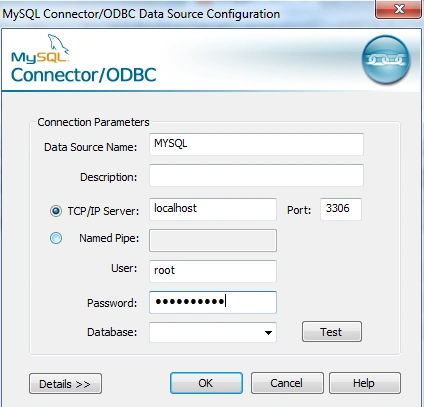
Fill Data Source Name as MYSQL (this can be anything). TCP/IP Server as localhost. Port as 3306(default port for mysql), User Name-root, Password -your database password and click test. This will show a success message. Now select database and click ok.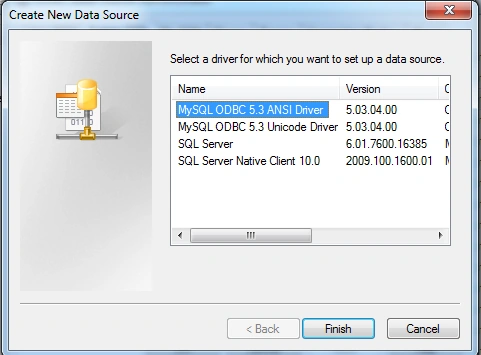
We are done with MYSQL System DSN. Now we will set Linked Server to MYSQL in SQL Server. Open SQL Server, Server Objects, then Linked Server. Right Click on Linked Servers, then Add New Linked Server.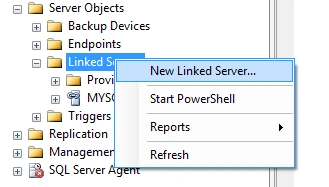
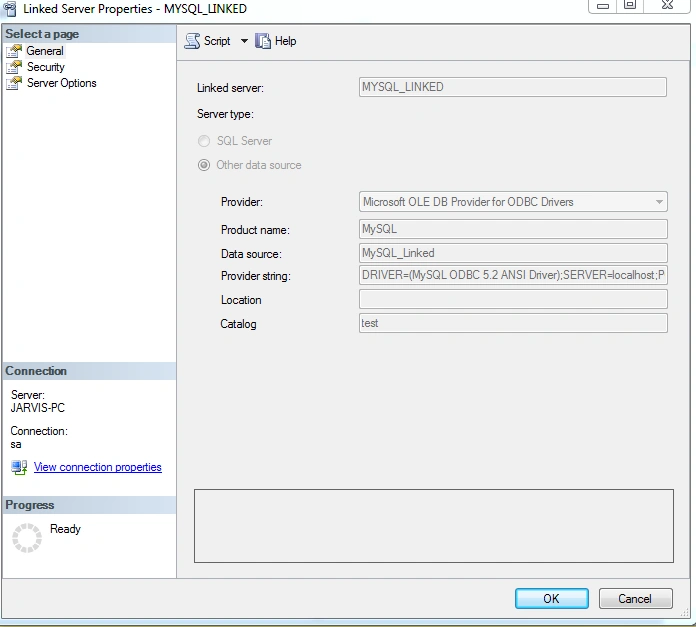
This will Open up a Linked Server Properties Dialog. Fill Linked Server as MYSQL_LINKED, select Provider as Microsoft OLEDB Provider For ODBC Drivers. Product Name as MySQl, DataSource as MySQL_Linked (whatever name is given while creating DSN). Provider String as,- DRIVER=(MySQL ODBC 5.2 ANSI Driver);SERVER=localhost;PORT=3306;DATABASE=databasename; USER=username;PASSWORD=password;OPTION=3;
Leave location as blank and Catalog as database name (in mysql).
Trần ViệtPosted Nov 20, 2018, 3:14 AM
I make it but MsSQL throw error : 7303. Can you help me?
Ravi KandelPosted Mar 8, 2017, 9:00 AM
Awesome Thanks for sharing
Ashish SrivastavaPosted Apr 5, 2016, 1:57 AM
very good.. i am looking for the same :)
Asfend YarPosted Mar 1, 2016, 4:10 PM
good
Hemant SrivastavaPosted Feb 29, 2016, 10:07 AM
Nice share
Mubarak AhmadPosted Feb 29, 2016, 9:10 AM
Good information....
Shriram PophaliPosted Feb 29, 2016, 6:50 AM
Nice article
Vignesh ManiPosted Feb 29, 2016, 5:17 AM
Nice one
Raja TPosted Feb 29, 2016, 1:57 AM
Nice,Thanks for sharing
Pankaj Kumar ChoudharyPosted Feb 29, 2016, 1:17 AM
Great Information , Best article by you till now..........