
Create a Simple WEB API Project
Select a Project
Start Visual Studio 2015. From the File menu, select New > Project. In the New Project Template, select Web > .NET Framework 4.6 > ASP.NET Web Application.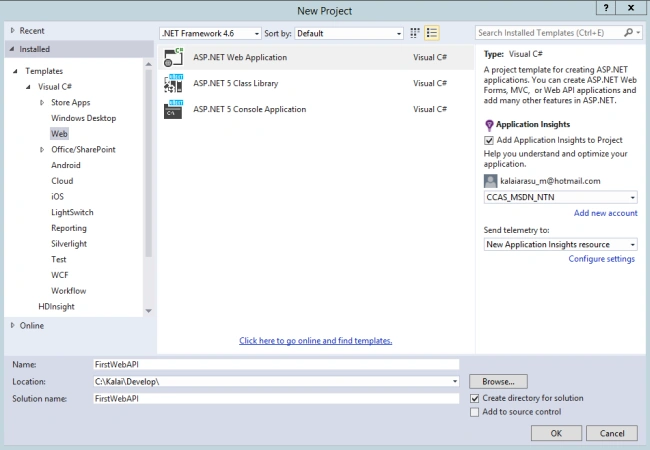
Name the project “FirstWebAPI”, browse and choose a location and click OK. Also check “Application Insights” and Send telemetry to “New Application Insights resource”. We will discuss Application Insights functionality in the near future separately.
Select a Template
Select the template ASP.NET 5 Empty and click Ok.
The first Web API solution is created. 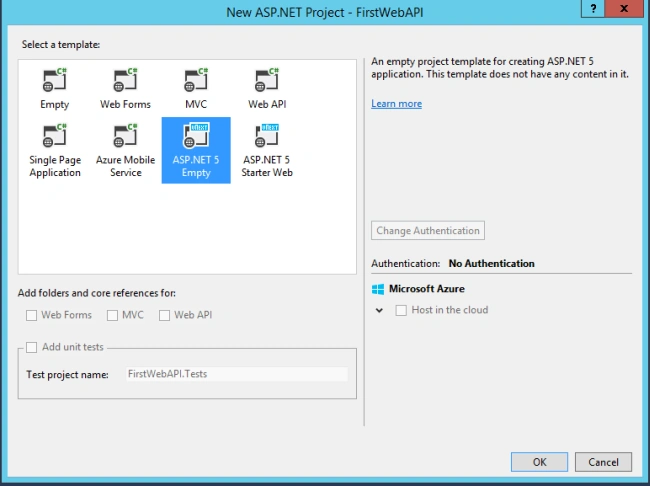
The default solution structure is created as in the following: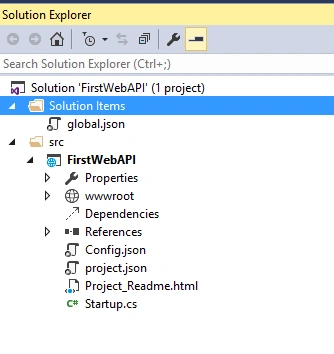
Build and execute it. There could be an error message as in the following:
HTTP Error 403.14 - Forbidden
The Web server is configured to not list the contents of this directory.
Enable directory browsing using the appcmd.exe tool. It is a two-step process.
- Go to the IIS Express install directory (in other words C:\Program Files (x86)\IIS Express).
- Run appcmd set config /section:system.webServer/directoryBrowse /enabled:true
Complete Employee API
Find the attached FirstWebAPI solution for implementation. The Employee controller implements some basic CRUD operations.
- GET /api/emp: Returns all employee records.
- Get /api/emp/id: Returns an employee records based on id.
- POST /api/emp: Create a new employee.
- DELETE /api/emp/id: Deletes an employee based on id.
How to invoke endpoints
A HTTP request can be passed using any a REST Client (Fiddler, SOAPUI, Chrome client and so on). An example request and response as in the following:
GET - http://localhost:1117/api/emp
Request Header
Content-Type: application/json
Output
[{
"Id": 1,
"Name": "Emp1",
"Dob": "2015-02-22T07:57:09.4668226+00:00",
"DateOfHire": "2015-02-22T07:57:09.4668226+00:00"
},
{
"Id": 2,
"Name": "Emp2",
"Dob": "2015-02-22T07:57:09.482453+00:00",
"DateOfHire": "2015-02-22T07:57:09.482453+00:00"
}]
Gowtham RajamanickamPosted Mar 16, 2015, 2:26 AM
good...
Rahul Kumar SaxenaPosted Feb 26, 2015, 4:32 AM
Good Show..
Sibeesh VenuPosted Feb 26, 2015, 2:38 AM
Good One.