

Introduction
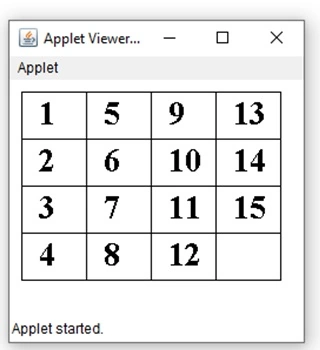
Using applet, create a working version of ‘fifteen puzzle’. The puzzle contains a grid with four rows and four columns. The cells of the grid are filled with numbers from 1 to 15 leaving one cell empty. On clicking the mouse on a cell adjacent to the empty cell, the number in the cell moves to the empty cell. The puzzle is completed when the user arranges the number in the cells in ascending order.
Source Code
import java.awt.*;
import java.applet.*;
import java.awt.event.*;
public class Puzzle extends Applet implements MouseListener {
    final int ncols = 4, nrows = 4;
    int nummax = ncols * nrows;
    int xstart = 10, ystart = 10;
    int gwidth = 55, gheight = 40;
    int[][] grd = new int[ncols][nrows];
    public void init() {
        addMouseListener(this);
    }
    public void start() {
        int k = 1;
        for (int i = 0; i < ncols; ++i)
            for (int j = 0; j < nrows; ++j) grd[i][j] = k++;
    }
    void swap(int x1, int y1, int x2, int y2) {
        if (x1 >= 0 && x1 < ncols && y1 >= 0 && y1 < nrows)
            if (x2 >= 0 && x2 < ncols && y2 >= 0 && y2 < nrows)
                if (grd[x2][y2] == nummax) {
                    grd[x2][y2] = grd[x1][y1];
                    grd[x1][y1] = nummax;
                }
    }
    public void mousePressed(MouseEvent e) {
        int x = e.getX();
        x -= xstart;
        int y = e.getY();
        y -= ystart;
        if (x > 0 && x < gwidth * (ncols) && y > 0 && y < gheight * (nrows)) {
            int col = x / gwidth;
            int row = y / gheight;
            swap(col, row, col + 1, row);
            swap(col, row, col - 1, row);
            swap(col, row, col, row + 1);
            swap(col, row, col, row - 1);
            repaint();
        }
    }
    public void mouseClicked(MouseEvent e) {}
    public void mouseEntered(MouseEvent e) {}
    public void mouseExited(MouseEvent e) {}
    public void mouseReleased(MouseEvent e) {}
    public void paint(Graphics g) {
        for (int i = 0; i < ncols + 1; ++i) g.drawLine(xstart + i * gwidth, ystart, xstart + i * gwidth, ystart + nrows * gheight);
        for (int j = 0; j < nrows + 1; ++j) g.drawLine(xstart, ystart + j * gheight, xstart + ncols * gwidth, ystart + j * gheight);
        g.setFont(new Font("TimesRoman", Font.BOLD, 28));
        g.setColor(Color.black);
        for (int j = 0; j < nrows; ++j)
            for (int i = 0; i < ncols; ++i) {
                if (grd[i][j] != nummax) g.drawString("" + grd[i][j], xstart + i * gwidth + 15, ystart + j * gheight + 28);
            }
    }
}
Save the file as Puzzle.java in a folder like E:\java\
and compile it...
Open up the other Editor, and write the HTML code as
<applet code="Puzzle.class" width=250  height=200>
</applet>
Save the HTML file as Puzzle.html in the same folder as E:\java
Code Functionality
The meaning of all the instance variables used in the Puzzle class are given below:
- nrows and ncols represents the number of rows and columns in the puzzle.
- gwidth and gheight stores the width and height (in pixels) of each cell.
- xstart and ystart are the coordinates of the top corner of the puzzle.
- grd is an array of integers which represents the puzzle internally.
- In the start() method the two dimensional array, grd, is filled with numbers ranging from 0 to 15. The number zero is used to represent a blank cell and is not displayed.
- The paint() method paints the grid lines and displays the number in the cells. It is important to note that, the cell, which has zero in it, is left blank.
- The if statement in the mousePressed() event handler (line 27) checks whether the mouse was pressed inside the puzzle (grid). Then, the mouse coordinates are translated into rows and columns of the grid (line 29 and 30). The swap() method is called for each of the cell which is adjacent to the cell in which mouse was pressed. If one of the cells adjacent to the cell in which mouse was clicked is blank (contains zero), the two cells are swapped.
Run the Source code
Compile the Puzzle.java in a folder as E:\java>
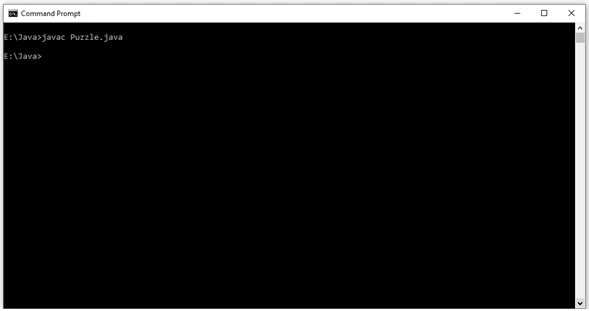
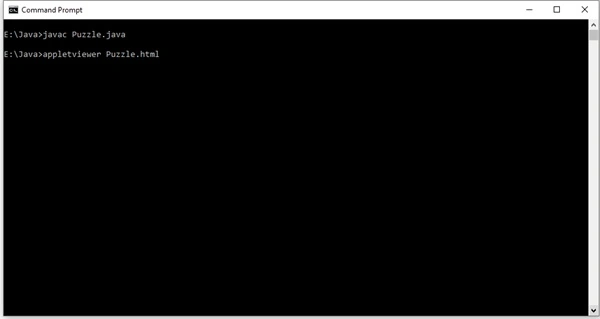
After compilation of code, type the following command as
E:\Java>appletviewer Puzzle.html
Output
Summary
An applet is like a small executable code that needs a full application to contain it or execute it. Applets are event driven, an applet represents a set of interrupt service routines. It will wait for an event to happen. Once the event takes place, the AWT notifies the applet that an event has taken place by calling the event handler, which has been provided by the applet. Once the applet has taken appropriate action, the control returns to the AWT. An applet should never have control for a long period of time and the control should return to AWT runtime system as soon as possible.
Join the conversation! Your thoughts help the community grow.