

In this article, we will tell you how to create and delete directories in ASP.NET.
To create a directory please use the procedure given below:
1. Used the namespace:
- using System.IO;
2. Get the path where you want to create the directory like:
- string path = Server.MapPath(Path where you want to create the directory);
3. Check if the directory already exists on the given path; if it does not exist then create the directory on the given path, as in:
- //Checking directory already exist or not at the given path
- if (!Directory.Exists(path))
- {
- //Create the directory on the given path
- Directory.CreateDirectory(path);
- Response.Write("Directory has been created successfuly.");
- }
To delete the directory from the given path please use the procedure given below.
1. Check if the directory already exists on the given path; if it already exists then delete that directory from the given path using the following:
- if (Directory.Exists(path))
- {
- // Delete the directory from the given path
- Directory.Delete(path);
- Response.Write("Directory has been deleted successfuly.");
- }
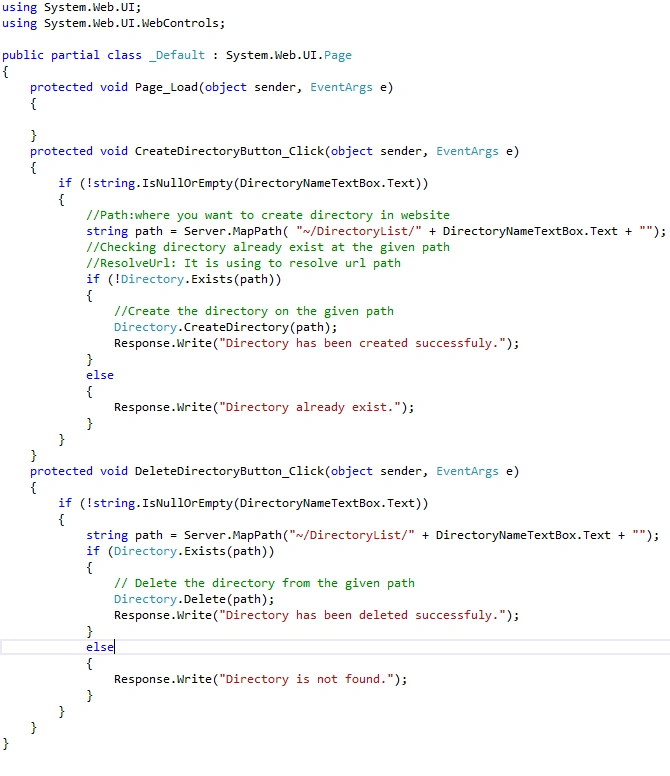
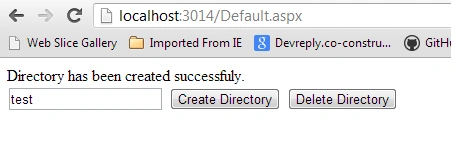
This is a simple live example of how to create and delete a directory in ASP.Net. In this example, I am creating the directory inside the "DirectoryList" folder.

In aspx.cs:
Result:
SubashPosted Oct 24, 2016, 6:06 AM
Nice