

I've been a programmer for a long time (started in '81 on a Timex-Sinclair 1000) mostly for fun, sometimes for profit (wishing more was for profit!). I used to teach electronics, computer science and programming at a private technical college in California from 1989 to 2001. The languages I taught were Basic, Visual Basic, Borland Turbo C/C++ (beginning class so not much ++) and x86 assembly. Writing games has always been a source of fun and enjoyment. To try and inspire students I would reverse-engineer whatever current game was a favorite. Some got the bug and became serious about programming, some didn't.
I program in other languages and have just started learning Visual C# and enjoy it's power and flexibility. I read a blog here, but forgot who it was by (sorry) about how when learning a new language that person will write a program to bounce a ball off the walls to learn some of the basic concepts. That sounded like a good idea. I glanced at his code but not seeing many comments I didn't want to dive into it and decipher it (sorry). Since I had just gotten to the chapter in the book I'm learning from about graphics, I have started trying to write games. The book of course doesn't have much about that. One of the first game-oriented things I ran across here was Mike Gold's Space Invaders program. I realized I need to create more objects, but was struck by something I saw in a rectangle property:
I then decided to write a bounce off the walls code and put in some of the things that anyone beginning to write games would like to learn, and commenting everywhere. I decided to write the program I wish I had found when I began to write games a long time ago. :)
The result is this small program called Bouncer. It creates a "ball cage" around the edge of the screen using flat rectangles, and places obstacle boxes (more rectangles) on the screen in random locations. The ball starts as white, moving in a random direction and when it hits a wall or a box the color changes to match what it hits. The ball bounces off in a different direction going after more boxes. If no boxes are hit after 7 seconds the ball changes back to white and changes direction. This is important when there are less boxes to hit. This makes sure that all the boxes will eventually be hit.
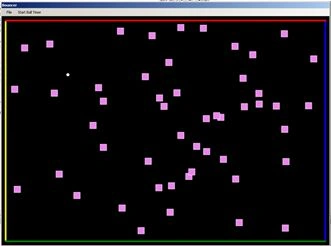
Bouncer screen shot, using PrtScr
The boxes hit are counted, the time between hits is counted and the total time to hit all boxes is calculated and reported at the end. If the ball hits a corner directly it will leave the screen. A label pops up for a second saying "Perfect Corner Hit" and the ball gets re-started on the screen. This could be eliminated by simply checking for two intersections (special case) of a side wall and bottom wall, or side wall and top wall.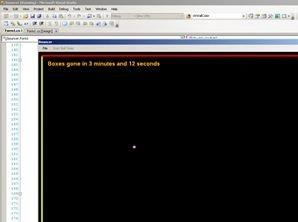
Report at end of hitting all boxes
The basic stuff in here can be used for making games. The IntersectsWith is wonderful for collisions. This code could be easily adapted to make a Pachinko-type game, or pinball with not too much effort.
Sample code
The following is sample code to detect collisions:
private void CheckForWallHit()
bool hitWall = false;
Mahesh ChandPosted May 14, 2014, 6:47 AM
Are you using Windows Forms? Which version of Visual Studio?
Leon PuthPosted May 14, 2014, 2:33 AM
how do you determine the angle of impact?