

In this article we will be seeing how to create Content Sources for Enterprise
Search Service Application in SharePoint 2010 using PowerShell.
Automating the Content Source creation in SharePoint 2010
A content source is used to specify what type of content is crawled, what URLs
to crawl, how and when to crawl.
We can create Content Sources for Enterprise Search Service Application in
SharePoint 2010 from Central Administration.
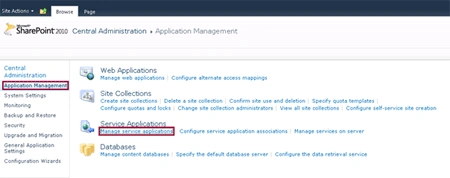
Go to Central Administration => Application Management => Manage Service
Applications => Enterprise Search Service Application.
On the Quick Launch Menu, go to Crawling and then click on Content Sources.
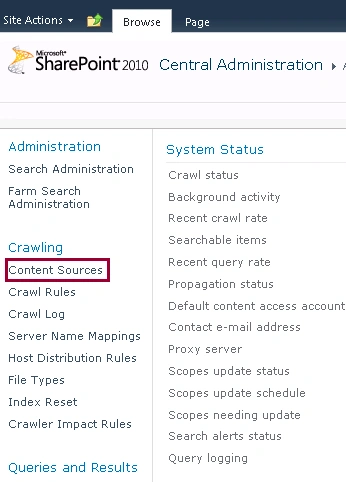
You could be able to see the Content Sources. By clicking on New Content Source
link we can create a new Content Source.
Another way is we can create the content sources for Search Service Application
using SharePoint Object Model.
Here we will be seeing about automating the content source creation using
powershell script.
Steps Involved:
- Create the input XML file which contains the inputs for content source creation.
- Create ps1 file which contains the script for content source creation.
CreateContentSources.xml
<?xml
version="1.0"
encoding="utf-8"
?>
<ContentSources>
<SSAName>EnterPrise
Search Service Application</SSAName>
<ContentSource
Name="Sample1
SharePoint Sites" />
<ContentSource
Name="Sample2
SharePoint Sites" />
<ContentSource
Name="Sample3
SharePoint Sites" />
</ContentSources>
CreateContentSources.ps1
#----------------Get
the xml file---------------------------------------------------------------
[xml]$xmlData=Get-Content "C:\Users\Desktop\ContentSources\CreateContentSources.xml"
#----------------Create New Content Source function---------------------------------------------

Greg RojasPosted May 18, 2016, 11:48 AM
How do we add to identify the URL or BDC connection?
Amit ChughPosted Oct 19, 2012, 10:40 AM
This is really nice! A small query: Can we change the name of default content source "Local Sharepoint Sites" to "<MYCOMP> sites" or something? Thanks! BR/ Amit