

Introduction
Today, in this article let's play around with one of the interesting and most useful concepts in SharePoint 2010.
What is ContentType?
In simple terms "Content types are reusable sets of columns created which can be used across multiple lists or libraries. They are considered to be a central component to manage metadata".
Step 1. Open SharePoint 2010 Central Administration and navigate to a specific site.
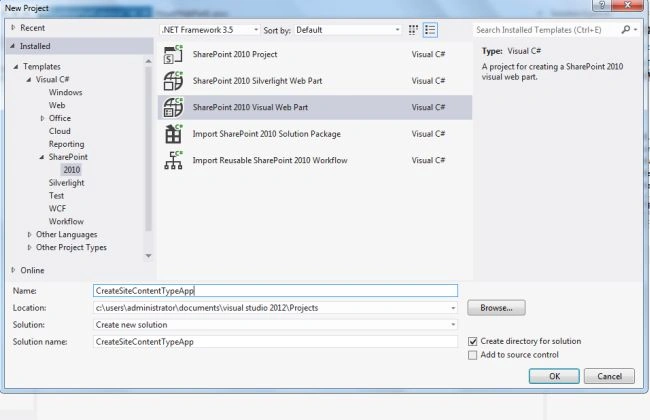
Step 2. Open up Visual Studio 2012 and try to "SharePoint Visual Web Part" project, as in.
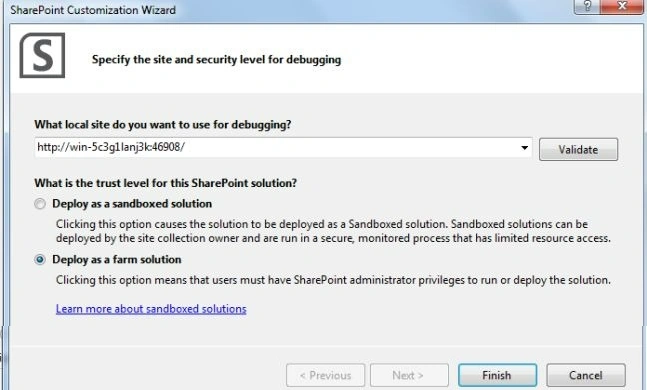
Step 3. Select "Deploy as a farm solution" as in the following and click the "Finish" button.
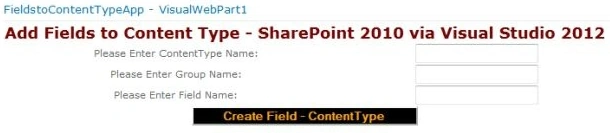
Step 4. The complete code of visualwebpart1usercontrol.ascx looks like this.
<%@ Assembly Name="$SharePoint.Project.AssemblyFullName$" %>
<%@ Assembly Name="Microsoft.Web.CommandUI, Version=14.0.0.0, Culture=neutral, PublicKeyToken=71e9bce111e9429c" %>
<%@ Register TagPrefix="SharePoint" Namespace="Microsoft.SharePoint.WebControls" Assembly="Microsoft.SharePoint, Version=14.0.0.0, Culture=neutral, PublicKeyToken=71e9bce111e9429c" %>
<%@ Register TagPrefix="Utilities" Namespace="Microsoft.SharePoint.Utilities" Assembly="Microsoft.SharePoint, Version=14.0.0.0, Culture=neutral, PublicKeyToken=71e9bce111e9429c" %>
<%@ Register TagPrefix="asp" Namespace="System.Web.UI" Assembly="System.Web.Extensions, Version=3.5.0.0, Culture=neutral, PublicKeyToken=31bf3856ad364e35" %>
<%@ Import Namespace="Microsoft.SharePoint" %>
<%@ Register TagPrefix="WebPartPages" Namespace="Microsoft.SharePoint.WebPartPages" Assembly="Microsoft.SharePoint, Version=14.0.0.0, Culture=neutral, PublicKeyToken=71e9bce111e9429c" %>
<%@ Control Language="C#" AutoEventWireup="true" CodeBehind="VisualWebPart1.ascx.cs" Inherits="FieldstoContentTypeApp.VisualWebPart1.VisualWebPart1" %>
<div>
    <table style="font-family: Verdana; text-align: center;">
        <tr>
            <td colspan="2">
                <asp:label id="Label1" runat="server" text="Add Fields to Content Type - SharePoint 2010 via Visual Studio 2012" font-bold="true" forecolor="Maroon" font-size="Large"></asp:label>
            </td>
        </tr>
        <tr>
            <td>
                <asp:label id="Label2" runat="server" text="Please Enter ContentType Name:"></asp:label>
            </td>
            <td>
                <asp:textbox id="TextBox1" runat="server"></asp:textbox>
            </td>
        </tr>
        <tr>
            <td>
                <asp:label id="Label5" runat="server" text="Please Enter Group Name:"></asp:label>
            </td>
            <td>
                <asp:textbox id="TextBox3" runat="server"></asp:textbox>
            </td>
        </tr>
        <tr>
            <td>
                <asp:label id="Label3" runat="server" text="Please Enter Field Name:"></asp:label>
            </td>
            <td>
                <asp:textbox id="TextBox2" runat="server"></asp:textbox>
            </td>
        </tr>
        <tr>
            <td colspan="2">
                <asp:button id="Button1" runat="server" text="Create Field - ContentType " forecolor="Orange" font-bold="true" backcolor="Black" onclick="Button1_Click" width="261px" />
            </td>
        </tr>
        <tr>
            <td colspan="2">
                <asp:label id="Label4" runat="server" font-bold="true"></asp:label>
            </td>
        </tr>
    </table>
</div>

Join the conversation! Your thoughts help the community grow.