
This article will demonstrate how to create the Navigation Based Windows Application in WPF.
There are two types of windows applications the first one is Standard Windows Application which is normally the same old style Stand alone or some time we say Desktop based application. The second one is called as Navigation Based Application which is kind of the Web type application. The behavior is some what as the Wizard Type of application where you can navigate between the windows and perform the task.
The WPF has given the way to create the Web Page kind of Windows application, where one can navigate between the Window or Page controls.
Normally when you create the WPF Application the XAML creates the Window control and which has the Title, Width, Height and Windows Startup attribute as shown below
Window1.xaml:
<Window x:Class="WpfApplication2.Window1" xmlns="http://schemas.microsoft.com/winfx/2006/xaml/presentation"
xmlns:x=http://schemas.microsoft.com/winfx/2006/xaml Title="ListView" Height="350" Width="400" Loaded="Window1_Loaded">
</Window>
But when you create the Navigation based application the control has the Page tag instead Window tag and it does can't have Title and few more properties/attributes. The Page tag looks like as below.
Page1.xaml:
<Page x:Class="WpfApplication2.Window1" xmlns="http://schemas.microsoft.com/winfx/2006/xaml/presentation"
xmlns:x=http://schemas.microsoft.com/winfx/2006/xaml WindowHeight="300" WindowWidth="300">
</Page>
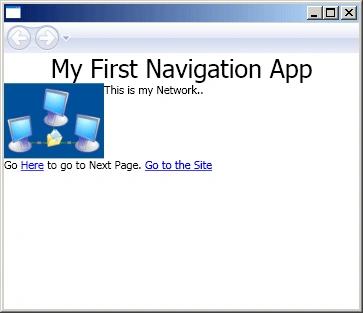
Example 1: The below example show how to implement the Navigation based application. Basically once you put the Page tag, it will render the window with the Navigation Toolbar as shown in Figure 1.
Window1.xaml
<Page x:Class="wpfnavigationwindow_cs.Window1"
xmlns="http://schemas.microsoft.com/winfx/2006/xaml/presentation"
xmlns:x="http://schemas.microsoft.com/winfx/2006/xaml"
WindowHeight="300" WindowWidth="300"
>
<StackPanel>
<TextBlock HorizontalAlignment="Center" FontSize="25">My First Navigation App</TextBlock>
<StackPanel Orientation="Horizontal">
<Image Source="IMG116.jpg" Width="100px"/>
<TextBlock HorizontalAlignment="Center">This is my Network..</TextBlock>
</StackPanel>
<TextBlock>
Go <Hyperlink NavigateUri="Page1.xaml">Here</Hyperlink> to go to Next Page.
<TextBlock>
<Hyperlink NavigateUri="http://www./www.c-sharpcorner.com">Go to the Site</Hyperlink>
</TextBlock>
</TextBlock>

Join the conversation! Your thoughts help the community grow.