

Introduction
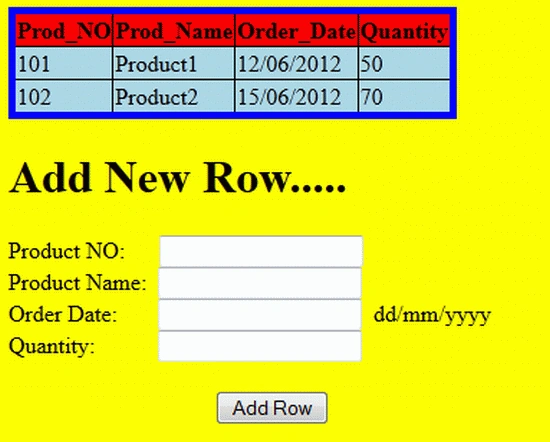
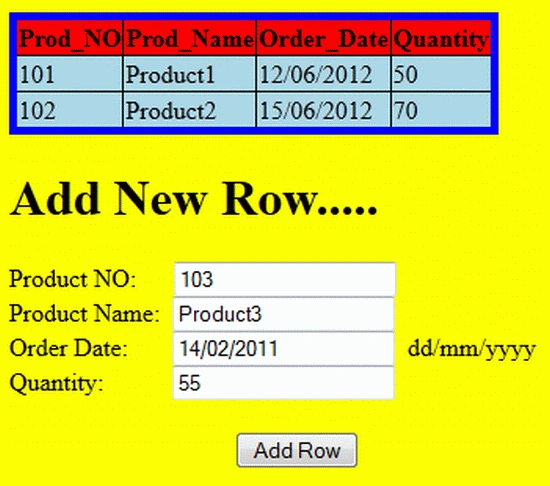
In this article we will create a table in a web application programmatically. Instead of a database table we will create a table in a code behind file using the DataTable class. We can add rows in this table dynamically from front ends through user input as many as we want. Basically this technique is used for adding and showing temporary data at run time.
All the code related to this mini application is given below. So let's start to create this web application.
Step 1: Open Visual Studio 2010.
- Go to Visual Studio 2010
- New-> Select a website application
- Click OK
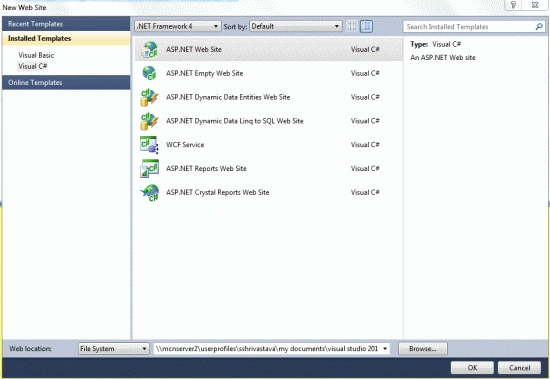
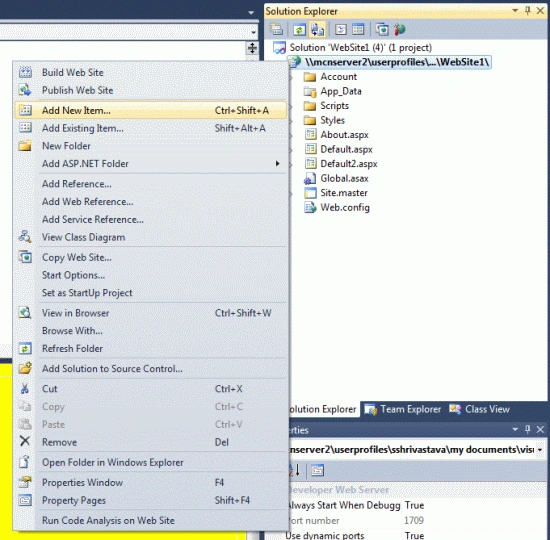
Step 2: Now we will add a new aspx page to our project; do the following for that:
- Go to the Solution Explorer
- Right-click on the Project name
- Select add new item
- Add new web page and give it a name
- Click OK
Step 3: This is the code of the .aspx file that determines how our page looks:
- <%@ Page Language="C#" AutoEventWireup="true" CodeFile="Default2.aspx.cs" Inherits="Default2" %>
- <!DOCTYPE html PUBLIC "-//W3C//DTD XHTML 1.0 Transitional//EN" "http://www.w3.org/TR/xhtml1/DTD/xhtml1-transitional.dtd">
- <html xmlns="http://www.w3.org/1999/xhtml">
- <head runat="server">
- <title></title>
- </head>
- <body style=" background-color:Yellow">
- <form id="form1" runat="server">
- <div >
- <asp:gridview runat="server" ID="Gv1" AutoGenerateColumns="true" HeaderStyle-BackColor="Red" BackColor="LightBlue"
- BorderWidth="5" BorderColor="Blue">
- </asp:gridview>
- </div>
- <div>
- <h1>Add New Row.....</h1>
- Product NO:
- <asp:TextBox ID="txtb1" runat="server"></asp:TextBox>
- <br />
- Product Name:
- <asp:TextBox ID="txtb2" runat="server"></asp:TextBox>
- <br />
- Order Date:
- <asp:TextBox ID="txtb3" runat="server"></asp:TextBox>
- <asp:Label runat="server" Text="dd/mm/yyyy"></asp:Label>
- <br /> Quantity:
- <asp:TextBox ID="txtb4" runat="server"></asp:TextBox>
- <br />
- <br />
- <asp:Button runat="server" OnClick="Addnewrow" Text="Add Row" />
- </div>
- </form>
- </body>
- </html>
Step 4: This is the code behind file code. It contains the logic of application:
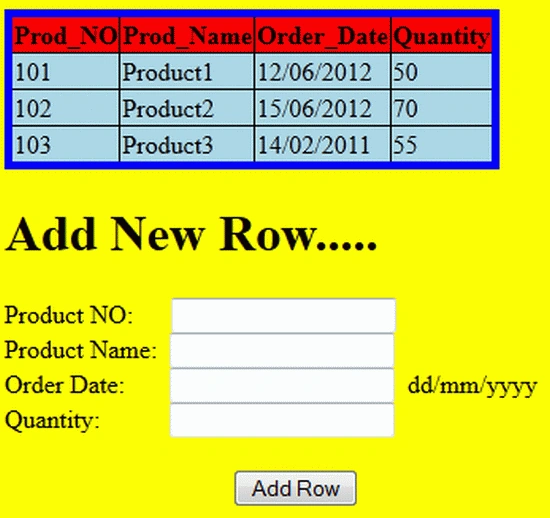
Ramzanali MominPosted Dec 4, 2018, 11:44 PM
Nice article for fresher
Jagadeeshwar ReddyPosted Feb 17, 2017, 2:10 AM
Is it applicable in MVC?
kalu singh raoPosted Jul 19, 2016, 8:20 AM
Nice...
alok singhPosted Jul 27, 2012, 6:28 AM
I didn't understand the line ViewState["table1"] = tb ...in the create table function and the top two lines of AddneRow.
santosh kadamPosted Jul 24, 2012, 6:46 AM
Greate thing!!!!!!!!!!! I want some more coding of deletion and insertion rows.
Arun ChoudharyPosted Jul 17, 2012, 10:27 AM
Good jobs Shubham. This article is very useful.
Aman SinghalPosted Jul 17, 2012, 10:05 AM
Thanks... your article is very useful.....
Farukh MujawarPosted Jul 17, 2012, 5:46 AM
nice article.....thanks. :)