

Introduction
Xamarin is a platform to develop cross-platform and multi-platform apps (for example, Windows phone, Android, iOS). In Xamarin platform, the code sharing concept is used. In Xamarin Studio, Visual Studio is also available.
Prerequisites
- Visual Studio 2015 Update 3.
The steps, given below are required to be followed in order to create a ListView in Xamarin Android app, using Visual Studio 2015.
Step 1
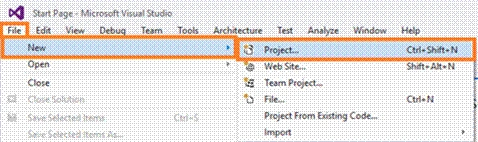
Click File--> select New--> select Project. The project needs to be clicked after opening all the types of projects in Visual Studio or click (Ctrl+Shift+N).
Step 2
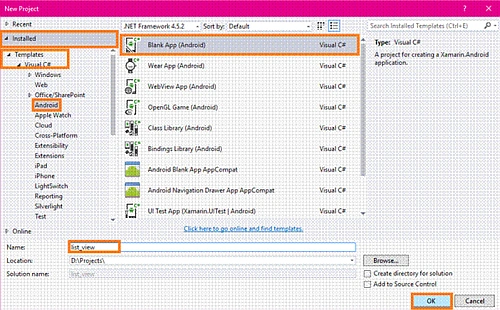
After opening New Project, select Installed-->Templates-->Visual C#-->Android-->choose the Blank app (Android).
Now, give your Android app; a name (Ex:sample) and give the path of your project. Afterwards, click OK.
Step 3
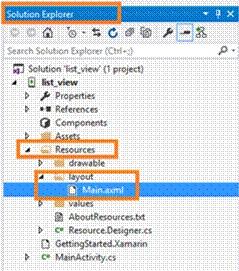
Now, go to Solution Explorer. In Solution Explorer, get all the files and source in your project. Now, select Resource-->Layout-->double click to open main.axml page. To write XAML code, you need to select the source. Choose the Designer Window, if you want the designer to design your app.
Step 4
After opening main.axml, file will open the main page designer. You can design the page, as per your desire.
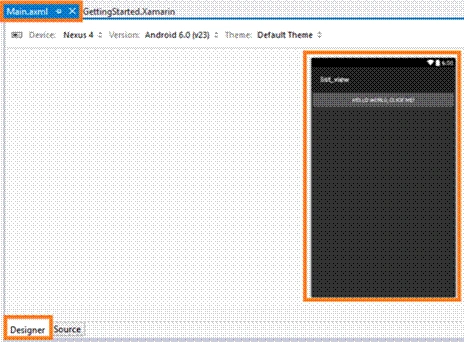
Now, delete the default "hello world" button. Go to the source panel and you need to delete the button coding. After deleting XAML code, delete C# button action code. Go to MainActivity.cs page. You need to delete the button code.
Step 5
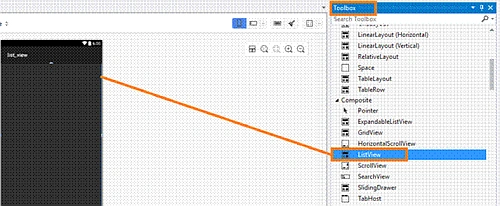
Now, go to the toolbox Window and scroll down. You will see all the tools and controls. You need to drag and drop the ListView.
Step 6
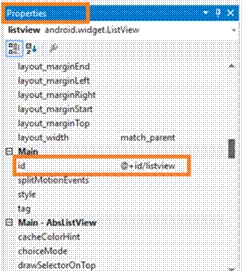
Now, go to the properties Window. You need to edit the ListView's Id value (EX android:id="@+id/listview" ).
Step 7
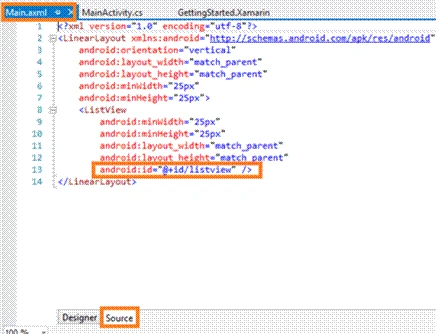
In this step, go to the Main.axml page source panel. Note, ListView's Id value.
Main.axml
- <LinearLayout xmlns:android="http://schemas.android.com/apk/res/android" android:orientation="vertical" android:layout_width="match_parent" android:layout_height="match_parent" android:minWidth="25px" android:minHeight="25px">
- <ListView android:minWidth="25px" android:minHeight="25px" android:layout_width="match_parent" android:layout_height="match_parent" android:id="@+id/listview" /> </LinearLayout>

Joe WilsonPosted Nov 25, 2016, 11:32 AM
Thank you very much for sharing.