

So, when I started to work on a Cordova project in Visual Studio and decided to use Sencha Touch framework, obviously my first instinct was to Google any existing tutorial of this, where someone has worked on the same technologies using same framework in same IDE for mobile devices. Too many constraints, isn’t it? Well Google thought so too, and I couldn’t find anything helpful for my query except couple of tutorials where people showed creating new website using Sencha Touch instead of a Mobile Application where Cordova is included in the scene. Not much difference but hey, it can get tricky. So, after spending a whole day with trial and error approach to create my first mobile app using Sencha Touch and Cordova in Visual Studio, I decided to write a small tutorial about it myself.
This tutorial assumes that you are well aware of (Or at least have read the Wikipedia pages of) all the things that are mentioned in the title of this article and so I won’t go deep into what is what, and would jump straight into explaining how to create it.
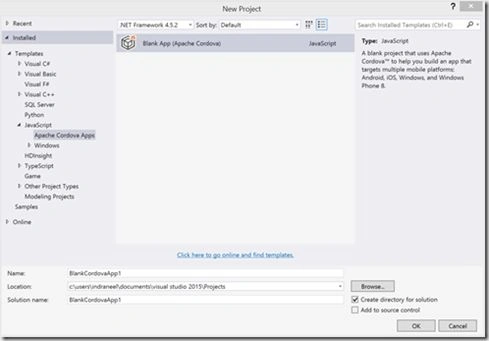
Go to Visual Studio. Open New Project, go to Installed Templates, JavaScript, then click Apache Cordova Apps.
Here I have assumed that you have already installed Visual Studio tools for Apache Cordova. If not, here is a complete tutorial from Visual Studio site on how to do it.
Give the name of the App and click OK.
A getting started guide will open. You should read this documentation if you aren’t familiar with Cordova already.
In Solution Explorer, you will see a ‘www’ folder inside your project. It is basically the website instance of your app. This is treated as a website with its own HTML, JavaScript and CSS files. You will see an index.html file which looks something like this.
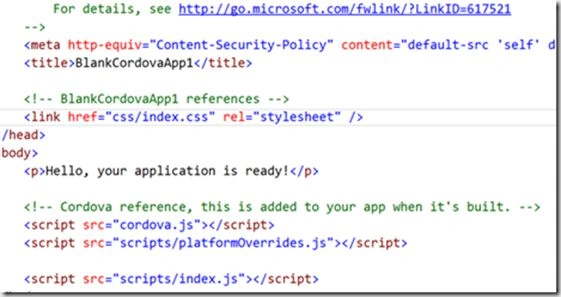
Right now if you run your application inside Ripple Browser, you will see a simple application with single page that has one line “Hello, your application is ready!”.
Till this point we haven’t done anything with Sencha Touch. We have just created a successful Cordova App with Visual Studio. Now let’s integrate Sencha Touch in this application.
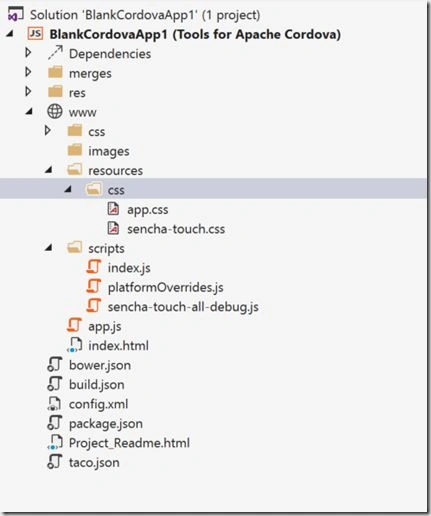
First - Download Sencha Touch Library from their website. Fill in the form there, and then you will get a download link in your email inbox. Use this link to download the framework. The downloaded zip folder will have name similar to sencha-touch-2.x.y-commercial.zip, where x and y will change according to latest version of the framework. Extract this folder and then open. Inside this folder there will be some JavaScript files for example, sencha-touch.js, sencha-touch-all.js and so on. These files differ based on whether they are minified, commented, and so on. For example, sencha-touch.js is the minified version of framework, while sencha-touch-all-debug.js is non-minified and has proper commenting. You can use any of them, but for understandability purpose we will use sencha-touch-all-debug.js. Copy this file and paste it inside the script folder of your project. Then in the library folder, go to resources->css folder, and copy the sencha-touch.css to resources->css folder of your project. Your project might not have this folder by default in that case create this hierarchy inside www.
Now we come to the point where we add app.js to the solution. In Sencha Touch all the views and controllers are defined and used inside a single file known as app.js. Right click on www to add a new JavaScript file. Call it app.js. (Remember! this file can also be created with Sencha Touch’s visual tools, in which case you can simply paste that file in www.).
Similarly inside the resources->css folder, create a new css file named app.css. And add this line to the app.css -
@import url(sencha-touch.css);
Your solutions explorer should look like this now:
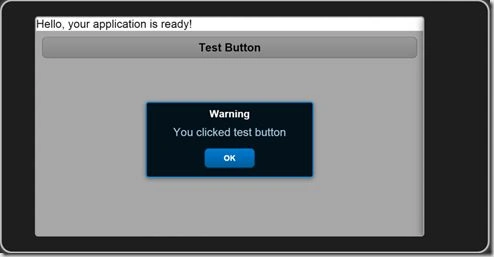
Go to index.html now and add the following code to the body of the html.
- <link href="resources/css/sencha-touch.css" rel="stylesheet" type="text/css" />
- <script src="scripts/sencha-touch-all-debug.js" type="text/javascript"></script>
- <script src="app.js" type="text/javascript"></script>

Anish AnsariPosted Nov 16, 2015, 12:44 AM
nice
Santhakumar MunuswamyPosted Nov 11, 2015, 10:04 AM
Good one
Sourabh SomaniPosted Nov 4, 2015, 10:15 AM
Nice one :)
Indraneel PolePosted Nov 4, 2015, 5:29 AM
Thank you everyone :)
Mukesh KumarPosted Nov 4, 2015, 2:54 AM
Good Job
Dinesh BeniwalPosted Nov 4, 2015, 1:03 AM
Welcome to C# Corner Indraneel.
Harshad PansuriyaPosted Nov 4, 2015, 12:29 AM
Nice one
Sibeesh VenuPosted Nov 4, 2015, 12:19 AM
Nice Share
Humayun Kabir MamunPosted Nov 4, 2015, 12:18 AM
Nice...