

This article is all about developing your first sample or you can say simple application using ASP.NET MVC. This article includes all the major components required for the development procedure, like software, environment and how to install.
Getting Started
The best way to learn about how MVC works is to get started with building an application, so let's try that folks. First of all I'll take you through the software requirements, here we go.
Software Requirements
MVC runs on the following Windows Client Operating Systems:
- Windows XP
- Windows Vista
- Windows 7
- Windows 8
It runs on the following Windows Server Operating Systems:
- Windows Server 2003
- Windows Server 2008
- Windows Server 2008 R2
MVC development tooling is included with Visual Studio, but the versions and the functionalities can vary with versions of Visual Studio.
Installing ASP.NET MVC
After ensuring the basic software requirements, it's time to install ASP.NET MVC on your development and platform machines.
If you have a previous version of MVC then you don't need to reinstall the entire setup again, what you need to do is just update it and you will get the latest version of MVC. For example if you have already used MVC 1, 2, 3 or 4 and you need to work upon MVC 5 then in this case, simply update the existing version.
Creating an ASP.NET MVC Application
After installing MVC, you'll have some options in your Visual Studio (Whatever versions you are using.)
Use the following procedure to create a MVC project.
Step 1
Begin with choosing a New Project, as shown in the figure below: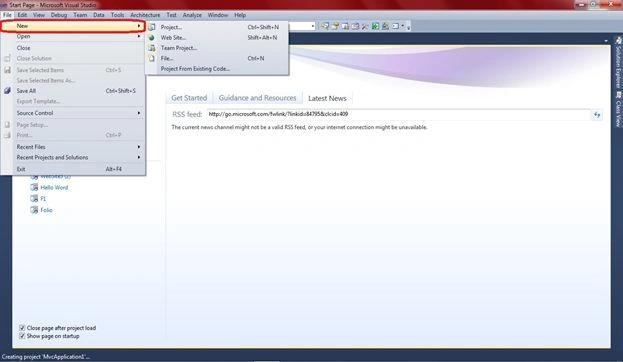
Select "Project...":
Step 2
Select Visual C# from the templates.
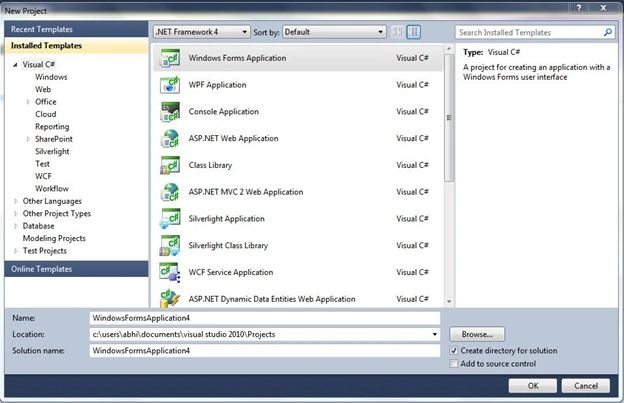
Step 3
In the installed templates of Visual C# select Web template list. This displays a list of web application types in the center portion of the window.
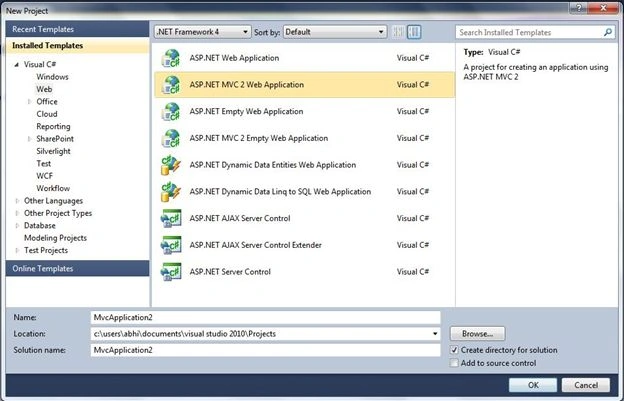
Step 4
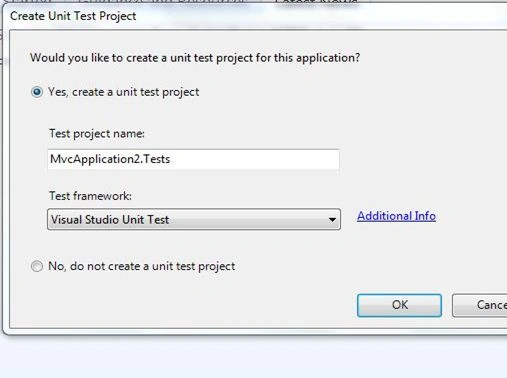
Step 5
On again selecting OK, you will get a window like this. This window contains the basic code structure of the MVC development environment.
(You can reconfigure it depending on you and your requirements.)
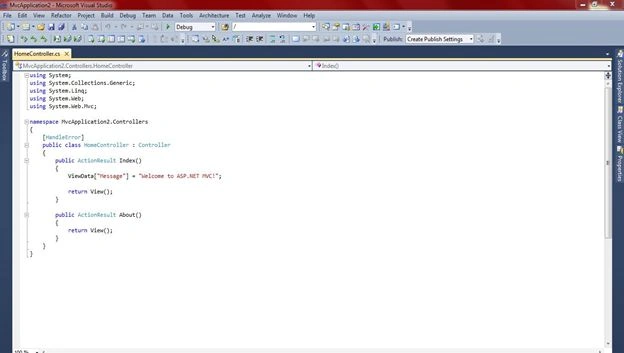
Coding
- using System;
- using System.Collections.Generic;
- using System.Linq;
- using System.Web;
- using System.Web.Mvc;
- namespace MvcApplication2.Controllers
- {
- [HandleError]
- public class HomeController : Controller
- {
- public ActionResult Index()
- {
- ViewData["Message"] = "Welcome to ASP.NET MVC!";
- return View();
- }
- public ActionResult About()
- {
- return View();
- }
- }
- }
You can add your functionalities between this code depending on your requirements.
Mukesh KumarPosted Oct 22, 2015, 1:59 PM
Good Job Sir
Abhishek JaiswalPosted Mar 20, 2015, 4:26 AM
Hey, this might be of ur interest. have a look- http://www.c-sharpcorner.com/UploadFile/2072a9/crud-operations-in-mvc/ :)
samuel deasonPosted Mar 19, 2015, 12:53 PM
If possible I was looking for a guide on MVC CRUD application using stored procedures over Entity Framework.
Abhishek JaiswalPosted Jul 10, 2014, 11:46 PM
Please mention, what u were expecting in this article!
milind babarPosted Jun 17, 2014, 10:45 AM
There is nothing in this article.