

ASP.NET Web API is a framework from .Net which helps in building HTTP services that reach all ranges of clients, including browsers and mobile devices, such as Windows, iOS and Android. ASP.NET Web API is an ideal platform for building RESTful applications on the .NET Framework.
Here, in this post, I am going to explain about the following things:
Here, in this post, I am going to explain about the following things:
- Creating WEB API for CRUD operations.
- Testing each WEB API using Postman clients.
- Consuming these API in MVC Project using HttpClient.
- A complete tutorial of CRUD operations in Webgrid in MVC Project using WEB API.
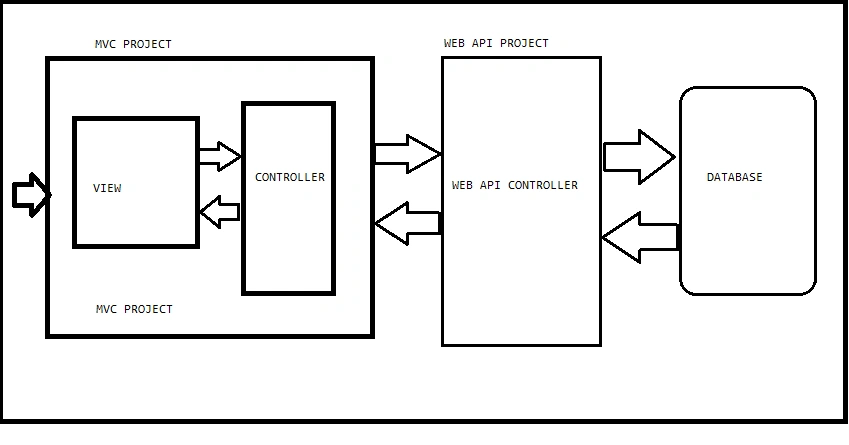
So, here, I will work with two projects, as you see in the diagram. The first is my WebAPI project where I will create various WEBAPIs according to my requirement. Here, I will create 4 APIs for my Crud operation. After that, I will host my WEB API project on local IIS.
Now, I will start my first project to create the WebAPI.
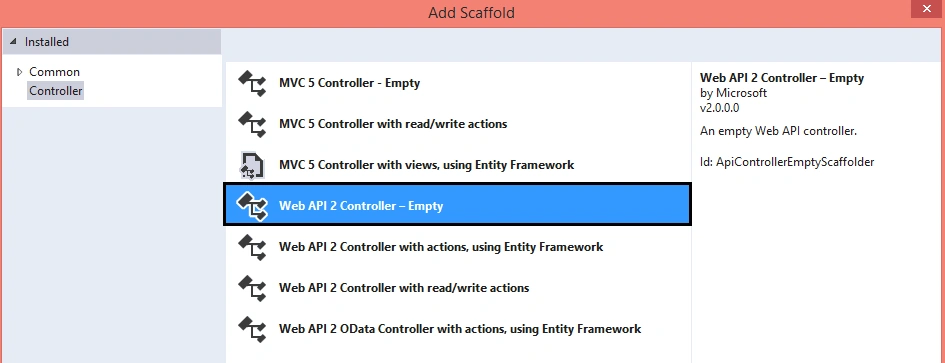
Create a WEB API project and add a WEBAPI 2 Empty Controller, as follows:
Now, in this, I have my Employee.cs Model, as follows:
- public class Employee
- {
- public int EmpId { get; set; }
- public string EmpName { get; set; }
- public string CompanyName { get; set; }
- public string Location { get; set; }
- public int Dept { get; set; }
- public string ContactNo { get; set; }
- public string Address { get; set; }
- }
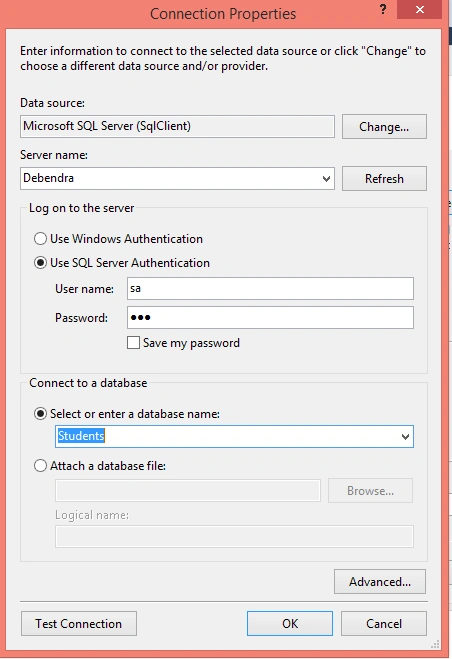
- using System;
- using System.Collections.Generic;
- using System.Linq;
- using System.Net;
- using System.Net.Http;
- using System.Web.Http;
- using System.Data.EntityModel;
- using System.Data.Entity;
- using System.Threading.Tasks;
- namespace MYWEBAPI.Controllers
- {
- [RoutePrefix("api/Employee")]
- public class EmployeeController : ApiController
- {
- StudentsEntities SE = new StudentsEntities();
- [Route("SaveDetails")]
- [HttpPost]
- public async Task<IHttpActionResult> SaveDetails(Employee emp)
- {
- Dictionary<string, string> dict = new Dictionary<string, string>();
- SE.Employees.Add(emp);
- if(SE.SaveChanges()==1)
- {
- dict.Add("Message", "Data Saved Successfully.");
- return Ok(dict);
- }
- else
- {
- dict.Add("Error", "Data Not saved.");
- return Ok(dict);
- }
- }
- [HttpPost]
- [Route("UpdateDetails")]
- public async Task<IHttpActionResult> UpdateDetails(Employee emp)
- {
- Dictionary<string, string> dict = new Dictionary<string, string>();
- var details = SE.Employees.Where(x => x.EmpId == emp.EmpId).SingleOrDefault();
- if(details!=null)
- {
- details.EmpName = emp.EmpName;
- details.CompanyName = emp.CompanyName;
- details.Dept = emp.Dept;
- details.Location = emp.Location;
- if(SE.SaveChanges()==1)
- {
- dict.Add("Message", "Data Updated Successfully.");
- return Ok(dict);
- }
- else
- {
- dict.Add("Error", "Data Not saved.");
- return Ok(dict);
- }
- }
- else
- {
- dict.Add("Error", "Invalid UserId");
- return Ok(dict);
- }
- }
- [Route("getDetails")]
- [HttpGet]
- public IHttpActionResult getDetails()
- {
- List<Employee> li = new List<Employee>();
- var details = SE.Employees.ToList();
- if (details != null)
- {
- return Ok(details);
- }
- else
- {
- return NotFound();
- }
- }
- [Route("DeleteEmployee")]
- [HttpPost]
- public IHttpActionResult DeleteEmployee(Employee eemp)
- {
- Dictionary<string, string> dict = new Dictionary<string, string>();
- List<Employee> li = new List<Employee>();
- var details = SE.Employees.Where(x => x.EmpId == eemp.EmpId).FirstOrDefault();
- bool result = false;
- SE.Employees.Remove(details);
- if(SE.SaveChanges()==1)
- {
- dict.Add("Message","Employee Deleted Successfully.");
- return Ok(dict);
- }
- else
- {
- dict.Add("Message", "Employee Not Deleted.");
- return Ok(dict);
- }
- }
- }
- }
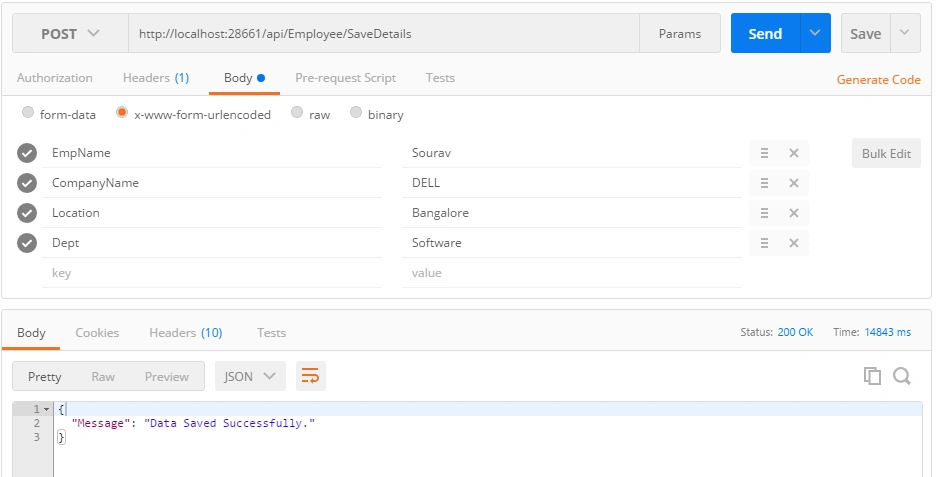
In the same way, we check all the APIs in the Postman. After completing the checking of all the APIs, we just host all the APIs on IIS.
Now, we will start our second MVC project work where we will consume the APIs.
So, add a new MVC Project. Here is my solution Explorer with a model added.
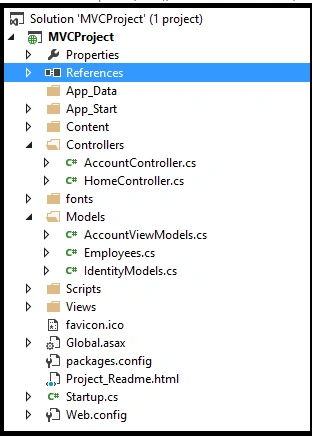
Here is the Employee.cs class model which contains the same fields as Employee.cs in WEB API Projects, with some additional fields as follows:
Here is the Employee.cs class model which contains the same fields as Employee.cs in WEB API Projects, with some additional fields as follows:
- public class Employees
- {
- public int EmpId { get; set; }
- public string EmpName { get; set; }
- public string CompanyName { get; set; }
- public string Location { get; set; }
- public string Dept { get; set; }
- public string ContactNo { get; set; }
- public string Address { get; set; }
- }
- public class HomeController : Controller
- {
- public async Task<ActionResult> EmployeeDetails()
- {
- Employees Model = new Employees();
- using (var client = new HttpClient())
- {
- client.BaseAddress = new Uri("http://localhost:28661/");
- client.DefaultRequestHeaders.Accept.Clear();
- client.DefaultRequestHeaders.Accept.Add(new MediaTypeWithQualityHeaderValue("application/json"));
- ViewBag.country = "";
- HttpResponseMessage response = await client.GetAsync("api/Employee/getDetails");
- List<string> li;
- if (response.IsSuccessStatusCode)
- {
- Employees obj = new Employees();
- var details = response.Content.ReadAsAsync<IEnumerable<Employees>>().Result;
- return View(details);
- }
- else
- {
- return View();
- }
- }
- }
Here is the code to view the data, and EDIT,UPDATE,CANCEL,DELETE the data from web Grid.
- @model IEnumerable<MVCProject.Models.Employees>
- @{
- ViewBag.Title = "EmployeeDetails";
- }
- <h2>EmployeeDetails</h2>
- <script src="~/Scripts/jquery-1.10.2.min.js"></script>
- <script src="~/Scripts/bootstrap.min.js"></script>
- <style type="text/css">
- .webgrid-table {
- font-family: "Trebuchet MS", Arial, Helvetica, sans-serif;
- font-size: 1.2em;
- width:300px;
- display: table;
- border-collapse: separate;
- border: solid 1px;
- background-color:purple;
- }
- .webgrid-table td, th {
- border: 3px solid ;
- padding: 3px 7px 2px;
- width:230px;
- }
- .webgrid-header {
- background-color:cornsilk;
- color: #FFFFFF;
- padding-bottom: 4px;
- padding-top: 5px;
- text-align: left;
- width:20%;
- }
- .webgrid-footer {
- }
- .webgrid-row-style {
- padding: 3px 7px 2px;
- }
- .webgrid-alternating-row {
- background-color: #EAF2D3;
- padding: 3px 7px 2px;
- }
- </style > <h2 > Index</h2 >
- <script type="text/javascript">
- $(function () {
- $('.edit-mode').hide();
- $('.edit-user, .cancel-user').on('click', function ()
- {
- var tr = $(this).parents('tr:first');
- tr.find('.edit-mode, .display-mode').toggle();
- });
- $('.Delete-user').on('click', function () {
- if (confirm("Are you sure?")) {
- var tr = $(this).parents('tr:first');
- var ID = tr.find("#lbl_Empid").html();
- var UserModel =
- {
- "EmpId": ID
- }
- $.ajax({
- url: '/Home/DeleteUser/',
- data: JSON.stringify(UserModel),
- type: 'POST',
- contentType: 'application/json; charset=utf-8',
- success: function (data) {
- location.reload();
- }
- });
- }
- else
- {
- var tr = $(this).parents('tr:first');
- tr.find('.edit-mode, .display-mode').toggle();
- }
- });
- $('.save-user').on('click', function () {
- var tr = $(this).parents('tr:first');
- var ID = tr.find("#lbl_Empid").html();
- var Name = tr.find("#txt_employeeName").val();
- var Location = tr.find("#txt_location").val();
- var Department = tr.find("#txt_dept").val();
- var companyName = tr.find("#txt_company").val();
- tr.find("#lblemployeename").text(Name);
- tr.find("#lbl_dept").text(Department);
- tr.find("#lbl_company").text(companyName);
- tr.find("#lbl_location").text(Location);
- tr.find('.edit-mode, .display-mode').toggle();
- var UserModel =
- {
- "EmpId": ID,
- "EmpName": Name,
- "Location": Location,
- "Dept": Department,
- "CompanyName": companyName
- };
- $.ajax({
- url: '/Home/Update/',
- data: JSON.stringify(UserModel),
- type: 'POST',
- contentType: 'application/json; charset=utf-8',
- success: function (data) {
- window.location.href = window.location.href;
- }
- });
- });
- })
- </script>
- <div>@{
- var grid = new WebGrid(source: Model, canPage: true, rowsPerPage: 10);
- grid.Pager(WebGridPagerModes.All);
- }
- </div>
- <h3>List Of Users</h3>
- <div>
- @grid.GetHtml(
- headerStyle: "webgrid-header",
- footerStyle: "webgrid-footer",
- alternatingRowStyle: "webgrid-alternating-row",
- selectedRowStyle: "webgrid-selected-row",
- rowStyle: "webgrid-row-style",
- mode: WebGridPagerModes.All,
- columns: grid.Columns(
- grid.Column("EmpId", format: @<text> <span class="display-mode">@item.EmpId </span> <label id="lbl_Empid" class="edit-mode">@item.EmpId</label> </text>, style: "col1Width" ),
- grid.Column(columnName: "EmpName", header: "EmployeeName", format: @<text> <span class="display-mode">@item.EmpName <label id="lblemployeename"></label> </span> <input type="text" id="txt_employeeName" value="@item.EmpName" class="edit-mode" /> </text>, style: "col2Width"),
- grid.Column(columnName: "Dept", header: "Department", format: @<text> <span class="display-mode">@item.Dept <label id="lbl_dept"></label> </span> <input type="text" id="txt_dept" value="@item.Dept" class="edit-mode" /> </text>, style: "col2Width"),
- grid.Column(columnName: "CompanyName", header: "CompanyName", format: @<text> <span class="display-mode">@item.CompanyName <label id="lbl_company"></label> </span> <input type="text" id="txt_company" value="@item.CompanyName" class="edit-mode" /> </text>, style: "col2Width"),
- grid.Column(columnName:"Location",header:"Location", format: @<text> <span class="display-mode">@item.Location <label id="lbllocation"></label> </span> <input type="text" id="txt_location" value="@item.Location" class="edit-mode" /> </text>, style: "col2Width"),
- grid.Column("Action", format: @<text>
- <button class="edit-user display-mode" style="background-color: #1E90FF; border-bottom-style: groove">Edit</button>
- <button class="save-user edit-mode" style="background-color: #FF5733; border-bottom-style: groove">Save</button>
- <button class="cancel-user edit-mode" style="background-color: #FF5733; border-bottom-style: groove">Cancel</button>
- <button class="Delete-user display-mode" style="background-color: #1E90FF; border-bottom-style: groove">Delete</button>
- </text>, style: "col3Width" , canSort:true)))
- </div>
- http://localhost:30517/Home/EmployeeDetails
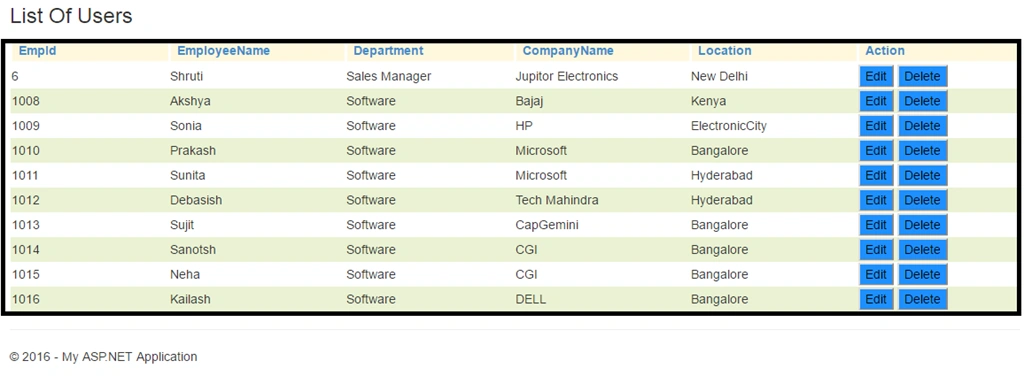
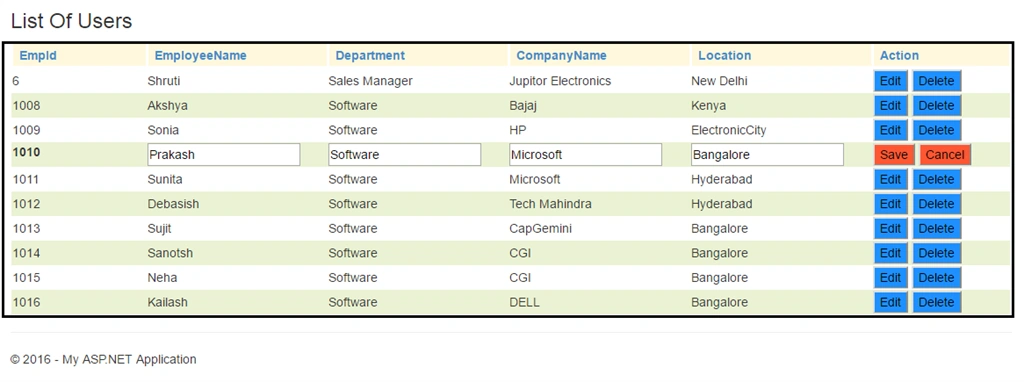
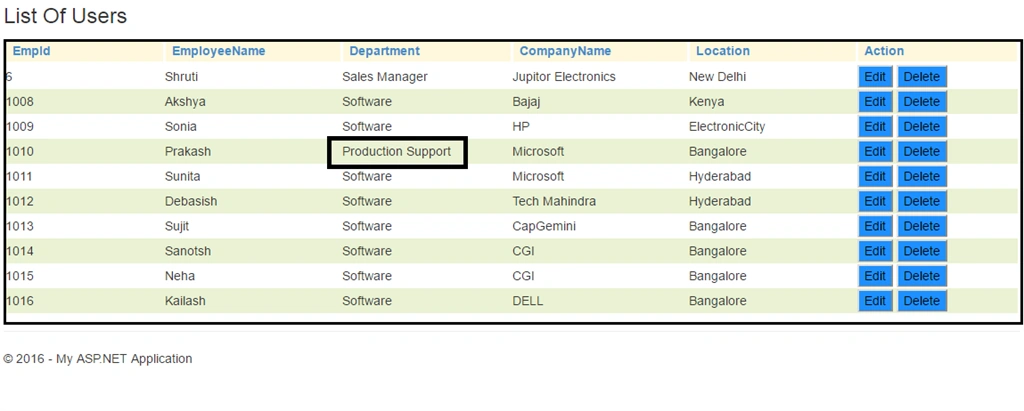
Now, when we click the EDIT button, the View will look like this:
Now, change any field and click Save.
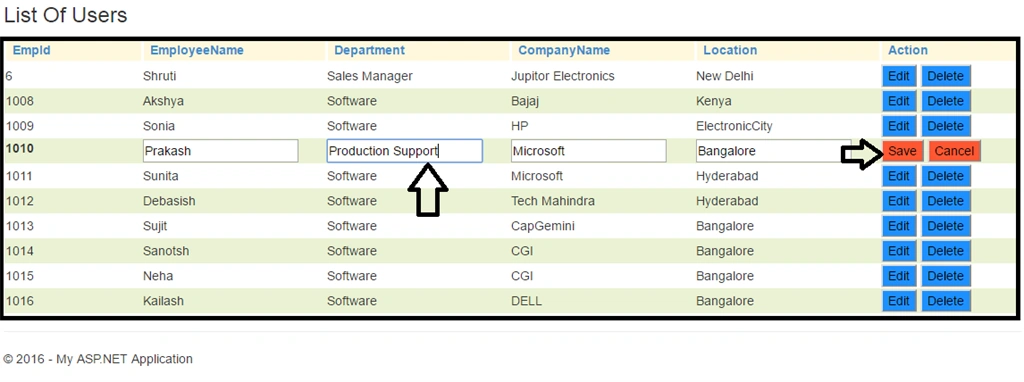
After clicking Save, it will call the following Action Method in Home Controller and update the Data.
- public async Task<ActionResult> Update(Employees employee)
- {
- using (var client = new HttpClient())
- {
- client.BaseAddress = new Uri("http://localhost:28661/");
- client.DefaultRequestHeaders.Accept.Clear();
- client.DefaultRequestHeaders.Accept.Add(new MediaTypeWithQualityHeaderValue("application/json"));
- //HttpResponseMessage response = await
- var Result = client.PostAsJsonAsync("api/Employee/UpdateDetails", employee).Result;
- if (Result.IsSuccessStatusCode == true)
- {
- return View();
- }
- else
- {
- return View();
- }
- }
- }
Now, write the following ActionMethod in Home controller to delete the selected user:
- public async Task<ActionResult> DeleteUser(Employees employee)
- {
- using (var client = new HttpClient())
- {
- client.BaseAddress = new Uri("http://localhost:28661/");
- client.DefaultRequestHeaders.Accept.Clear();
- client.DefaultRequestHeaders.Accept.Add(new MediaTypeWithQualityHeaderValue("application/json"));
- //HttpResponseMessage response = await
- var Result = client.PostAsJsonAsync("api/Employee/DeleteEmployee", employee).Result;
- if(Result.IsSuccessStatusCode==true)
- {
- return View();
- }
- else
- {
- return View();
- }
- }
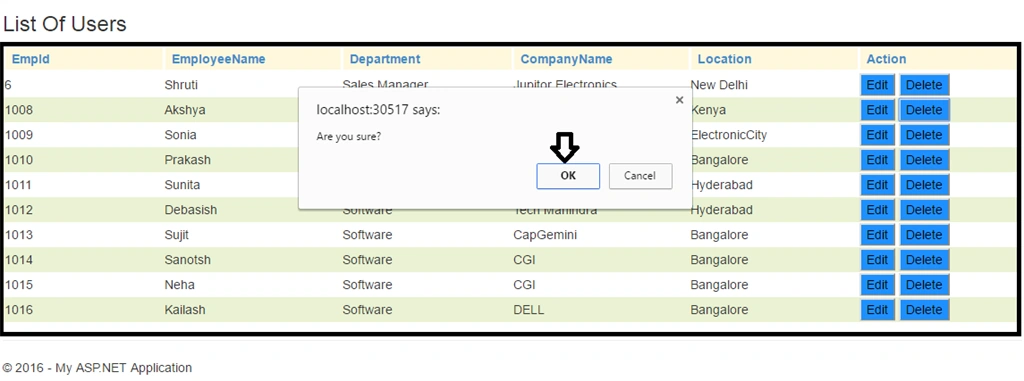
If you click OK, it will call the API and Delete the User.
So, this way, we can do CRUD operation in WebGrid by consuming the API.
I hope this article will help to learn these initial steps toward Creating and Consuming WEB API with complete CRUD operation of Webgrid. If I missed anything, please mention in the comments, so that I can implement that the next time.
PEDRO RENE GONZALEZPosted Aug 29, 2017, 12:22 AM
Thx man, you great!!!
Shakti Singh DulawatPosted Aug 12, 2017, 5:56 AM
Thats is awesome and congratulations for reaching in Article of the day at asp.net
Subhash BalakrishnanPosted Feb 27, 2017, 5:48 AM
Looks Good..Please share the coding as some steps cannot be completed..Subhash
Ravi KandelPosted Jul 14, 2016, 11:59 AM
Thanks for sharing.
Vignesh ManiPosted Jul 12, 2016, 4:26 PM
Nice
kalu singh raoPosted Jul 12, 2016, 1:47 AM
Nice...