

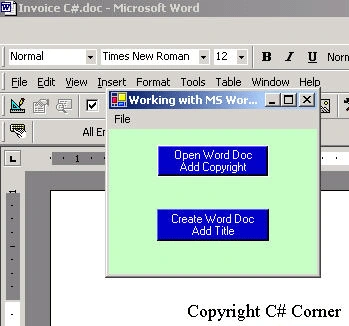
Figure 1 - Word Launched from .NET Form
This article is being written in response to a couple inquiries on the question, "How do I open a word document from .NET?". I guess after people read my excel article, they were under the impression that I knew how to do this in Word. Luckily, after some hunting around on the forums and feedback from other C# Corner members I got the gist of it.
The First Step in manipulating Word in .NET is that you'll need to add a COM reference to your project by right clicking in the solution explorer on References->Add Reference. Click on the COM tab and look for the Microsoft Word 9.0 Object Library. Click Select and OK.
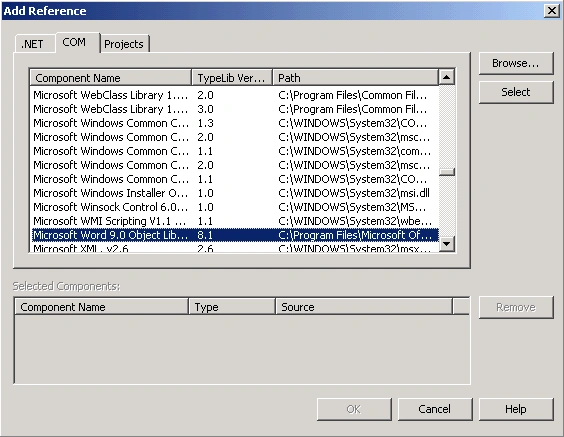
This will automatically place an assembly in your application directory that wraps COM access to Word. Now we are ready to create a word object in our code. To instantiate an instance of a Word application, you just declare the line below in your class:
- private Word.ApplicationClass WordApp = new Word.ApplicationClass();
Now you can call the interesting methods and properties that Microsoft Word provides to you to manipulate documents in Word. Personally, I never want to figure the Microsoft Word code out myself, because the Word hierarchy and properties, although rich in features, has a bit of a learning curve. So in order to jump straight over the learning curve, I simple turn the Macro Recorder on in Word and let Word write the code for me. (Of course this is VBA code, but...close enough). To start the macro recorder in Word, go to Tools->Macro->Record New Macro inside Microsoft Word. Now anything you type, open, delete, or format, will get recorded in VBA, so you have a clue how to write your Word Interoperability code.
The application in this particular article is divided into two methods based on the button that is pressed in the form. The first button opens an existing Word Document and adds a copyright line to the document. The second button creates a new document, and brings up a dialog to allow you to enter a title to the document.
Below is the code for the first button event handler:
- private void button1_Click(object sender, System.EventArgs e)
- {
- // Use the open file dialog to choose a word document
- if (this.openFileDialog1.ShowDialog() == DialogResult.OK)
- {
- // set the file name from the open file dialog
- object fileName = openFileDialog1.FileName;
- object readOnly = false;
- object isVisible = true;
- // Here is the way to handle parameters you don't care about in .NET
- object missing = System.Reflection.Missing.Value;
- // Make word visible, so you can see what's happening
- WordApp.Visible = true;
- // Open the document that was chosen by the dialog
- Word.Document aDoc = WordApp.Documents.Open(ref fileName, ref missing,ref readOnly, ref missing, ref missing, ref missing, ref missing, ref missing, ref missing, ref missing, ref missing, ref isVisible);
- // Activate the document so it shows up in front
- aDoc.Activate();
- // Add the copyright text and a line break
- WordApp.Selection.TypeText("Copyright C# Corner");
- WordApp.Selection.TypeParagraph();
- }
- }
Adam JonesPosted Nov 17, 2018, 4:21 AM
Https://www.c-sharpcorner.com/article/creating-and-opening-microsoft-word-documents-from-net-usin/
Vu Hong TrieuPosted Sep 16, 2015, 4:14 AM
How to open ms word on windows form using c#
Jasna KozeljPosted Mar 23, 2014, 4:15 PM
I would just like to point to a very good document generation toolkit for .NET that allows you to populate documents with application/database data and does not need MS Word (Office COM): http://www.docentric.com
Priti KumariPosted Jan 9, 2014, 2:05 AM
I am looking for C# code that will read document file (.doc/.docx) with all formatted words including images, bullets, font with bold/italic/underline, table, header & footer and so on.please help me.....Thanks in advance.
Former memberPosted Oct 1, 2013, 5:27 AM
There is another C# Library available that can help you create, edit, read and convert MS Word to many other formats. Here is the link of this Library: http://www.aspose.com/.net/word-component.aspx I hope it will help.
Naeem UllahPosted Jun 28, 2012, 11:08 PM
Hi,i want to read Ms Word 2010 .doc file with same format like same text position,font style,size e.t.c.
ankit khandelwalPosted Mar 29, 2011, 4:46 AM
Hi... Your code runs smoothlessly as a C# application but when i tried to run it on a web page using a client it failed to run.Can you plz help me on this??? Thnks in advance.
Amit MPosted Feb 28, 2011, 6:46 AM
How to open word document in asp.net application from code behind?
Bala GPosted Feb 14, 2011, 2:48 AM
I was looking for this tutorial for three days and got it here. Thanks for the article
ryanPosted Nov 8, 2010, 3:42 AM
Hi, I am working on an application that needs to save a file in desktop. I know that i can just put the path to the desktop. The problem is there will be many computers that will be using the application that has different users, so it will have different file name. I want to know is it possible to automatically save it in desktop after running the application ? Im using visual c sharp 2010 . Thanks in Advance
sandeepPosted Oct 15, 2010, 1:40 PM
I am developing one application where in I have to make few checkbox's and textbox's on word doc page dynamically populate values from database. I have created the template of word document using visual studio word project. But I am not able to access the components (check box's or text box's) on the page using underlying c# code. Can you suggest something that I might be missing or skipping.
pradeep kumarPosted Sep 27, 2010, 9:10 AM
hai
RajarajanPosted Sep 22, 2010, 9:13 AM
I have created a window form which fetch synonyms from Msword for the given word. Like that I want to get Look Up option from Msword. I don't know how to do that. Can u help me!!!!!! Thanks!
Michael EisenmanPosted Aug 27, 2010, 11:44 AM
Your original post has really helped me a lot - Thanks for being responsive as well - I am now able to open a document and move through each page - but i am trying now to save each page off as a PDF but i can't seem to get my currently selected page range (which is 1) to be saved off - I see that the SaveAs method can be used but I can only fget it to work on the ActiveDocument and not a particular page. Do i need to create a new document for each page and set Copy the pagerange content to that before saving ? Thanks
Michael EisenmanPosted Aug 25, 2010, 3:52 PM
public void test_pages() { object missing = System.Type.Missing; object Filename = "Z:\\ttestdoc1.docx"; //Microsoft.Office.Interop.Word.ApplicationClass wordApp; Microsoft.Office.Interop.Word.Application wordApp = new Microsoft.Office.Interop.Word.Application(); wordApp.Visible = true; // The following line opens an existing document on my desktop; modify this to point to the document you // want to open. Microsoft.Office.Interop.Word.Document doc = wordApp.Documents.Open(ref Filename, ref missing, ref missing, ref missing, ref missing, ref missing, ref missing, ref missing, ref missing, ref missing, ref missing, ref missing, ref missing, ref missing, ref missing, ref missing); // \page is a predefined bookmark in Word. For more information, seehttp://msdn.microsoft.com/en-us/library/bb221188.aspx object pageBookmark = @"\page"; Microsoft.Office.Interop.Word.Range pageRange = doc.Bookmarks.get_Item(ref pageBookmark).Range; // pageRange now represents the first page in the document. Do whatever you want with it... MessageBox.Show(pageRange.Text); // If you want to loop through the other pages in the document, do something like the following int pagenum = doc.Content.ComputeStatistics(Microsoft.Office.Interop.Word.WdStatistic.wdStatisticPages); for (int i = 2; i <= pagenum; i++) { wordApp.Selection.GoToNext(Microsoft.Office.Interop.Word.WdGoToItem.wdGoToPage); pageRange = wordApp.Selection.Bookmarks.get_Item(ref pageBookmark).Range; MessageBox.Show(pageRange.Text); } }
Michael EisenmanPosted Aug 25, 2010, 3:28 PM
This is a very good introductory article - thanks I am having problems accessing a particular page inside word - can you explain how to identify which page you are on if you are selecting text using the range functions and find it - knowing the page number is important to my requirement and I seem to be having quite a time with this ....
abhishek lokaPosted May 27, 2010, 10:01 AM
Hello, Im trying to open a word document in a panel (Web), exactly like the word document that Im typing in now.Please help me out. Thanks, Abhi
laxman vanamPosted Apr 30, 2010, 3:51 PM
C:\My Documents\CSharp Book Project\Normal.dot will be created or its existed already
Mai HoPosted Jan 5, 2010, 8:50 AM
However i am using Visual Studio 2008 and if you could update it to 2008, that would be great. Thank you.
hemant aroraPosted Oct 29, 2009, 7:23 AM
I need ur help in the following issue : I am developing window application in C# 2005 in which I have to print a bank statement.I am using Microsoft.Office.Interop.Word and creating Word.Application object.There is a specific format in which I have to generate the word file like (Bank logo on the top and Advertisement at the end of page)only on first page of each statement. A statement may contain multiple pages. We are creating one word file for all the accounts for a particular account type. In this case the image of the bank logo and the advt. will be coming for each new statement in that file. When I start generating the word file every thing working fine coming in required format but randomly after creating say 15 or 50 pages the alignment for the image on the top (bank logo) is distorted. Hence the all the following pages the header portion gets haywire. We to manually press 2 enter keys to bring the header down and reformat the file. This is not manually possible a single file may contain 100-150 pages. You tips and tricks on this will be appreciated. So please help me out to solve this problem its urgent.
Gaurav DudejaPosted Oct 19, 2009, 5:59 AM
h
harsha vasuPosted Sep 11, 2009, 9:00 AM
Hi mike, i have a requirement where i have to call mspaint in similar way like u have done ms word above could u pls explain me . thank you in advance rgs harsha.
sdnkrs sdnkrsPosted Jun 18, 2009, 6:59 AM
Hi!! I could do these stepes but i wanna save them in a specified data base. How can i do it? Thanks:)
Jean AbrahameditedPosted Mar 27, 2009, 7:58 AMEdited Mar 27, 2009, 8:00 AM
Thanks! This helped! Some of our machines only have wordview instead of the full version of word. Since I have an existing word document, is there any hope of just printing without a full version of Word? I also tried to start a new process, but there is not an application associated with specified file for this operation. If I click on a doc, the viewer opens it and I don't have a problem opening a pdf file with just Adobe Acrobat instead of the full blown version of Adobe. I really did not want to maintain a pdf version of the documents along with a word version of the document, any other ideas or suggestions? System.Diagnostics.Process p = new System.Diagnostics.Process(); p.StartInfo = new System.Diagnostics.ProcessStartInfo(newFileName); p.StartInfo.Verb = "printTo"; p.StartInfo.UseShellExecute = true; p.StartInfo.CreateNoWindow = true; p.StartInfo.WindowStyle = System.Diagnostics.ProcessWindowStyle.Hidden; p.Start(); int loop_cnt = 0; try { while (!p.HasExited) { p.Refresh(); loop_cnt++; p.CloseMainWindow(); System.Threading.Thread.Sleep(750); if (loop_cnt > 10) break; } p.Close();
mohammed salamaPosted Mar 6, 2009, 2:59 AM
i want open infopath using .net as this example i use Microsoft.Office.Interop.InfoPath.dll but can not run
fgligorovicPosted Jan 27, 2009, 7:10 PM
Thanks ! Filip
sairam mPosted Jan 22, 2009, 3:57 AM
thank you
theo philusPosted Oct 8, 2008, 3:25 PM
I would like you to help me open up word documents in c# so that I can only click on the treeview and get my word documents opened up.
Kriti NepalPosted Sep 18, 2008, 11:52 AM
Article is good. I have a problem I read your articles about the word Automation. They are good one. I have some problem, hope you can help me. I have a template that has 3 tables in it. first two are like a header so it will me constant, but 3rd table needs to repeate based on the Grid selection how can I make repetation. I could populate the 3 rd table based on the first grid selection, but for the second or third selection it overwrites on the top of the first one, my requirement is to repete the 3 rd table at the end of (3rd table) based on the grid selection
Kriti NepalPosted Sep 18, 2008, 11:50 AM
Article is very good, I have this problem I read your articles about the word Automation. it is good one. I have some problem, hope you can help me. I have a template that has 3 tables in it. first two are like a header so it will me constant, but 3rd table(starts form Contact Person, -----, Narrative)one needs to repeate based on the Grid selection how can I make repetation. I could populate the 3 rd table based on the first grid selection, but for the second or third selection it overwrites on the top of the first one, my requirement is to repete the 3 rd table at the end of (3rd table) based on the grid selection. My template looks like this one CONTACT LOG REPORT ICWIS September 18, 2008 Report # Worker Name Contacts Contact Name Reference Person Contact Status Date Contact Type Contact Method Contacted By Narrative
zeinab sheaibPosted Jun 7, 2007, 3:12 AM
i need to display a table from the MS word processor without opening the word application just i want to display this table as a dataset plz help to solve this probleme i cant end by a result :(
Ahsan MurshedPosted Apr 19, 2007, 1:12 AM
ur article very very useful for me
rami atedgiPosted Apr 15, 2007, 3:04 AM
Hi I have a problem to define coordinat in document for insert object, such as table,in specific place in new document Is it possible anyway? Thank
Quan ThanhPosted Apr 13, 2007, 11:47 AM
I am learning VB. Can you help me?
Noelia JoyaPosted Apr 9, 2007, 8:36 AM
Hello, I have a problem with creation document in application. I can´t
Noelia JoyaPosted Apr 9, 2007, 8:33 AM
Hello, I have a problem at the time of creating a Word document in an application ASP.NET. Using the bookstores office and Word, give to an error of privileges having all the privileges me of access. That I can do? Thanks
Noelia JoyaPosted Apr 9, 2007, 8:33 AM
Hello, I have a problem at the time of creating a Word document in an application ASP.NET. Using the bookstores office and Word, give to an error of privileges having all the privileges me of access. That I can do? Thanks
Narayan MurthyPosted Apr 4, 2007, 9:24 AM
Hi, I am having a problem in word automation , it would be great if you please help me regarding this. My problem is I am having a word document with many form fields in that , I need to change all the form fields colour and font of anly form fields(such as check boxes, text box) we can change it by looping through all form fields count , but it is taking a lot of time as i am having more that 100 form fields , in that document , My question is is it possible to change the font or colour af all form fields in a single stroke ,without looping
DianaPosted Mar 22, 2007, 8:05 AM
I want to create a Word document with a survey using Form elements, so the user can modify only the those fields (text, check-boxes and drop-down lists) and not the text that I enter. I couldn't find neither in MSDN documentation anything that would lead to that, nor with Google. Maybe you could help me. Thank you.
DianaeditedPosted Mar 22, 2007, 8:02 AMEdited Mar 22, 2007, 8:04 AM
sorry, wrong button
BadGuyeditedPosted Jan 7, 2007, 5:28 PMEdited Jan 7, 2007, 5:35 PM
Mike, tell me, please, is it possible to address text selection in already opened word application. (I don't need to initiate another copy of Word application) Thank you.
j jPosted Nov 27, 2006, 12:20 PM
I am completely new to C# and have been tasked to create application. In the application, I need to run all microsoft word macros though my App.Is it possible?
Alex ANealseditedPosted Nov 3, 2006, 6:21 PMEdited Nov 3, 2006, 6:22 PM
I think you may have inadvertantly typed a "t" instead of a "d" in your title. "How to I" instead of "How do I." I thought you might want to correct it since it detracts attention from your article.
shinoy alphonsePosted Nov 1, 2006, 5:59 AM
Dear, if you have the idea please let me know how can i make a automated email repaly in c#.
Moderage WaasPosted Oct 31, 2006, 1:03 PM
Boss We like to create word documents on the fly at the server end ( not the client end ) How can we do this ? I understand you need to have WORD installed on the web server. But then can you show us the code. This way user will not see a word document. he can only see it after it has been created.
kali babueditedPosted Jul 5, 2006, 7:44 AMEdited Nov 23, 2006, 11:32 AM
I implemented the code in my dev env and got the results. Thank you very much. But even i have the same problem. I need to use WordViewer instead of Word. Could you please help me in solving my problem.
Victor Van HaleneditedPosted Jun 8, 2006, 4:36 PMEdited Jun 8, 2006, 4:42 PM
Hey Michael, Great and helpful article! I'm looking into using C# code to integrate World-related routines with BizTalk in order to create automatically-generated Word documents, but the BizTalk server box is not guaranteed to have MS Word installed. Is it possible to install and normally use the Word Object Library without having MS Word installed on the system? My searches on the web have proved unsuccessful, and I wonder if you had any insights on the matter. Thanks a lot in advance and keep up the good work. It's pure "gold" ;) V.
Shelley ZhaoeditedPosted May 9, 2006, 10:32 PMEdited May 9, 2006, 10:35 PM
Your article is very usefull for me! :)
JoePosted Jan 22, 2006, 11:09 AM
I am completely new to C# and have been tasked to create a scoring application. In the application, I will need to open an existing word document. I was able to follow your example and it worked fine on my developement machine. But the customer has a limitation, some of the pcs will not have word installed, only the Word viewer. My question(s) is ... 1. Is this possible? I have not been able to get this to work. 2. And if it is, how do I go about it? Thanks in advance.