

In our previous article we explained how to get an image from Notes using OData endpoints. In this article we will explain how to create a HTML web resource and use our JavaScript method to get and display the image. We need to implement the following two steps:
· Create HTML page
· Deploy HTML page and SDK.REST.js using web resource
Create HTML page
Create a HTML page using a HTML editor. Use the following code for the HTML page:
- <html lang="en-us"><head>
- //Reference clientglobalcontest.js to get context information
- <script src="../ClientGlobalContext.js.aspx"></script>
- //add SDK.Rest.js reference
- <script type="text/javascript" src="SDK.REST.js"></script>
- <script type="text/javascript">
- //check if document is loaded or not
- var imgControl = document.createElement("IMG");
- //Check if documented loaded fully
- document.onreadystatechange = function () {
- if (document.readyState == "complete") {
- getnotesImages();
- }
- }
- //this function is used to get image from notes
- function getnotesImages()
- { //get regarding object id
- var regardingObjectId=window.parent.Xrm.Page.data.entity.getId();
- //assign notes entity name
- var entitySchemaName="Annotation";
- var odataQuery = "?$top=1&$select=AnnotationId,DocumentBody,MimeType&" +
- "$filter=ObjectId/Id eq guid'" + regardingObjectId +
- "' and IsDocument eq true and startswith(MimeType,'image/') ";
- //call retrieveMultipleRecords method in SDK.REST javascript script library
- SDK.REST.retrieveMultipleRecords(entitySchemaName, odataQuery, getnotesImagesCallback, function (error) { alert(error.message); }, function(){});
- }
- //process callbanck result
- function getnotesImagesCallback(resultSet)
- {
- if (resultSet.length > 0) {
- var mimeType = resultSet[0].MimeType;
- var body = resultSet[0].DocumentBody;
- imgControl.src="data:" + mimeType + ";base64," + body;
- document.getElementById('imagediv').appendChild(imgControl);
- }
- }
- </script>
- <meta charset="utf-8"></head><body style="zoom: 1;">
- <div style="width: 100px;" id="imagediv"></div>
- </body></html>
Deploy HTML page and SDK.REST library using web resource
Use following procedure to deploy a HTML page and SDK.REST library in Microsoft CRM.
- Navigate to Settings -> Customization-> Customize the System from the top navigation bar
- Navigate to Components -> Web Resources-> New
- Fill in the details as in the following screen:
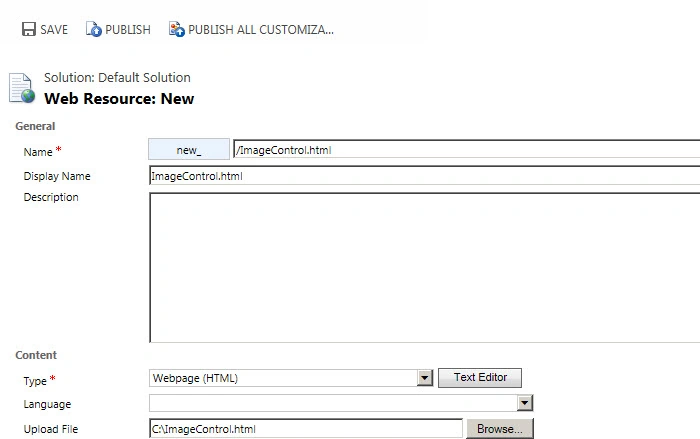
- Click on the browse button and select your HTML web resource.
- Click on Save and then Publish
- Navigate to Components -> Web Resources-> New
- Fill in the details as in the following screen:
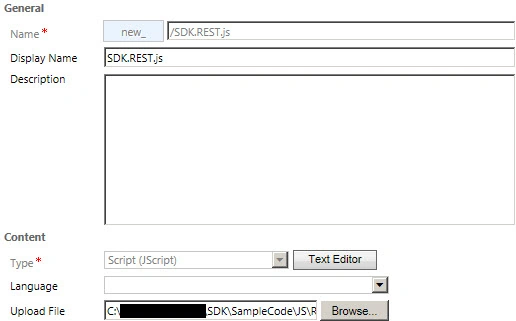
- Click on browse and select SDK.REST.js from Microsoft CRM SDK
Note: Please refer to my previous article for the SDK.REST.js location.
Now we can place our HTML web resource in the account entity form by navigating to Insert -> Web Resource options. Save your changes and then publish the account entity form.
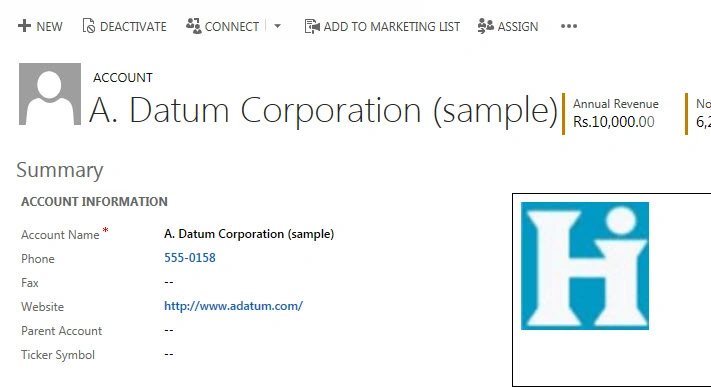
When you try to open your account record you should be able to see the attached images loaded into the HTML web resource.
AJIT AGARWALPosted Jul 30, 2018, 5:22 AM
Hi Mahendra, how to display multiple note and image for single tenant. i want bind image and note into <ul><li></li></ul>..using html webs resource.
Mahender PalPosted Nov 22, 2015, 11:52 PM
I am working on sample article on this, will publish soon. Thanks
Bidhan ChakrabortyPosted Nov 22, 2015, 6:12 PM
Hi Mahender,How can i upload a file and create an ActivityMimeAttchment through a HTMl Web resource? any help would be very appreciated. Bidhan