

In this article we will create a simple Master-Detail form using a GridView and DetailsView.
Introduction
In this article we will create a Master-Detail form using a GridView and a DetailsView. A Master-Detail form displays a master list and the details for the currently selected item. We will use a "Titles" table of a "Pubs" database to display a master list in a GridView and an "Authors" table to display author details of the currently selected book in the master list.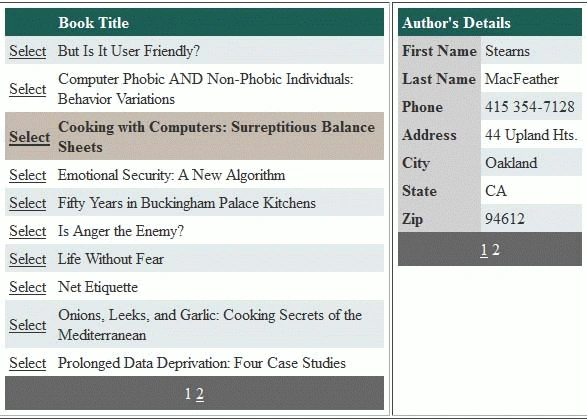
Steps:
- Create a new ASP.NET Web Application.
- Add a GridView and a DetailsView in the Default.aspx.
- Add a ConnectionString in the Web.config file for database connection.
- In the code view of Default.aspx, add the "System.Data.SqlClient" namespace. Declare the following variables inside the class declaration:
SqlConnection con;
SqlCommand cmd;
SqlDataAdapter sda;
DataTable dt;
string ConString, CmdString, TitleID;
- Add the following code in the page load event:
protected void Page_Load(object sender, EventArgs e)
{
ConString = ConfigurationManager.ConnectionStrings["ConString"].ConnectionString;
if (!IsPostBack)
{
BindGridView();
}
}
ConString retrieves connection string from the Web.config file named "ConString". BindGridView() method binds data to the GridView.
private void BindGridView()
{
con = new SqlConnection(ConString);
CmdString = "SELECT Title_Id, Title FROM Titles";
cmd = new SqlCommand(CmdString, con);
sda = new SqlDataAdapter(cmd);|
dt = new DataTable();
sda.Fill(dt);
GridView1.DataSource = dt.DefaultView;
GridView1.DataBind();
}
BindGridView sets Title_Id and Title of Titles table as the data source of the GridView.
Add the following code to the HTML view of Default.aspx to set the properties of the GrieView:
<asp:GridView ID="GridView1"
runat="server"
AutoGenerateColumns="False"
AutoGenerateSelectButton="True"
AllowPaging="True"
AllowSorting="True"
DataKeyNames="Title_Id"
onselectedindexchanged="GridView1_SelectedIndexChanged"
onpageindexchanging="GridView1_PageIndexChanging">
<Columns>
<asp:BoundField HeaderText="Book Title" DataField="title" />
</Columns>
</asp:GridView>
Niyazi TorosPosted May 25, 2016, 7:02 AM
Do you have any MVC5 version of the article with editing the master and details view.