

Introduction
JSPDF is an open-source library for generating PDF documents using nothing but JavaScript.
It uses various functions to create various elements of PDF pages.
For example,
- doc.text(x, y, 'string');
- Will print the string given in single quotes starting from the position given as point (x,y).
- Instead of using a string, we can select a tag from an HTML page using JavaScript or jQuery.
- doc.save('filename.pdf');
- Will save the document with the name "filename".
- doc.addPage();
- Gets an extra page in the PDF file.
- doc.setFontType('stylename');
- Changes the style of the font such as to italic or bold.
- doc.setFont('fontfaceName');
- It provides the font face, like Times New Roman, Comic, Arial, and so on.
Code
HTML Code
<html>
<head>
    <title>Example of jsPDF</title>
    <script type="text/javascript" src="jquery-1.7.1.min.js"></script>
    <script type="text/javascript" src="jquery-ui-1.8.17.custom.min.js"></script>
    <script type="text/javascript" src="jspdf.debug.js"></script>
    <script type="text/javascript" src="basic.js"></script>
</head>
<body>
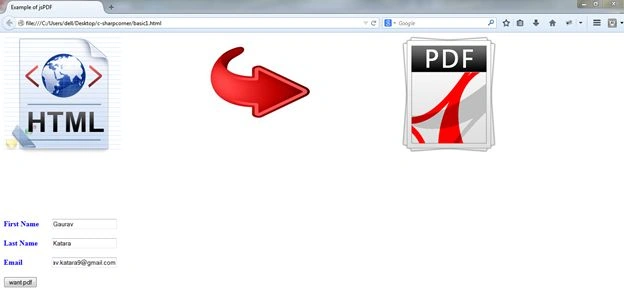
    <img src="html.jpg" align="left">
    <img src="download.jpg" align="center" style="margin-left: 170px">
    <img src="pdf.png" align="right" style="margin-right: 250px">
    <div style="margin-top: 200px">
        <b>
            <label style="color: blue">
                First Name
            </label>
        </b>
        <input type="text" id="fname" style="margin-left: 24px"><br>
        <br>
        <b>
            <label style="color: blue">
                Last Name
            </label>
        </b>
        <input type="text" id="lname" style="margin-left: 27px"><br>
        <br>
        <b>
            <label style="color: blue">
                Email
            </label>
        </b>
        <input type="text" id="email" style="margin-left: 60px"><br>
        <br>
        <button onclick="demoPDF()">
            want pdf
        </button>
    </div>
</body>
</html>
JavaScript file
function demoPDF() {
    var doc = new jsPDF();
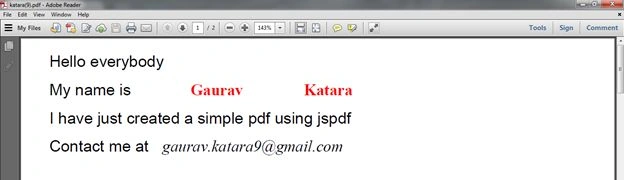
    doc.text(10, 10, 'Hello everybody');
    doc.text(10, 20, 'My name is');
    doc.text(10, 30, 'I have just created a simple pdf using jspdf');
    doc.text(10, 40, 'Contact me at');
    doc.setFont("times");
    doc.setFontType("italic");
    doc.text(50, 40, document.getElementById("email").value); // append email id in pdf
    doc.setFontType("bold");
    doc.setTextColor(255, 0, 0); // set font color to red
    doc.text(60, 20, document.getElementById("fname").value); // append first name in pdf
    doc.text(100, 20, document.getElementById("lname").value); // append last name in pdf
    doc.addPage(); // add new page in pdf
    doc.setTextColor(165, 0, 0);
    doc.text(10, 20, 'extra page to write');
    doc.save('katara.pdf'); // Save the PDF with name "katara"...
}
Output
1. HTML page
2. PDF output

MadhavPosted Jan 30, 2017, 7:01 AM
How to export a HTML control like div,Table or panel to PDF file??
SubashPosted Oct 13, 2016, 6:18 AM
This script not allowed other java scripts
kalu singh raoPosted Jul 7, 2016, 1:44 AM
Nice...
Humayun Kabir MamunPosted Jun 12, 2016, 4:52 AM
Nice...
Ashiwani SharmaPosted Jun 4, 2016, 3:27 AM
what changes we will have to done to run this Project in our ASP .net 4.0 Project
Sakthikumar ThanavelPosted Sep 9, 2015, 5:34 AM
nice article. Can you help me to export the entire HTML page to PDF?
anil kumarPosted Jun 16, 2015, 10:53 AM
value ="Anil"
Vishvendu PalawatPosted Dec 11, 2014, 4:31 AM
Not working on phonegap application
Marvin MarvinPosted Nov 25, 2014, 4:31 PM
Very nice Article :) Helped a lot! Can you help me to implement graphics?
Nagaraj SaveeraPosted Oct 30, 2014, 1:50 AM
How to save the generated pdf in a particular location?
s fPosted Sep 8, 2014, 7:52 PM
How could you Print the PDF file from the output page? ie - I want to print the PDF file from Onclick, "demoPDF ()"
RAVINDER SINGH NEGIPosted Jul 14, 2014, 5:17 AM
nice artice..can you provide details about how to implement graphics using jspdf
Gaurav KataraPosted Jul 3, 2014, 10:08 PM
thank you.... I think it would help a lot of people.... :)
Sanjay SinghPosted Jul 3, 2014, 5:12 PM
very nice article
Gaurav KataraPosted Jul 3, 2014, 1:18 PM
there is a function doc.addImage(); to add images... also we can add graphics like line, triangle, circle, square etc....
Gaurav KataraPosted Jul 3, 2014, 12:55 PM
yes we can.... i m working on that article also... i will upload that as soon as possible....
Pradeep ShetPosted Jul 3, 2014, 11:41 AM
hey can we have images embedded in it along with text?
Gaurav KataraPosted Jul 3, 2014, 10:48 AM
thanks for appreciation....
Pradeep ShetPosted Jul 3, 2014, 8:09 AM
good 1
Gaurav KataraPosted Jul 3, 2014, 4:05 AM
thankuuu... :)
Khan Abrar AhmedPosted Jul 3, 2014, 3:31 AM
Nice one
Abhijeet SinghPosted Jul 3, 2014, 3:05 AM
very good start waiting for more... :)
RAVINDER SINGH NEGIPosted Jul 3, 2014, 1:13 AM
well explained....
Prerana TiwariPosted Jul 2, 2014, 11:07 PM
Nice article..........