

For Part I, click here>>
Introduction
In online marketing, a shopping cart is a piece of e-commerce software running on a web server, that allows visitors to an Internet shop to select items for eventual purchase, analogous to the American English term "shopping cart." In British English, it is generally known as a shopping basket, almost exclusively shortened on websites to "basket".
The software allows online shopping customers to accumulate a list of items for purchase, described metaphorically as “placing items in the shopping cart” or “add to cart.” Upon checkout, the software typically calculates a total for the order, including shipping and handling (i.e., postage and packing) charges and the associated taxes, as applicable.
This article describes the implementation of a shopping cart using MVC and jQuery.
Prerequisites
- General knowledge of web applications.
- HTML, CSS, Bootstrap, JavaScript.
- Database Configuration and Connection.
Agenda
- Displaying product details from the database.
- Showing particular product details from the database.
- Implementing Zoom effect for products.
- Adding selected items to the shopping cart.
- Showing all recently added cart items.
- Removing items from a cart.
In our previous section, we have learned how to start creating the shopping cart application. There we learned about creating a project with different layers, basic flow, creating basic Layouts, etc. You can find the link here.
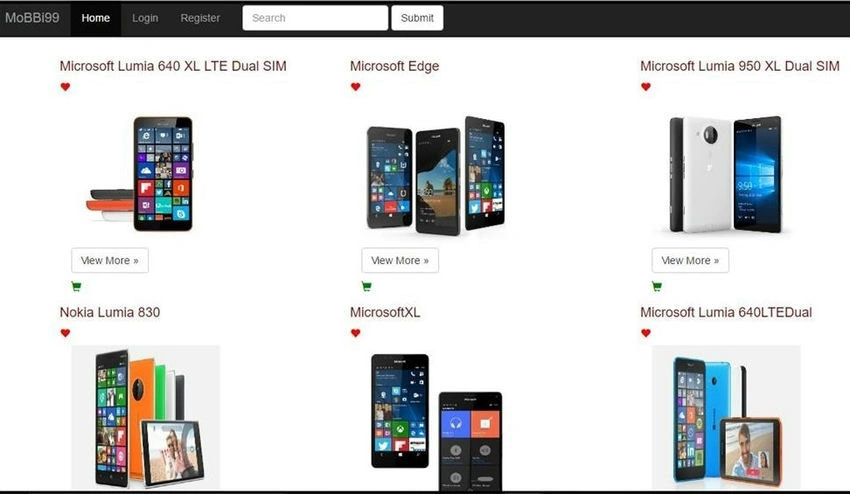
In this section, we will learn to add a full description to each product from the database. Here is the code to show the full description of the product in the View.
@model IEnumerable<DapperProject.Models.ProductDetails>
@{
    ViewBag.Title = "EachProductDetails";
    Layout = "~/Views/Shared/_Layout.cshtml";
}
<script src="~/Scripts/jquery-1.10.2.min.js"></script>
<link rel="stylesheet" href="https://maxcdn.bootstrapcdn.com/bootstrap/3.3.7/css/bootstrap.min.css">
<script src="https://ajax.googleapis.com/ajax/libs/jquery/1.12.4/jquery.min.js"></script>
<script src="https://maxcdn.bootstrapcdn.com/bootstrap/3.3.7/js/bootstrap.min.js"></script>

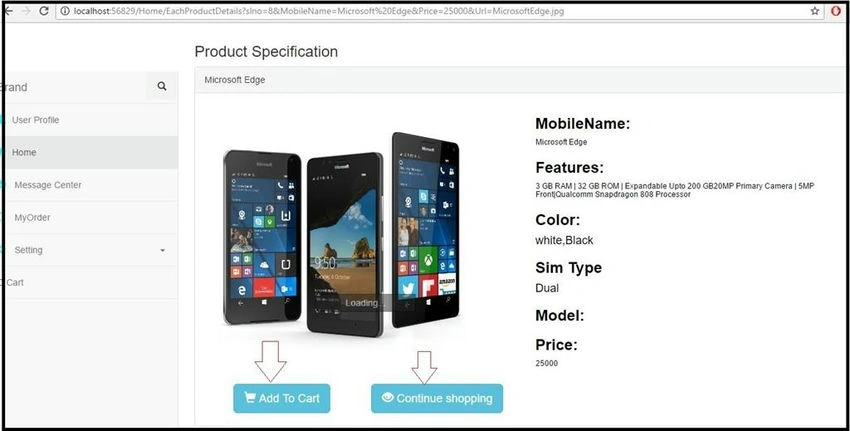
<h3>Product Specification</h3>
<div ng-controller="MainCtrl">
    @foreach(var x in Model) {
        <div class="panel panel-default">
            <div class="panel-heading">@x.MobileName</div>
            <div class="panel-body">
                <div class="col-sm-3 col-md-6" style="color:blue">
                    <img src="~/Images/@x.Url" width="400" height="400"/>
                </div>
                <div class="col-sm-9 col-md-6">
                    <h3><span id="mobilename" style="color:black"><b>MobileName:</b></span></h3>
                    <h6><span id="mobilename" style="color:black">@x.MobileName</span></h6>
                    <h3><span id="mobilename" style="color:black"><b>Features:</b></span></h3>
                    <h6><span id="mobilename" style="color:black">@x.Features</span></h6>
                    <h3><span id="mobilename" style="color:black"><b>Color:</b></span></h3>
                    <h4><span id="mobilename" style="color:black">@x.color</span></h4>
                    <h3><span id="mobilename" style="color:black"><b>Sim Type</b></span></h3>
                    <h4><span id="mobilename" style="color:black">@x.SimType</span></h4>
                    <h3><span id="mobilename" style="color:black"><b>Model:</b></span></h3>
                    <h6><span id="mobilename" style="color:black">@x.model</span></h6>
                    <h3><span id="mobilename" style="color:black"><b>Price:</b></span></h3>
                    <h6><span id="mobilename" style="color:black">@x.Price</span></h6>
                </div>
            </div>
            <div>
                <a id="btn_add" href="@Url.Action("Add", "AddToCart", x)" class="btn btn-info btn-lg" style="margin-left:60px"><span class="glyphicon glyphicon-shopping-cart"></span> Add To Cart</a>
                <a id="btn_add" href="@Url.Action("Index", "Home")" class="btn btn-info btn-lg" style="margin-left:60px"><span class="glyphicon glyphicon-eye-open"></span> Continue shopping</a><br/>
            </div>
        </div>
    }
</div>
So, here is our ProductDetails model.
using System;
using System.Collections.Generic;
using System.Linq;
using System.Web;

namespace DapperProject.Models {
    public class ProductDetails {
        public int? slno {
            get;
            set;
        }
        public string MobileName {
            get;
            set;
        }
        public double Price {
            get;
            set;
        }
        public string Url {
            get;
            set;
        }
        public string Features {
            get;
            set;
        }
        public string model {
            get;
            set;
        }
        public string color {
            get;
            set;
        }
        public string SimType {
            get;
            set;
        }
    }
}
Here is the model for mobile.
using System;
using System.Collections.Generic;
using System.Linq;
using System.Web;

namespace DapperProject.Models
{
    public class Mobiles
    {
        public int? slno { get; set; }
        public string MobileName { get; set; }
        public double Price { get; set; }
        public string Url { get; set; }
        public string ZoomUrl { get; set; }
        public string Description { get; set; }
    }
}
This is the script of the table.
USE [Demo]
GO

/****** Object:  Table [dbo].[MobileDetails]  Script Date: 03-12-2016 10:33:24 ******/
SET ANSI_NULLS ON
GO
SET QUOTED_IDENTIFIER ON
GO
CREATE TABLE [dbo].[MobileDetails](
    [SLNO] [int] IDENTITY(1, 1) NOT NULL,
    [MobileId] [int] NULL,
      NULL,
      NULL,
      NULL,
      NULL,
 CONSTRAINT [PK_MobileDetails] PRIMARY KEY CLUSTERED
(
    [SLNO] ASC
)WITH (PAD_INDEX = OFF, STATISTICS_NORECOMPUTE = OFF, IGNORE_DUP_KEY = OFF, ALLOW_ROW_LOCKS = ON, ALLOW_PAGE_LOCKS = ON) ON [PRIMARY]
) ON [PRIMARY]
GO
ALTER TABLE [dbo].[MobileDetails]  WITH CHECK ADD  CONSTRAINT [FK_MobileDetails_Mobiles] FOREIGN KEY([MobileId])
REFERENCES [dbo].[Mobiles] ([slNo])
GO
ALTER TABLE [dbo].[MobileDetails] CHECK CONSTRAINT [FK_MobileDetails_Mobiles]
GO
And, this is my table data for showing in the details page.

Now, given below is the Controller logic to get the data.
public ActionResult EachProductDetails(Mobiles m)
{
    string mycmd = "select m.slNo,m.MobileName,m.price,m.url,md.Features,md.model,md.color,md.SimType from mobiles m inner join MobileDetails md on m.slNo=md.MobileId where m.slNo="+m.slno+"";
    dt = new DataTable();

    dt = _mdal.SelactAll(mycmd);

    List<ProductDetails> list = new List<ProductDetails>();

    for (int i = 0; i < dt.Rows.Count; i++)
    {
        ProductDetails mob = new ProductDetails();
        mob.slno = Convert.ToInt32(dt.Rows[i]["slNo"]);
        mob.MobileName = dt.Rows[i]["MobileName"].ToString();
        mob.Price = Convert.ToDouble(dt.Rows[i]["Price"]);
        mob.Url = dt.Rows[i]["Url"].ToString();
        mob.Features= dt.Rows[i]["Features"].ToString();
        mob.color = dt.Rows[i]["color"].ToString();
        mob.SimType = dt.Rows[i]["SimType"].ToString();

        list.Add(mob);
    }

    return View(list);
}
Here is our MobileDAL.cs class.
using System;
using System.Collections.Generic;
using System.Linq;
using System.Text;
using System.Threading.Tasks;
using System.Data;
using System.Configuration;
using System.Data.SqlClient;

namespace MobileDAL.cs {
    public class MobiledetailDAL {
        SqlCommand cmd;
        SqlDataAdapter da;
        DataSet ds;

        public static SqlConnection connect() {
            string connection = ConfigurationManager.ConnectionStrings["Connect"].ConnectionString;
            SqlConnection con = new SqlConnection(connection);
            if (con.State == ConnectionState.Open) {
                con.Close();
            } else {
                con.Open();
            }
            return con;
        }

        public bool DMLOpperation(string query) {
            cmd = new SqlCommand(query, MobiledetailDAL.connect());
            int x = cmd.ExecuteNonQuery();
            if (x == 1) {
                return true;
            } else {
                return false;
            }
        }

        public DataTable SelactAll(string query) {
            da = new SqlDataAdapter(query, MobiledetailDAL.connect());
            DataTable dt = new DataTable();
            da.Fill(dt);
            return dt;
        }
    }
}
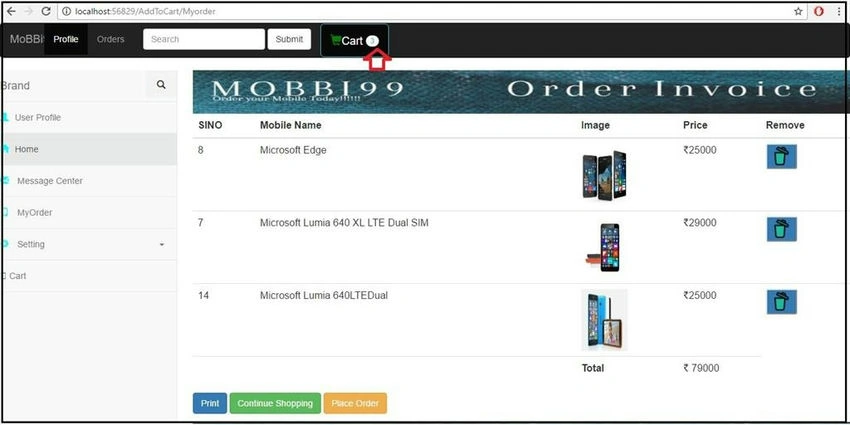
Now, just run the project. It will show the following output.






Nayak AnshumanPosted May 7, 2024, 10:09 AM
Nice article. Please add some other small articles. Which will helpful to us.
Truong NgoPosted Jul 25, 2021, 11:16 AM
Many thanks for your tutorials! I appreciate for them!!
Villads ClaesPosted Apr 30, 2020, 8:31 AM
Thank you. This worked for me. Could you add the ActionResult for "Place Order"?
Sherry ZakhariPosted Feb 5, 2020, 6:12 AM
Extra good but i need to make a search first in the home page which will display all these products
hayel aljaamiPosted Dec 29, 2019, 5:34 AM
Hi bro can you please share the db script with me
shanthan rubanPosted Aug 22, 2019, 10:00 PM
Thanks.. you are one of the reason.. if i got the job.. ;)
Hamid KhanPosted Nov 29, 2018, 12:48 AM
Very help full for all of us...……………...
jubula samalPosted Sep 4, 2018, 9:40 PM
Thanks brother. Appreciate your effort. It helped me a lot and I am sure it will be helpful for so many programmers.
Shah ShahPosted Aug 5, 2018, 2:10 PM
Wah janu kya kam kia ha :*
Dharmesh KhatriPosted Jun 3, 2018, 6:16 AM
Hello sir can you please share the DB scrip with us since the scrip provided in post is not complete. It will be a very big help.
Shahul HameedPosted May 9, 2018, 6:15 AM
Can I get the Database Scripts for this project. Thanks in advance
Shahul HameedPosted May 9, 2018, 6:10 AM
Hello, Im new to MVC & this proj is an eye opener. But this doesn't have Db Scripts. Can I get it plz.
prince tomyPosted Mar 22, 2018, 1:46 AM
Nice work.this is a standard project in asp.net mvc .
Sudha SarswatPosted Jan 20, 2018, 3:59 AM
Hello sir...u really dropped a lot of help to the needy students lyk me..actually for my college project submission i only need to create a simple shopping site using asp.net...actually i am a onlune seller of woman apparels so that i create my own store as well..bt for now i just want to create a very simple site as i am a single preventative.so will this code will work for that with doing some editing?
Jennifer BumanglagPosted Jul 25, 2017, 5:44 AM
DO YOU HAVE A COPY OF GENERATE SCRIPT IN SQL SERVER (Schema and data) FOR THIS PROJECT??
Debendra DashPosted Dec 17, 2016, 10:27 AM
For zoom effect please check the link http://embed.plnkr.co/iULn27/.
Debendra DashPosted Dec 17, 2016, 10:27 AM
Hi Jamal please download the project and check once what problem you have.
jamal refaideenPosted Dec 16, 2016, 8:14 AM
Help me sir zoom before run
jamal refaideenPosted Dec 16, 2016, 8:13 AM
Not bind mobile name,model simtype also
jamal refaideenPosted Dec 16, 2016, 8:13 AM
Sir image not shown after zoom before code run
Ravi MaheshwariPosted Dec 5, 2016, 11:02 PM
Yes please provide the code and database script .it will be great for us.
Former memberPosted Dec 5, 2016, 4:00 AM
Please provide code. thanks
Debendra DashPosted Dec 5, 2016, 1:00 AM
Hi pankaj,i will upload the last part of this project in that i will upload the complete source code.
Pankaj GuptaPosted Dec 4, 2016, 9:13 PM
Nice post and very understandable but how to download the code.Plz share any link to download..