

Here I have performed the following operations.
- Document Adding
- Document Updating
- Document Deleting
Step 1
Open Visual Studio 2013 and create an Empty SharePoint Project.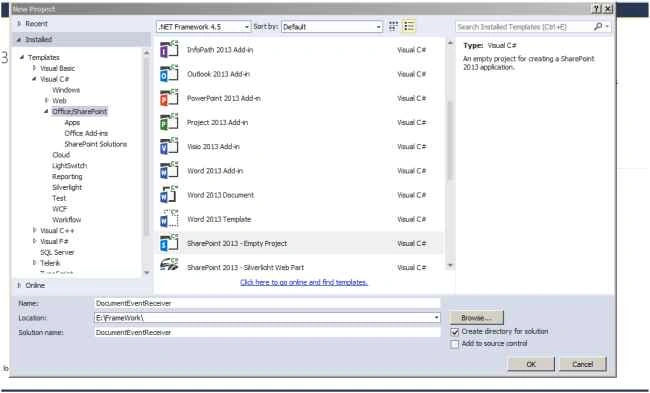
Step 2
Enter site URL and select Deploy as a farm solution and click Finish.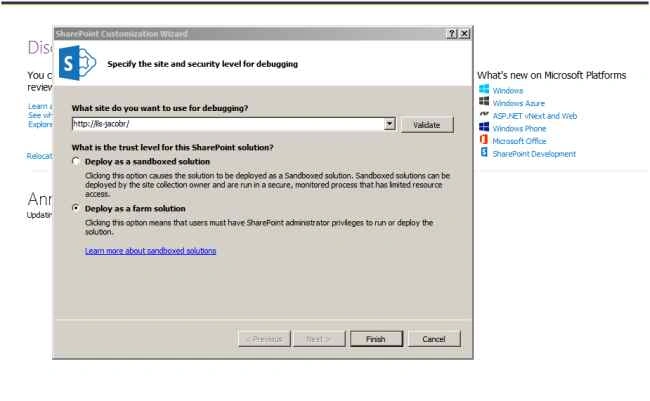
Step 3
Open Solution Explorer and add a new item.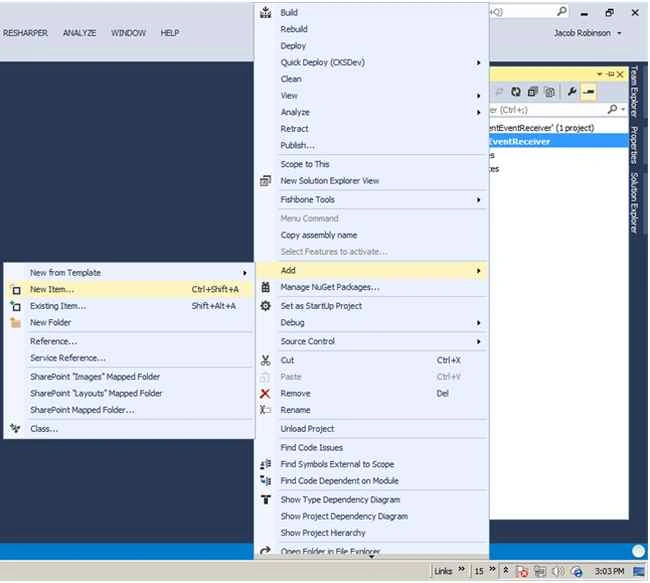
Step 4
Select event receiver and enter the title of the event receiver. Click the Add button.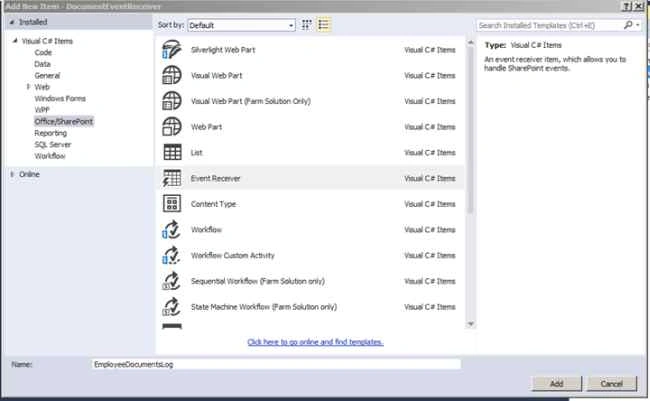
Step 5
Select List Item Events in type of event receiver and select the Document Library option from the event source. Then select an events as in the following and click Finish.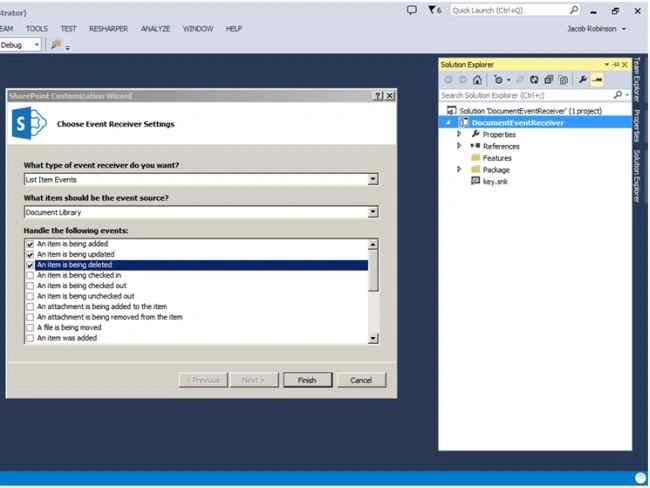
Step 6
The following screen will appear. Here I'm trying to update a SharePoint list based on file changes happening to a separate SharePoint Document Library.
Basically, the list will act like a document log. So we need to create the library and a list.
Here, I have created the EmployeeDocuments library to add and maintain documents and also created an EmployeeDocumentLog list to log the changes happening to the library.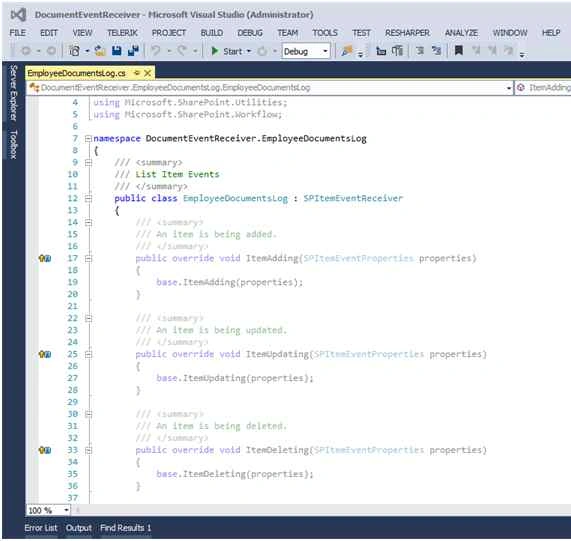
An EmployeeDocuments Document Library has the following columns:
- Name
- Modified
- ModifiedBy
An EmployeeDocumentLog List has the following columns:
- Title
- DocumentAction
Step 7
Go to the Event receiver cs file and paste the following code.
Add Document
Here note that the ItemAdded method is used instead of the ItemAdding method.
- public override void ItemAdded(SPItemEventProperties properties) {
- //base.ItemAdding(properties);
- using(SPWeb web = properties.OpenWeb()) {
- try {
- SPList list = web.Lists["EmployeeDocumentLog"];
- SPListItem newItem = list.Items.Add();
- newItem["Title"] = properties.ListItem.Name;
- newItem["DocumentAction"] = "Document Added";
- newItem.Update();
- } catch (Exception ex) {
- throw ex;
- }
- }
- }
- public override void ItemUpdating(SPItemEventProperties properties) {
- //base.ItemUpdating(properties);
- using(SPWeb web = properties.OpenWeb()) {
- try {
- SPList list = web.Lists["EmployeeDocumentLog"];
- SPListItem newItem = list.Items.Add();
- newItem["Title"] = properties.ListItem.Name;
- newItem["DocumentAction"] = "Document Updated";
- newItem.Update();
- } catch (Exception ex) {
- throw ex;
- }
- }
- }
- public override void ItemDeleting(SPItemEventProperties properties)
- {
- //base.ItemDeleting(properties);
- using (SPWeb web = properties.OpenWeb())
- {
- try
- {
- SPList list = web.Lists["EmployeeDocumentLog"];
- SPListItem newItem = list.Items.Add();
- newItem["Title"] = properties.ListItem.Name;
- newItem["DocumentAction"] = "Document Deleted";
- newItem.Update();
- }
- catch (Exception ex)
- {
- throw ex;
- }
- }
- }
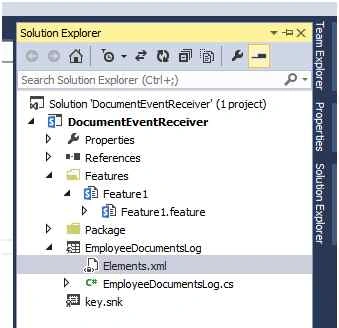
Here targeting to add the event receiver only to the “EmployeeDocuments” library, the Elements.xml file requires the following change.
- <?xml version="1.0" encoding="utf-8"?>
- <Elements xmlns="http://schemas.microsoft.com/sharepoint/">
- <!--<Receivers ListTemplateId="101">-->
- <Receivers ListUrl="EmployeeDocuments">
- <Receiver>
- <Name>EmployeeDocumentsLogItemAdding</Name>
- <Type>ItemAdded</Type>
- <Assembly>$SharePoint.Project.AssemblyFullName$</Assembly>
- <Class>DocumentEventReceiver.EmployeeDocumentsLog.EmployeeDocumentsLog</Class>
- <SequenceNumber>10000</SequenceNumber>
- </Receiver>
- <Receiver>
- <Name>EmployeeDocumentsLogItemUpdating</Name>
- <Type>ItemUpdating</Type>
- <Assembly>$SharePoint.Project.AssemblyFullName$</Assembly>
- <Class>DocumentEventReceiver.EmployeeDocumentsLog.EmployeeDocumentsLog</Class>
- <SequenceNumber>10000</SequenceNumber>
- </Receiver>
- <Receiver>
- <Name>EmployeeDocumentsLogItemDeleting</Name>
- <Type>ItemDeleting</Type>
- <Assembly>$SharePoint.Project.AssemblyFullName$</Assembly>
- <Class>DocumentEventReceiver.EmployeeDocumentsLog.EmployeeDocumentsLog</Class>
- <SequenceNumber>10000</SequenceNumber>
- </Receiver>
- </Receivers>
- </Elements>
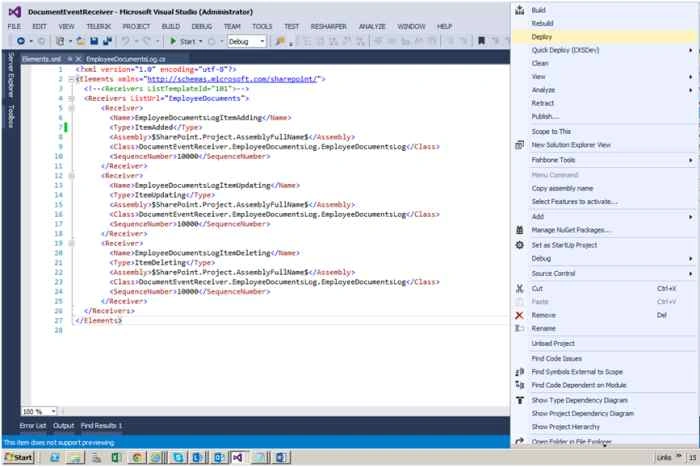
Build and deploy the solution.
Step 10
The document has been added.
Go to the EmployeeDocuments Document Library and add a new document.
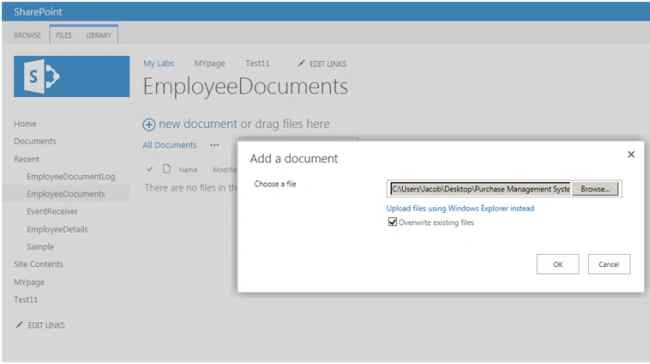
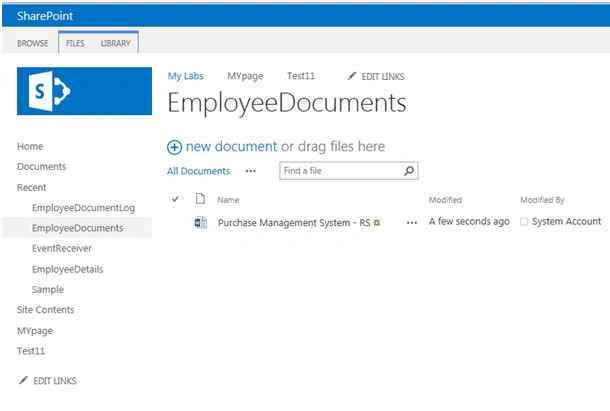
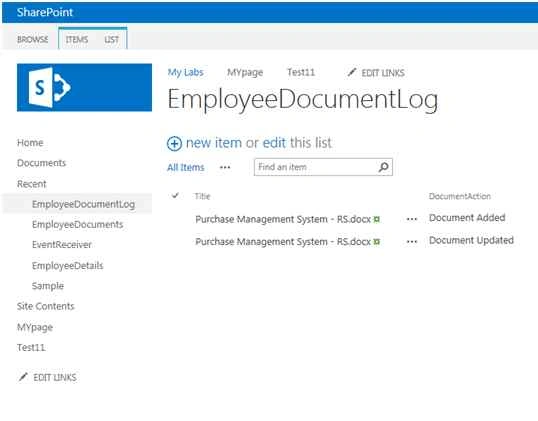
Go to “EmployeeDocumentLog” list. The log will show by the following.
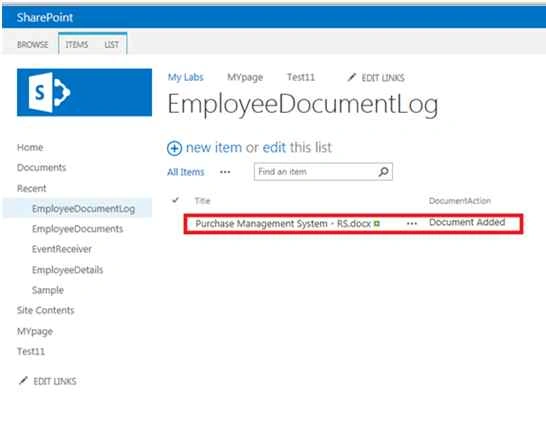
Step 11
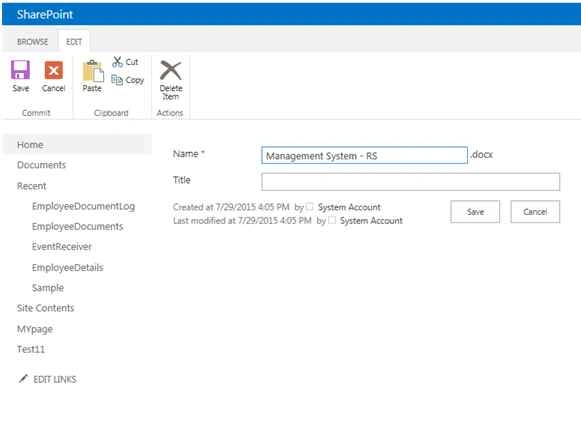
The document has been updated.
Go to the EmployeeDocuments library and update the document.
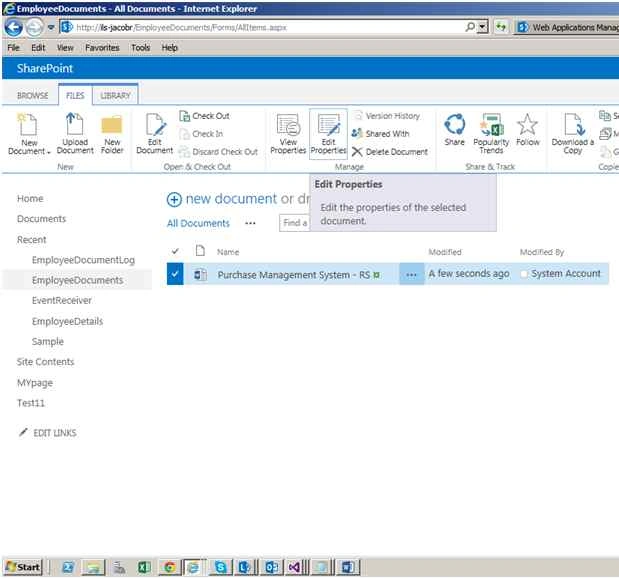
Here I have changed the File Name.
Go to the “EmployeeDocumentLog” list. The log will show as in the following:
Step 12
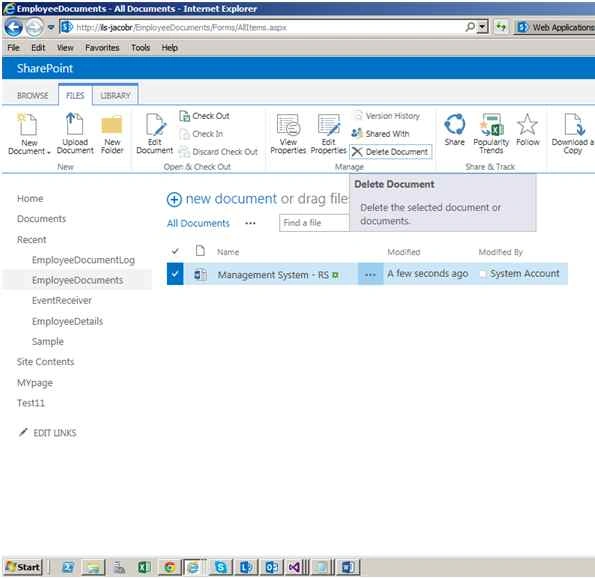
The document has been deleted.
Go to EmployeeDocuments library and delete the document.
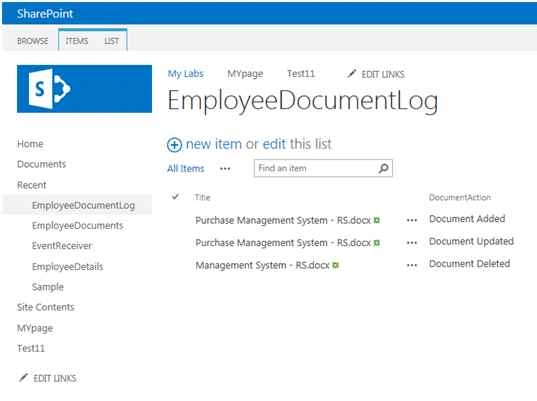
Go to the “EmployeeDocumentLog” list. The deleted document log will show as in the following:
Summary
In this article we saw have how to create an event receiver for a Document Library and custom list level in SharePoint 2013.
Akash KumharPosted Oct 5, 2018, 9:18 AM
Great Article Sir.. Thanks for sharing
SHRUTI dwivediPosted Dec 1, 2017, 2:58 AM
Nice article..........................
Senior MelvinPosted Jul 3, 2017, 6:46 AM
Which manual do you use when writing this code? Or where do you take these examples?
RakeshPosted Jul 30, 2015, 12:54 PM
Nice one
Santhakumar MunuswamyPosted Jul 30, 2015, 6:23 AM
Thanks for nice article
Sibeesh VenuPosted Jul 30, 2015, 5:03 AM
Nice Share
Neeraj KumarPosted Jul 30, 2015, 1:54 AM
Nice Article
Debasis SahaPosted Jul 30, 2015, 12:48 AM
Good Article..
Nilesh JadavPosted Jul 30, 2015, 12:04 AM
Nice one sir
Gopi ChandPosted Jul 29, 2015, 10:26 PM
Nice one
Abhay ShankerPosted Jul 29, 2015, 10:17 PM
Nice one..