

Now, it is the time of Ionic 2 (Cross-platform mobile apps using AngularJS and TypeScript). If you know about AngularJS and TypeScript, this is your “cup of tea.”
In this tutorial, I am going to cover the following topics.
- HTTP Services (Providers)
- Fetching JSON Data From URL
- Add task
- Conditionally applying CSS class
- Delete Task
- Update Task & more..
You can find the code here also. So, feel free to play with the code yourself. In this tutorial, I am using Ionic 2 CLI (Command Line Interface) to have work convenience with Ionic 2. In other words using CLI will create a boilerplate ready for us. For setup and all other instructions, please go through the previous article here.
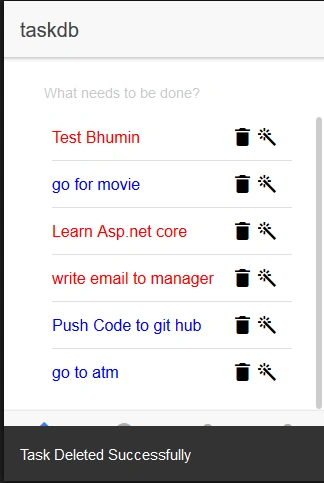
In this tutorial, we are developing a to-do application to simply list all the tasks, add tasks, delete tasks, and update tasks. I have already created the REST API using NodeJS, which will fetch data from MySQL. My Task table contains 3 columns - Id, Title, and Status.
Creating Data Structure/Class
- [code language=”typescript”]
- export class Task {
- constructor(public IdString,public TitleString,public StatusString){}
- }
- [/code]
First, I have created a class and named it as Task. It will be used to store the JSON data.
What are Services?
We can say, Services mean - don’t repeat yourself (Try)!
Now, what does this mean?
Let’s say for example, we require one function which can be used by more than one components. Then, what happens that we just need to write the same code again and again for each component. When we want to change some logic in function, we need to change it on each and every component.
Or, instead of doing this, we simply create a Service in which we can write the code once and use it for as many components as we want, by simply injecting the Service Instance. In other language, Services keep our function and logic centralized.
In general, our service can perform the following tasks.
- Communicate with database.
- Communicate with components /classes.
- Some other business logic which is accessible from various places of our application.
Creating Provider/Service
cmd> ionic g provider dbtaskservice
- [code language=”typescript”]
- public urlstring="https//localhost3000/Tasks/";
- getAllTasks(){
- return this._http.get(this.url)
- .map((responseResponse)=>response.json());
- }
- [/code]
The above function will return all the tasks from the database. But before creating this function, create the object of HTTP as shown below and also import rxjs/Rx for map and observable.
- [code language=”typescript”]
- import { Injectable } from '@angular/core';
- import { Task } from '../pages/tasks/task';
- import { Http,Response,RequestOptions,Headers } from '@angular/http';
- import { Observable } from "rxjs/Observable";
- import 'rxjs/Rx';
- @Injectable()
- export class Dbtaskservice {
- private allTaskTask[]=[];
- private urlstring="https//localhost3000/Tasks/";
- constructor(public _http Http)
- {
- console.log('Hello Dbtaskservice Provider');
- }
- getAllTask()
- {
- return this._http.get(this.url)
- .map((responseResponse)=>response.json());
- }
- deleteTask(itemTask){
- let headers = new Headers({ 'Content-Type' 'application/json' });
- let options = new RequestOptions({ headers headers });
- return this._http.delete(this.url+item.Id,
- options)
- .map((responseResponse)=>response.json());
- }
- addTask(itemTask){
- let body = JSON.stringify(item);
- let headers = new Headers({ 'Content-Type' 'application/json' });
- let options = new RequestOptions({ headers headers });
- return this._http.post(this.url,
- body, options)
- .map((responseResponse)=>response.json());
- }
- getTaskId(idany){
- return this._http.get(this.url+id)
- .map((responseResponse)=>response.json());
- }
- editTask(itemTask){
- let body = JSON.stringify(item);
- let headers = new Headers({ 'Content-Type' 'application/json' });
- let options = new RequestOptions({ headers headers });
- return this._http.put(this.url+item.Id,
- body, options)
- .map((responseResponse)=>response.json());
- }
- }
- [/code]
So, here in the above service, I have created all methods for tasks like getAllTask(), addTask(), deleteTask() etc.
Note -
To make this service available to each component, it must be declared inside the provider array of app.module.ts (i.e. global declaration file), as shown below.
- [code language=”typescript”]
- import { NgModule } from '@angular/core';
- import { IonicApp, IonicModule } from 'ionic-angular';
- import { MyApp } from './app.component';
- import { AboutPage } from '../pages/about/about';
- import { ContactPage } from '../pages/contact/contact';
- import { Dbtaskservice } from '../providers/dbtaskservice';
- @NgModule({
- declarations: [
- MyApp,
- AboutPage,
- ContactPage
- ],
- providers [Dbtaskservice]
- })
- [/code]
Creating Component
So far, I have created class and service, Now, it is time for component to display all the tasks.
cmd>ionic g page tasks
It will generate tasks directory inside pages directory.
Ionic 2 comes with global declaration concept. So, whenever creating a component, it must declare it in app.module.ts, inside the declaration array and entryComponents array as shown below. Then only can it be used.
- [code language=”typescript”]
- import { NgModule } from '@angular/core';
- import { IonicApp, IonicModule } from 'ionic-angular';
- import { MyApp } from './app.component';
- import { AboutPage } from '../pages/about/about';
- import { ContactPage } from '../pages/contact/contact';
- import { TasksPage } from '../pages/tasks/tasks';
- @NgModule({
- declarations [
- MyApp,
- AboutPage,
- ContactPage,
- TasksPage
- ],
- entryComponents [
- MyApp,
- AboutPage,
- ContactPage,
- HomePage,
- TasksPage
- ],
- })
- [/code]
Component can be divided in two parts.
- HTML
- TypeScript
I will first start with the TypeScript part. The TypeScript can be further divided in 3 parts.
- Import section
- Component metadata
- Class
So, in our example,
- First, create the array and name it as allTasks which is the type of task (which was created earlier).
- Then, inject the dbtaskservice inside the constructor and create the instance of your service.
- And then finally, call getAllTask method of your Service inside the ionViewDidLoad event.
Join the conversation! Your thoughts help the community grow.