

Introduction
ASP.NET Web API is a framework, which makes it easy to build HTTP Services, which reaches a broad range of clients, including Browsers and mobile devices. ASP.NET Web API is an ideal platform to build RESTful Applications on .NET Framework.
Here, in this article, we will focus on the things, mentioned below.
ASP.NET Web API is a framework, which makes it easy to build HTTP Services, which reaches a broad range of clients, including Browsers and mobile devices. ASP.NET Web API is an ideal platform to build RESTful Applications on .NET Framework.
Here, in this article, we will focus on the things, mentioned below.
- Layered Architecture of Web API Project.
- Working with Repository Pattern in Web API Project.
- Working with Dependency Injection in Web API.
- Explaining Entity Framework for Data Access.
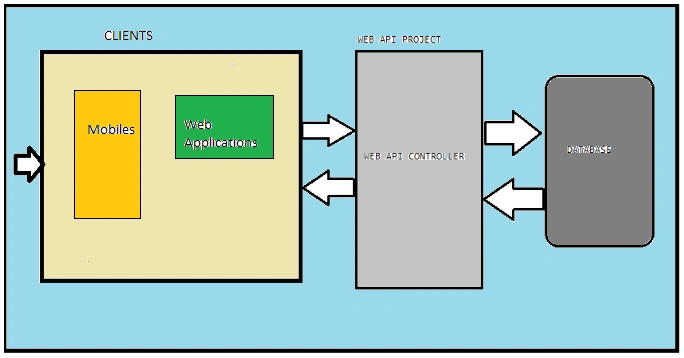
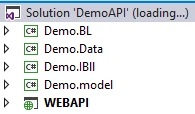
Now, just create a Web API Project with the layers of the project, mentioned below.
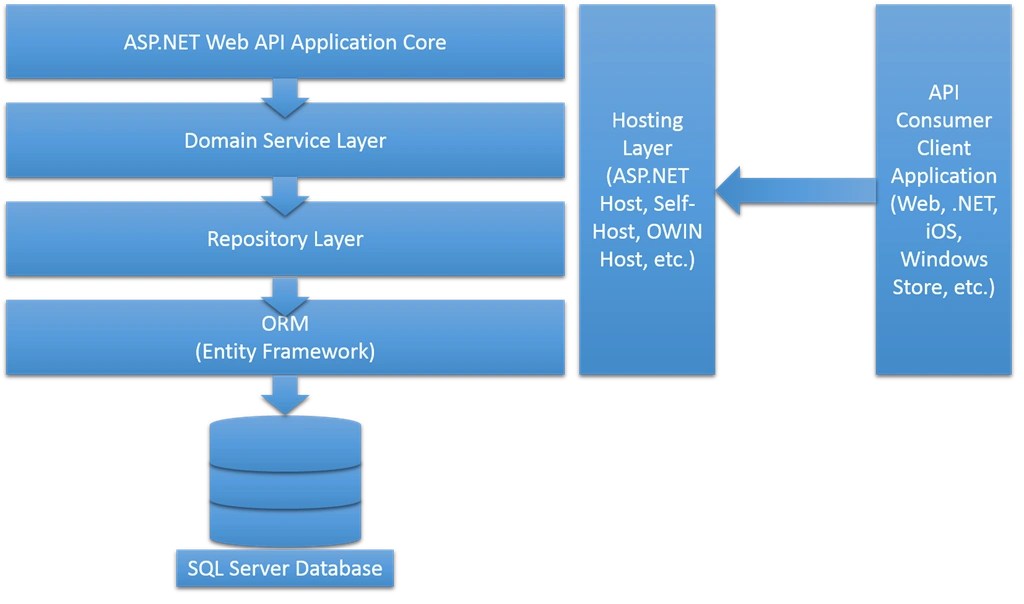
Here is the complete picture of how these layers appear in the project after hosting it.
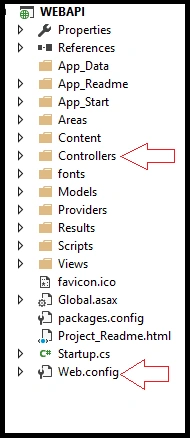
Now, we will check each layer one by one in detail, so the first layer is WEB API Layer.
This layer is mainly used to handle the request coming from any client. The Web API layers mainly contain Controller classes. These controller classes are derived from API Controller. In each controller, we have several Action Methods and we are writing our logic.
Now, the second is my IBLL layer. Here, my IBLL layer contains all the interfaces, where all the abstract classes have an abstract method, which will be declared. Thus, the controller will call the IBLL layer, where all my interfaces are defined.
Here, I have created a IProduct.cs interface, where I have declared all the abstract methods to manipulate some operation.
Here, I have declared the abstract class, as shown below.
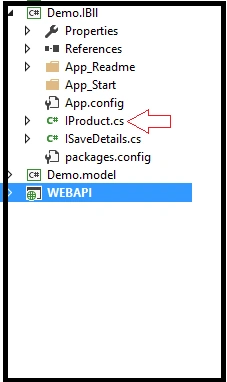
- Here, I have declared three abstract methods, as mentioned above.
- using System;
- using System.Collections.Generic;
- using System.Linq;
- using System.Text;
- using System.Threading.Tasks;
- using Demo.model;
- namespace Demo.IBll
- {
- public interface IProduct
- {
- bool SaveProducts(ProductDetailsModel pod);
- List<ProductDetailsModel> searchdetails(string id);
- List<ProductDetailsModel> showDetails();
- }
- }
Here is my Model Layer, where all my model classes and properties are declared.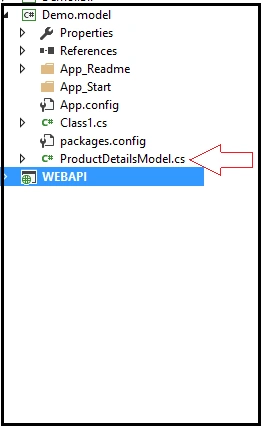
Here is my ProductDetailsModel.cs.Now, I will declare a Helper Class, which is inherited from the IProduct Interface, as shown below.- using System;
- using System.Collections.Generic;
- using System.Linq;
- using System.Text;
- using System.Threading.Tasks;
- namespace Demo.model
- {
- public class ProductDetailsModel
- {
- public long slNo { get; set; }
- public string ProductName { get; set; }
- public string ProductDetail { get; set; }
- public int Price { get; set; }
- public string ProductType { get; set; }
- }
- }
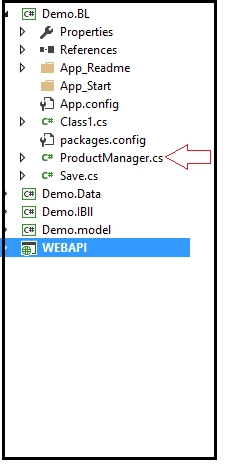 Now, I will explain the DataLayer, which is used to communicate with the database. Here is the Implementation of this layer.
- using System;
- using System.Collections.Generic;
- using System.Linq;
- using System.Text;
- using System.Threading.Tasks;
- using Demo.IBll;
- using Demo.model;
- using AutoMapper;
- using Demo.Data;
- namespace Demo.BL
- {
- public class ProductManager : IProduct
- {
- DemoEntities2 _dbContext = new DemoEntities2();
- public bool SaveProducts(ProductDetailsModel pod)
- {
- productDetail pd = new productDetail();
- pd.ProductName = pod.ProductName;
- pd.ProductDetail1= pod.ProductDetail;
- pd.Price = pod.Price;
- pd.Type = pod.ProductType;
- _dbContext.productDetails.Add(pd);
- if(_dbContext.SaveChanges()==1)
- {
- return true;
- }
- else
- {
- return false;
- }
- }
- public List<ProductDetailsModel> searchdetails(string type)
- {
- List<ProductDetailsModel> li = new List<ProductDetailsModel>();
- var details = _dbContext.productDetails.Where(x => x.Type == type);
- if(details!=null)
- {
- Parallel.ForEach(details, x =>
- {
- ProductDetailsModel obj = new ProductDetailsModel();
- obj.slNo = x.slNo;
- obj.ProductName = x.ProductName;
- obj.Price = Convert.ToInt32(x.Price);
- li.Add(obj);
- });
- return li;
- }
- else
- {
- return li;
- }
- }
- public List<ProductDetailsModel> showDetails()
- {
- List<ProductDetailsModel> li = new List<ProductDetailsModel>();
- var details = _dbContext.productDetails;
- if (details != null)
- {
- Parallel.ForEach(details, x =>
- {
- ProductDetailsModel obj = new ProductDetailsModel();
- obj.slNo = x.slNo;
- obj.ProductName = x.ProductName;
- obj.Price = Convert.ToInt32(x.Price);
- li.Add(obj);
- });
- return li;
- }
- else
- {
- return li;
- }
- }
- public bool DeleteDetails(int id)
- {
- var Info = _dbContext.productDetails.Where(m => m.slNo == id).FirstOrDefault();
- _dbContext.productDetails.Remove(Info);
- if (_dbContext.SaveChanges() == 0)
- return true;
- return false;
- }
- }
- }
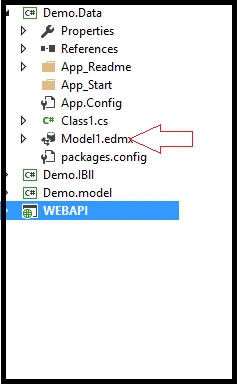
Here is my Model1.edmx as follows.This layer will communicate with the database and is responsible for all kinds of DB related operations. Here, we have have used Entityframework, which is an ORM patterm.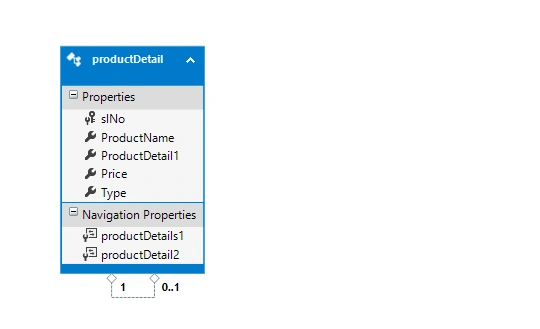
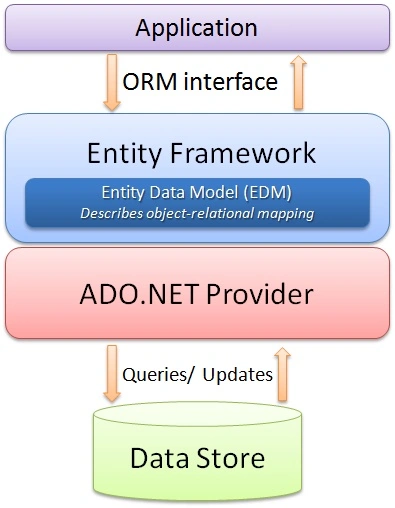
The Microsoft ADO.NET Entity Framework is an Object/Relational Mapping (ORM) framework that enables developers to work with relational data as domain-specific objects, eliminating the need for most of the data access plumbing code that developers usually need to write.
Using the Entity Framework, the developers issue queries, using LINQ, and retrieve and manipulate the data as strongly typed objects. The Entity Framework's ORM implementation provides the Services like change tracking, identity resolution, lazy loading and query translation , so that the developers can focus on their Application-specific business logic rather than the data access fundamentals.
Entity framework is an Object/Relational Mapping (O/RM) framework. It is an enhancement to ADO.NET, which gives the developers an automated mechanism to access & store the data in the database.
Now, I will explain how to write code under Web API controller, using Dependency injection.
Let me explain what Dependency Injection is.
Dependency Injection is a technique to develop an Application in an independent way. It is independent in the sense that every module of the Application should be unique and will not depend upon the other modules. They should be loosely coupled.
Let me discuss here what tightly coupled and loosely coupled means in software development.
Tight Coupling
It means two classes or two modules are fully dependent upon each other. Changing one class object may lead to change in several areas in the other class. When we are creating an object of a class and calling that class method by its object from another class, we will say that the two classes are tightly coupled or dependent on each other.
Loose Coupling
It means two objects are independent and an object can use another object without being dependent on it. They are unique. In software development, we always prefer loosely coupling Applications.
It means two classes or two modules are fully dependent upon each other. Changing one class object may lead to change in several areas in the other class. When we are creating an object of a class and calling that class method by its object from another class, we will say that the two classes are tightly coupled or dependent on each other.
Loose Coupling
It means two objects are independent and an object can use another object without being dependent on it. They are unique. In software development, we always prefer loosely coupling Applications.
Now, I will explain how to use Dependency Injection, using NinJect Container.

Go To Manage NuGet Package, search for Ninject in WEB API Project and install it.
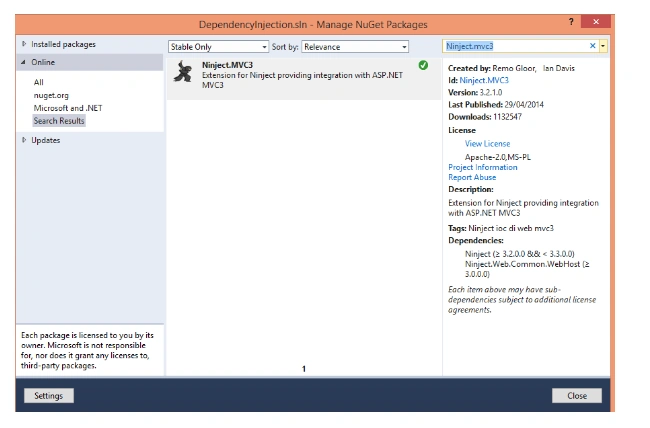
After installing this Ninject, we found the 3 assemblies in our References and one NinjectWebCommon.cs class in App.start, mentioned below.
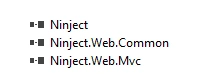
Here is the NinjectWebCommon.cs class in App.start.
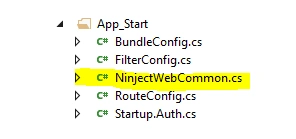
Now, go to NinjectWebCommon.cs class and register the dependency, as shown below.
- [assembly: WebActivatorEx.PreApplicationStartMethod(typeof(Demo.Data.App_Start.NinjectWebCommon), "Start")]
- [assembly: WebActivatorEx.ApplicationShutdownMethodAttribute(typeof(Demo.Data.App_Start.NinjectWebCommon), "Stop")]
- namespace Demo.Data.App_Start
- {
- using System;
- using System.Web;
- using Microsoft.Web.Infrastructure.DynamicModuleHelper;
- using Ninject;
- using Ninject.Web.Common;
- public static class NinjectWebCommon
- {
- private static readonly Bootstrapper bootstrapper = new Bootstrapper();
- /// <summary>
- /// Starts the application
- /// </summary>
- public static void Start()
- {
- DynamicModuleUtility.RegisterModule(typeof(OnePerRequestHttpModule));
- DynamicModuleUtility.RegisterModule(typeof(NinjectHttpModule));
- bootstrapper.Initialize(CreateKernel);
- }
- /// <summary>
- /// Stops the application.
- /// </summary>
- public static void Stop()
- {
- bootstrapper.ShutDown();
- }
- /// <summary>
- /// Creates the kernel that will manage your application.
- /// </summary>
- /// <returns>The created kernel.</returns>
- private static IKernel CreateKernel()
- {
- var kernel = new StandardKernel();
- try
- {
- kernel.Bind<Func<IKernel>>().ToMethod(ctx => () => new Bootstrapper().Kernel);
- kernel.Bind<IHttpModule>().To<HttpApplicationInitializationHttpModule>();
- RegisterServices(kernel);
- return kernel;
- }
- catch
- {
- kernel.Dispose();
- throw;
- }
- }
- /// <summary>
- /// Load your modules or register your services here!
- /// </summary>
- /// <param name="kernel">The kernel.</param>
- private static void RegisterServices(IKernel kernel)
- {
- kernel.Bind<Demo.IBll.IProduct>().To<Demo.BL.ProductManager>().InRequestScope();
- }
- }
- }
REPOSITORY PATTERN
As we are working on a layer architecture, our project must be independent between all the layers. I can say that the Controller layers and DataAccess layers must be independent. If we make it tightly coupled, any change related to the data-access layer can change the controller code.
Without Repository, my code will be, as shown below.
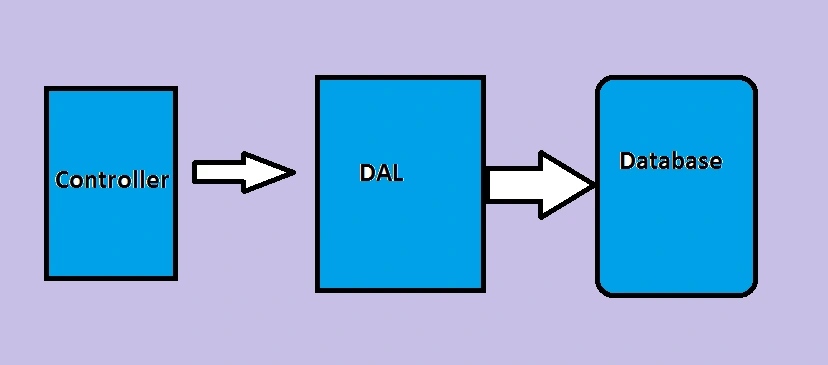
Hence, the repository is used to create an abstraction layer between the Data Access layer and the Business Logic layer of an Application. Implementing these patterns can help insulate your Application from the changes in the data store and can facilitate automated unit testing or test-driven development (TDD).
Here, we are creating an object of Bll in controller, so both the BLL and Controller are tightly coupled. Thus, when our Application becomes tightly coupled, then any change in DAL will change the whole Controller.
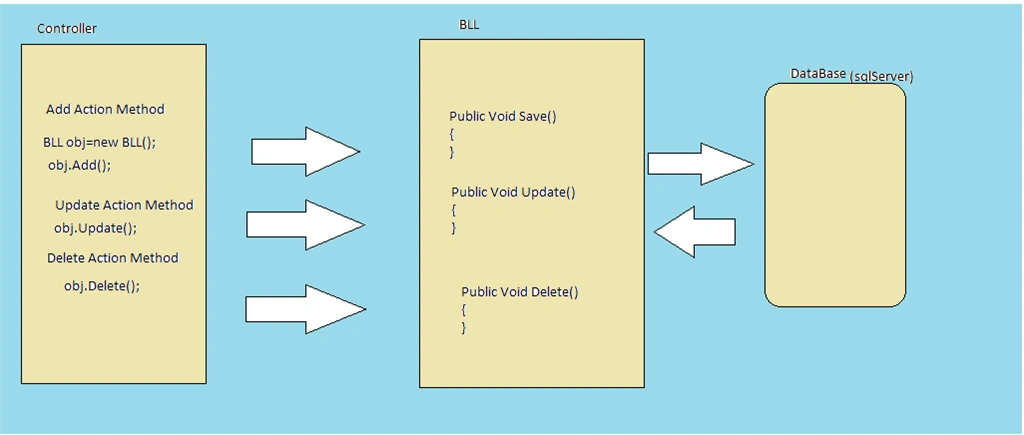
Changes are something like changing the database, changing in Data access techinique (ADO.NET Entity Framework, ADO.NET, NHibernate) so any changes will affect the frontend.
Suppose my manager is quite unhappy with the performance of Entity framework and advises me to use normal ADO.NET instead of Entity Framework.
If our Application is tightly coupled, then it is very difficult to change. If you change the DAL Layer, all the layers in the controller need to change as follows.
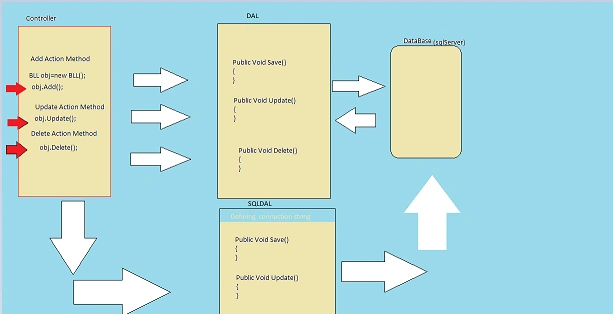
Thus, it will affect both the layers. Here for reference, I have marked with a red arrow mark, where the change may occur. When we are using object of DAL class, it needs to be replaced with SQL DAL class.
Now, let's consider the project, using Repository Pattern. It will look, as shown below.
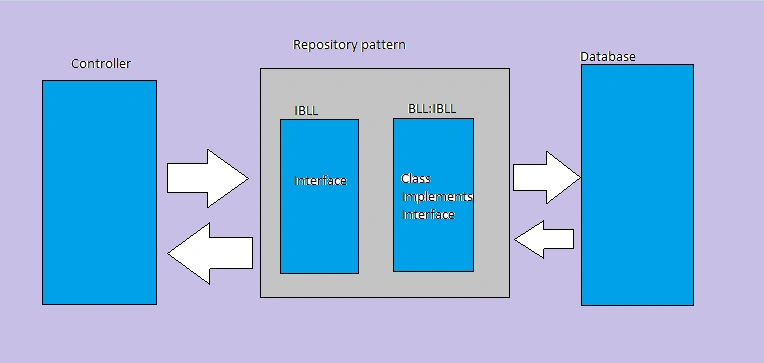
Here, my controller will point to the IBLL, which is an interface and the Interface will be implemented in BLL.
Suppose we need to change the Entity Framework BAL to normal ADO.NET BAL, Thus, we simply create a ADO.NET BAL and inherit it from IBLL, as shown in the image below.
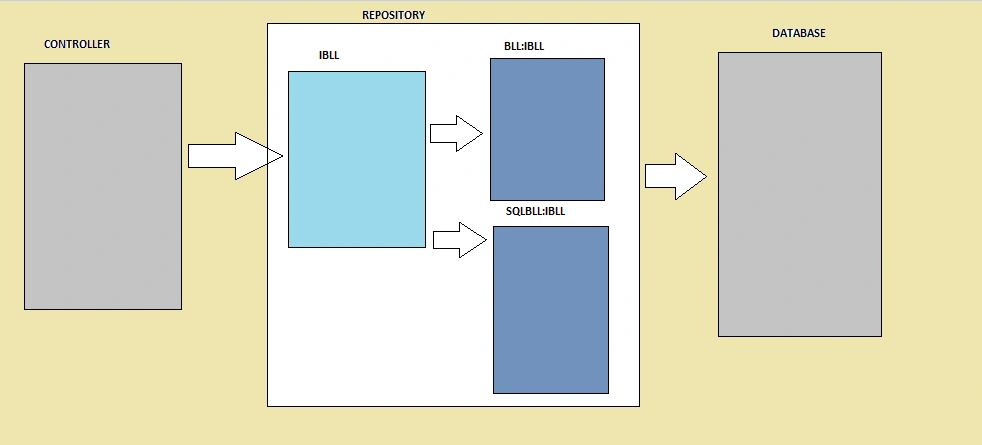
In this way, we can overcome the problem of frequently changing any data access technology in our projects.
For this reason, we have taken IBLL and BLL in our Project, as shown below.
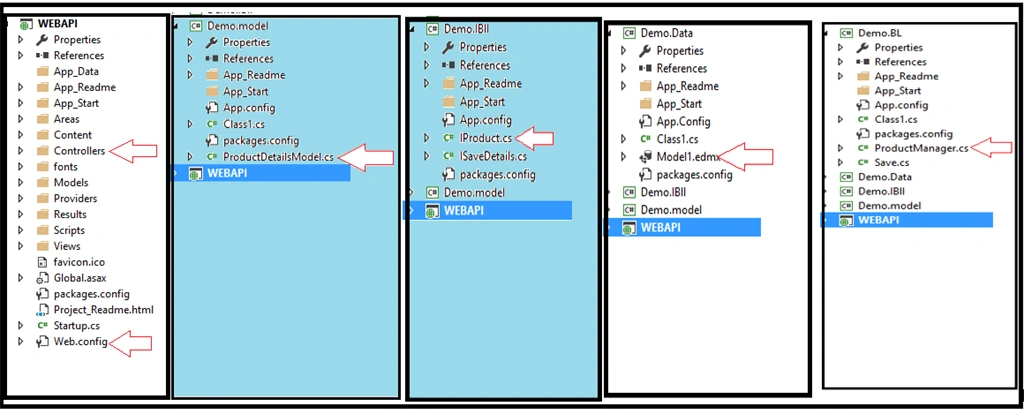
Now, our project is almost done. We need to write the code in the controller for Dependency Injection and call our respective classes. Thus, my complete code for CRUD operation in ProductDetails controller is as follows.
- using System;
- using System.Collections.Generic;
- using System.Linq;
- using System.Net;
- using System.Net.Http;
- using System.Threading.Tasks;
- using System.Web.Http;
- using Demo.model;
- using Demo.IBll;
- namespace WEBAPI.Controllers
- {
- [RoutePrefix("api/Product")]
- public class ProductController : ApiController
- {
- Demo.IBll.IProduct iproductdetails;
- public ProductController(Demo.IBll.IProduct _iproductdetails)
- {
- iproductdetails = _iproductdetails;
- }
- [Route("addProduct")]
- [HttpPost]
- public async Task<HttpResponseMessage> saveProductDetails(ProductDetailsModel pod)
- {
- Dictionary<string, string> dict = new Dictionary<string, string>();
- bool res = false;
- res = iproductdetails.SaveProducts(pod);
- if (res == true)
- {
- var showmessage = "Product Saved Successfully.";
- dict.Add("Message", showmessage);
- return Request.CreateResponse(HttpStatusCode.OK, dict);
- }
- else
- {
- var showmessage = "Product Not Saved Please try again.";
- dict.Add("Message", showmessage);
- return Request.CreateResponse(HttpStatusCode.BadRequest, dict);
- }
- }
- [Route("showList")]
- [HttpGet]
- public async Task<HttpResponseMessage> showList()
- {
- List<ProductDetailsModel> li = new List<ProductDetailsModel>();
- Dictionary<string, string> dict = new Dictionary<string, string>();
- var details = iproductdetails.showDetails();
- foreach (var x in details)
- {
- ProductDetailsModel pcm = new ProductDetailsModel();
- pcm.slNo = x.slNo;
- pcm.ProductName = x.ProductName;
- pcm.Price = x.Price;
- li.Add(pcm);
- }
- return Request.CreateResponse(HttpStatusCode.OK, li);
- }
- [Route("searchProduct")]
- [HttpPost]
- public async Task<HttpResponseMessage> searchProduct(ProductDetailsModel pod)
- {
- List<ProductDetailsModel> li = new List<ProductDetailsModel>();
- Dictionary<string, string> dict = new Dictionary<string, string>();
- var details = iproductdetails.searchdetails(pod.ProductType);
- foreach(var x in details)
- {
- ProductDetailsModel pcm = new ProductDetailsModel();
- pcm.slNo = x.slNo;
- pcm.ProductName = x.ProductName;
- pcm.Price = x.Price;
- li.Add(pcm);
- }
- return Request.CreateResponse(HttpStatusCode.OK,li);
- }
- }
- }
In this way, we can create Web API, using Dependency Injection and Repository Layer in our Project.
Hope, you will find some idea about creating Web API, using these techniques. In case you have any doubt about the code written by me, you can comment and I will try to explain it more clearly. If there is any fault in my understanding, I will learn from you.
sachin kaushalPosted Apr 29, 2022, 10:25 AM
Bhuwan MittalCould you please share the complete solution
Bhuwan MittalPosted Mar 1, 2021, 9:31 AM
Could you please share the complete solution
raaja sekarPosted Sep 12, 2019, 7:53 AM
[Route("showStateList")] [HttpGet] public async Task<HttpResponseMessage> showStateList() { Dictionary<string, string> dict = new Dictionary<string, string>(); _liststatemodel.Clear(); var details = istate.showDetails();//Getting error in this line as " Object reference not set to an instance of an object.-- System.NullReferenceException" if (details != null) { Parallel.ForEach(details, x => { obj.StateID = x.StateID; obj.Code = x.Code; obj.Description = x.Description; obj.CountryID = x.CountryID; obj.Name = x.Name; obj.EffectiveDate = x.EffectiveDate; obj.ExpirationDate = x.ExpirationDate; _liststatemodel.Add(obj); }); } return Request.CreateResponse(HttpStatusCode.OK, _liststatemodel); } Kindly let me know , what should be done
paulo nogueiraPosted Jul 19, 2018, 8:15 AM
In the product controller, i'm getting a warning about missing await call, isn't this needed in order to complete the await asynchronous api?
Vinay Kumar GuptaPosted Jun 2, 2018, 8:37 AM
Hello Debendra, [assembly: WebActivatorEx.PreApplicationStartMethod(typeof(Demo.Data.App_Start.NinjectWebCommon), "Start")] [assembly: WebActivatorEx.ApplicationShutdownMethodAttribute(typeof(Demo.Data.App_Start.NinjectWebCommon), "Stop")] need to add NinjectWebCommon.cs in Data Access layer please suggest because i am getting error below : make sure that the controller has a parameterless public constructor ninject
AK AKPosted Oct 30, 2017, 8:17 AM
Nice article !! data layer could have been explained in detail. You have the solution to share with us ?
Sriram VellankiPosted Oct 27, 2017, 8:01 PM
Please share the complete solution
Humayun Kabir MamunPosted Nov 30, 2016, 1:49 AM
Nice work, detail oriented...
PEDRO RENE GONZALEZPosted Nov 24, 2016, 10:01 AM
Hi, how can i consume from other project? thx
Ziku AhmedPosted Nov 22, 2016, 12:57 PM
Nice explanation ..............thanks a lot
Kanniyappan KrishPosted Nov 14, 2016, 1:57 AM
Nice article. Way of explanation is great. Thanks :)
Rafi MohdPosted Nov 3, 2016, 10:37 AM
Hi, Nice Article. Could you please elaborate on dependency injection. How does tight coupling effect classes. For example say can you take an example of two classes, change one of them an show how it is effecting other object?
Prasanna MuraliPosted Nov 3, 2016, 7:28 AM
Nice one...
Sandeep Singh ShekhawatPosted Nov 2, 2016, 9:50 PM
Good! Please choose article category "ASP.NET" rather than "ASP.NET Core"..