

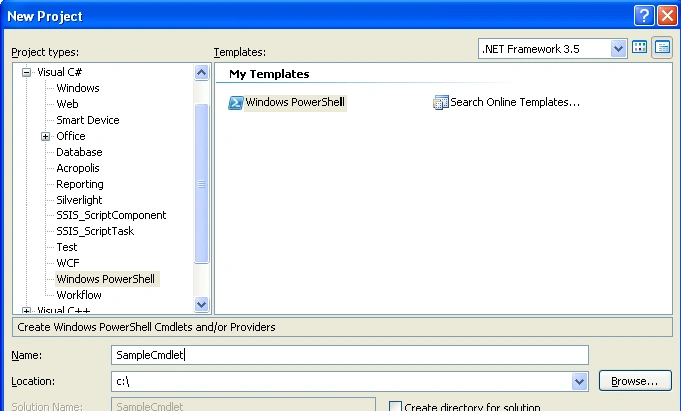
Now, open our VS 2008 and create a new project with name the SampleCmdlet as shown below:
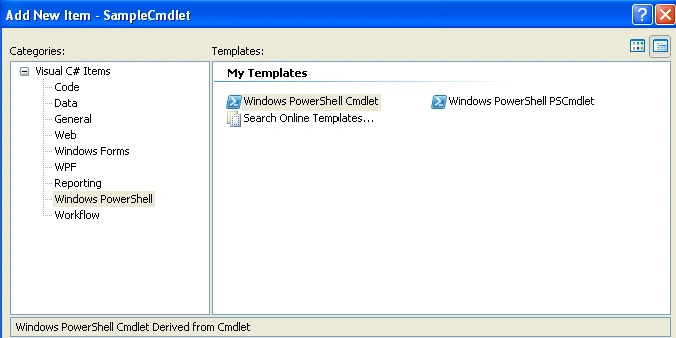
We will make our Cmdlet to display the environment variables of our machine. Add a new item of type "Windows PowerShell PSCmdlet" with name as SampleCmdlet as shown below:
Now, go to the SampleCmdlet class and add the following code:
[Cmdlet(VerbsCommon.Get, "SampleCmdlet", SupportsShouldProcess = true)]
public class SampleCmdlet : PSCmdlet
{
#region Parameters
[Parameter(Position = 0,
Mandatory = false,
ValueFromPipelineByPropertyName = true,
HelpMessage = "Help Text")]
[ValidateNotNullOrEmpty]
public string VariableTarget
{
get;
set;
}
#endregion
protected override void ProcessRecord()
{
try
{
IEnumerator objEnum = GetVariables(VariableTarget).GetEnumerator();
while (objEnum.MoveNext())
{
DictionaryEntry entry = (DictionaryEntry)objEnum.Current;
WriteObject("Key : "+entry.Key + " " +"Value : "+ entry.Value);
}
}
catch (Exception)
{
}
}
private IDictionary GetVariables(string target)
{
if (target.ToLower() == "user")
{
return Environment.GetEnvironmentVariables(EnvironmentVariableTarget.User);
}
else if (target.ToLower() == "machine")
{
return Environment.GetEnvironmentVariables(EnvironmentVariableTarget.Machine);
}
else if (target.ToLower() == "process")
{
return Environment.GetEnvironmentVariables(EnvironmentVariableTarget.Process);
}
else if (target.ToLower() == "all")
{
return Environment.GetEnvironmentVariables();
}
else
{
return Environment.GetEnvironmentVariables();
}
}
}
Here, we are passing a parameter named VariableTarget to specify the type of environment variables to be displayed. In the ProcessRecord() method, we are getting the key and value of the variable and sending it for display using WriteObject() method.
Now, build the solution. Here, we are getting environment variables based on machine, user or process. We need to register the dll using installutil tool. Go to VS/ PowerShell command prompt and run the following command:
InstallUtil <DLLName>. Now, add our SampleCmdlet to PowerShell commands using the following command:
"add-pssnapin samplecmdlet". Finally, we can run the command (samplecmdlet "all") to get a list of environment variables. In this way, we can write our own Cmdlets using VS 2008.
I am ending up the things here. I am attaching source code for reference. I hope this article will be helpful for all.
santosh kumarPosted May 9, 2018, 12:47 AM
Hi Sateesh can you help me to develop a cmdlet in powershell to connect to a storage cluster
Mahesh ChandPosted Sep 17, 2010, 10:58 AM
Good. I think now Visual Studio 2010 uses Windows PowerShell 2.0 and have better templates.