

Introduction
This application shows how to do Create, Read, Update and Delete (CRUD) operations on a BOOKS table using a DLL and a Stored Procedure. ASP.NET pages access methods from the DLL that contains the DAL in it and Stored Procedures in the SQL Server database to do the actual operations on the BOOKS table.
Open Visual Studio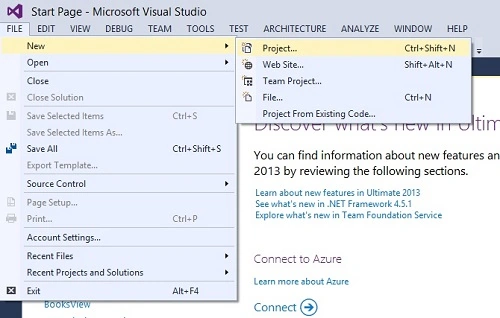
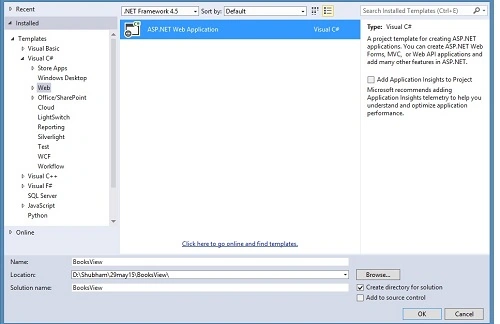

Open Microsoft Visual Studio 2013 and create an Empty Web Application with any suitable name.
Database Structure
Open SQL Server to create a database (we have used database as the name of our database in SQL) with any suitable name and then create table and Stored Procedure for the CRUD operations.
Table Structure
- create Table books
- (
- bookid int identity(1,1) primary Key,
- title varchar(50) null,
- authors varchar(200) null,
- price money null,
- publisher varchar(50),
- )
Stored Procedure
- CREATE PROCEDURE dbo.GetBooks
- AS
- select * from books
- CREATE PROCEDURE dbo.GetBook(@bookid int)
- AS
- select * from books where bookid = @bookid
- CREATE PROCEDURE dbo.AddBook( @title varchar(50), @authors varchar(200), @price money, @publisher varchar(50) )
- AS
- insert into books (title,authors,price,publisher)
- values(@title,@authors,@price,@publisher)
- CREATE PROCEDURE dbo.DeleteBook (@bookid int)
- AS
- delete from books where bookid = @bookid
- if @@rowcount <> 1
- raiserror('Invalid Book Id',16,1)
- CREATE PROCEDURE dbo.UpdateBook( @bookid int, @title varchar(50), @authors varchar(200), @price money, @publisher varchar(50) )
- AS
- update books set title= @title, authors = @authors, price = @price, publisher = @publisher
- where bookid = @bookid;
- if @@rowcount <> 1
- raiserror('Invalid Book Id',16,1)
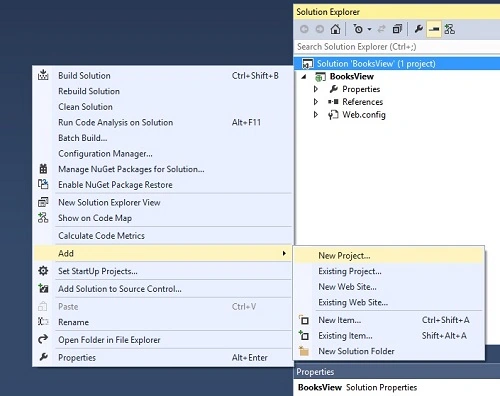
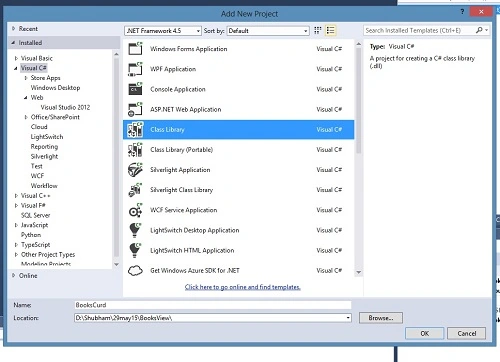
Now add class files to create a Data Access Layer (DAL). We will add the following three class files:
- Book.cs (to set get, set Properties).
- BookDal.cs (to make the DAL).
- DataBase.cs (to import a connection string from Web.Config and use this file name the same as our database file name).
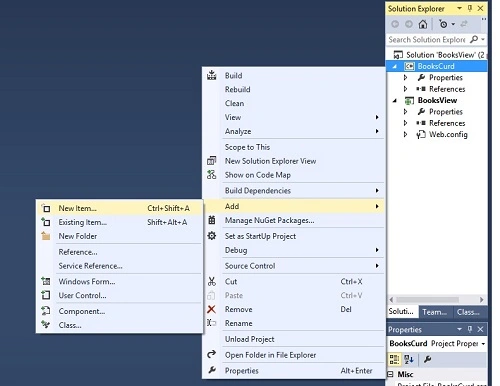
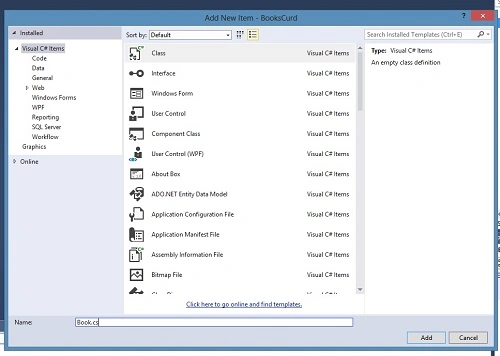
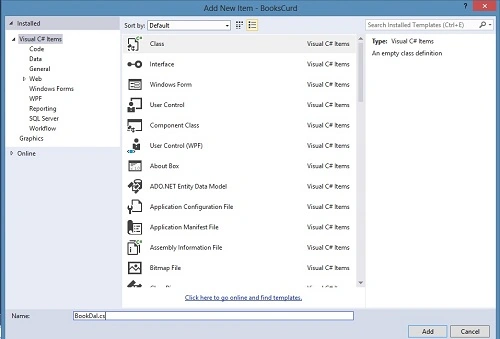

Connection String
Open the Web.Config file to add a connection string.
- <configuration>
- <connectionStrings>
- <add name="database" connectionString="Data Source=ServerName; Initial Catalog=Database; User Id=User; Password=Password;" providerName="System.Data.SqlClient"/>
- </connectionStrings>
- <system.web>
- <compilation debug="true" targetFramework="4.5" />
- <httpRuntime targetFramework="4.5" />
- </system.web>
- </configuration>
If we have made our database on Windows Authentication mode then we need to add "Integrated Security=true".
Class Files
Import the connection string into the DataBase.cs file as in the following:
- using System;
- using System.Collections.Generic;
- using System.Linq;
- using System.Web;
- using System.Configuration;
- namespace BooksCrud
- {
- public class DataBase
- {
- static public String ConnectionString
- {
- get
- {
- return ConfigurationManager.ConnectionStrings["database"].ConnectionString;
- }
- }
- }
- }
Now prepare the get and set properties in the Book.cs file as in the following:
- using System;
- using System.Collections.Generic;
- using System.Linq;
- using System.Web;
- namespace BooksCrud
- {
- public class Book
- {
- public int Bookid { get; set; }
- public string Title { get; set; }
- public string Authors { get; set; }
- public string Publishers { get; set; }
- public double Price { get; set; }
- }
- }
- using System;
- using System.Data.SqlClient;
- using System.Data;
- using System.Configuration;
- namespace BooksCrud
- {
- public class BookDal
- {
- public static DataSet GetBooks()
- {
- SqlConnection con = new SqlConnection(DataBase.ConnectionString);
- SqlDataAdapter da = new SqlDataAdapter("getbooks", con);
- da.SelectCommand.CommandType = CommandType.StoredProcedure;
- DataSet ds = new DataSet();
- da.Fill(ds, "books");
- return ds;
- }
- public static Book GetBook(int bookid)
- {
- SqlConnection con = new SqlConnection(DataBase.ConnectionString);
- try
- {
- con.Open();
- SqlCommand cmd = new SqlCommand("getbook", con);
- cmd.CommandType = CommandType.StoredProcedure;
- cmd.Parameters.AddWithValue("@bookid", bookid);
- SqlDataReader dr = cmd.ExecuteReader();
- if (dr.Read())
- {
- Book b = new Book();
- b.Title = dr["title"].ToString();
- b.Authors = dr["authors"].ToString();
- b.Price = Double.Parse(dr["price"].ToString());
- b.Publishers = dr["publisher"].ToString();
- return b;
- }
- else
- return null;
- }
- catch (Exception ex)
- {
- return null;
- }
- finally
- {
- con.Close();
- }
- }
- public static string AddBook(string title, string authors, double price, string publisher)
- {
- SqlConnection con = new SqlConnection(DataBase.ConnectionString);
- try
- {
- con.Open();
- SqlCommand cmd = new SqlCommand("addbook", con);
- cmd.CommandType = CommandType.StoredProcedure;
- cmd.Parameters.AddWithValue("@title", title);
- cmd.Parameters.AddWithValue("@authors", authors);
- cmd.Parameters.AddWithValue("@price", price);
- cmd.Parameters.AddWithValue("@publisher", publisher);
- cmd.ExecuteNonQuery();
- return null; // success
- }
- catch (Exception ex)
- {
- return ex.Message; // return error message
- }
- finally
- {
- con.Close();
- }
- }
- public static string DeleteBook(int bookid)
- {
- SqlConnection con = new SqlConnection(DataBase.ConnectionString);
- try
- {
- con.Open();
- SqlCommand cmd = new SqlCommand("deletebook", con);
- cmd.CommandType = CommandType.StoredProcedure;
- cmd.Parameters.AddWithValue("@bookid", bookid);
- cmd.ExecuteNonQuery();
- return null; // success
- }
- catch (Exception ex)
- {
- return ex.Message; // return error message
- }
- finally
- {
- con.Close();
- }
- }
- public static string UpdateBook(int bookid, string title, string authors, double price, string publisher)
- {
- SqlConnection con = new SqlConnection(DataBase.ConnectionString);
- try
- {
- con.Open();
- SqlCommand cmd = new SqlCommand("updatebook", con);
- cmd.CommandType = CommandType.StoredProcedure;
- cmd.Parameters.AddWithValue("@bookid", bookid);
- cmd.Parameters.AddWithValue("@title", title);
- cmd.Parameters.AddWithValue("@authors", authors);
- cmd.Parameters.AddWithValue("@price", price);
- cmd.Parameters.AddWithValue("@publisher", publisher);
- cmd.ExecuteNonQuery();
- return null; // success
- }
- catch (Exception ex)
- {
- return ex.Message; // return error message
- }
- finally
- {
- con.Close();
- }
- }
- }
- }
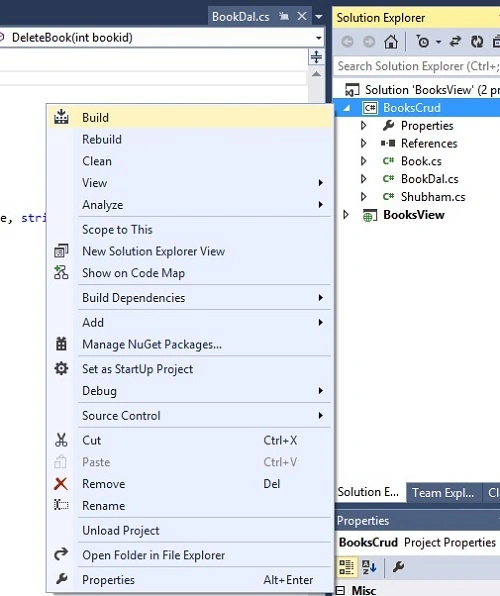
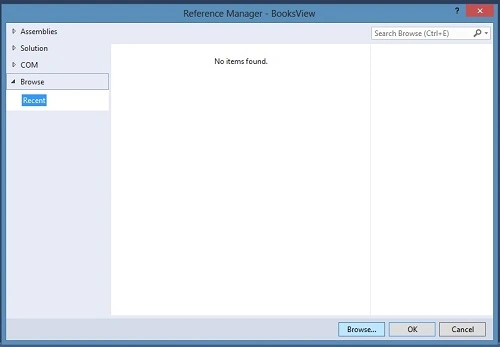
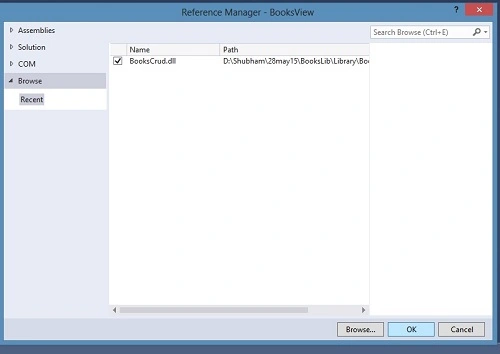
After a successful build, now the BookCrud.dll is ready for use in our Web Project.
Now add a reference to our web project.


Web Forms Structure
menu.html
- <!DOCTYPE html>
- <html>
- <head>
- <title>CRUD Application using .dll, DAL and Stored Procedures</title>
- <style>
- a {
- font-weight: 700;
- color: red;
- font-size: 12pt;
- }
- </style>
- </head>
- <body>
- <h2>CRUD Application using DLL and Stored Procedure</h2>
- This application shows how to perform Create, Read , Update and Delete (CRUD) operations.
- ASP.NET pages access methods in DAL (Data Access Layer),which call stored procedures in
- Sql Server Database to perform the actual operations on BOOKS table.
- <a href="addbook.aspx">Add New Book</a>
- <p />
- <a href="updatebook.aspx">Update Book</a>
- <p />
- <a href="deletebook.aspx">Delete Book</a>
- <p />
- <a href="listbook.aspx">List Books</a>
- </body>
- </html>
addbook.aspx
- <!DOCTYPE html>
- <html xmlns="http://www.w3.org/1999/xhtml" >
- <head id="Head1" runat="server">
- <title>Add Book</title>
- </head>
- <body>
- <form id="form1" runat="server">
- <h2>Add New Book</h2>
- <table>
- <tr>
- <td>Book Title</td>
- <td><asp:TextBox ID="txtTitle" runat="server"></asp:TextBox></td>
- </tr>
- <tr>
- <td>Authors</td>
- <td><asp:TextBox ID="txtAuthors" runat="server"></asp:TextBox></td>
- </tr>
- <tr>
- <td>Price</td>
- <td><asp:TextBox ID="txtPrice" runat="server"></asp:TextBox></td>
- </tr>
- <tr>
- <td>Publisher</td>
- <td><asp:TextBox ID="txtPublisher" runat="server"></asp:TextBox></td>
- </tr>
- </table>
- <br />
- <asp:Button ID="btnAdd" runat="server" Text="Add Book" OnClick="btnAdd_Click" /><br />
- <br />
- <asp:Label ID="lblMsg" runat="server" EnableViewState="False"></asp:Label><br />
- <p />
- <a href="menu.html">Go Back To Menu</a>
- </form>
- </body>
- </html>
addbook.aspx.cs
- using System;
- using System.Collections.Generic;
- using System.Linq;
- using System.Web;
- using System.Web.UI;
- using System.Web.UI.WebControls;
- using System.Data;
- using System.Data.SqlClient;
- using BooksCrud;
- namespace BooksView
- {
- public partial class addbook : System.Web.UI.Page
- {
- protected void Page_Load(object sender, EventArgs e)
- {
- }
- protected void btnAdd_Click(object sender, EventArgs e)
- {
- string msg = BookDal.AddBook(txtTitle.Text, txtAuthors.Text, Double.Parse(txtPrice.Text), txtPublisher.Text);
- if (msg == null)
- lblMsg.Text = "Book Has Been Added Successfully!";
- else
- lblMsg.Text = "Error -> " + msg;
- }
- }
- }
deletebook.aspx
- <!DOCTYPE html>
- <html xmlns="http://www.w3.org/1999/xhtml" >
- <head id="Head2" runat="server">
- <title>Delete Book</title>
- </head>
- <body>
- <form id="form2" runat="server">
- <h2>Delete Book</h2>
- Enter Book Id :
- <asp:TextBox ID="txtBookid" runat="server"></asp:TextBox>
- <p />
- <asp:Button ID="btnDelete" runat="server" Text="Delete Book" OnClick="btnDelete_Click"/>
- <p />
- <asp:Label ID="lblMsg" runat="server" EnableViewState="False"></asp:Label>
- <p />
- <a href="menu.html">Go Back To Menu</a>
- </form>
- </body>
- </html>
- using System;
- using System.Collections.Generic;
- using System.Linq;
- using System.Web;
- using System.Web.UI;
- using System.Web.UI.WebControls;
- using System.Data;
- using System.Data.SqlClient;
- using BooksCrud;
- namespace BooksView
- {
- public partial class deletebook : System.Web.UI.Page
- {
- protected void Page_Load(object sender, EventArgs e)
- {
- }
- protected void btnDelete_Click(object sender, EventArgs e)
- {
- string msg = BookDal.DeleteBook(Int32.Parse(txtBookid.Text));
- if (msg == null)
- lblMsg.Text = "Book Has Been Deleted Successfully!";
- else
- lblMsg.Text = "Error -> " + msg;
- }
- }
- }
listbook.aspx
- <!DOCTYPE html>
- <html xmlns="http://www.w3.org/1999/xhtml" >
- <head id="Head4" runat="server">
- <title>List Books</title>
- </head>
- <body>
- <form id="form4" runat="server">
- <h2>List Of Books</h2>
- <asp:GridView ID="GridView1" runat="server" Width="100%">
- <HeaderStyle BackColor="Red" Font-Bold="True" ForeColor="White" />
- </asp:GridView>
- <br />
- <a href="menu.html">Go Back To Menu</a>
- </form>
- </body>
- </html>
listbook.aspx.cs
- using System;
- using System.Collections.Generic;
- using System.Linq;
- using System.Web;
- using System.Web.UI;
- using System.Web.UI.WebControls;
- using System.Data;
- using System.Data.SqlClient;
- using BooksCrud;
- namespace BooksView
- {
- public partial class listbook : System.Web.UI.Page
- {
- protected void Page_Load(object sender, EventArgs e)
- {
- GridView1.DataSource = BookDal.GetBooks();
- GridView1.DataBind();
- }
- }
- }
updatebook.aspx
- <!DOCTYPE html>
- <html xmlns="http://www.w3.org/1999/xhtml" >
- <head id="Head3" runat="server">
- <title>Update Book</title>
- </head>
- <body>
- <form id="form3" runat="server">
- <h2>Update Book</h2>
- <table>
- <tr>
- <td>Book ID</td>
- <td><asp:TextBox ID="txtBookid" runat="server"></asp:TextBox>
- <asp:Button ID="btnGetDetails" runat="server" Text="Get Details" OnClick="btnGetDetails_Click" />
- </td>
- </tr>
- <tr>
- <td>Book Title</td>
- <td><asp:TextBox ID="txtTitle" runat="server"></asp:TextBox></td>
- </tr>
- <tr>
- <td>Authors</td>
- <td><asp:TextBox ID="txtAuthors" runat="server"></asp:TextBox></td>
- </tr>
- <tr>
- <td>Price</td>
- <td><asp:TextBox ID="txtPrice" runat="server"></asp:TextBox></td>
- </tr>
- <tr>
- <td>Publisher</td>
- <td><asp:TextBox ID="txtPublisher" runat="server"></asp:TextBox></td>
- </tr>
- </table>
- <br />
- <asp:Button ID="btnUpdate" runat="server" Text="Update Book" Enabled="false" OnClick="btnUpdate_Click" /><br />
- <br />
- <asp:Label ID="lblMsg" runat="server" EnableViewState="False"></asp:Label><br />
- <p />
- <a href="menu.html">Go Back To Menu</a>
- </form>
- </body>
- </html>
updatebook.aspx.cs
- using System;
- using System.Collections.Generic;
- using System.Linq;
- using System.Web;
- using System.Web.UI;
- using System.Web.UI.WebControls;
- using System.Data;
- using System.Data.SqlClient;
- using BooksCrud;
- namespace BooksView
- {
- public partial class updatebook : System.Web.UI.Page
- {
- protected void Page_Load(object sender, EventArgs e)
- {
- }
- protected void btnGetDetails_Click(object sender, EventArgs e)
- {
- Book b = BookDal.GetBook(Int32.Parse(txtBookid.Text));
- if (b != null)
- {
- txtTitle.Text = b.Title;
- txtAuthors.Text = b.Authors;
- txtPrice.Text = b.Price.ToString();
- txtPublisher.Text = b.Publishers;
- btnUpdate.Enabled = true;
- }
- else
- {
- lblMsg.Text = "Sorry! Book Id Not Found";
- btnUpdate.Enabled = false;
- }
- }
- protected void btnUpdate_Click(object sender, EventArgs e)
- { string msg = BookDal.UpdateBook(Int32.Parse(txtBookid.Text), txtTitle.Text, txtAuthors.Text, Double.Parse(txtPrice.Text), txtPublisher.Text);
- if (msg == null)
- lblMsg.Text = "Updated Book Details Successfully!";
- else
- lblMsg.Text = "Error -> " + msg;
- }
- }
- }
In this article we performed CRUD Operations but using a DLL. The new thing with our DLL is that this DLL file contains a Data Access Layer (DAL) in it, with Stored Procedures in SQL Server.
Basher SarkarPosted Jun 26, 2020, 3:22 AM
Good job man...
Omar AlFalahiPosted Jan 11, 2019, 10:26 AM
Great Shubham KumarYou can download or send to me this file my email Id: [email protected]
shiva mohanPosted Oct 26, 2018, 5:02 AM
Good Information
Anuj VermaPosted Jun 19, 2015, 4:33 AM
Great going shubham
RakeshPosted Jun 17, 2015, 8:40 AM
Good one
Shubham KumarPosted May 31, 2015, 10:38 AM
Thanks to you all.
Sibeesh VenuPosted May 30, 2015, 1:12 PM
Good one.
Santhakumar MunuswamyPosted May 30, 2015, 12:31 PM
Welcome :)
Santhakumar MunuswamyPosted May 30, 2015, 12:31 PM
Good Start..
Shailesh UkePosted May 30, 2015, 9:18 AM
Nice ...
NitinPosted May 30, 2015, 8:29 AM
Nice
Ajith MohanPosted May 30, 2015, 7:15 AM
Nice one
Abhishek JaiswalPosted May 30, 2015, 1:41 AM
Informative. Keep articles coming!! :)
Pankaj Kumar ChoudharyPosted May 29, 2015, 8:32 PM
Nice Start........ Welcome......