

Today, we will create an ASP.NET MVC 4 application using AngularJS and perform CRUD (Create, Read, Update, and Delete) operations and Multi-Row Insert using Web API.
Background
The basic idea behind it is that some time ago, I was trying to search multi-row insert demos in MVC with Angular, using Web API but did not find any good solution. Then, I decided to write about this from a basic level. We all know that AngularJS is the most popular MVW (Model View Whatever) JavaScript framework for single page application development and believe that it's fun to develop applications on it.
Getting Started
- Start Visual Studio 2012 or later.
- Create a new project.
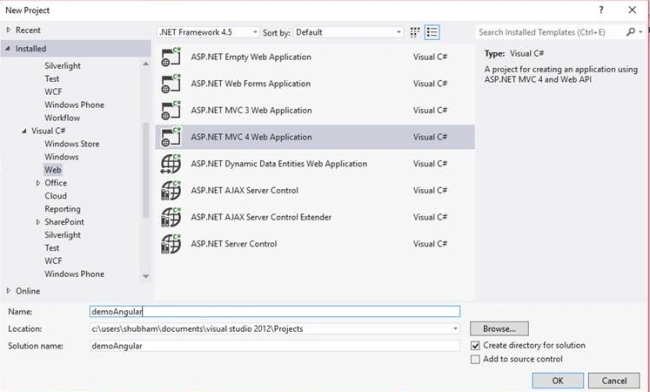
- Select ASP.NET MVC 4 Web Application.
- Provide the name of the project as demoAngular.
- Set the location where you want to save the project.
- Click on OK button.
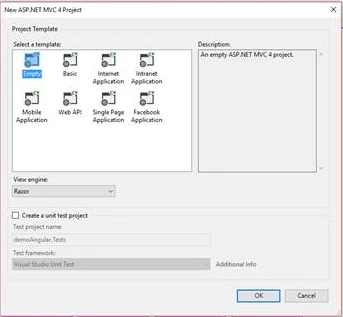
- Now, select the project template "Empty" or "Basic"; and the View engine will be razor.
- Click on OK button.
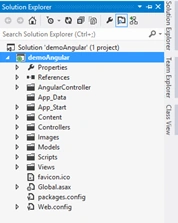
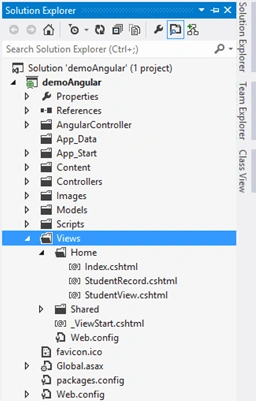
After that, your application looks like this (note : expect AngularController).
The next step is to add new Model class in the Models directory. And, name it as StudentData.cs.
- namespace demoAngular.Models
- {
- public class StudentData
- {
- public int KeyId { get; set; }
- public string SName { get; set; }
- public string FName { get; set; }
- public string Gender { get; set; }
- public string MobileNo { get; set; }
- public int StateId { get; set; }
- public int CityID { get; set; }
- public int ProcID { get; set; }
- public string SXML { get; set; }
- public IEnumerable<StudentData> StudentDataList { get; set; }
- public List<ClassModel> ClassList { get; set; }
- }
- public class StateMaster
- {
- public int StateId { get; set; }
- public string StateName { get; set; }
- public IEnumerable<StateMaster> StateMasterList { get; set; }
- }
- public class CityMaster
- {
- public int CityID { get; set; }
- public string CityName { get; set; }
- public int StateId { get; set; }
- public IEnumerable<CityMaster> CityMasterList { get; set; }
- }
- public class ClassModel
- {
- public int StudentID { get; set; }
- public string ClassName { get; set; }
- public string BoardName { get; set; }
- public string CRollNo { get; set; }
- public int MM { get; set; }
- public int OM { get; set; }
- public int Divi { get; set; }
- public List<ClassModel> ClassList { get; set; }
- }
- }
Namespaces
- using System;
- using System.Collections.Generic;
- using System.Linq;
- using System.Web;
- using System.Data.Entity;
- using System.Data.Entity.Infrastructure;
- using System.Data.SqlClient;
- namespace demoAngular.Models
- {
- public class DataLayer : DbContext
- {
- public virtual IEnumerable<StudentData> StudentSubmiteDetails(StudentData Model)
- {
- var sqlParams = new SqlParameter[]{
- new SqlParameter { ParameterName = "@KeyId",Value=Model.KeyId==null?0:Model.KeyId},
- new SqlParameter { ParameterName = "@SName",Value=Model.SName??string.Empty},
- new SqlParameter { ParameterName = "@FName",Value=Model.FName??string.Empty},
- new SqlParameter { ParameterName = "@Gender", Value = Model.Gender??string.Empty },
- new SqlParameter { ParameterName = "@MobileNo", Value = Model.MobileNo??string.Empty},
- new SqlParameter { ParameterName = "@StateId",Value=Model.StateId==null?0:Model.StateId},
- new SqlParameter { ParameterName = "@CityID",Value=Model.CityID==null?0:Model.CityID},
- new SqlParameter { ParameterName = "@ProcID", Value = Model.ProcID},
- new SqlParameter { ParameterName = "@XML", Value = Model.SXML}
- };
- var sqlQaury = @"PROC_StudentSubmitDetails @KeyId, @SName,@FName,@Gender,@MobileNo,@StateId,@CityID,@ProcID,@XML";
- var IList = this.Database.SqlQuery<StudentData>(sqlQaury, sqlParams);
- return IList;
- }
- public IEnumerable<StudentData> StudentALLDetails(int ProcID, int Keyid)
- {
- var sqlParams = new SqlParameter[]{
- new SqlParameter { ParameterName = "@ProcID", Value = ProcID},
- new SqlParameter { ParameterName = "@Keyid", Value = Keyid}};
- var sqlQaury = @"PROC_StudentALLDetails @ProcID,@Keyid";
- var IList = this.Database.SqlQuery<StudentData>(sqlQaury, sqlParams);
- return IList;
- }
- public IEnumerable<StudentData> StudentOneDetails(int ProcID, int Keyid)
- {
- var sqlParams = new SqlParameter[]{
- new SqlParameter { ParameterName = "@ProcID", Value = ProcID},
- new SqlParameter { ParameterName = "@Keyid", Value = Keyid}};
- var sqlQaury = @"PROC_StudentALLDetails @ProcID,@Keyid";
- var IList = this.Database.SqlQuery<StudentData>(sqlQaury, sqlParams);
- return IList;
- }
- public IEnumerable<ClassModel> StudenteduDetails(int ProcID, int Keyid)
- {
- var sqlParams = new SqlParameter[]{
- new SqlParameter { ParameterName = "@ProcID", Value = ProcID},
- new SqlParameter { ParameterName = "@Keyid", Value = Keyid}};
- var sqlQaury = @"PROC_StudentALLDetails @ProcID,@Keyid";
- var IList = this.Database.SqlQuery<ClassModel>(sqlQaury, sqlParams);
- return IList;
- }
- public IEnumerable<StateMaster> BindLstate(int Procid)
- {
- var sqlParms = new SqlParameter[]{
- new SqlParameter{ParameterName="@Procid",Value=Procid},};
- var sqlqaury = @"Proc_getState @Procid";
- var IList = this.Database.SqlQuery<StateMaster>(sqlqaury, sqlParms);
- return IList;
- }
- public IEnumerable<CityMaster> BindLcity(int Pracid, int stateid)
- {
- var sqlParms = new SqlParameter[]{
- new SqlParameter{ParameterName="@Procid",Value=Pracid},
- new SqlParameter{ParameterName="@Stateid",Value=stateid}};
- var sqlQaury = @"Proc_getState @Procid,@Stateid";
- var IList = this.Database.SqlQuery<CityMaster>(sqlQaury, sqlParms);
- return IList;
- }
- public IEnumerable<StudentData> DeleteStudentbyid(int ProcID, int Keyid)
- {
- var sqlParams = new SqlParameter[]{
- new SqlParameter { ParameterName = "@ProcID", Value = ProcID},
- new SqlParameter { ParameterName = "@Keyid", Value = Keyid}};
- var sqlQaury = @"PROC_StudentALLDetails @ProcID,@Keyid";
- var IList = this.Database.SqlQuery<StudentData>(sqlQaury, sqlParams);
- return IList;
- }
- }
- }
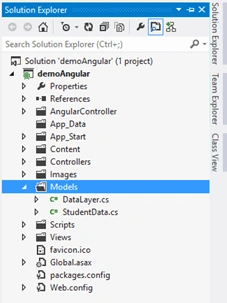
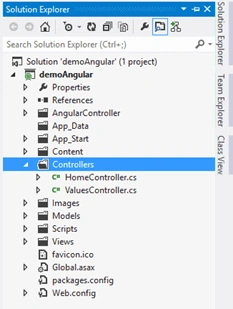
After adding Model, your project looks like this,
Now, add Controller to the Controllers directory and give name as HomeController,
- namespace demoAngular.Controllers
- {
- public class HomeController : Controller
- {
- public ActionResult Index()
- {
- return View();
- }
- public ActionResult StudentRecord()
- {
- return PartialView("StudentRecord");
- }
- public ActionResult StudentView()
- {
- return PartialView("StudentView");
- }
- }
- }
Namespaces
- using System;
- using System.Collections.Generic;
- using System.Linq;
- using System.Net;
- using System.Net.Http;
- using System.Web.Http;
- using System.Xml.Linq;
- using demoAngular.Models;
- using Newtonsoft.Json;
- namespace demoAngular.Controllers
- {
- public class ValuesController : ApiController
- {
- DataLayer db = new DataLayer();
- [HttpPost]
- [ActionName("AddNewStudent")]
- public StudentData AddnewStudent(StudentData Model)
- {
- Model.ProcID = 1;
- List<ClassModel> valueSet = Model.ClassList;
- XElement root = new XElement("root");
- for (int i = 0; i < valueSet.Count; i++)
- {
- XElement ele = new XElement("Student", new XElement("ClassName", valueSet[i].ClassName),
- new XElement("BoardName", valueSet[i].BoardName),
- new XElement("CRollNo", valueSet[i].CRollNo),
- new XElement("MM", valueSet[i].MM),
- new XElement("OM", valueSet[i].OM),
- new XElement("Divi", valueSet[i].Divi));
- root.Add(ele);
- }
- XElement xmlclass = root;
- Model.SXML = xmlclass.ToString();
- var mod = db.StudentSubmiteDetails(Model).ToList();
- return mod.FirstOrDefault();
- }
- [HttpGet]
- [ActionName("ShowALLStudent")]
- public IEnumerable<StudentData> ShowALLStudent()
- {
- var mod = db.StudentALLDetails(2,0).ToList();
- return mod;
- }
- [HttpGet]
- [ActionName("ShowOneStudent")]
- public IEnumerable<StudentData> ShowOneStudent(int id)
- {
- var mod = db.StudentOneDetails(3, id).ToList();
- return mod;
- }
- [HttpGet]
- [ActionName("ShowEduStudent")]
- public IEnumerable<ClassModel> ShowEduStudent(int id)
- {
- ClassModel mod1 = new ClassModel();
- mod1.ClassList = db.StudenteduDetails(4, id).ToList();
- return mod1.ClassList;
- }
- [HttpGet]
- [ActionName("ShowState")]
- public IEnumerable<StateMaster> ShowState()
- {
- var mod = db.BindLstate(1).ToList();
- return mod;
- }
- [HttpGet]
- [ActionName("ShowCity")]
- public IEnumerable<CityMaster> ShowCity(int id)
- {
- var mod = db.BindLcity(2,id).ToList();
- return mod;
- }
- [HttpDelete]
- [ActionName("DeleteStudent")]
- public IEnumerable<StudentData> DeleteStudent(int id)
- {
- var mod = db.DeleteStudentbyid(5, id).ToList();
- return mod;
- }
- }
- }
Sachin ChourasiaPosted Jan 26, 2017, 11:33 PM
Pioneer for a Fresher(With Practical Example), also helpful for Experienced...Great...Article
Humayun Kabir MamunPosted Oct 13, 2016, 4:25 AM
Nice...
Srishti SrivastavaPosted Sep 24, 2016, 12:50 AM
Great Article Sir.. Thank You for Sharing this.
Mohammad AliPosted Sep 24, 2016, 12:24 AM
Good Article with Practical Example