

Prerequisites
- We must have knowledge of C# programming
- We must have an understanding of database
- We must have an understanding of CRUD operations
Background
In most programming languages, we must keep maintainability and extensibility in mind. These are the most important factors for keeping the applications stable for a long time. These can be achieved using loose coupling in software modules and hence we separate modules to perform independent tasks.
While performing CRUD operations in the database, we must connect our software with the database using a database connection. This connectivity is important because when an application needs to restore data in the database, we need this connectivity.
In most of the applications, to achieve loose coupling, we maintain an ORM layer between a software application and the database, which maps database tables to C# entities.
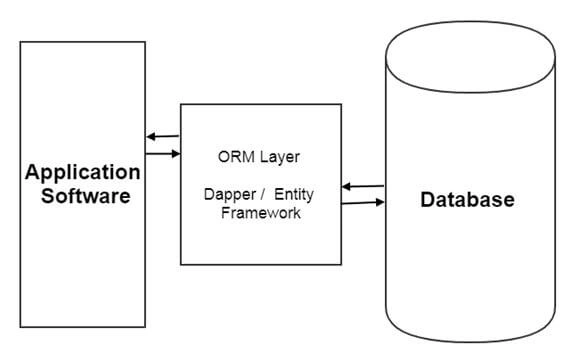
ORM Layer
ORM layer is responsible to map database tables to c# entities and visa versa.
We have many ORM libraries available in C#, out of which the below are some main libraries.
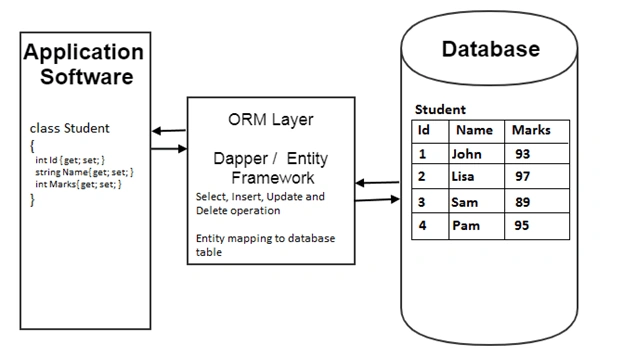
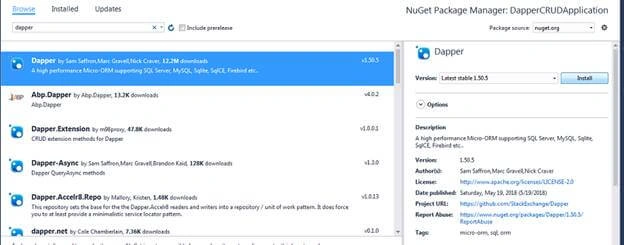
Dapper
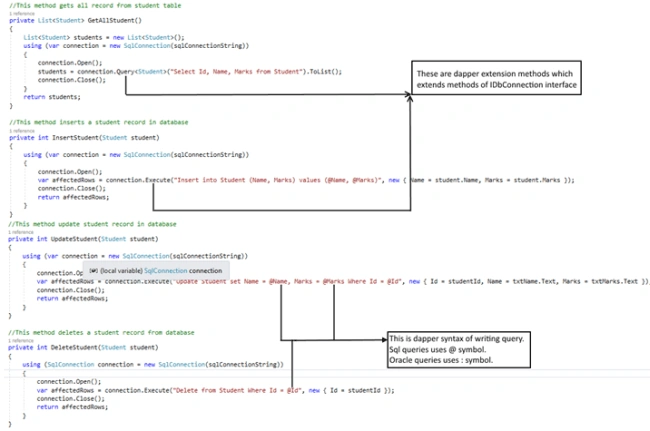
Dapper is an ORM library, which extends methods of IDbConnection interface. These extension methods have efficient code to perform insert, update delete and select methods. These extension methods are,
- Execute
- Query
- QueryFirstOrDefault
- QuerySingle
- QuerySingleOrDefault
- QueryMultiple
Let’s start with the implementation of CRUD operation using dapper.
Step 1
Create table Student (Id Int Identity, Name Varchar(100), Marks Numeric)

Step 2
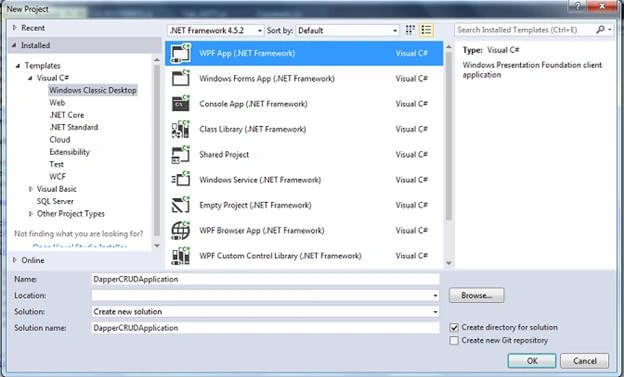
Step 3
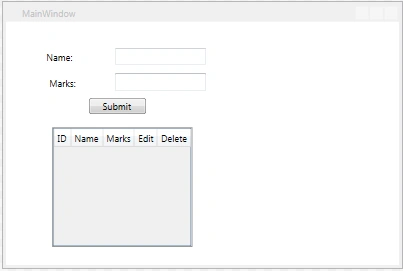
- <Grid Margin="0,0,-31,-189">
- <DataGrid x:Name="studentDataGrid" x:Uid="employeeDataGrid" SelectionMode="Single" Height="auto" MaxHeight="300" HorizontalAlignment="Left" Margin="62,140,25,214" ItemsSource="{Binding}" AutoGenerateColumns="False" Grid.ColumnSpan="2">
- <DataGrid.Columns>
- <DataGridTextColumn Binding="{Binding Id}" Header="ID" x:Name="id" IsReadOnly="True" Width="Auto"></DataGridTextColumn>
- <DataGridTextColumn Binding="{Binding Name}" Header="Name" x:Name="name" Width="Auto"></DataGridTextColumn>
- <DataGridTextColumn Binding="{Binding Marks}" Header="Marks" x:Name="city" Width="Auto"></DataGridTextColumn>
- <DataGridTemplateColumn Header="Edit">
- <DataGridTemplateColumn.CellTemplate >
- <DataTemplate>
- <Button Content="Edit" Click="Edit_Click" CommandParameter="{Binding id}"></Button>
- </DataTemplate>
- </DataGridTemplateColumn.CellTemplate>
- </DataGridTemplateColumn>
- <DataGridTemplateColumn Header="Delete">
- <DataGridTemplateColumn.CellTemplate >
- <DataTemplate>
- <Button Content="Delete" Click="Delete_Click" ></Button>
- </DataTemplate>
- </DataGridTemplateColumn.CellTemplate>
- </DataGridTemplateColumn>
- </DataGrid.Columns>
- </DataGrid>
- <TextBox Grid.ColumnSpan="2" HorizontalAlignment="Left" Height="23" TextWrapping="Wrap" VerticalAlignment="Top" Width="120" Margin="143,34,0,0" Name="txtName"/>
- <Label Grid.ColumnSpan="2" Content="Name:" HorizontalAlignment="Left" Margin="48,34,0,0" VerticalAlignment="Top" Target="{Binding ElementName=txtName}"/>
- <Label Grid.ColumnSpan="2" Content="Marks:" HorizontalAlignment="Left" Margin="52,68,0,0" VerticalAlignment="Top" Target="{Binding ElementName=txtMarks}"/>
- <TextBox Grid.ColumnSpan="2" HorizontalAlignment="Left" Height="23" TextWrapping="Wrap" VerticalAlignment="Top" Width="120" Margin="143,68,0,0" x:Name="txtMarks"/>
- <Button x:Name="btnsubmit" Grid.ColumnSpan="2" Content="Submit" HorizontalAlignment="Left" VerticalAlignment="Top" Width="75" Margin="109,100,0,0" Click="InsertOrUpdateStudent"/>
- </Grid>
IMAD AYOUBPosted Jun 9, 2020, 3:54 PM
Thanks a lot for this excellent tutorial.
P EPosted Feb 17, 2020, 7:31 AM
Hi, I cannot connect to the DB... I downloaded your example and created a SQL Database in the solution folder (i do not have/want to install SQL Express or others in my computer). It seems I am doing wrong with the connection string... Could you please let me how should it look like in this case? Thanks in advance,
Ashok ChawdryPosted May 27, 2019, 3:45 AM
Thanks! Nice & simple explanation