

Step 1. Create a new ASP.NET MVC Empty project using VS.
Step 2. Add a new project by right-clicking on the project, adding the class library, and giving a name to it.
Step 3. Create one database using SQL Server with the below script.
CREATE TABLE [dbo].[UserDetails] (
    [Id] INT IDENTITY(1,1) NOT NULL,
    [Name] VARCHAR(50) NULL,
    [Address] VARCHAR(50) NULL,
    [City] VARCHAR(50) NULL,
    CONSTRAINT [PK_UserDetails] PRIMARY KEY CLUSTERED (
        [Id] ASC
    ) WITH (
        PAD_INDEX = OFF,
        STATISTICS_NORECOMPUTE = OFF,
        IGNORE_DUP_KEY = OFF,
        ALLOW_ROW_LOCKS = ON,
        ALLOW_PAGE_LOCKS = ON
    ) ON [PRIMARY]
) ON [PRIMARY];
Step 4. Now, create EDMX from our Database. Just right-click on Infrastructure, add New Item => Select ADO.NET Entity Data Model from the data template, and give a name to it. Click on Next.
Select Generate from Database, and click on the Next button. Now, give the New connection string and select your database; click OK.
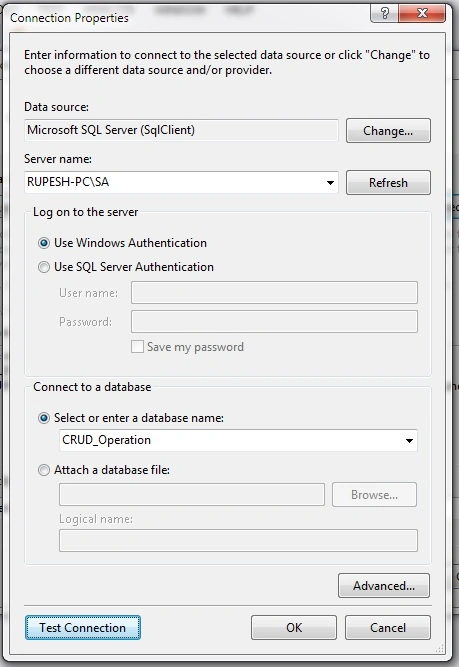
It will automatically take the entity name. Click on Next and select tables to include the database object in your Model. Then, click on Finish. You will see the edmx as.
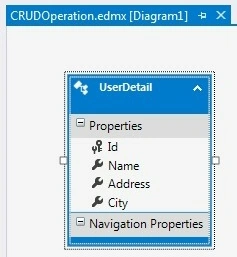
Step 5. Also, add one new class library for the Repository pattern. Add a reference to Infrastructure dll and add Entity Framework from the NuGet package.
Step 6. Now, create GenericRepository, IGenericRepository, and UnitOfWork classes and add appropriate codes to it, as follows.
using System;
using System.Collections.Generic;
using System.Data;
using System.Data.Entity;
using System.Linq;
using System.Linq.Expressions;
using System.Text;
using System.Threading.Tasks;

namespace Repository
{
    public interface IGenericRepository<T> where T : class
    {
        IEnumerable<T> GetAll(
            Expression<Func<T, bool>> filter = null,
            Func<IQueryable<T>, IOrderedQueryable<T>> orderBy = null,
            params Expression<Func<T, object>>[] np);

        T GetByID(object id);
        void Insert(T e);
        void Delete(object id);
        void Delete(T eDlt);
        void Update(T eUpdt);
        void Save();
        T GetSingle(
            Expression<Func<T, bool>> where,
            params Expression<Func<T, object>>[] np);
    }
}
Now, add the code below to a UnitOfWork class.
using System;
using System.Collections.Generic;
using System.Linq;
using System.Text;
using System.Threading.Tasks;
using Infrastructure;
using Repository.GenericRepository;

namespace Repository.GenericRepository
{
    public class UnitOfWork : IDisposable
    {
        private CRUD_OperationEntities context = new CRUD_OperationEntities();
        private IGenericRepository<UserDetail> userRepository;

        public IGenericRepository<UserDetail> UserRepository
        {
            get
            {
                return userRepository ?? (userRepository = new GenericRepository<UserDetail>(context));
            }
        }
    }
}
Step 7. Add a connection string to the app configuration of the repository class library as well as to the web configuration file of our main project.
<connectionStrings>
    <add name="CRUD_OperationEntities"
         connectionString="metadata=res://*/CRUDOperation.csdl|res://*/CRUDOperation.ssdl|res://*/CRUDOperation.msl;
                           provider=System.Data.SqlClient;
                           provider connection string="data source=RUPESH-PC\SA;initial catalog=CRUD_Operation;integrated security=True;MultipleActiveResultSets=True;App=EntityFramework""
         providerName="System.Data.EntityClient" />
</connectionStrings>
Step 8. Now, create one Home Controller in the application. First, we will create one IndexViewModel by adding properties and constructors to it.
using System;
using System.Collections.Generic;
using System.Linq;
using System.Web;

namespace CRUD_Using_Repository_Pattern.ViewModel
{
    public class IndexViewModel
    {
        private Infrastructure.UserDetail x;
        public IndexViewModel() { }
        public IndexViewModel(Infrastructure.UserDetail user)
        {
            Id = user.Id;
            Name = user.Name;
            Address = user.Address;
            City = user.City;
        }
        public int Id { get; set; }
        public string Name { get; set; }
        public string Address { get; set; }
        public string City { get; set; }
    }
}
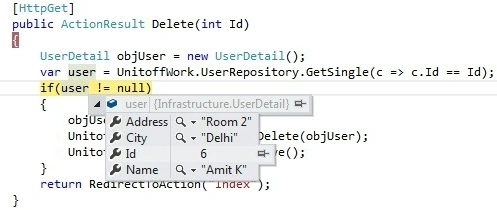
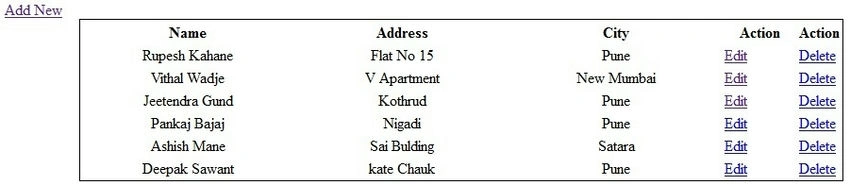
Add the code below in the Home Controller to perform the CRUD operation.

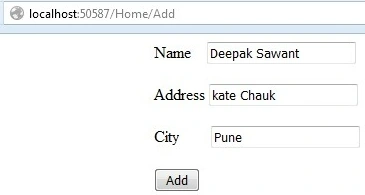
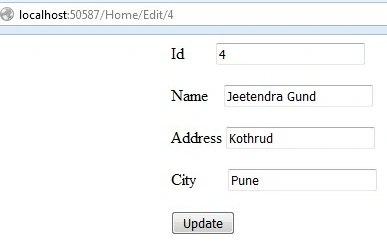

Prakash JoshiPosted Dec 6, 2016, 11:00 PM
Rupesh Kahane I think its just code code no explanation. A short description about what is repository pattern, what's the need and why we use it is missing, adding this will make article more effective. Looking for the updated one.
Rupesh KahanePosted Sep 27, 2016, 5:24 AM
Thanks Humayun Kabir Mamun
Humayun Kabir MamunPosted Sep 27, 2016, 3:04 AM
Nice...
Rupesh KahanePosted Sep 27, 2016, 2:49 AM
Manav Pandya Thanks a lot
Manav PandyaPosted Sep 26, 2016, 1:16 PM
Nice one sir ...