I am going to explain about how to perform CRUD operations without using a database; i.e., I have neither used any database of SQL Server nor used any connection string. I took here an example that creates a bill of a grocery shop. Follow along step by step
Step 1
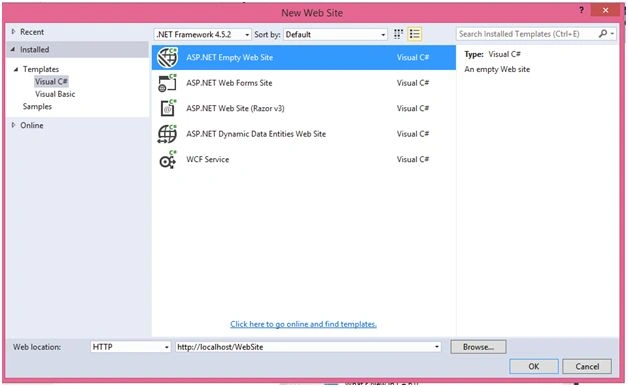
- We have to create a Webpage, for which we open the Visual Studio -> new option and select the new Website.
- Chose an “ASP.NET Empty Web Site” and give a solution name. For example: I took an example “Customer Bill”.
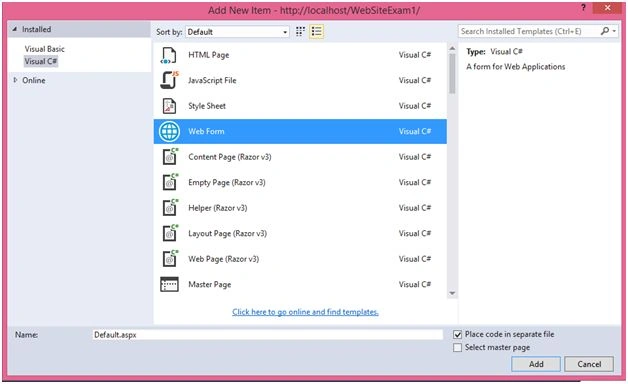
- Right click on the Solution Explorer, go to Add option, select Add New Item option and select Web form and click Add option.
Step 2
After adding the Web form, we have to design my web page, according to my requirement, so here, I took a table and within a table, five textboxes, one button and a grid view.
Default.aspx
- <%@ Page Language="C#" AutoEventWireup="true" CodeFile="Default2.aspx.cs" Inherits="Default2" %>
-
- <!DOCTYPE html>
-
- <html xmlns="http://www.w3.org/1999/xhtml">
-
- <head runat="server">
- <title></title>
- </head>
-
- <body>
- <form id="form1" runat="server">
- <div align="center">
- <h1 style="color:green">Welcome To CURD Operation Without Database</h1>
- <div style="width: 55%; background-image: url(Images/mks1.jpg); border: 5px solid yellow; border-radius: 25px; box-shadow: maroon 10px 10px 10px; color: aliceblue">
- <table>
- <tr>
- <td></td>
- <th>Emp ID:
- </th>
- <th>Emp Name:
- </th>
- <th>Dept Name :
- </th>
- <th>Emp Address :
- </th>
- <th>Emp Salary:
- </th>
- </tr>
- <tr>
- <td></td>
- <td>
- <asp:TextBox ID="txtEmpId" runat="server" Width="120px"></asp:TextBox>
-
- </td>
- <td>
- <asp:TextBox ID="txtEmpName" runat="server" Width="120px"></asp:TextBox>
- </td>
- <td>
- <asp:TextBox ID="txtDeptName" runat="server" Width="120px"></asp:TextBox>
- </td>
- <td>
- <asp:TextBox ID="txtEmpAddress" runat="server" Width="120px"></asp:TextBox>
- </td>
- <td>
- <asp:TextBox ID="txtEmpSalary" runat="server" Width="120px"></asp:TextBox>
- </td>
- </tr>
- <tr>
-
- <td colspan="6" align="right">
- <asp:Button ID="AddEmpDetails" runat="server" Style="color: White" Text="Add Employee" OnClick="AddEmpDetails_Click" BackColor="#00248E" />
- </td>
- </tr>
- </table>
-
- <div style="margin-left: 10px; margin-top: 10px">
- <asp:GridView ID="GridView1" Width="700" OnRowEditing="GridView1_RowEditing" OnRowUpdating="GridView1_RowUpdating" OnRowDeleting="GridView1_RowDeleting" OnRowCancelingEdit="GridView1_RowCancelingEdit" AutoGenerateColumns="False" runat="server" CellPadding="4" BackColor="White" BorderColor="#3366CC" BorderStyle="None" BorderWidth="1px">
- <Columns>
- <asp:CommandField ShowEditButton="true" ShowDeleteButton="true" HeaderText="Operation" ItemStyle-Width="120px" />
-
- <asp:BoundField HeaderStyle-Width="120px" HeaderText="Emp Id" DataField="EmpId">
- <HeaderStyle Width="120px"></HeaderStyle>
- </asp:BoundField>
- <asp:BoundField HeaderStyle-Width="120px" HeaderText="Emp Name" DataField="EmpName">
- <HeaderStyle Width="120px"></HeaderStyle>
- </asp:BoundField>
- <asp:BoundField HeaderStyle-Width="120px" HeaderText="Dept Name" DataField="DeptName">
- <HeaderStyle Width="120px"></HeaderStyle>
- </asp:BoundField>
- <asp:BoundField HeaderStyle-Width="120px" HeaderText="Emp Address" DataField="EmpAddress">
- <HeaderStyle Width="120px"></HeaderStyle>
- </asp:BoundField>
- <asp:BoundField HeaderStyle-Width="120px" HeaderText="Emp Salary" DataField="EmpSalary">
- <HeaderStyle Width="120px"></HeaderStyle>
- </asp:BoundField>
- </Columns>
- <FooterStyle BackColor="#99CCCC" ForeColor="#003399" />
- <HeaderStyle BackColor="#003399" Font-Bold="True" ForeColor="#CCCCFF" />
- <PagerStyle BackColor="#99CCCC" ForeColor="#003399" Horizontal />
- <RowStyle BackColor="White" ForeColor="#003399" />
- <SelectedRowStyle BackColor="#009999" Font-Bold="True" ForeColor="#CCFF99" />
- <SortedAscendingCellStyle BackColor="#EDF6F6" />
- <SortedAscendingHeaderStyle BackColor="#0D4AC4" />
- <SortedDescendingCellStyle BackColor="#D6DFDF" />
- <SortedDescendingHeaderStyle BackColor="#002876" />
- </asp:GridView>
- </div>
- <br />
- </div>
- </div>
- </form>
- </body>
-
- </html>
Now, we have to perform logic for CRUD operation, so for this, right click the design page and select view code.
Here, I have used datatable for the dynamic generated table.
Default.aspx.cs
- using System;
- using System.Collections.Generic;
- using System.Linq;
- using System.Web;
- using System.Web.UI;
- using System.Web.UI.WebControls;
- using System.Data;
- public partial class Default2: System.Web.UI.Page
- {
- protected void Page_Load(object sender, EventArgs e)
- {
- if (!IsPostBack)
- {
- DefaultEmpRecord();
- }
- }
- private void DefaultEmpRecord()
- {
-
- DataTable dt = new DataTable();
- DataRow dr;
- dt.TableName = "EmployeeDetails";
- dt.Columns.Add(new DataColumn("EmpId", typeof(string)));
- dt.Columns.Add(new DataColumn("EmpName", typeof(string)));
- dt.Columns.Add(new DataColumn("DeptName", typeof(string)));
- dt.Columns.Add(new DataColumn("EmpAddress", typeof(string)));
- dt.Columns.Add(new DataColumn("EmpSalary", typeof(string)));
- dr = dt.NewRow();
- dt.Rows.Add(dr);
-
- ViewState["EmployeeDetails"] = dt;
-
- GridView1.DataSource = dt;
- GridView1.DataBind();
- }
- private void AddNewRecordRowToGrid()
- {
-
- if (ViewState["EmployeeDetails"] != null)
- {
-
- DataTable dtCurrentTable = (DataTable) ViewState["EmployeeDetails"];
- DataRow drCurrentRow = null;
- if (dtCurrentTable.Rows.Count > 0)
- {
- for (int i = 1; i <= dtCurrentTable.Rows.Count; i++)
- {
-
- drCurrentRow = dtCurrentTable.NewRow();
- drCurrentRow["EmpId"] = txtEmpId.Text;
- drCurrentRow["EmpName"] = txtEmpName.Text;
- drCurrentRow["DeptName"] = txtDeptName.Text;
- drCurrentRow["EmpAddress"] = txtEmpAddress.Text;
- drCurrentRow["EmpSalary"] = txtEmpSalary.Text;
- }
-
- if (dtCurrentTable.Rows[0][0].ToString() == "")
- {
- dtCurrentTable.Rows[0].Delete();
- dtCurrentTable.AcceptChanges();
- }
-
- dtCurrentTable.Rows.Add(drCurrentRow);
-
- GridView1.DataSource = dtCurrentTable;
- GridView1.DataBind();
- }
- }
- }
- protected void AddEmpDetails_Click(object sender, EventArgs e)
- {
- AddNewRecordRowToGrid();
- }
- protected void GridView1_RowUpdating(object sender, GridViewUpdateEventArgs e)
- {
- DataTable dt = new DataTable();
- dt.Columns.Add(new DataColumn("EmpId", typeof(string)));
- dt.Columns.Add(new DataColumn("EmpName", typeof(string)));
- dt.Columns.Add(new DataColumn("DeptName", typeof(string)));
- dt.Columns.Add(new DataColumn("EmpAddress", typeof(string)));
- dt.Columns.Add(new DataColumn("EmpSalary", typeof(string)));
- string Id = string.Empty;
- string Name = string.Empty;
- string DeptName = string.Empty;
- string EmpAddress = string.Empty;
- string EmpSalary = string.Empty;
- for (int i = 0; i < GridView1.Rows.Count; i++)
- {
- GridViewRow row = (GridViewRow) GridView1.Rows[i];
- if (i != e.RowIndex)
- {
- Id = row.Cells[1].Text;
- Name = row.Cells[2].Text;
- DeptName = row.Cells[3].Text;
- EmpAddress = row.Cells[4].Text;
- EmpSalary = row.Cells[5].Text;
- }
- else
- {
- Id = ((TextBox) row.Cells[1].Controls[0]).Text;
- Name = ((TextBox) row.Cells[2].Controls[0]).Text;
- DeptName = ((TextBox) row.Cells[3].Controls[0]).Text;
- EmpAddress = ((TextBox) row.Cells[4].Controls[0]).Text;
- EmpSalary = ((TextBox) row.Cells[5].Controls[0]).Text;
- }
- DataRow dr = dt.NewRow();
- dr["EmpId"] = Id;
- dr["EmpName"] = Name;
- dr["DeptName"] = DeptName;
- dr["EmpAddress"] = EmpAddress;
- dr["EmpSalary"] = EmpSalary;
- dt.Rows.Add(dr);
- }
- GridView1.EditIndex = -1;
- GridView1.DataSource = dt;
- GridView1.DataBind();
- }
- protected void GridView1_RowDeleting(object sender, GridViewDeleteEventArgs e)
- {
- {
- DataTable dt = new DataTable();
- dt.Columns.Add(new DataColumn("EmpId", typeof(string)));
- dt.Columns.Add(new DataColumn("EmpName", typeof(string)));
- dt.Columns.Add(new DataColumn("DeptName", typeof(string)));
- dt.Columns.Add(new DataColumn("EmpAddress", typeof(string)));
- dt.Columns.Add(new DataColumn("EmpSalary", typeof(string)));
- string Id = string.Empty;
- string Name = string.Empty;
- string DeptName = string.Empty;
- string EmpAddress = string.Empty;
- string EmpSalary = string.Empty;
- for (int i = 0; i < GridView1.Rows.Count; i++)
- {
- GridViewRow row = (GridViewRow) GridView1.Rows[i];
- if (i != e.RowIndex)
- {
- Id = row.Cells[1].Text;
- Name = row.Cells[2].Text;
- DeptName = row.Cells[3].Text;
- EmpAddress = row.Cells[4].Text;
- EmpSalary = row.Cells[5].Text;
- DataRow dr = dt.NewRow();
- dr["EmpId"] = Id;
- dr["EmpName"] = Name;
- dr["DeptName"] = DeptName;
- dr["EmpAddress"] = EmpAddress;
- dr["EmpSalary"] = EmpSalary;
- dt.Rows.Add(dr);
- }
- }
- GridView1.EditIndex = -1;
- GridView1.DataSource = dt;
- GridView1.DataBind();
- }
- }
- protected void GridView1_RowCancelingEdit(object sender, GridViewCancelEditEventArgs e)
- {
- GridView1.EditIndex = -1;
- BindEmpDetails();
- }
- protected void GridView1_RowEditing(object sender, GridViewEditEventArgs e)
- {
- GridView1.EditIndex = e.NewEditIndex;
- BindEmpDetails();
- }
- private void BindEmpDetails()
- {
- if (ViewState["EmployeeDetails"] != null)
- {
-
- DataTable dtCurrentTable = (DataTable) ViewState["EmployeeDetails"];
- DataRow drCurrentRow = null;
- if (dtCurrentTable.Rows.Count > 0)
- {
- for (int i = 1; i <= dtCurrentTable.Rows.Count; i++)
- {
-
- drCurrentRow = dtCurrentTable.NewRow();
- drCurrentRow["EmpId"] = txtEmpId.Text;
- drCurrentRow["EmpName"] = txtDeptName.Text;
- drCurrentRow["DeptName"] = txtDeptName.Text;
- drCurrentRow["EmpAddress"] = txtEmpAddress.Text;
- drCurrentRow["EmpSalary"] = txtEmpSalary.Text;
- }
-
- if (dtCurrentTable.Rows[0][0].ToString() == "")
- {
- dtCurrentTable.Rows[0].Delete();
- dtCurrentTable.AcceptChanges();
- }
-
- GridView1.DataSource = dtCurrentTable;
- GridView1.DataBind();
- }
- }
- }
- }
Now, we finally run the project and see the output.
Output 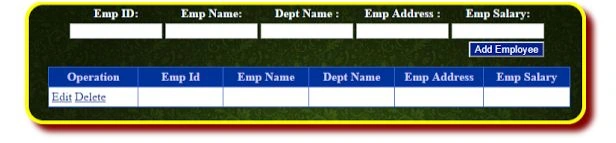
Fill all the Text-boxes and click Add Employee button to see the result.
Similarly, I added five records here, for an example.
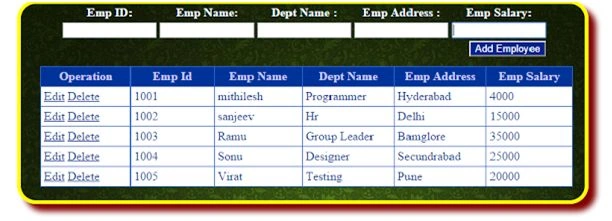
Afterwards, click the Edit button to update the record.
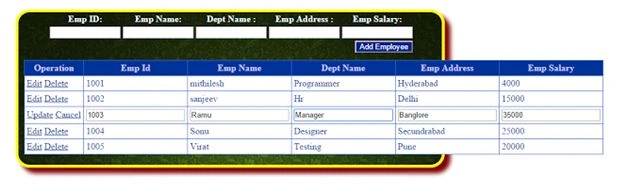
After making the changes, click update button.
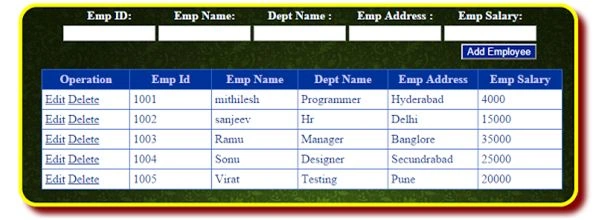
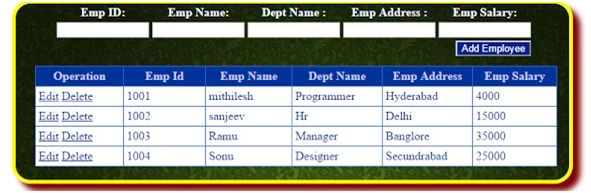
Afterwards, click delete button.


Selva KumarPosted Feb 15, 2018, 5:21 AM
In the 80th line last word horizontal will be shown error, what to do? i am never to MVC
Bonnie PettisPosted Nov 29, 2017, 4:57 PM
Thank you very much. I have an issue that's driving me batty: After I delete entries then I add a new entry, all of the deleted ones reappear. Suggestions?
Santhakumar MunuswamyPosted Jun 9, 2016, 12:29 AM
Thank you for nice share
RakeshPosted Jun 8, 2016, 11:32 AM
Good one
Vignesh ManiPosted Jun 7, 2016, 6:59 AM
Nice
Muhammad Aqib ShehzadPosted Jun 7, 2016, 2:02 AM
nice
Sonu ChaudharyPosted Jun 6, 2016, 1:53 PM
good one