

- Getting Started AngularJS
- Looping With Ng-repeat in AngularJS
- ngController in AngularJS
- Filtering Data in AngularJS
Getting Started
- Start Visual Studio 2013
- Create a new Project
- Select Web Template and select ASP.NET Web Application
- Provide the name and location of website
- Click "Next"
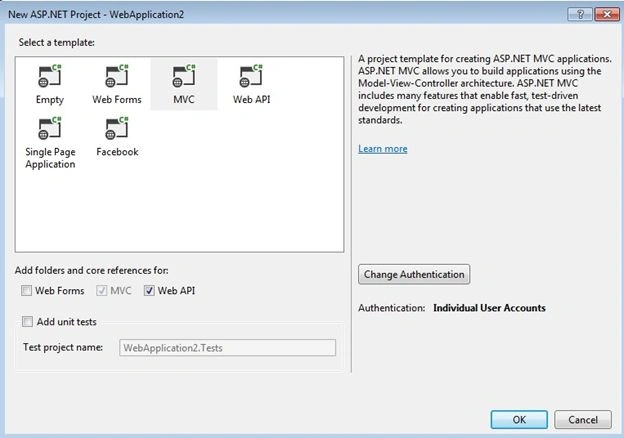
- Now select MVC template and do check Web API to add folder and core references.
Now add a new model class in the model directory.
- public class Friend
- {
- [Key]
- [DatabaseGeneratedAttribute(DatabaseGeneratedOption.Identity)]
- public int FriendId { get; set; }
- public string FirstName { get; set; }
- public string LastName { get; set; }
- public string Address { get; set; }
- public string City { get; set; }
- public string PostalCode { get; set; }
- public string Country { get; set; }
- public string Notes { get; set; }
- }
Now add a context class.
- public class FriendsContext : DbContext
- {
- public FriendsContext()
- : base("name=DefaultConnection")
- {
- base.Configuration.ProxyCreationEnabled = false;
- }
- public DbSet<Friend> Friends { get; set; }
- }
Now add a controller in the controller directory.
- public class FriendController : ApiController
- {
- private FriendsContext db = new FriendsContext();
- // GET api/<controller>
- [HttpGet]
- public IEnumerable<Friend> Get()
- {
- return db.Friends.AsEnumerable();
- }
- // GET api/<controller>/5
- public Friend Get(int id)
- {
- Friend friend = db.Friends.Find(id);
- if (friend == null)
- {
- throw new HttpResponseException(Request.CreateResponse(HttpStatusCode.NotFound));
- }
- return friend;
- }
- // POST api/<controller>
- public HttpResponseMessage Post(Friend friend)
- {
- if (ModelState.IsValid)
- {
- db.Friends.Add(friend);
- db.SaveChanges();
- HttpResponseMessage response = Request.CreateResponse(HttpStatusCode.Created, friend);
- response.Headers.Location = new Uri(Url.Link("DefaultApi", new { id = friend.FriendId }));
- return response;
- }
- else
- {
- return Request.CreateErrorResponse(HttpStatusCode.BadRequest, ModelState);
- }
- }
- // PUT api/<controller>/5
- public HttpResponseMessage Put(int id, Friend friend)
- {
- if (!ModelState.IsValid)
- {
- return Request.CreateErrorResponse(HttpStatusCode.BadRequest, ModelState);
- }
- if (id != friend.FriendId)
- {
- return Request.CreateResponse(HttpStatusCode.BadRequest);
- }
- db.Entry(friend).State = EntityState.Modified;
- try
- {
- db.SaveChanges();
- }
- catch (DbUpdateConcurrencyException ex)
- {
- return Request.CreateErrorResponse(HttpStatusCode.NotFound, ex);
- }
- return Request.CreateResponse(HttpStatusCode.OK);
- }
- // DELETE api/<controller>/5
- public HttpResponseMessage Delete(int id)
- {
- Friend friend = db.Friends.Find(id);
- if (friend == null)
- {
- return Request.CreateResponse(HttpStatusCode.NotFound);
- }
- db.Friends.Remove(friend);
- try
- {
- db.SaveChanges();
- }
- catch (DbUpdateConcurrencyException ex)
- {
- return Request.CreateErrorResponse(HttpStatusCode.NotFound, ex);
- }
- return Request.CreateResponse(HttpStatusCode.OK, friend);
- }
- protected override void Dispose(bool disposing)
- {
- db.Dispose();
- base.Dispose(disposing);
- }
- }
Now add AngularJS using Manage Nuget Package Manager and search AngularJS.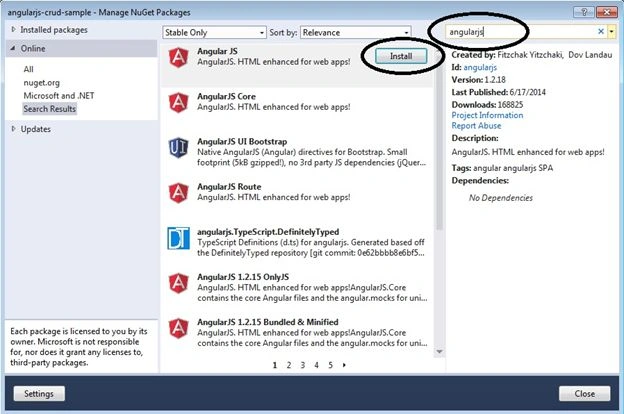
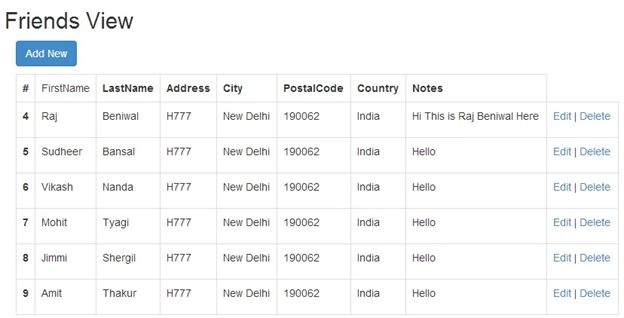
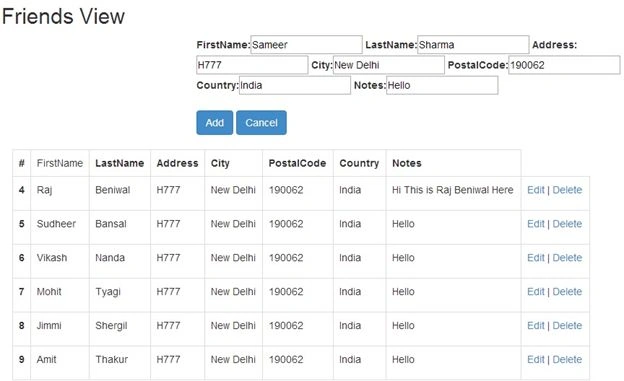
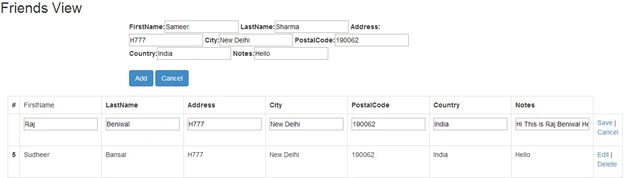
Now add a new JavaScript file in the scripts directory and add angular functions.
emad elshareefPosted Mar 4, 2017, 2:25 PM
Error in ViewStart what is ViewBag ????
kalu singh raoPosted Jul 16, 2016, 3:11 AM
Nice...
StepUpPosted Mar 5, 2016, 4:56 AM
Guys, "Edit" is not working. How can I resolve it?
Naren BanarasePosted Feb 25, 2016, 1:45 AM
Nice Artical..... But I got one issue. alert(emp); (what is emp?) emp.editMode = false;(Not Working)
Akash VarshneyPosted Oct 3, 2015, 11:17 AM
good to know about empjs .. !! nice ..
Astro BoyzonePosted Feb 4, 2015, 2:31 AM
{{ error }} is being displayed on top of the view , what might be the issue?
Former memberPosted Dec 20, 2014, 7:56 AM
I really love this article. Anyways, I just want to know that you are using Web Api so is it possible to work MVC controller with views, using Entity Framework with AngularJS?
Anh Nhan RaPosted Nov 25, 2014, 2:46 AM
Please help me . Argument 'friendController' is not a function, got undefined
Manish SharmaPosted Nov 21, 2014, 1:26 AM
Hi all, update your action and remove int id from put like : "public HttpResponseMessage Put(Friend friend)" and add "int id = friend.FriendId;" in your action than it will be work for you.
Munna KumarPosted Oct 28, 2014, 4:06 AM
Save feature not working please reply what is this error and how to resolve at [email protected]
jeya prakashPosted Oct 24, 2014, 2:59 AM
it is very needed at this time. Useful article
bhupender khatkarPosted Oct 8, 2014, 11:09 PM
Save Not working
mekh eddinePosted Sep 8, 2014, 12:00 PM
This works for me,check the connection string in the web.config
Devansh KumarPosted Sep 5, 2014, 10:44 AM
Save functionality not working. There was an error occurs which is "The requested resource does not support http method 'PUT'.".please reply what is this error and how to resolve at [email protected]
GrishmaPosted Aug 9, 2014, 2:22 AM
Hi, i have created web api project with controller for crud operations. Now i need to use that web api in another web project , i need to know how can i access web api in web project.
Rajeev RanjanPosted Jul 17, 2014, 1:33 AM
Dear sir, i was also trying to make a webapi and consuming all get,post,put,delete methods in html page using jQuery. Will you help me sir coz i couldn't able to use put,delete and post calls. how to call put,delete calls using jQuery
Raj KumarPosted Jun 23, 2014, 2:33 AM
I need to check this.
minhhung voPosted Jun 22, 2014, 8:46 PM
save feature isn't work
Sanjay KumarPosted Jun 21, 2014, 1:26 AM
Nice article
Ruben FlorezPosted Jun 20, 2014, 10:14 AM
Nice article. Almost everything its clear. Can you explain us a bit more about the (empjs). What's its role there ?